
1. Introduction
The YONHAN 0-20A 12V/24V Smart Battery Charger is an advanced 7-stage quick battery charger designed for a wide range of 12-volt and 24-volt lead-acid automotive, marine, and deep-cycle batteries. This includes AGM, GEL, EFB, SLA, Flooded (WET), and Calcium battery types. It features intelligent charging, maintenance, and repair modes, making it a versatile tool for keeping your vehicle batteries in optimal condition. This manual provides essential information for safe and effective operation.
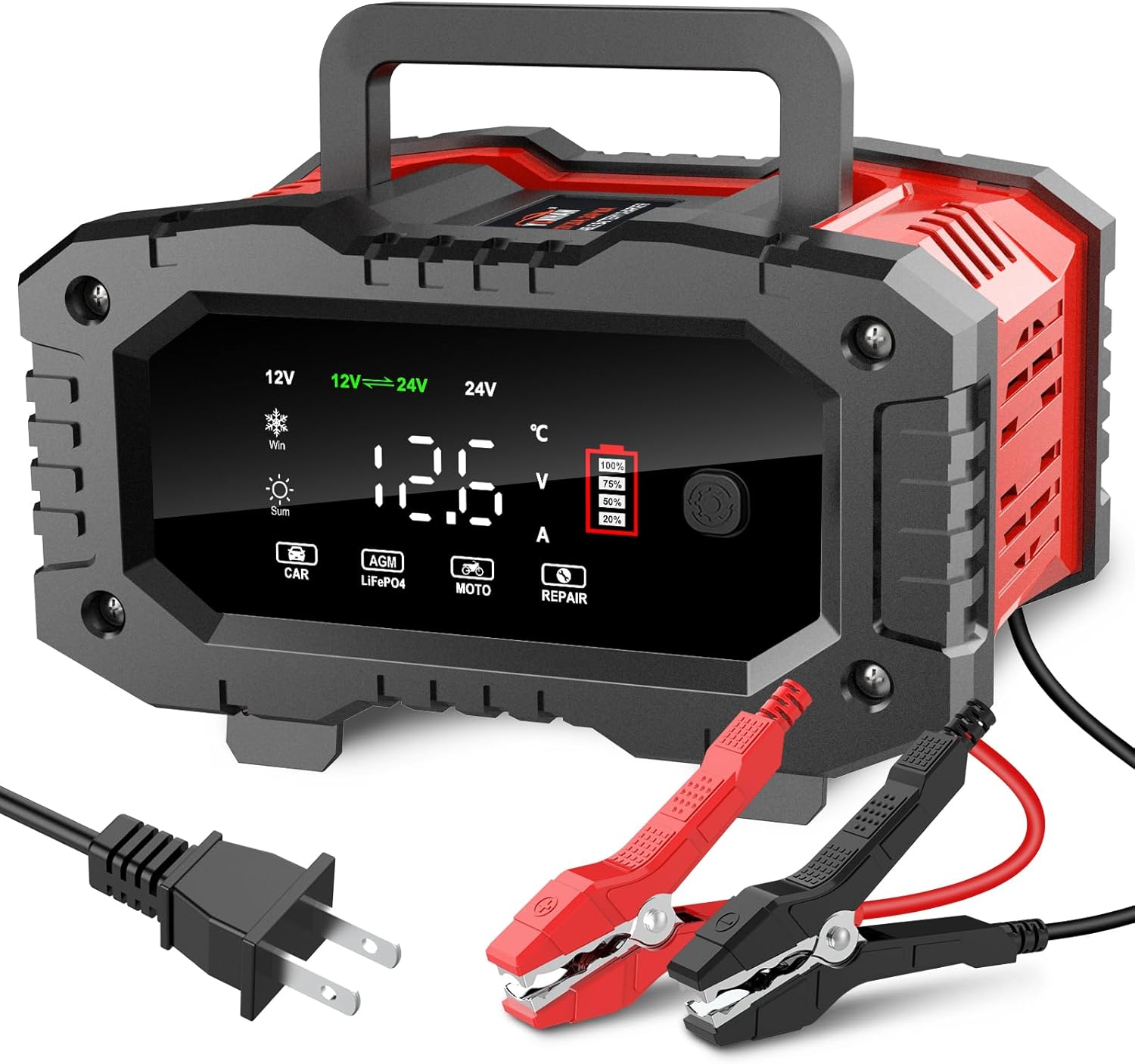
Figure 1: YONHAN 0-20A 12V 24V Smart Battery Charger with clamps and power cord.
2. Important Safety Instructions
WARNING: Read all instructions carefully before using the charger. Failure to follow these instructions may result in electric shock, fire, or serious injury. Save these instructions for future reference.
- Always connect the charger to the battery terminals correctly (positive to positive, negative to negative) before plugging into an AC outlet.
- Ensure the charger is disconnected from the AC power supply before making or breaking connections to the battery.
- Use the charger in a well-ventilated area. Do not operate in explosive atmospheres, such as in the presence of flammable liquids, gases, or dust.
- Avoid short-circuiting the charging clamps. The charger has short-circuit protection, but it is best practice to avoid direct contact.
- Do not charge frozen batteries.
- This charger is designed for 12V and 24V lead-acid batteries (including AGM, GEL, EFB, SLA, Flooded, Calcium) and LiFePO4 batteries. LITHIUM BATTERY CHARGING IS DISABLED. Attempting to charge incompatible battery types may cause damage or injury.
- Keep out of reach of children.
3. Product Features
- Versatile Compatibility: Charges 12V 20 Amp and 24V 10 Amp lead-acid automotive, marine, and deep-cycle batteries, including AGM, GEL, EFB, SLA, Flooded (WET), and Calcium types.
- 8-Stage Smart Charging: Optimizes the charging process for efficiency and battery longevity.
- Pulse Repair/Trickle Charge: Advanced repair mode to recover old or idle batteries and extend battery life. Provides perfect final protection for fully charged batteries.
- Large LCD Display: Provides clear, easy-to-read information on charging status, voltage, current, temperature, and battery full status. Includes summer and winter modes.
- User-Friendly Design: Features a foldable handle for portability and a clip organizer on both sides for neat cable storage. The screen is inclined for easier operation.
- Comprehensive Safety Protections: Built-in safeguards against overcharge, over current, overheating, reverse polarity, and short circuits. Features a cooling fan and sparks-free contact.
- Memory Function: The charger defaults to the last used mode after a power interruption.

Figure 2: Visual display of battery information on the large LCD screen.

Figure 3: Key design features including foldable handle, inclined screen, cable organizer, and stronger alligator clips.
4. Setup and Connection
- Prepare the Battery: Ensure the battery terminals are clean and free from corrosion.
- Connect the Clamps:
- Connect the red (+) positive charging clamp to the positive (+) terminal of the battery.
- Connect the black (-) negative charging clamp to the negative (-) terminal of the battery.
- Ensure a secure connection to prevent sparks.
- Connect to Power: Plug the AC power cord into a standard 100-240V 50/60Hz electrical outlet. The charger will power on and display information.
- Initial Display: The LCD screen will show the current battery voltage and other relevant information.

Figure 4: Steps for intelligent charging: Connect, Power On, Select Mode, Go.
5. Operating Modes
The charger features multiple operating modes to suit different battery types and conditions. Use the "Mode" button on the charger to cycle through the available options:
- CAR Mode: For standard 12V/24V lead-acid car batteries.
- LiFePO4 Mode: Specifically for LiFePO4 batteries. Note: The charger's lithium battery charging function is disabled for other lithium types.
- MOTO Mode: For motorcycle batteries and smaller 12V/24V batteries.
- REPAIR Mode: Used to recover old, idle, or sulfated batteries. This mode uses high-frequency and low-frequency pulse technology. Note: This mode cannot activate severely dead batteries or repair physically damaged ones.

Figure 5: The four mode selections available on the YONHAN charger: Car, LiFePO4, Moto, and Repair.
Video 1: An overview of the YONHAN 20A Car Battery Charger, demonstrating its features and operation.
6. Charging Process
- Connect the Charger: Follow the steps in Section 4 to connect the charger to the battery and then to the AC power.
- Select Charging Mode: Press the "Mode" button to select the appropriate charging mode for your battery type (CAR, LiFePO4, MOTO, or REPAIR). The charger will automatically detect 12V or 24V batteries.
- Monitor Charging: The LCD display will show real-time charging information, including voltage, current, temperature, and battery charge level.
- The charger automatically adjusts charging voltage based on ambient temperature (Summer/Winter mode recognition).
- For batteries above 100Ah capacity, the charging current can reach 20A. For smaller or nearly full batteries, the current will be lower to ensure safety.
- Charging Completion: The display will indicate "FUL" (Full) when the battery is fully charged. The charger will then switch to trickle charge mode to maintain the battery.
- Disconnecting: First, unplug the AC power cord from the outlet. Then, disconnect the black (-) negative clamp, followed by the red (+) positive clamp from the battery terminals.

Figure 6: The charger provides high power output to save charging time.

Figure 7: Diagram illustrating safe charging for lead-acid, AGM, and LiFePO4 batteries.
7. Maintenance
- Cleaning: Wipe the charger casing with a soft, dry cloth. Do not use abrasive cleaners or solvents.
- Cable Storage: Utilize the integrated clip organizer on the back of the charger to neatly store the power cord and charging clamps when not in use. This prevents tangles and damage.
- Storage: Store the charger in a cool, dry place away from direct sunlight, moisture, and extreme temperatures.
- Regular Inspection: Periodically inspect the charging cables, clamps, and casing for any signs of damage or wear. Do not use the charger if any part is damaged.
8. Troubleshooting
| Problem | Possible Cause | Solution |
|---|---|---|
| Charger displays "ERO" (Error) and beeps. | Reverse polarity connection or short circuit. | Disconnect from power, correct clamp connections (red to +, black to -), then reconnect. |
| Battery not charging or charging slowly. | Incorrect mode selected, battery capacity too low/high for current, or battery is severely damaged/dead. | Ensure correct mode is selected. For very low batteries, try REPAIR mode (cannot revive dead batteries). Note that charging current may not reach 20A for batteries below 100Ah or nearly full. |
| Charger does not turn on. | No AC power, loose connection. | Check AC outlet and power cord connection. Ensure clamps are properly connected to the battery. |
| LCD display is dim or unreadable. | Extreme temperatures. | Move the charger to an environment within its operating temperature range. The charger has temperature compensation. |
9. Specifications
| Specification | Value |
|---|---|
| Type | Smart & Automatic |
| AC Input | 100-240V 50/60Hz |
| Output Current | 12V 20A & 24V 10A |
| Output Voltage | 12V / 24V Auto |
| Output Volt under No Load | 13.8V |
| Minimum Start Volt | >5.0V |
| Input Power with Load | Max. 300W |
| Input Power under No Load | 3.5W |
| Cooling | Fan |
| Size (L*W*H) | 192*165*102mm (approx. 7.56 x 6.5 x 4.02 inches) |
| Weight | 955g (approx. 2.1 lbs) |
10. Warranty and Support
For warranty information, technical support, or service inquiries, please refer to the documentation included with your product or contact YONHAN customer service directly. Keep your purchase receipt as proof of purchase.