
1. Introduction
This manual provides essential information for setting up, operating, maintaining, and troubleshooting your Dell 14 Plus Laptop DB14250. Please read this manual thoroughly to ensure optimal performance and longevity of your device.

Figure 1: Dell 14 Plus Laptop DB14250
2. Initial Setup
2.1. Unboxing and Contents
Carefully unpack your Dell 14 Plus Laptop and verify all components are present:
- Dell 14 Plus DB14250 Laptop
- 65W Type-C Adapter
- Power Cord
- Documentation
2.2. Connecting to Power
Connect the 65W Type-C adapter to the laptop's USB-C port and then to a power outlet. The laptop is designed for optimal performance when connected to power.
2.3. First Power On
Press the power button located on the keyboard to turn on your laptop. Follow the on-screen instructions to complete the initial Windows 11 setup.
Figure 2: Windows 11 Operating System
3. Operating Your Laptop
3.1. Key Features
- Intel Core Ultra Processors: Experience enhanced performance for AI-driven tasks and efficient multitasking.
- 2.5K Display: Enjoy crisp and vibrant visuals on the 14-inch 2.5K (2560x1600) display.
- Backlit Keyboard: Work comfortably in various lighting conditions with the illuminated keyboard.
- Copilot Key: Access AI assistance quickly with the dedicated Copilot key.

Figure 3: Backlit Keyboard Detail
3.2. Ports and Connectors
Your Dell 14 Plus Laptop is equipped with various ports for connectivity:
- Thunderbolt™ 4 (40 Gbps) with DisplayPort™ 2.1 and Power Delivery: For high-speed data transfer, video output, and charging.
- USB 3.2 Gen 2 (10 Gbps) Type-C® port with DisplayPort™ 1.4 and Power Delivery: Versatile port for data, video, and power.
- HDMI 2.1: For connecting to external displays.
- USB 3.2 Gen 1 Type-A (5 Gbps): Standard USB port for peripherals.
- Headset Jack: For audio input/output.

Figure 4: Right Side Ports

Figure 5: Left Side Ports
3.3. AI-Powered Experiences
Leverage the Intel Core Ultra processors for enhanced AI features:
- Recall: Instantly find content you've seen using simple prompts.
- Live Captions: Translate audio into English subtitles in real-time.
- Cocreator: Generate custom images from text prompts.
- Windows Studio Effects: Enhance video calls with AI-powered camera and audio effects.

Figure 6: Windows 11 Recall Feature

Figure 7: Live Captions
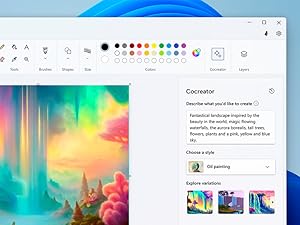
Figure 8: Cocreator AI Tool
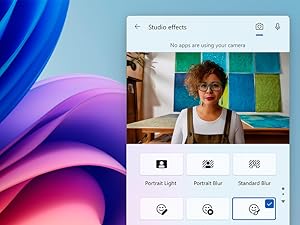
Figure 9: Windows Studio Effects
4. Maintenance and Care
To maintain your Dell 14 Plus Laptop in optimal condition:
- Keep the laptop clean by wiping surfaces with a soft, lint-free cloth.
- Avoid exposing the laptop to extreme temperatures or direct sunlight.
- Ensure proper ventilation by not blocking air vents.
- Regularly back up your data to prevent loss.
- Keep software and drivers updated for security and performance.
5. Troubleshooting
If you encounter issues with your Dell 14 Plus Laptop, consider the following basic troubleshooting steps:
- No Power: Ensure the power adapter is securely connected to both the laptop and a working power outlet.
- Display Issues: Check external display connections if applicable. Try adjusting brightness settings.
- Slow Performance: Close unnecessary applications, check for malware, or restart the system.
- Connectivity Problems: Verify Wi-Fi and Bluetooth settings. Restart your router if network issues persist.
For more advanced issues, refer to Dell's official support website or contact customer service.
6. Specifications
| Feature | Detail |
|---|---|
| Brand | Dell |
| Model Name | Dell DB14250 Laptop |
| Screen Size | 14 Inches |
| Resolution | 2560x1600 (2.5K) |
| CPU Model | Intel Core Ultra 7 258V |
| RAM Memory Installed Size | 32 GB LPDDR5X (8533 MHz) |
| Hard Disk Size | 1 TB SSD |
| Graphics Coprocessor | Intel Arc Graphics |
| Operating System | Windows 11 Home |
| Special Feature | Anti Glare Coating, Backlit Keyboard, HD Audio |
| Connectivity Technology | Bluetooth 5.4, Wi-Fi 7 |
| Total USB Ports | 3 (including Thunderbolt 4 and USB 3.2 Gen 2 Type-C) |
| HDMI Ports | 1 |
| Item Weight | 3.4 Pounds |
| Item Dimensions L x W x Thickness | 8.9"L x 12.36"W x 0.67"Th |
7. Warranty and Support
7.1. Warranty Information
Your Dell 14 Plus Laptop DB14250 comes with a 1 Year Mail-in-service warranty. Additionally, it includes 6 Months Dell Migrate service to assist with data transfer to your new PC.
7.2. Dell Technologies - Sustainability
Dell is committed to circular design, utilizing recycled and repurposed materials in their products. This commitment helps protect the planet and future generations.
Video 1: Dell Technologies - Sustainability. This video highlights Dell's commitment to using recycled and repurposed materials in product design.
7.3. Product Overview
For a visual overview of the Dell 14 Plus DB14250, including its design and features, please watch the official product video:
Video 2: Dell 14 Plus DB14250. This video provides a general overview of the Dell 14 Plus Laptop DB14250, showcasing its design and key functionalities.


