
1. Introduction
This manual provides essential information for the proper setup, operation, and maintenance of your Coliao 1.54 Inch OLED Module. Please read these instructions carefully before using the product to ensure optimal performance and longevity.
2. Product Overview
The Coliao 1.54 Inch OLED Module is a self-luminous display board featuring a 128x64 pixel resolution. It is designed for integration with various microcontrollers and single-board computers, including Raspberry Pi, Arduino (R3 board, Mega), 51 MCU, and STM32. The module supports both I2C (IIC) and SPI serial interfaces, offering flexibility in connectivity. Its OLED technology provides high contrast, a wide viewing angle (greater than 160°), and ultra-low power consumption.
Key Features:
- Display Size: 1.54 inches
- Resolution: 128 x 64 pixels
- Driver IC: SSD1309 (compatible with SSD1306)
- Interface: I2C (IIC) and SPI
- Operating Voltage: DC 3.3V-5V
- Display Color: Blue/White
- Viewing Angle: > 160°
- Power Consumption: 0.04W (normal operation), 0.08W (full screen lit)
- Self-Luminous: No backlight required, high contrast.
What's in the Box:
The package includes:
- 1x Coliao 1.54 Inch OLED I2C IIC Display Module
- 1x Protective Box
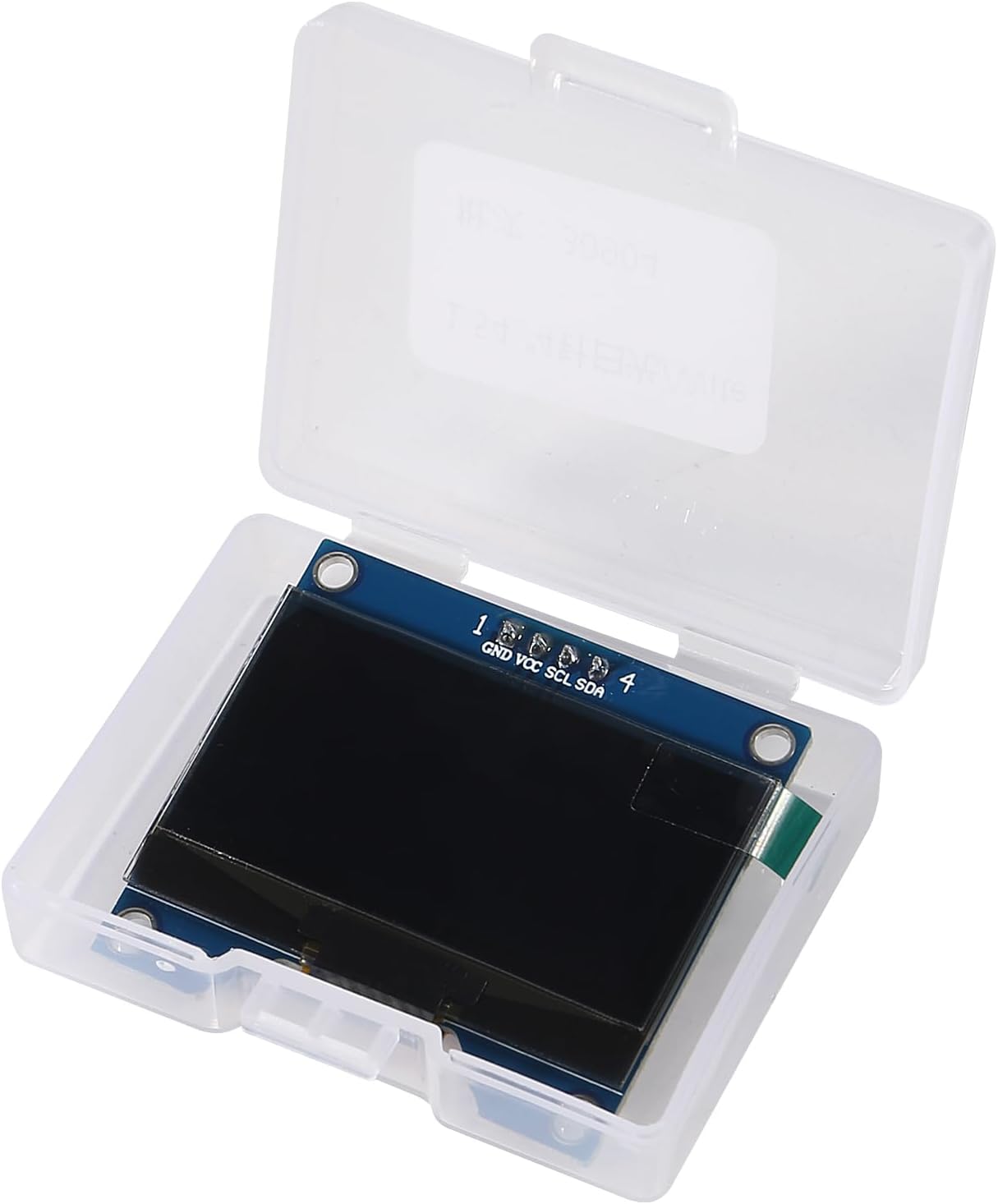
3. Specifications
| Specification | Value | |
|---|---|---|
| Brand | Coliao | |
| Model | Display Size | 1.54 inches |
| Resolution | 128 x 64 pixels | |
| Driver IC | SSD1309 (compatible with SSD1306) | |
| Interface | I2C (IIC), SPI | |
| Drive Voltage | 3.3V - 5V DC | |
| Power Consumption (Normal) | 0.04W | |
| Power Consumption (Full Screen Lit) | 0.08W | |
| Viewing Angle | > 160° | |
| Compatible Devices | Raspberry Pi, Arduino (R3, Mega), 51 MCU, STM32 | |
| Dimensions (Module) | Approximately 42mm x 38mm (1.65in x 1.49in) |


4. Setup
Pinout and Connections:
The module features a 4-pin header for I2C communication. Ensure correct connections to your microcontroller to avoid damage.
- GND: Ground connection. Connect to the ground (GND) pin of your microcontroller.
- VCC: Power supply. Connect to a 3.3V to 5V DC power source from your microcontroller.
- SCL: Serial Clock Line. Connect to the I2C SCL pin of your microcontroller.
- SDA: Serial Data Line. Connect to the I2C SDA pin of your microcontroller.
Important Note on Voltage Tolerance:
Some users have reported that the I2C lines (SCL, SDA) on this module may not be 5V tolerant. If your microcontroller operates at 5V, it is recommended to use a logic level shifter for the SCL and SDA lines to prevent potential damage to the OLED module. The VCC pin can typically handle 3.3V-5V directly.


5. Operating
Programming and Libraries:
To operate the OLED module, you will need to use appropriate libraries for your chosen microcontroller platform. The module is compatible with the SSD1309 driver IC, which is often compatible with SSD1306 libraries.
- Arduino: For Arduino platforms, libraries such as U8g2 or Adafruit SSD1306/SSD1309 libraries are commonly used. When using U8g2, you may find success with constructors designed for SSD1306.
- Raspberry Pi: For Raspberry Pi, Python libraries like Luma.OLED can be used. Ensure I2C is enabled on your Raspberry Pi.
The module does not have embedded fonts. Users are expected to generate or include fonts within their code using font generation software or library functions.

6. Maintenance
The Coliao 1.54 Inch OLED Module requires minimal maintenance. Follow these guidelines to ensure its longevity:
- Handling: Handle the module by its edges to avoid touching the display surface or delicate components.
- Cleaning: If necessary, gently clean the display surface with a soft, dry, lint-free cloth. Avoid using abrasive materials or chemical cleaners.
- Storage: Store the module in its protective box or an anti-static bag when not in use to prevent dust accumulation and electrostatic discharge.
- Environmental Conditions: Operate and store the module within typical indoor temperature and humidity ranges. Avoid extreme temperatures or high humidity.
7. Troubleshooting
- Display Not Lighting Up:
- Verify all power (VCC, GND) and data (SCL, SDA) connections are secure and correct.
- Ensure the power supply voltage is within the 3.3V-5V range.
- Check your code for proper initialization of the OLED display and I2C/SPI communication.
- Confirm the I2C address. The module typically uses 0x3C or 0x3D. You can use an I2C scanner sketch/program to detect the correct address.
- Garbled or Incorrect Display:
- Ensure you are using the correct library and constructor for the SSD1309 driver (or compatible SSD1306).
- Some modules, despite being advertised as SSD1309, may use a CH1116 driver. If you experience issues, try libraries compatible with CH1116 or SH110X drivers, adjusting for 132x64 resolution if necessary.
- Check for proper data transmission and timing in your code.
- Module Freezes or Behaves Erratically:
- If using a 5V microcontroller, ensure you are using a logic level shifter for the SCL and SDA lines. Direct 5V input to these pins may cause instability or damage.
- Check for loose connections or interference, especially with long cables.
- No Fonts Displayed:
- Remember that the OLED controller does not have built-in fonts. You must include font data within your programming code or use library functions that handle font rendering.
8. Warranty and Support
For warranty information and technical support, please refer to the seller or manufacturer's official channels. Keep your purchase receipt for any warranty claims.
