
1. Important Safety Information
Please read all safety instructions carefully before using the JTLB Jinding Electric Pedicure Tool. Failure to follow these instructions may result in injury or damage to the device.
- Always use the tool on dry skin.
- Avoid applying excessive pressure to prevent injury.
- Do not use the tool on broken or irritated skin.
- Keep the tool away from water while in use to prevent electrical shock. The device has an IPX5 waterproof rating, meaning it is resistant to water jets, but it should not be submerged.
- Always unplug the tool before changing the grinding head or cleaning it.
- Do not attempt to disassemble, modify, or repair the product yourself to avoid personal injury or equipment damage.

Image: A multi-language warning graphic advising users not to disassemble, modify, or repair the product themselves to prevent injury or damage.
2. Product Overview
The JTLB Jinding Electric Pedicure Tool is designed for effective removal of dead skin and calluses. It features an ergonomic design, two-gear speed regulation, a digital battery display, and USB charging.

Image: Front view of the JTLB Jinding Electric Pedicure Tool, showing its white body, rose gold accents, power button, digital display, and grinding head.
2.1 Components

Image: A diagram labeling the key components of the electric pedicure tool, including the exfoliating roller, light, power switches, battery display screen, remove key for grinding head, and charging interface.
- Exfoliating Roller: The primary grinding head for callus removal.
- Light: Illuminates the treatment area.
- Power Switches: Controls the device's on/off function and speed settings.
- Battery Display Screen: Shows the current battery charge level.
- Remove Key of Grinding Head: Button to release the grinding head.
- Charging Interface: USB port for charging the device.
2.2 Included Accessories

Image: The electric pedicure tool displayed alongside two types of grinding heads: a coarse grinding head and a fine grinding head, indicating they are interchangeable.
- Electric Pedicure Tool (Main Unit)
- Coarse Grinding Head (for tougher calluses)
- Fine Grinding Head (for smoother finishing)
- USB Charging Cable
- Cleaning Brush
- Pedicure Head Cover
- User Manual (this document)
3. Setup and Charging
3.1 Charging the Device
Before first use, fully charge the device. The battery display will indicate charging status.
- Connect the USB charging cable to the charging interface at the bottom of the tool.
- Plug the other end of the USB cable into a suitable power source (e.g., USB wall adapter, computer USB port).
- The red power indicator on the digital display will flash while charging.
- Charging is complete when the indicator shows "100". A full charge takes approximately 3.5 hours.
- Once fully charged, unplug the charging cable.
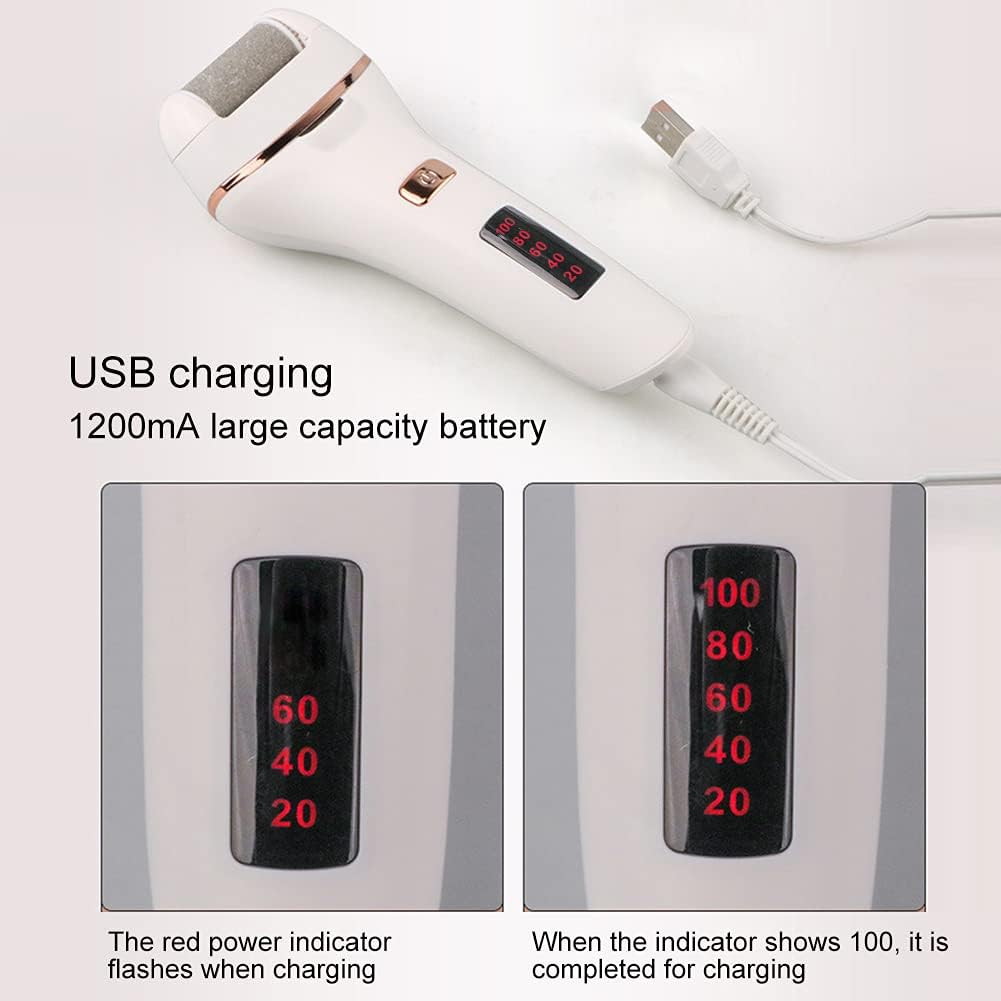
Image: The electric pedicure tool connected via USB for charging, with close-ups of the digital display showing a flashing "60" during charging and a steady "100" when fully charged.
3.2 Attaching and Removing Grinding Heads
The device comes with two types of grinding heads: coarse and fine. Choose the appropriate head for your needs.
To Remove a Grinding Head:
- Hold the machine body firmly with one hand.
- Press the switches button for the grinding head (located on the side) at the same time.
- With the other hand, pull the grinding head upwards to detach it.
To Mount a Grinding Head:
- Hold the machine body firmly with one hand.
- Align the grinding head with the front and back slots of the body.
- Press the switches button for the grinding head at the same time, then press the grinding head down into place until it clicks securely.

Image: A series of six images demonstrating the step-by-step process for both removing and mounting the grinding heads on the electric pedicure tool.
4. Operating Instructions
Ensure your feet are clean and completely dry before use. Do not use on wet or damp skin.
- Select and attach the desired grinding head (coarse for heavy calluses, fine for lighter skin or finishing).
- Press the power switch to turn on the device. The device has 2 gear regulations. Press once for the first speed, press again for the second speed.
- Gently apply the rotating grinding head to the affected area of your foot. Move the tool in circular motions, applying light to moderate pressure.
- Do not hold the tool in one spot for too long to avoid excessive friction and potential skin irritation.
- Continue until the desired smoothness is achieved.
- After use, press the power switch to turn off the device.
Note: The ergonomic design and built-in light enhance usability and visibility during operation.
5. Maintenance and Cleaning
Regular cleaning ensures optimal performance and extends the lifespan of your pedicure tool.
- Ensure the device is turned off and unplugged from any charging source.
- Remove the grinding head as described in Section 3.2.
- Use the provided cleaning brush to remove any dead skin particles from the grinding head.
- You can rinse the grinding head under running water. Ensure it is completely dry before reattaching or storing.
- Clean the main body of the device with a dry or slightly damp cloth. Do not rinse the main body under water to avoid damage to the electrical components, especially the charging interface.
- After cleaning, reattach the grinding head or store it with the pedicure head cover.
- Store the tool in a dry place, away from direct sunlight and moisture.

Image: A hand using a small brush to clean the grinding head of the electric pedicure tool, emphasizing the importance of removing the head for cleaning to protect the main unit's charging interface.
6. Specifications
| Feature | Detail |
|---|---|
| Brand | JTLB |
| Model Number | JTLBmtbie82sd6 |
| Power | 5W |
| Battery Type | Lithium Battery 1200mAh |
| Charging Time | Approximately 3.5 Hours |
| Waterproofing Grade | IPX5 (Resistant to water jets) |
| Item Weight | 0.25 Kilograms (approx. 8.8 ounces) |
| Dimensions | 8.03 x 4.92 x 2.24 inches (Package Dimensions) |
| Color | White |
7. Troubleshooting
If you encounter issues with your JTLB Jinding Electric Pedicure Tool, please refer to the following common solutions:
- Device not turning on: Ensure the device is fully charged. Check the battery display.
- Grinding head not rotating: Ensure the grinding head is correctly installed and clicked into place. Check for any obstructions.
- Reduced performance: The grinding head may be worn out and needs replacement, or it might be clogged with skin particles. Clean or replace the grinding head.
- Charging issues: Ensure the USB cable is securely connected to both the device and the power source. Try a different USB port or adapter.
For further assistance, please contact JTLB customer support.
8. Warranty and Support
Specific warranty details may vary by region and retailer. Please retain your proof of purchase for any warranty claims.
For product support, replacement parts, or warranty inquiries, please refer to the contact information provided with your purchase or visit the official JTLB website.
9. Legal Disclaimer
Statements regarding dietary supplements have not been evaluated by the FDA and are not intended to diagnose, treat, cure, or prevent any disease or health condition.
This product is intended for personal use only and should not be considered a substitute for professional medical advice or treatment. Consult a healthcare professional if you have underlying foot conditions or concerns.