
Ingco CRHLI202081
INGCO CRHLI202081 Lithium-Ion 20V Rotary Hammer Instruction Manual
Model: CRHLI202081
1. Introduction and Safety Information
This manual provides essential instructions for the safe and effective operation, maintenance, and troubleshooting of your INGCO CRHLI202081 Lithium-Ion 20V Rotary Hammer. Please read this manual thoroughly before using the tool and retain it for future reference.
General Safety Warnings
- Always wear appropriate personal protective equipment (PPE) such as safety glasses, hearing protection, and gloves when operating the tool.
- Ensure your work area is clean and well-lit. Cluttered or dark areas invite accidents.
- Keep children and bystanders away while operating a power tool. Distractions can cause you to lose control.
- Do not operate power tools in explosive atmospheres, such as in the presence of flammable liquids, gases, or dust. Power tools create sparks which may ignite the dust or fumes.
- Always disconnect the battery pack from the tool before making any adjustments, changing accessories, or storing the tool.
- Use the correct tool for your application. Do not force the tool.
2. Product Overview
The INGCO CRHLI202081 is a versatile 20V Lithium-Ion rotary hammer featuring a brushless motor for enhanced efficiency and durability. It offers four distinct functions for various applications.
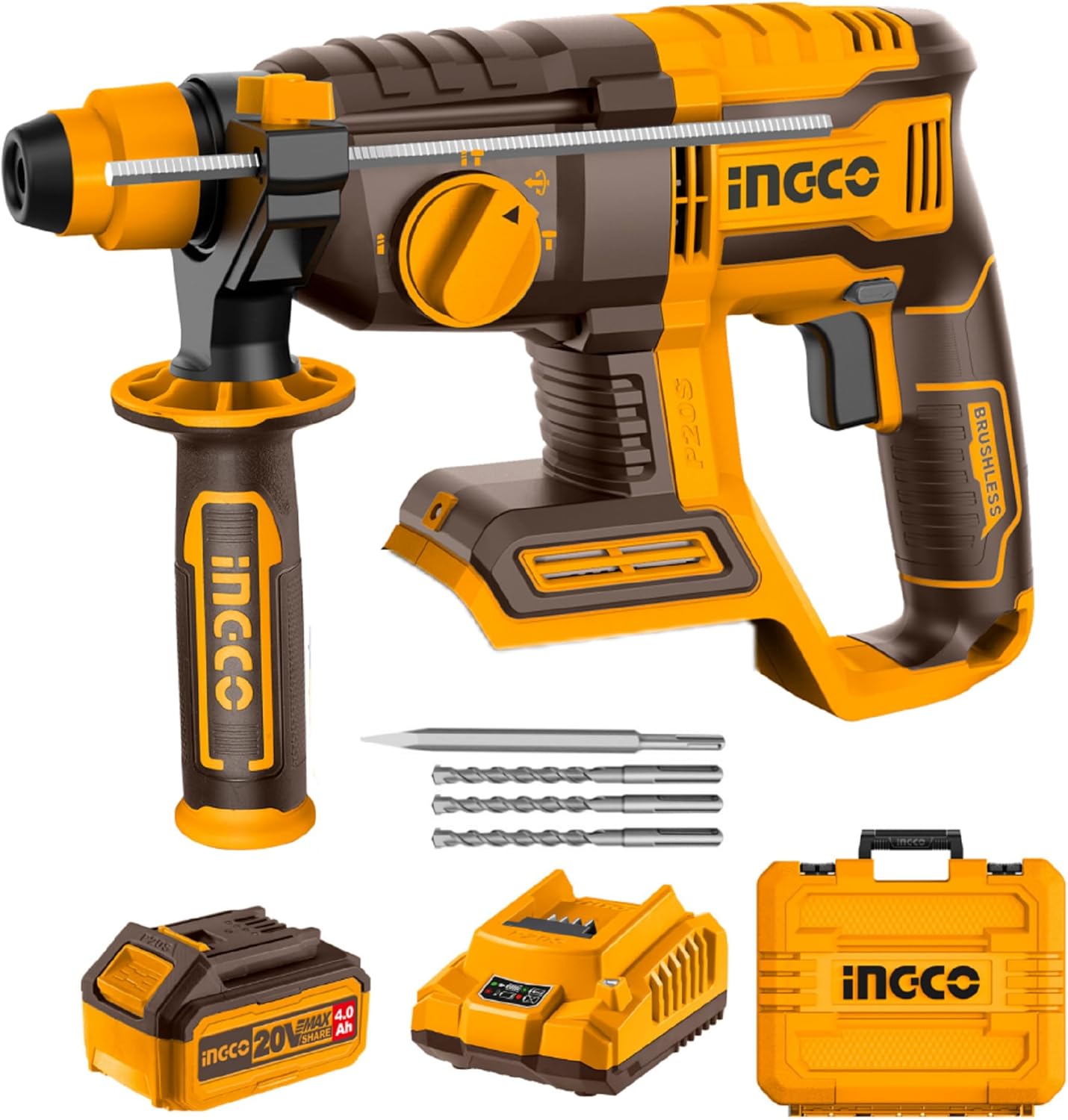
Figure 2.1: INGCO CRHLI202081 Rotary Hammer Kit Components
Key Components and Features

Figure 2.2: Labeled Components of the Rotary Hammer
- SDS-Plus Chuck: For quick and secure bit changes.
- 4-in-1 Function Adjust Knob: Selects between drilling, hammer drilling, chiseling, and chisel angle adjustment.
- Brushless Motor: Provides increased power, efficiency, and longer tool life.
- Optimum Cooling System: Designed to prevent overheating during extended use.
- Forward and Reverse Button: Changes the rotation direction of the chuck.
- Variable Speed Reversing Trigger: Allows for precise speed control and reverse operation.
- LED Work Light: Illuminates the work area for improved visibility.
- 360° Auxiliary Handle: Provides additional grip and control, adjustable for user comfort.
3. Setup
3.1 Battery Installation and Removal
- To install the battery, align the battery pack with the tool's battery port and slide it in until it clicks securely into place.
- To remove the battery, press the battery release button (usually located on the battery pack) and slide the battery out.
Note: Ensure the battery is fully charged before first use. INGCO 20V Lithium-Ion batteries are compatible with all INGCO 20V power tools.
3.2 Attaching and Removing Accessories (SDS Plus Chuck System)

Figure 3.1: Inserting an SDS Plus Drill Bit
- To attach a drill bit or chisel: Clean the shank of the accessory. Pull back the chuck collar, insert the accessory into the chuck as far as it will go, then release the collar. Pull on the accessory to ensure it is securely locked. The SDS Plus system allows for slight axial movement of the bit, which is normal for hammer action.
- To remove a drill bit or chisel: Pull back the chuck collar firmly and pull the accessory out of the chuck.
3.3 Adjusting the Auxiliary Handle
The 360° rotary auxiliary handle can be adjusted to any position for optimal comfort and control. Loosen the handle by twisting it counter-clockwise, adjust to the desired angle, and then tighten by twisting clockwise until secure.
4. Operating Instructions
4.1 Selecting Operating Mode (4-in-1 Function Adjust Knob)
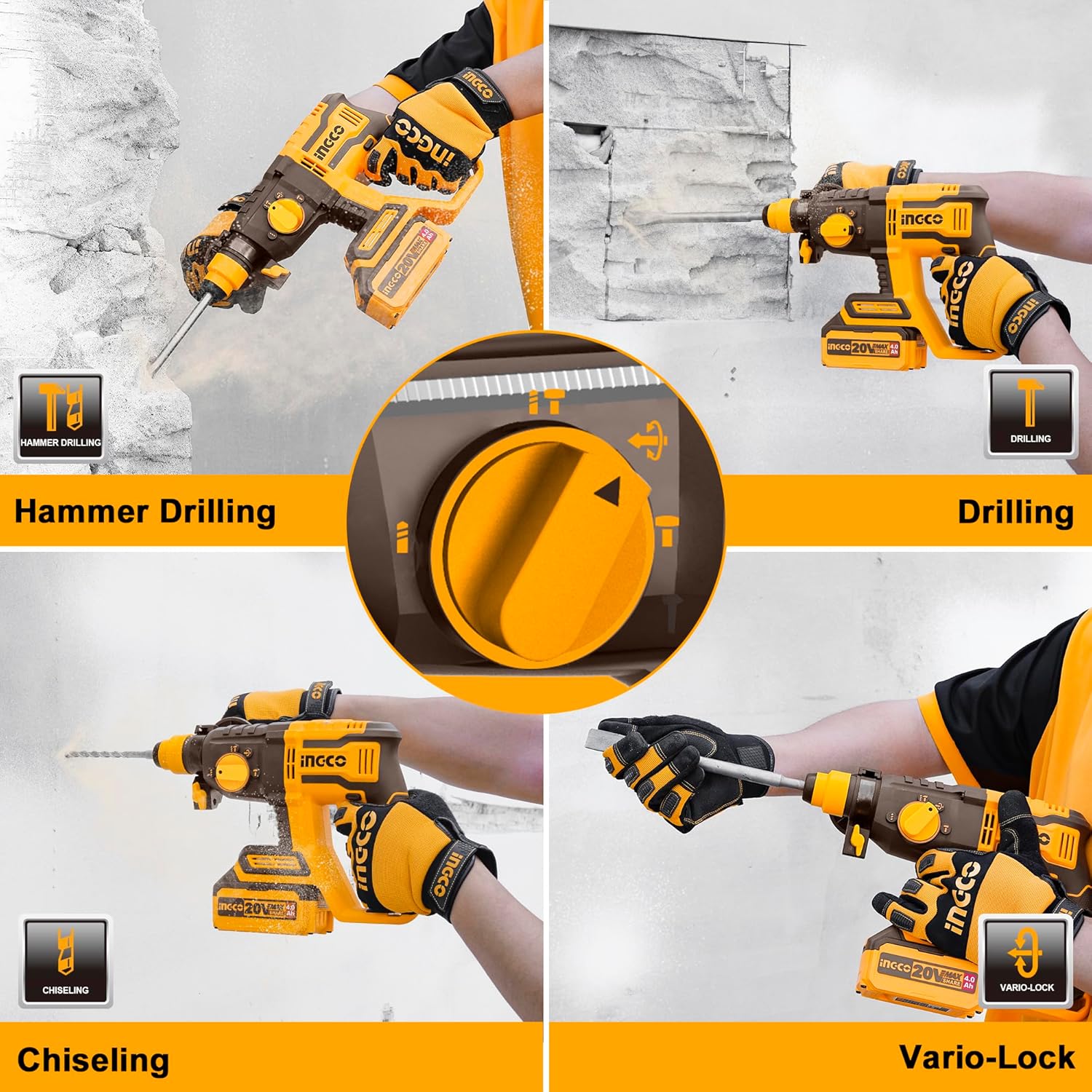
Figure 4.1: 4-in-1 Function Selection
Rotate the 4-in-1 function adjust knob to select the desired operating mode:
- Drilling (Rotation Only): For drilling in wood, metal, or plastic without hammer action.
- Hammer Drilling (Rotation with Hammering): For drilling in concrete, masonry, and stone.
- Chiseling (Hammering Only): For light chiseling, chipping, or demolition work.
- Chisel Direction Adjusting (Vario-Lock): Allows you to rotate and lock the chisel into various positions for optimal working angles.
4.2 Starting and Stopping the Tool
- To start the tool, press the variable speed reversing trigger. The speed increases as you press the trigger further.
- To stop the tool, release the trigger.
4.3 Forward/Reverse Operation
The forward/reverse button, located above the trigger, allows you to change the direction of rotation. Push the button to the left for forward rotation (drilling/hammer drilling) and to the right for reverse rotation (e.g., removing a stuck drill bit).
4.4 Using the LED Work Light
The integrated LED work light automatically illuminates when the trigger is pressed, providing visibility in dimly lit areas.
4.5 General Operation Guidelines

Figure 4.2: Proper Handling During Operation
- Always hold the tool firmly with both hands, using the main handle and the auxiliary handle.
- Apply steady, even pressure. Do not force the tool.
- For hammer drilling, allow the hammer action to do the work.
- When chiseling, ensure the chisel is properly oriented using the Vario-Lock function.

Figure 4.3: Chiseling Application
5. Maintenance
5.1 Cleaning
- Regularly clean the ventilation openings of the tool to prevent dust buildup, which can lead to overheating. Use a soft brush or compressed air.
- Wipe the tool housing with a damp cloth. Do not use harsh chemicals or abrasive cleaners.
- Clean the SDS Plus chuck regularly to ensure smooth operation and prevent debris from interfering with bit changes.
5.2 Storage
- Store the tool and accessories in a dry, secure place, out of reach of children.
- Remove the battery pack from the tool before storage, especially for extended periods.
- Store batteries in a cool, dry place, away from direct sunlight and extreme temperatures.
6. Troubleshooting
If you encounter issues with your INGCO CRHLI202081 rotary hammer, refer to the following common troubleshooting steps:
| Problem | Possible Cause | Solution |
|---|---|---|
| Tool does not start | Battery not charged or improperly installed | Ensure battery is fully charged and securely inserted. |
| Reduced power or performance | Low battery charge; accessory worn or dull | Recharge battery. Replace worn drill bits or chisels. |
| Bit not locking into chuck | Chuck collar not pulled back sufficiently; debris in chuck | Pull chuck collar back fully. Clean chuck thoroughly. |
| Tool overheating | Blocked ventilation slots; continuous heavy use | Clean ventilation slots. Allow tool to cool down during prolonged use. |
If the problem persists after attempting these solutions, please contact customer support.
7. Specifications
Technical data for the INGCO CRHLI202081 Rotary Hammer:
| Feature | Specification |
|---|---|
| Model Number | CRHLI202081 |
| Voltage | 20V |
| Motor Type | Brushless |
| No-load Speed | 0-1100 RPM |
| Impact Rate | 0-5400 BPM |
| Single Impact Force | 2.0 J |
| Max. Drilling Capacity (Concrete) | Ø22 mm |
| Max. Drilling Capacity (Steel) | Ø13 mm |
| Max. Drilling Capacity (Wood) | Ø28 mm |
| Chuck System | SDS Plus |
| Item Weight | 4.72 Kilograms |
| Product Dimensions | 38 x 26 x 9 cm |
| Battery Capacity (Included) | 4.0 Ah Lithium-Ion |
| Included Accessories | 3 Pcs Drill Bits, 1 Pcs Chisel, 1 Pcs 4.0Ah Battery, 1 Pcs Charger, Plastic Box |
8. Warranty and Support
For information regarding product warranty, please refer to the warranty card included with your purchase or contact the retailer where the product was purchased. Warranty terms and conditions may vary by region and seller.
For technical support, spare parts, or service inquiries, please contact INGCO customer service or your authorized INGCO dealer. Keep your purchase receipt and product model number (CRHLI202081) readily available when seeking support.
Related documentsCRHLI202081


Ask a question about this manual
Ask about setup, troubleshooting, compatibility, parts, safety, or missing instructions. Manuals+ will review the question and use this page’s manual context to help answer it.