
QIO TECH Iceriver KS5L
IceRiver KS5L 12T 3400W Kas Miner
User Manual
Model: Iceriver KS5L | Brand: QIO TECH
1. Introduction
This manual provides essential information for the safe and efficient operation of your IceRiver KS5L 12T 3400W Kas Miner. Please read this guide thoroughly before setting up and operating the device to ensure optimal performance and longevity.
2. Safety Information
Adherence to these safety guidelines is crucial to prevent damage to the device, property, or personal injury.
- Electrical Requirements: The IceRiver KS5L requires an input voltage of 170-300V AC. Do not use 110V voltage, as this will damage the miner and void the warranty. Ensure your power supply infrastructure can support the 3400W output wattage.
- Ventilation: Ensure adequate airflow around the miner. Do not obstruct the intake or exhaust fans. Operate in a well-ventilated area to prevent overheating.
- Placement: Place the miner on a stable, non-flammable surface. Keep it away from water, moisture, and direct sunlight.
- Handling: The unit weighs approximately 35.2 pounds (16 kg). Use proper lifting techniques or assistance when moving the device.
- Professional Installation: If you are unsure about electrical connections or setup, consult a qualified electrician or IT professional.
3. Product Overview
The IceRiver KS5L is a high-performance ASIC miner designed for Kaspa cryptocurrency. It features robust construction and efficient cooling.

Figure 3.1: Front-side view of the IceRiver KS5L Kas Miner, showing the cooling fans and power input.
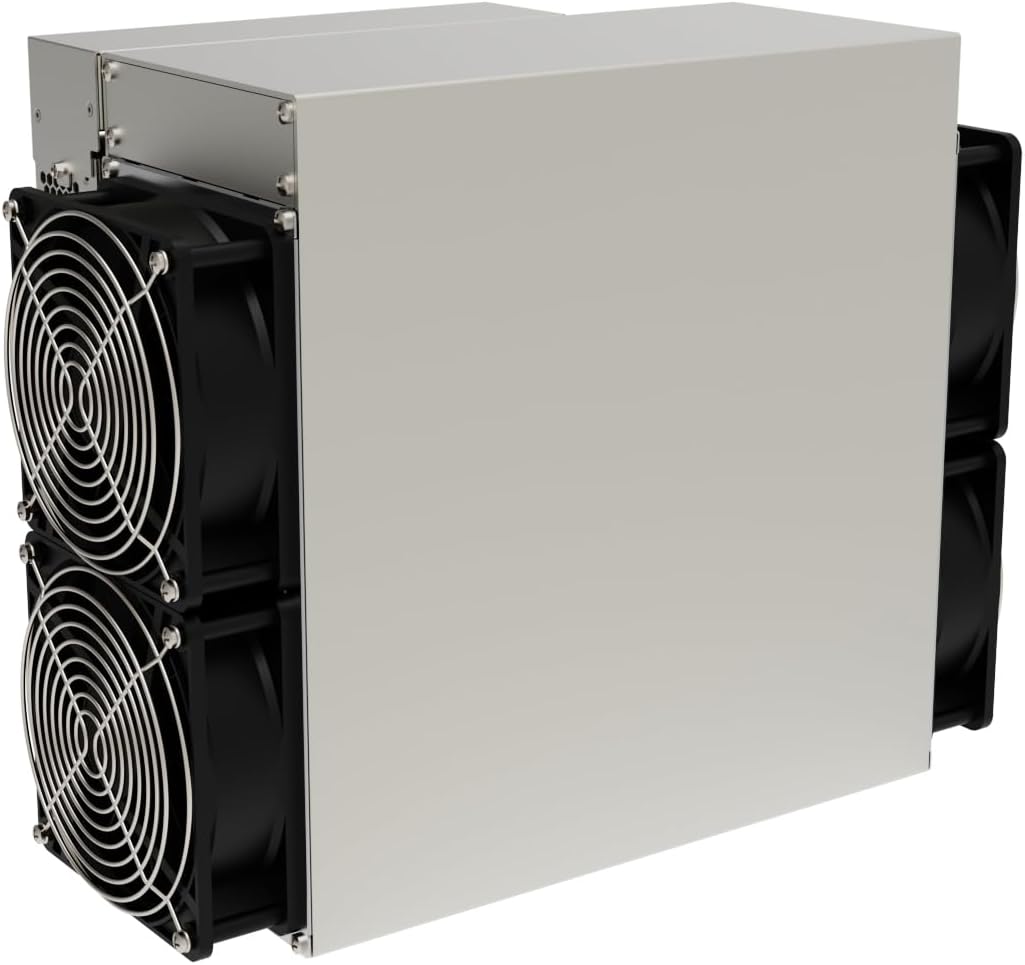
Figure 3.2: Side view of the IceRiver KS5L Kas Miner, highlighting its compact form factor.
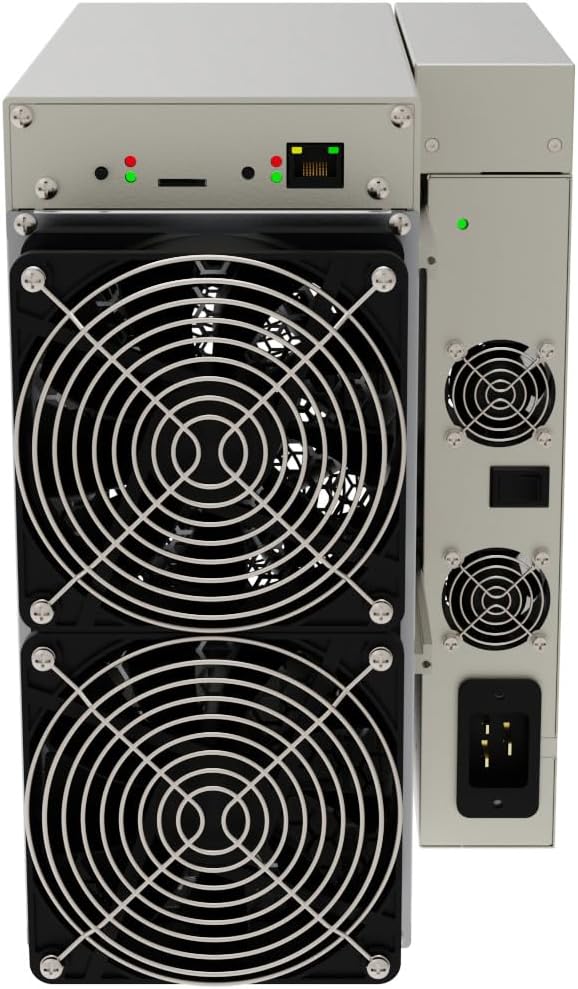
Figure 3.3: Rear view of the IceRiver KS5L Kas Miner, showing the RJ-45 network connector and power switch.
Components:
- Main Unit: The core mining hardware.
- Cooling Fans: Integrated high-speed fans for heat dissipation.
- Power Input: Standard AC power inlet (C13/C14 type, depending on region).
- Network Port: RJ-45 Ethernet port for network connectivity.
- Status Indicators: LED lights indicating power and network status.
4. Setup
Follow these steps to set up your IceRiver KS5L miner.
- Unpacking: Carefully remove the miner from its packaging. Inspect for any visible damage. Retain the original packaging for future transport or returns.
- Placement: Choose a location with stable temperature, low humidity, and excellent ventilation. Ensure there is at least 12 inches (30 cm) of clear space around all sides of the miner for optimal airflow.
- Power Connection: Connect the appropriate power cable (not included) to the miner's power input. Crucially, ensure your power source provides 170-300V AC. Connecting to a 110V source will cause irreparable damage.
- Network Connection: Connect an Ethernet cable (RJ-45) from your network router or switch to the miner's RJ-45 port. A stable internet connection is essential for mining operations.
- Initial Power On: Once power and network cables are securely connected, flip the power switch to the 'ON' position. The miner's fans will start, and status LEDs will illuminate.
- Accessing the Web Interface: After the miner boots up (typically 1-2 minutes), you can access its web interface via a web browser. You will need to find the miner's IP address on your network (e.g., using your router's connected devices list or an IP scanner tool). Enter the IP address into your browser's address bar.
- Configuration: Log in to the web interface (default credentials are often 'root' for username and 'root' for password, but check the manufacturer's specific documentation if these do not work). Configure your mining pool settings, wallet address, and worker name as required.
5. Operating
Once configured, the IceRiver KS5L will begin mining. Monitor its status through the web interface.
- Status Monitoring: The web interface provides real-time data on hash rate, temperature, fan speed, and network status. Regularly check these metrics to ensure optimal performance.
- LED Indicators: Observe the LED lights on the miner. Typically, a solid green light indicates power, and a blinking green/orange light indicates network activity or mining status. Refer to the manufacturer's specific guide for detailed LED interpretations.
- Shutdown Procedure: To safely power off the miner, it is recommended to first use the 'Shutdown' option in the web interface, if available, before disconnecting power. If not, simply turn off the power switch.
6. Maintenance
Regular maintenance helps ensure the longevity and stable operation of your miner.
- Dust Removal: Periodically clean the miner, especially the fans and heatsinks, to prevent dust buildup. Dust can impede airflow and lead to overheating. Use compressed air or a soft brush. Ensure the miner is powered off and unplugged before cleaning.
- Environmental Control: Maintain a stable operating environment. Avoid extreme temperatures, high humidity, and sudden temperature changes.
- Firmware Updates: Check the official QIO TECH website or IceRiver support channels for firmware updates. Updating firmware can improve performance, stability, and security. Follow the provided instructions carefully when performing updates.
7. Troubleshooting
This section addresses common issues you might encounter.
- Miner Not Powering On:
- Check if the power cable is securely connected to both the miner and the power outlet.
- Verify that the power switch is in the 'ON' position.
- Confirm that the power outlet is supplying the correct voltage (170-300V AC).
- No Network Connectivity:
- Ensure the Ethernet cable is properly connected to both the miner and the router/switch.
- Check your router/switch for network issues.
- Verify that the network LED on the miner is active.
- Low Hash Rate or Offline Status:
- Check your internet connection stability.
- Verify your mining pool settings and wallet address in the web interface.
- Ensure the miner is not overheating; check fan speeds and ambient temperature.
- Restart the miner.
- Unusual Noise or Vibration:
- Inspect fans for obstructions or damage.
- Ensure the miner is placed on a stable surface.
For persistent issues or complex problems, contact QIO TECH customer support.
8. Specifications
| Feature | Specification |
|---|---|
| Model Name | Iceriver KS5L |
| Brand | QIO TECH |
| Product Dimensions (L x W x H) | 19.29 x 11.81 x 15.75 inches |
| Item Weight | 35.2 pounds (16 Kilograms) |
| Output Wattage | 3400 Watts |
| Wattage | 3400 watts |
| Cooling Method | Air |
| Connector Type | RJ-45 |
| Compatible Devices | Desktop |
| Form Factor | ATX |
| Manufacturer | QIO TECH |
| Date First Available | September 5, 2023 |
9. Warranty and Support
For warranty information and technical support, please refer to the official QIO TECH website or contact their customer service directly. Please note that a 50% restock fee may apply if the IceRiver KS5L 12T is returned within 30 days, so serious consideration before purchase is advised.
For general inquiries or support, visit the QIO TECH brand page on Amazon.
Ask a question about this manual
Ask about setup, troubleshooting, compatibility, parts, safety, or missing instructions. Manuals+ will review the question and use this page’s manual context to help answer it.