
1. Important Safety Information
Please read and understand this entire manual before attempting to assemble, operate, or install the product. Failure to follow these instructions could result in electric shock, fire, or serious personal injury.
- Ensure all electrical connections comply with local codes and ordinances, as well as the National Electrical Code (NEC).
- Disconnect power at the main circuit breaker before installation or servicing.
- The fan must be mounted with a minimum of 7 feet (2.1 meters) clearance from the floor to the trailing edge of the blades.
- This fan is damp-rated for outdoor use in covered areas. Do not expose to direct rain.
- Use only with the remote control provided.
2. Package Contents
Carefully unpack all components and ensure all items are present before beginning installation. Refer to the video below for a visual overview of the package contents.
Video: Unboxing and component overview of the addlon 60-inch ceiling fan. This video demonstrates all parts included in the package, such as the three ABS blades, downrods, motor, mounting bracket, remote control, and wiring module, before assembly begins.
- 3 ABS Blades
- Motor Assembly
- Mounting Bracket
- Downrods (5-inch, 10-inch, 24-inch)
- Canopy and Collar
- Remote Control with Batteries (2 AAA)
- Wiring Module
- Hardware Pack (screws, wire nuts, etc.)
- User Manuals
3. Specifications
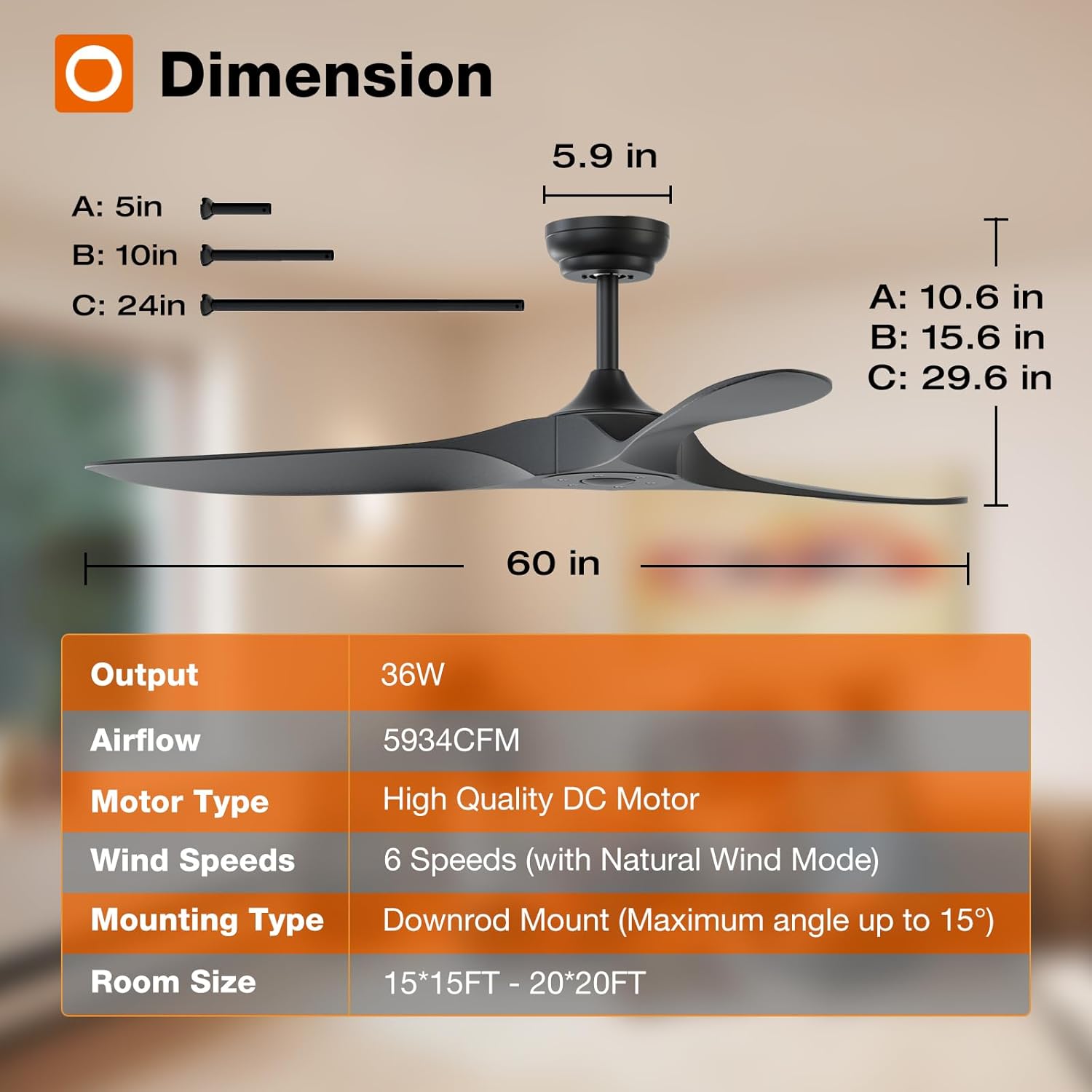
Image: Detailed diagram illustrating the dimensions of the addlon 60-inch ceiling fan, including downrod lengths and overall height, along with a table of key specifications.
| Feature | Detail |
|---|---|
| Brand | addlon |
| Model Name | KDM60ABS01R0 |
| Size | 60 inch |
| Color | Black |
| Number of Blades | 3 |
| Motor Type | DC Motor |
| Number of Speeds | 6 |
| Control Method | Remote Control |
| Noise Level | 35 Decibels |
| Air Flow Capacity | 5934 Cubic Feet Per Minute |
| Wattage | 36 watts |
| Voltage | 120 Volts |
| Mounting Type | Downrod Mount |
| Indoor/Outdoor Usage | Indoor (Damp Rated for covered outdoor areas) |
| Special Features | 6 Speeds, Memory Function, Remote Controlled, Reversible, Timer |
4. Installation Guide (Setup)
This section provides a general overview of the installation process. For detailed instructions, please refer to the included user manual and the installation video.

Image: An illustration of the ease of installation, showing two individuals celebrating a successful 30-minute installation, highlighting reduced electrician fees.
4.1 Mounting Bracket Installation
Secure the mounting bracket to the ceiling junction box. Ensure the bracket is firmly attached and can support the weight of the fan. The yellow ground wire should be connected to the house ground wire.
4.2 Blade Assembly
Attach the three ABS blades to the motor assembly. When securing the blades, tighten the screws snugly but do not fully tighten until all blades are in place. This allows for minor adjustments to ensure proper alignment.

Image: A detailed view of the fan's motor hub with the three ABS blades securely attached, illustrating the connection points.
4.3 Downrod Attachment
Select the appropriate downrod length (5-inch, 10-inch, or 24-inch) for your ceiling height. Feed the electrical wires from the fan motor through the downrod. Secure the downrod to the motor assembly and then to the hanging ball.
4.4 Wiring and Final Mounting
Hang the fan assembly onto the mounting bracket. Connect the electrical wires (live, neutral, ground) from the fan to the corresponding house wires using wire nuts. Ensure all connections are secure. Insert the remote control receiver into the mounting bracket area, ensuring its antenna is exposed for optimal signal reception. Finally, slide the canopy up to cover the wiring and secure it in place.

Image: The addlon 60-inch ceiling fan fully installed and operational, showcasing its sleek design in a room.
5. Operating Instructions
5.1 Remote Control Functions
The addlon ceiling fan is operated via the included remote control. Ensure the two AAA batteries are correctly installed in the remote.

Image: An illustration highlighting the multi-functionality of the fan, including timer settings, reversible mode, 6 wind speeds, and remote control operation.
- Power Button: Turns the fan On or Off.
- Speed Buttons (1-6): Adjusts the fan speed from 1 (lowest) to 6 (highest).
- Wind Mode Button (Wave icon): Activates a natural wind mode, cycling through various speeds.
- Forward/Reverse Button (F/R): Changes the direction of blade rotation for seasonal use. 'F' for forward (cooling), 'R' for reverse (air circulation in winter).
- Timer Buttons (1H, 2H, 4H, 8H): Sets the fan to automatically turn off after 1, 2, 4, or 8 hours.
5.2 Speed Settings
The fan offers 6 distinct speed settings to suit various comfort levels and room conditions.
Image: A visual guide to the 6 fan speeds, suggesting optimal use for sleeping/ventilation (Levels 1-2), daily use (Levels 3-4), and exercise/hot weather (Levels 5-6).
- Levels 1-2: Low, comfortable wind for sleeping or gentle ventilation.
- Levels 3-4: Medium, natural wind for daily use.
- Levels 5-6: High, strong cooling wind for exercise or hot weather.
5.3 Reversible DC Motor (Seasonal Use)
The reversible DC motor allows for year-round comfort. In summer, the fan blades rotate counter-clockwise to create a downward airflow, providing a cooling effect. In winter, the blades rotate clockwise to create an upward airflow, circulating warm air trapped near the ceiling and distributing it throughout the room.

Image: An illustration demonstrating the reversible DC motor function, showing how the fan provides strong wind for rapid cooling in summer and balances indoor heating in winter.
5.4 Timer Function
Utilize the timer function to automatically turn off the fan after a set period, ideal for use during sleep or when leaving a room.

Image: A visual representation of the timer setting feature, indicating that the fan can be set to turn off automatically after 1, 2, 4, or 8 hours, promoting undisturbed sleep.
5.5 Quiet Operation
The addlon ceiling fan is designed with a low-noise DC motor, ensuring a quiet environment. At its lowest setting, the fan operates at approximately 35dB, comparable to the sound of falling leaves, making it suitable for bedrooms and quiet spaces.

Image: A graphic illustrating the low noise output of the addlon fan (24dB), significantly quieter than typical ambient sounds, ensuring a peaceful environment.
6. Maintenance
Regular maintenance ensures optimal performance and longevity of your ceiling fan.
- Cleaning: Use a soft, damp cloth to clean the fan blades and motor housing. Do not use abrasive cleaners or solvents. Ensure the fan is turned off and power is disconnected before cleaning.
- Blade Care: Periodically check the blades for any dust buildup that might affect balance. Clean them gently.
- Connections: Annually check all screws and connections for tightness. Over time, vibrations can cause them to loosen.
7. Troubleshooting
If you encounter any issues with your addlon ceiling fan, refer to the following common troubleshooting steps:
- Fan Not Turning On: Check the circuit breaker. Ensure all wiring connections are secure. Verify remote control batteries are fresh and correctly inserted.
- Remote Not Responding: Replace the remote control batteries. Ensure the remote control receiver's antenna is not obstructed.
- Fan Wobbling: Ensure all blade screws are tightened. Check that the downrod is securely attached to both the motor and the mounting bracket. Verify the mounting bracket is firmly secured to the ceiling.
- Unusual Noise: Ensure all screws are tight. Check for any obstructions around the blades.
If problems persist, please contact addlon customer support for assistance.
8. Warranty and Support
addlon is committed to customer satisfaction and provides comprehensive support for your product.

Image: Details on the 10-year motor warranty and 2-year warranty for other parts, emphasizing customer satisfaction.

Image: Information about the 24-hour customer service team, ready to assist with any after-sales or installation inquiries.
- Motor Warranty: The fan motor is covered by a 120-month (10-year) warranty.
- Parts Warranty: All other components of the fan are covered by a 2-year warranty.
- Customer Support: For any questions regarding installation, operation, or warranty claims, please contact addlon customer support. They offer 24-hour assistance.