
Introduction
This manual provides comprehensive instructions for the installation, operation, and maintenance of your GUPUP 16.4ft COB RGB Smart IC LED Strip Lights. These addressable color chasing strip lights feature 24V 2880 LEDs, offering multicolor flexible tape lighting with APP control and music mode, suitable for various indoor decoration purposes.
What's in the Box
Please verify that all components are present before proceeding with installation.
- 16.4ft COB RGB Smart IC LED Strip Light
- 24V Power Adapter
- Control Box (with Bluetooth receiver)
- IR Remote Control
- Fixed Clips (for strengthening fixation)
- 10mm Width Connector (to connect light strips)
- User Manual
Video: An overview of the GUPUP RGB Smart IC COB LED Strip Lights package contents, including the strip, power adapter, control box, remote, and connectors.
Key Features
The GUPUP COB RGB Smart IC LED Strip Lights offer advanced lighting capabilities:
- Upgraded COB Technology: Features 2880 high-density LEDs (576 LEDs/meter) for continuous, uniform linear lighting with no dark spots, providing brighter and more consistent illumination compared to traditional SMD strips.
- Smart IC for Addressable Colors: Built-in IC chips enable the lights to display multiple colors simultaneously, segmentally, and dynamically, creating breathtaking RGB effects and color chasing patterns.
- 24V System: Operates on 24V for lower voltage drop, ensuring brighter and more consistent light across the entire strip length.
- Flexible and Cuttable Design: The flexible strip can be bent into various shapes and cut at designated marks to fit specific installation areas.
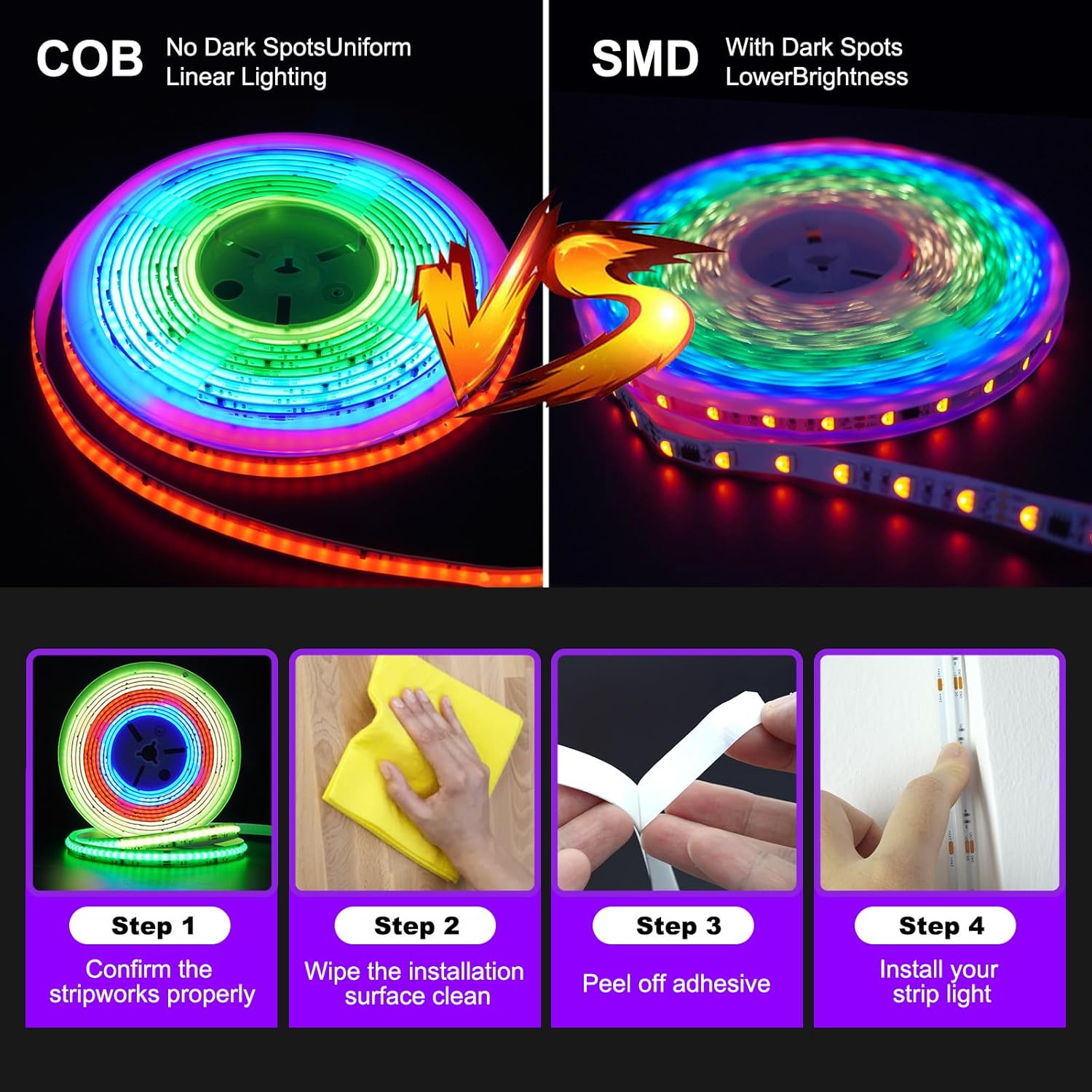
Image: Illustrates the superior uniform and linear lighting of COB LED strips compared to SMD LED strips, which exhibit dark spots.

Image: Highlights the key attributes of the COB RGB LED Strip: Uniform Light, Cuttable, DIY light strip, Colorful, and With adhesive.

Image: Demonstrates the difference between RGB Smart IC (multicolor in one line) and standard RGB (single color in one line) LED strips.
Specifications
| Brand | GUPUP |
| Model Number | GCK0G15020H-JH |
| Item Length | 16.4 Feet |
| Light Source Type | LED (COB RGB Smart IC, 2880 LEDs total, 576 LEDs/meter) |
| Light Color | Multicolor (RGB, Chasing Color, Color Segment, Dream Color) |
| Voltage | 24 Volts |
| Power Source | AC/DC |
| Control Method | App, Remote |
| Indoor/Outdoor Usage | Indoor |
| Material | Polyester |
| Item Weight | 12.3 ounces |
Setup and Installation
Follow these steps for proper installation of your LED strip lights.
1. Preparation
- Unroll the LED strip completely before powering on to prevent heat buildup and damage.
- Ensure the installation surface is clean, dry, and smooth for optimal adhesive performance.
- Test the strip lights by connecting them to the power adapter and control box before final installation to ensure they function correctly.

Image: Visual guide for installation. Step 1: Confirm the strip works properly. Step 2: Wipe the installation surface clean. Step 3: Peel off adhesive. Step 4: Install your strip light.
2. Connecting Components
- Connect the LED strip to the control box. Ensure the pins are aligned correctly and push firmly until it clicks into place. Incorrect alignment may prevent the lights from working or cause damage.
- Connect the control box to the 24V power adapter.
- Plug the power adapter into a standard electrical outlet.

Image: The LED strip connected to the control box and power adapter, illustrating the setup for APP control and IR Remote control.
3. Mounting the LED Strip
- Peel off the protective backing from the adhesive tape on the back of the LED strip.
- Carefully press the strip onto the prepared surface, ensuring firm contact along its entire length.
- For added security, use the provided fixed clips at regular intervals or at corners.
- The COB RGB LED strip can be cut at designated marks to fit your desired length. Ensure to cut only at the indicated points to avoid damaging the circuit.
Operating Instructions
Your GUPUP LED Strip Lights can be controlled via the included IR remote or a smartphone application.
1. IR Remote Control
The IR remote allows for basic control of colors, brightness, and dynamic modes.
- Power On/Off: Use the ON and OFF buttons.
- Color Selection: Choose from various preset colors using the color buttons.
- Brightness Adjustment: Use the Brightness Up and Brightness Down buttons.
- Dynamic Modes: Select modes like flashing, jumping, or fading effects.
- Speed Adjustment: Adjust the speed of dynamic modes using the SPEED+ and SPEED- buttons.

Image: The smartphone app interface for brightness adjustment (0%-100%) and visual examples of different brightness levels in a room.
2. APP Control (Bluetooth)
For advanced features and customization, download the "Magic Light" APP.
- Scan the QR code on the control box or visit https://daybetter.smartthingsapp.com/app/QRcode/ to download the "Magic Light" APP.
- Enable Bluetooth on your smartphone.
- Open the APP and follow the on-screen instructions to connect to your LED strip lights.
The APP offers features such as:
- 16 Million Colors: Access a wide spectrum of colors.
- DIY Mode: Customize individual lighting segments and create unique color patterns.
- Timing Mode: Set schedules for the lights to turn on/off automatically.
- Music Mode: The built-in sensitivity adjustable mic allows the lights to sync with environmental sounds and music.
- Group Control: Control multiple GUPUP LED strips simultaneously.

Image: The "Magic Light" APP demonstrating Timing Mode (set open and close time) and Music Mode (beat with the frequency of music).

Image: Illustrates the "Create Your Dream Home" features, including 16 Million Colors, DIY Mode, and Timer, controllable via remote and app.
Maintenance
Proper maintenance ensures the longevity and optimal performance of your LED strip lights.
- Cleaning: Gently wipe the LED strip with a soft, dry cloth to remove dust. Do not use harsh chemicals or abrasive cleaners.
- Adhesive Care: If the adhesive begins to lose its stickiness, ensure the surface is clean and dry. For long-term stability, utilize the provided fixed clips.
- Heat Dissipation: Always unroll the LED strip completely when in use to allow for proper heat dissipation. Do not operate the lights while they are still rolled up, as this can lead to overheating and damage.
- Storage: When not in use for extended periods, store the LED strip in a cool, dry place, away from direct sunlight and extreme temperatures.
Troubleshooting
If you encounter any issues, refer to the following common solutions:
- Lights not turning on:
- Ensure the power adapter is securely plugged into both the control box and a working electrical outlet.
- Check the connection between the LED strip and the control box. The pins must be fully inserted and correctly aligned.
- Verify that the remote control has working batteries and is pointed directly at the control box's IR receiver.
- Incorrect colors or partial lighting:
- This often indicates a loose connection between the LED strip and the control box. Disconnect and firmly re-insert the strip, ensuring all pins make proper contact.
- If using the APP, ensure it is correctly synced with the lights.
- Remote control not working:
- Replace the battery in the remote control.
- Ensure there are no obstructions between the remote and the control box's IR receiver.
- APP not connecting:
- Ensure Bluetooth is enabled on your smartphone and the lights are powered on.
- Restart the APP and try connecting again.
- If issues persist, try restarting your phone or the LED strip power.
Warranty and Support
For specific warranty details and customer support, please refer to the documentation included with your product packaging or visit the official GUPUP website. You can also visit the GUPUP Store on Amazon for more information.