
Introduction
This manual provides essential information for the proper setup, operation, and maintenance of your Motorola R7 UHF Radio with Display. The Motorola R7 is a robust and capable two-way radio designed for reliable communication in various professional environments. It is built to support MOTOTRBO R7 capabilities, offering advanced features for enhanced communication.
Product Overview
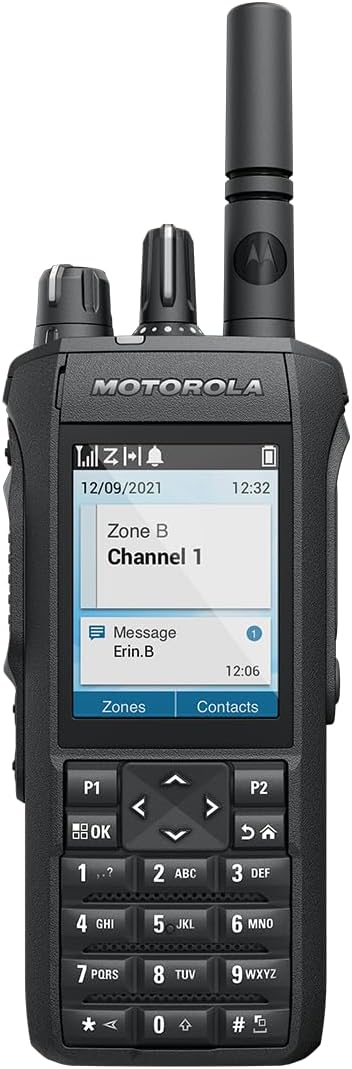
Image: Front view of the Motorola R7 UHF Radio, showcasing its full keypad, color display, and top-mounted antenna and control knobs. The display shows "Zone B Channel 1" and a message from "Erin.B".
The Motorola R7 features a large, clear display for easy navigation and information viewing. It includes a full alphanumeric keypad for direct input and navigation buttons for intuitive control. The radio is equipped with a durable antenna and robust construction suitable for demanding conditions.
Setup
- Battery Installation: Ensure the radio is powered off. Align the battery with the battery compartment on the back of the radio. Slide the battery into place until it clicks securely.
- Antenna Attachment: Screw the antenna clockwise onto the antenna connector located on the top of the radio until it is finger-tight. Do not overtighten.
- Initial Charging: For optimal performance, fully charge the battery before first use. Connect the radio to the charger according to the charger's instructions.
- Power On: Rotate the On/Off/Volume knob clockwise until you hear a click and the display illuminates.
Operating the Radio
- Power On/Off and Volume Control: The top-mounted knob controls both power and volume. Rotate clockwise to power on and increase volume; rotate counter-clockwise to decrease volume and power off.
- Channel/Zone Selection: Use the navigation buttons (up/down arrows) to scroll through available channels or zones displayed on the screen. Zones can be programmed for specific work areas such as "WAREHOUSE," "MAINTENANCE," or "CUSTODIAL."
- Push-to-Talk (PTT): To transmit, press and hold the large side button (PTT). Speak clearly into the microphone. Release the PTT button to listen.
- Sending Text Messages: The radio supports sending text messages. Use the keypad to input numbers and letters. Specific contacts can be programmed for quick messaging.
- Menu Navigation: Use the OK button and navigation arrows to access and navigate through the radio's menu options for advanced settings and features.
Maintenance
- Battery Care: Use only genuine Motorola IMPRES™ batteries. Avoid overcharging or fully discharging the battery frequently to prolong its lifespan. Store batteries in a cool, dry place.
- Cleaning: Clean the radio's exterior with a soft, damp cloth. Do not use harsh chemicals or abrasive cleaners. Ensure all ports are dry before use.
- Storage: When not in use for extended periods, store the radio in a dry, temperature-controlled environment. Remove the battery if storing for more than a month.
Troubleshooting
- No Power: Ensure the battery is properly installed and charged. Check that the On/Off knob is rotated clockwise past the click.
- No Signal/Poor Reception: Verify the antenna is securely attached. Ensure you are within the radio's effective talking range (up to 5 miles). Check if the correct channel/zone is selected.
- Audio Issues: Adjust the volume knob. Ensure the microphone and speaker are not obstructed.
- Keypad Unresponsive: Check for any physical damage or debris. If issues persist, power cycle the radio.
For persistent issues or advanced troubleshooting, please refer to the official Motorola Solutions support resources or contact your dealer.
Specifications
| Brand | Motorola Solutions |
| Model Number | R7 |
| Item Weight | 2.33 pounds |
| Product Dimensions | 12 x 3 x 9 inches |
| Color | Gray |
| Number of Channels | 1000 |
| Special Feature | Noise Reduction |
| Frequency Range | UHF |
| Talking Range Maximum | 5 Mile |
| Tuner Technology | UHF |
| Water Resistance Level | Water Repellent |
| Included Components | Battery |
Warranty and Support
Motorola Solutions offers various protection plans for your R7 radio to ensure long-term reliability and peace of mind. These may include 2-Year and 3-Year Protection Plans, as well as a Complete Protect plan that covers eligible past and future purchases with monthly renewal options.
For detailed warranty information, technical support, or to explore additional accessories, please visit the official Motorola Solutions Store or contact their customer service.


