
1. Introduction
Thank you for choosing the LEKIA HL001 LED Headlamp. This manual provides essential information for the safe and effective use of your headlamp. Please read it thoroughly before operation and retain it for future reference.

Figure 1: LEKIA HL001 LED Headlamp
Key Features:
- Ultra-Bright Illumination: Equipped with an upgraded XHM99 LED chip, delivering up to 90,000 lumens with a beam range of up to 1,000 meters.
- Multiple Lighting Modes: Features High, Low, Strobe, and a Sensor mode for versatile use.
- USB-C Rechargeable: Integrated 6000mAh battery provides 3-5 hours on high brightness and up to 10 hours on low brightness.
- Adjustable Angle & Zoom: Headlamp can be adjusted 90 degrees, and the beam offers a variable zoom function.
- Durable & Waterproof: IP65 rated for protection against dust and water jets, constructed from aviation aluminum for rapid heat dissipation and durability.
2. Package Contents
Ensure all items are present upon unboxing:
- LEKIA HL001 LED Headlamp (with 3 CR123A Lithium-ion batteries pre-installed)
- USB-C Charging Cable
- User Manual
3. Setup
3.1 Initial Charging
Before first use, fully charge the headlamp. Connect the provided USB-C charging cable to the headlamp's charging port and to a compatible USB power source (e.g., laptop, power bank, car charger, wall adapter). The charging time is approximately 4 to 8 hours, depending on the adapter's power output.

Figure 2: 90-degree angle adjustment and USB-C charging options.
3.2 Adjusting the Headband
The elastic headband is adjustable to fit various head sizes. Slide the buckles on the strap to achieve a comfortable and secure fit. Ensure the headlamp is centered on your forehead.
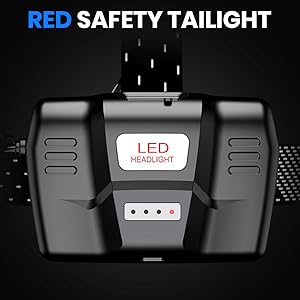
Figure 3: Adjustable elastic strap and power display.
3.3 Adjusting the Light Angle
The headlamp unit can be tilted up to 90 degrees vertically. Gently push or pull the light unit to adjust the beam direction to your desired angle.
4. Operation
4.1 Power On/Off and Mode Selection
Locate the power button on the top of the headlamp unit.
- To Turn On/Off: Press the power button once to turn on. Press again to cycle through modes. Hold the button for 2-3 seconds to turn off.
- Lighting Modes: The headlamp cycles through High, Low, and Strobe modes with successive presses of the power button.

Figure 4: Headlamp lighting modes and sensor function.
4.2 Sensor Mode
The headlamp features a motion sensor for hands-free operation.
- Activate Sensor Mode: While the headlamp is on, press and hold the power button for 3 seconds. The sensor indicator light will illuminate.
- Operate with Sensor: Wave your hand in front of the sensor (located on the right side of the head unit) to turn the light on or off.
- Deactivate Sensor Mode: Press and hold the power button for 3 seconds again.
4.3 Zoom Function
To adjust the beam focus, gently pull the front bezel of the headlamp forward or push it backward. This allows you to switch between a wide floodlight and a focused spotlight.
4.4 Power Display
The headlamp features a power indicator to show the remaining battery level. Refer to the display on the battery compartment for current charge status.
4.5 Red Warning Lights
The rear battery pack includes red warning lights for enhanced visibility and safety, especially during nighttime activities. These lights typically activate automatically when the headlamp is on.
5. Maintenance and Care
5.1 Waterproofing (IP65)
The headlamp is rated IP65, meaning it is protected against dust ingress and low-pressure water jets from any direction. It is suitable for use in rainy conditions but should not be submerged in water.
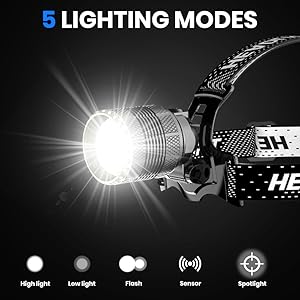
Figure 5: IP65 waterproof design and rapid heat dissipation.
5.2 Heat Dissipation
The headlamp's aviation aluminum material and unique head design facilitate rapid heat dissipation. This helps maintain optimal performance and extends the lifespan of the LED. Avoid covering the headlamp's cooling fins during operation.
5.3 Cleaning
Wipe the headlamp with a soft, damp cloth to remove dirt or debris. Do not use abrasive cleaners or solvents, as these may damage the finish or internal components.
6. Troubleshooting
6.1 Diminished Brightness
If the headlamp's brightness appears to decrease during prolonged use, this is a normal characteristic of battery-powered LED devices as the battery charge depletes. Recharge the headlamp fully to restore maximum brightness.
6.2 Headlamp Not Turning On
- Ensure the battery is fully charged.
- Check that the battery compartment is securely closed.
- If the issue persists, contact customer support.
7. Specifications
| Feature | Specification |
|---|---|
| Brand | LEKIA |
| Model Number | HL001 |
| Product Dimensions (L x W x H) | 3 x 3 x 8 cm (1.18 x 1.18 x 3.15 inches) |
| Weight | 455 grams (16.05 oz) |
| IP Rating | IP65 |
| Color | Black |
| Material | Aviation Aluminum |
| Bulb Type | LED (XHM99 Chip) |
| Luminous Flux | 90,000 lm |
| Power | 50 Watts |
| Color Temperature | 6500 Kelvin |
| Average Lifespan | 150,000 Hours |
| Beam Length | Up to 1,000 Meters |
| Lighting Angle | 90 Degrees (adjustable) |
| Battery Type | 3 x CR123A Lithium-ion (6000mAh total) |
| Charging Port | USB-C |
| Charging Time | 4-8 hours |
| Run Time (High) | 3-5 hours |
| Run Time (Low) | Up to 10 hours |
8. Warranty and Support
LEKIA is committed to providing high-quality products. If you encounter any quality issues with your headlamp, please contact our customer service team. We strive to offer the most satisfactory service to our customers.
For support, please refer to the contact information provided with your purchase or visit the official LEKIA website.