
1. Introduction
This manual provides essential information for the safe and effective use of the FOUNCY GYM8 Miniature Circuit Breaker (MCB). This device is designed for protection against overload and short circuit conditions in AC 50Hz/60Hz electrical systems, with rated voltages of 230V/400V and rated currents from 1A to 63A. It can also be used for non-frequent switching operations under normal circumstances.
The FOUNCY GYM8 MCB complies with IEC/EN60898-1 standards. Key features include a contact position indicator, a transparent cover for labels, and bilateral busbar wiring capabilities.
2. Safety Information
WARNING: Electrical work should only be performed by qualified and licensed electricians. Failure to follow these safety instructions can result in electric shock, fire, serious injury, or death.
- Always disconnect power at the main service panel before installing, servicing, or removing the circuit breaker.
- Verify that the power is off using a voltage tester before touching any wires.
- Ensure the circuit breaker's rating (current and voltage) matches the requirements of the circuit it is protecting.
- Do not use the circuit breaker if it appears damaged or has been dropped.
- Ensure all connections are tight and secure to prevent overheating and fire hazards.
- Install the circuit breaker in an appropriate enclosure to protect it from environmental factors and accidental contact.
3. Product Overview
The FOUNCY GYM8 Miniature Circuit Breaker is a compact device designed to protect electrical circuits from overcurrents.

Figure 1: Front and side view of the FOUNCY GYM8 Single Pole C Curve 10A Miniature Circuit Breaker. The image shows the white housing, red toggle switch, and product markings including "GYM8", "230/400V~", "50/60Hz", and "C32" (example rating).

Figure 2: Detailed view of the circuit breaker's front panel, highlighting the model number, voltage, frequency, and current rating. A green indicator is visible, showing the contact position.
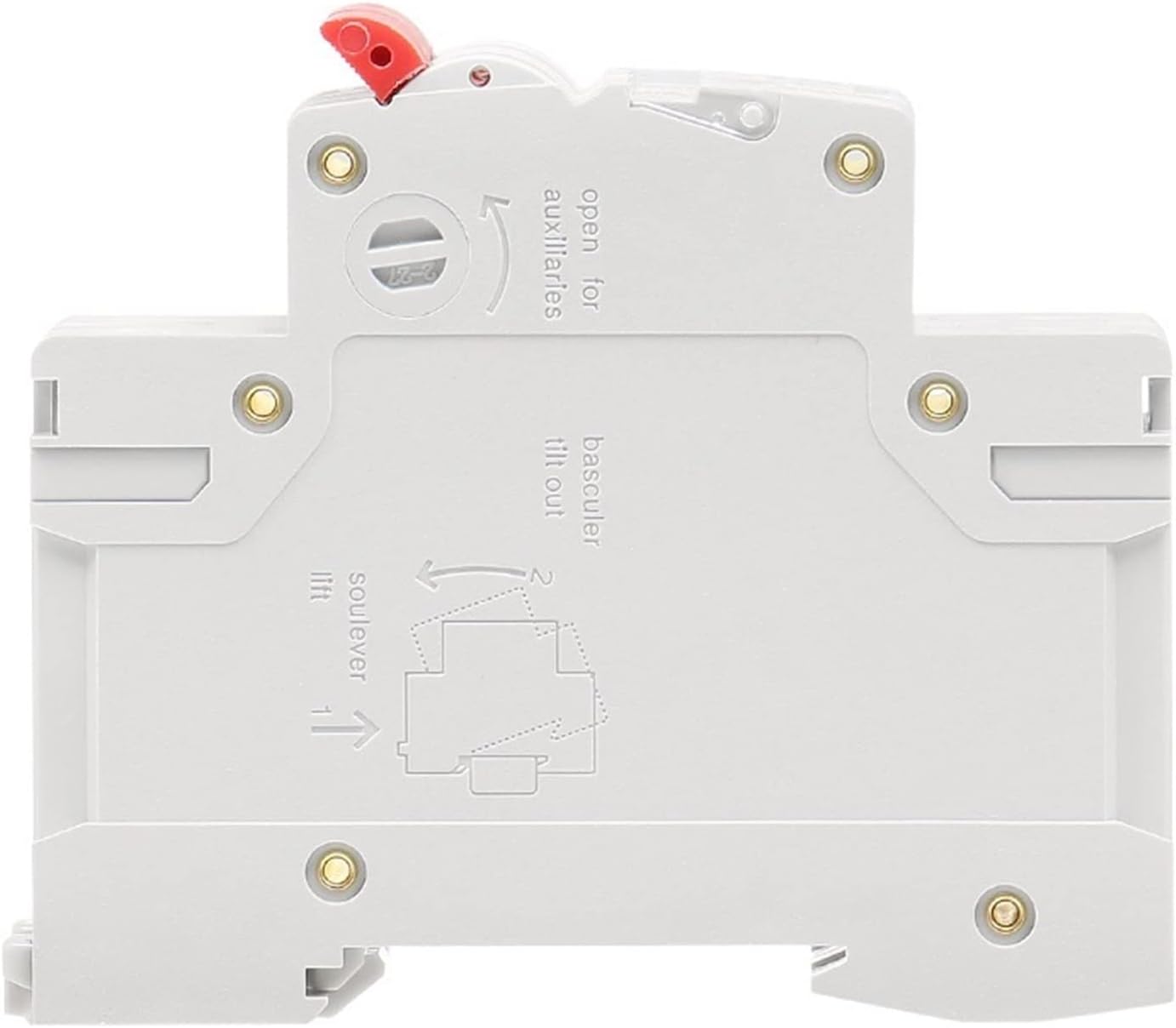
Figure 3: Side view of the circuit breaker, illustrating the mechanism for mounting and accessing auxiliaries. Text on the side indicates "open for auxiliaries", "tilt out", and "lift" with corresponding arrows.
4. Specifications
| Specification | Value |
|---|---|
| Brand | FOUNCY |
| Model | GYM8 (1 Pole C Curve 10A variant) |
| Circuit Breaker Type | Standard Miniature Circuit Breaker (MCB) |
| Number of Poles | 1 |
| Rated Voltage | 230V/400V AC |
| Rated Current (for this model) | 10A |
| Frequency | 50Hz/60Hz |
| Tripping Curve | C Curve |
| Mounting Type | Plug-In Mount (DIN Rail compatible) |
| Maximum Connecting Ability | 16mm2 |
| Wiring Torque | 2.5N·m |
| Compliance | IEC/EN60898-1 |
| Item Weight | 0.035 ounces (approx.) |

Figure 4: An overview of different FOUNCY GYM8 MCB configurations, including 1P, 2P, 3P, 4P poles and various current ratings (1A to 63A) available in B/C/D curves.
5. Installation and Setup
The FOUNCY GYM8 MCB is designed for DIN rail mounting within an electrical panel or enclosure.
5.1 Mounting
- Ensure all power to the electrical panel is disconnected and verified as off.
- Align the circuit breaker with the DIN rail.
- Press the circuit breaker firmly onto the DIN rail until it clicks into place. The mechanism shown in Figure 3 (lift, tilt out) assists in proper mounting and removal.
- Verify that the circuit breaker is securely fastened to the DIN rail.

Figure 5: Technical drawing illustrating the mounting dimensions and overall size of the 1-pole circuit breaker. Dimensions are provided in millimeters.
5.2 Wiring
- Strip the insulation from the circuit wires to the appropriate length, ensuring no bare wire is exposed outside the terminal.
- Connect the incoming (line) wire to the top terminal and the outgoing (load) wire to the bottom terminal. The terminals are designed for bilateral busbar wiring.
- Insert the wires fully into the terminals.
- Tighten the terminal screws to a torque of 2.5 N·m. Ensure connections are firm and secure. The maximum connecting ability is 16mm2 wire.
- Double-check all wiring for correctness and tightness before restoring power.
6. Operation
The circuit breaker has a simple toggle switch for operation and an indicator for contact position.
- ON Position: Push the toggle switch upwards. The green indicator (if present) will show the "ON" state. This closes the circuit, allowing current to flow.
- OFF Position: Push the toggle switch downwards. The green indicator will show the "OFF" state. This opens the circuit, stopping current flow.
- Tripped Position: In case of an overload or short circuit, the toggle switch will automatically move to an intermediate or "tripped" position (often between ON and OFF). This indicates that the breaker has interrupted the circuit to prevent damage.
7. Maintenance
FOUNCY GYM8 MCBs are generally maintenance-free. However, periodic inspection is recommended.
- Visual Inspection: Periodically check the circuit breaker for any signs of physical damage, discoloration, or loose connections.
- Terminal Tightness: Over time, terminal screws can loosen. It is advisable to re-tighten terminal screws to the specified torque (2.5 N·m) during routine electrical system checks. Always disconnect power before performing this check.
- Cleaning: If necessary, gently clean the exterior of the circuit breaker with a dry, lint-free cloth. Do not use liquids or abrasive cleaners.
8. Troubleshooting
8.1 Circuit Breaker Trips Frequently
- Overload: The circuit may be drawing more current than the breaker's rating (10A for this model). Disconnect some appliances or devices from the circuit.
- Short Circuit: A direct connection between live and neutral/ground wires can cause a short circuit. This requires immediate investigation by a qualified electrician to identify and repair the fault.
- Faulty Appliance: An appliance connected to the circuit may be defective, causing it to draw excessive current. Unplug all appliances and plug them back in one by one to identify the faulty device.
- Loose Connections: Loose wiring can cause arcing and heat, leading to nuisance tripping. Ensure all terminal connections are tight (refer to Section 5.2).
8.2 Circuit Breaker Does Not Reset
- If the breaker trips, first move the toggle switch fully to the OFF position, then attempt to move it to the ON position.
- If it still does not reset or immediately trips again, there is likely a persistent fault (overload or short circuit) on the line. Do not force the breaker ON. Consult a qualified electrician.
If you are unable to resolve an issue, contact a qualified electrician for assistance.