
Introduction
The Antec Performance 1 FT W is a full-tower E-ATX PC case designed for high-performance computing. It features extensive compatibility, superior cooling capabilities, and user-friendly design elements to enhance your PC building and operating experience.
Key features include support for RTX 40 Series graphics cards, an integrated temperature display, four pre-installed Storm T3 PWM fans, dual tempered glass side panels, and a removable top fan/radiator bracket for simplified installation.

Image: Front-left view of the Antec Performance 1 FT W PC Case, showcasing its mesh front panel and tempered glass side panel.
Setup and Installation
This section provides guidance on installing your PC components into the Antec Performance 1 FT W case.
Motherboard Installation
The case supports E-ATX motherboards. Ensure all standoffs are correctly aligned with your motherboard's mounting holes. The removable top cooling bracket simplifies access during motherboard installation.

Image: Exploded view showing the removable top cooling bracket, designed to facilitate easier installation of components like the motherboard and radiators.
Graphics Card Installation
The Antec Performance 1 FT W is designed to support large graphics cards, including the RTX 40 Series. Ensure proper seating in the PCIe slot and secure with screws.

Image: Internal view of the PC case demonstrating ample space for large graphics cards, specifically highlighting compatibility with RTX 40 Series GPUs.
Fan and Radiator Configuration
The case comes with four pre-installed Storm T3 PWM fans: three 140mm fans at the front and one 120mm fan at the rear. The case supports up to two 360mm radiators simultaneously. The top bracket supports up to a 360mm radiator, and the front supports up to a 420mm radiator.

Image: Illustration of the pre-installed Storm T3 PWM fans, highlighting their 30mm thickness and the included 1-to-3 fan splitter cable.
Storage and Power Supply Installation
Install your 2.5" SSDs and 3.5" HDDs into the designated drive bays. The power supply unit (PSU) mounts at the bottom of the case.
Cable Management
The case features excellent cable management options, including two cable covers and ten sets of velcro straps for organized routing of fan, I/O, hardware, and power supply cables. A 30mm clearance is provided for cable management behind the motherboard tray.
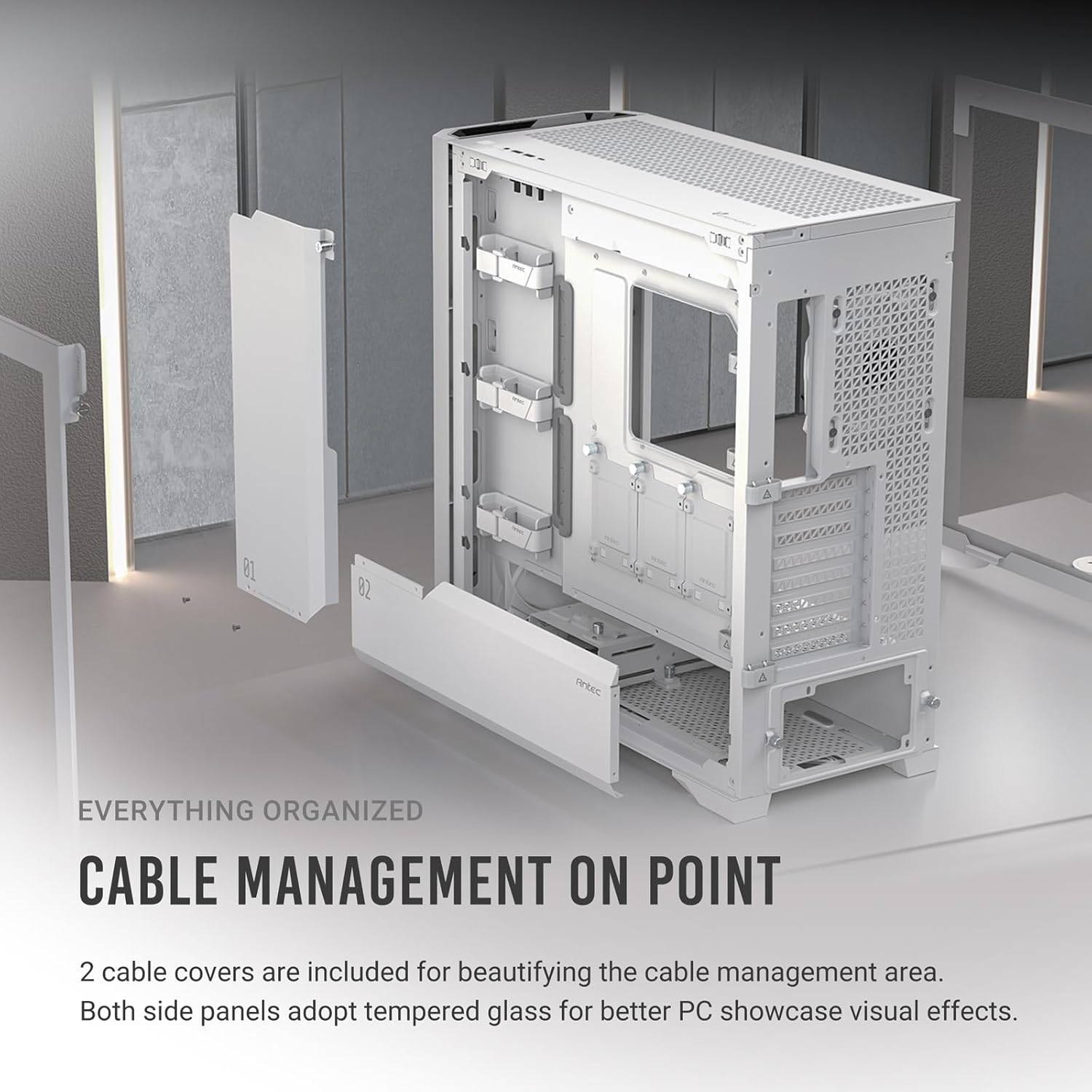
Image: Rear view of the PC case showcasing the cable management area with two cable covers and multiple velcro straps for neat cable routing.

Image: Diagram illustrating the 30mm clearance available for cable management behind the motherboard tray, ensuring ample space for routing cables.
Operating Your System
Temperature Display
The integrated temperature display on the I/O panel allows you to monitor your CPU and GPU temperatures at a glance. Press the switch button on the I/O panel to toggle between CPU and GPU temperature or to turn the display off. For the temperature display to function, the Antec iUnity software must be installed on your system.

Image: Close-up of the PC case's I/O panel showing the integrated temperature display, indicating CPU temperature.
Antec iUnity Software
Antec iUnity is a proprietary software that provides instant data on your PC's specifications, loads, and usage, including CPU and GPU temperatures. This software is essential for the functionality of the case's temperature display.

Image: Screenshot of the Antec iUnity software interface, showing detailed system information such as CPU, RAM, GPU, and storage status.
Airflow and Cooling
The Performance 1 FT W features a powerful airflow path design, optimized for GPU cooling. The mesh front panel provides massive air intake, and ample mesh at the bottom with optional fans on the meshed PSU shroud further enhances cooling performance.

Image: Diagram illustrating the optimized airflow path within the PC case, showing cool air intake from the front and bottom, and hot air exhaust from the top and rear.
Maintenance and Cleaning
Regular maintenance ensures optimal performance and longevity of your PC case.
Dust Filters
The case is equipped with multiple dust filters to minimize dust intrusion:
- Top: Magnetic dust filter
- Front: Magnetic & clip-on dust filter
- Bottom: Full-sized pull-out dust filter
Regularly remove and clean these filters to maintain optimal airflow and prevent dust buildup inside your system.

Image: Diagram showing the locations of the magnetic top, magnetic and clip-on front, and pull-out bottom dust filters for easy access and cleaning.
Cleaning the Mesh Front Panel
The exquisite steel mesh front panel is designed for easy access and cleaning. It features 1.2mm vent holes and a magnetic & clip-on design, allowing for simple removal and cleaning.

Image: Close-up view of the 1.2mm exquisite steel mesh on the front panel, highlighting its fine perforations for optimal airflow and dust filtration.
Tempered Glass Panels
Both side panels are made of tempered glass. Clean them with a soft, lint-free cloth and a non-abrasive glass cleaner to avoid scratches and maintain clarity.
Troubleshooting Common Issues
- Temperature Display Not Working: Ensure the Antec iUnity software is correctly installed and running. Check the connection cable from the case's I/O panel to your motherboard.
- Fan Noise/Performance: Verify that all PWM fans are properly connected to your motherboard's fan headers. Adjust fan curves in your motherboard's BIOS/UEFI or through fan control software for optimal balance between cooling and noise. Ensure dust filters are clean.
- Cable Management Difficulties: Utilize the included velcro straps and cable covers to organize cables. The 30mm clearance behind the motherboard tray provides ample space for routing.
Technical Specifications
| Feature | Specification |
|---|---|
| Model Name | Performance 1 FT White |
| Case Type | Full Tower |
| Dimensions (LxWxH) | 20.55 x 9.06 x 20.55 inches (522 x 230 x 522 mm) |
| Weight | 27.7 pounds (12.56 kg) |
| Motherboard Compatibility | Extended ATX, ATX, Micro-ATX, Mini-ITX |
| Material | Steel, Tempered Glass |
| Pre-installed Fans | Front: 3 x 140mm Storm T3 PWM Fans, Rear: 1 x 120mm Storm T3 PWM Fan |
| Radiator Support | Top: Up to 360mm, Front: Up to 420mm |
| Front I/O Ports | 2 x USB 3.0, 2 x USB 2.0, 1 x Type-C, Audio In/Out, Temperature Display Switch |
| Dust Filters | Top (Magnetic), Front (Magnetic & Clip-on), Bottom (Pull-out) |
| GPU Clearance | Supports RTX 40 Series Graphics Cards |
Warranty and Support
Antec products are manufactured to high quality standards. For warranty information, please refer to the warranty card included with your product or visit the official Antec website. If you encounter any issues or require technical assistance, please contact Antec customer support through their official channels.
For the latest drivers, software (such as Antec iUnity), and support resources, please visit the Antec official website.


