Introduction
This manual provides essential instructions for the safe and efficient use of your Anker SOLIX BP1000 Expansion Battery. This expansion battery is designed to increase the capacity of your Anker SOLIX C1000 Portable Power Station. Please read this manual thoroughly before operation and retain it for future reference.
For detailed information regarding the Anker SOLIX C1000 Portable Power Station, please refer to its dedicated user manual.

Figure 1: Anker SOLIX BP1000 Expansion Battery. This image shows the compact, grey Anker SOLIX BP1000 Expansion Battery with its power button and textured side panel.
Setup
The Anker SOLIX BP1000 Expansion Battery is designed for seamless integration with the Anker SOLIX C1000. Follow these steps to connect and prepare your expansion battery for use.
- Connect the Battery: Use the provided battery-to-host cable to connect the Anker SOLIX BP1000 Expansion Battery to your Anker SOLIX C1000 Portable Power Station. Ensure the connection is secure.
- Power On: If the C1000 is already on, the expansion battery will automatically power on. If both units are off, press and hold the power button on the C1000 for 2 seconds to turn on both units. Alternatively, if the C1000 is off, pressing the power button on the BP1000 will also power on both units.
- Verify Connection: Once connected and powered on, the C1000's display will show the combined battery capacity and status, indicating a successful connection.

Figure 2: Anker SOLIX C1000 with BP1000 stacked. This image illustrates the Anker SOLIX BP1000 Expansion Battery securely stacked on top of the Anker SOLIX C1000 Portable Power Station, connected by a cable.

Figure 3: Setup diagram showing cable connection. This diagram visually guides the user on connecting the expansion battery to the power station using the included cable.

Figure 4: Setup diagram showing power button press. This diagram illustrates pressing the on/off button for 2 seconds until an icon appears, indicating the unit is powered on and connected.
Operating Instructions
Charging the Expansion Battery
The Anker SOLIX BP1000 Expansion Battery charges exclusively through its connection to the Anker SOLIX C1000. When the C1000 is connected to an AC power source, it will first fully charge itself, and then proceed to charge the connected BP1000 Expansion Battery.
- Connect the Anker SOLIX C1000 to a wall outlet using its AC charging cable.
- Ensure the BP1000 is properly connected to the C1000.
- For faster charging, activate "UltraFast mode" within the Anker app. This allows both units to reach 100% charge in under 2 hours.
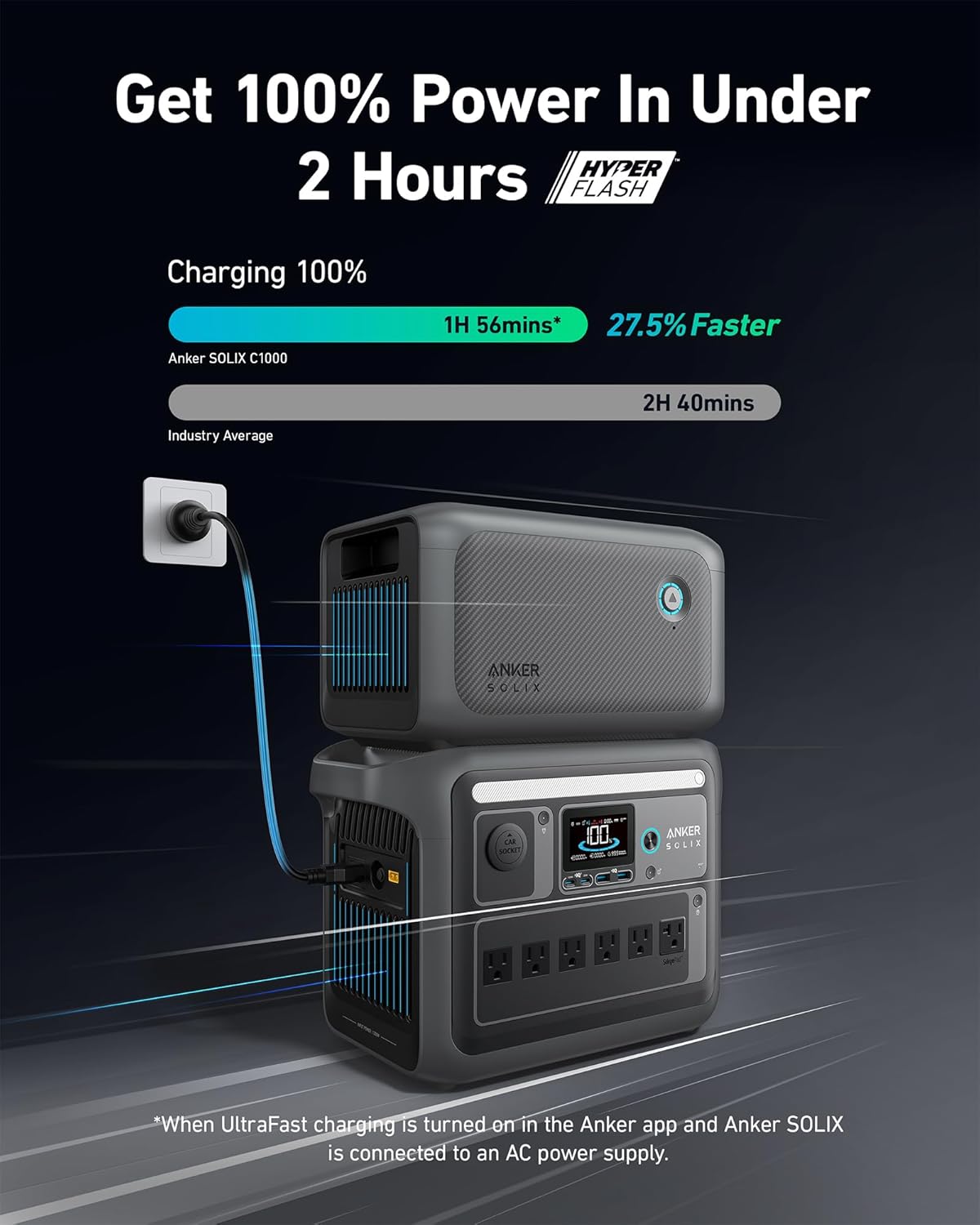
Figure 5: Charging process illustration. This image shows the Anker SOLIX C1000 and BP1000 stacked, with the C1000 connected to a wall outlet for recharging. The display indicates charging status.

Figure 6: Charging diagram via AC outlet. This diagram illustrates connecting the power station to a wall outlet to recharge the expansion battery, showing the power flow.
Using the Anker App
The Anker app provides comprehensive control and monitoring capabilities for your Anker SOLIX C1000 and connected BP1000 Expansion Battery. Connect via Bluetooth or Wi-Fi to:
- Customize AC charging speed.
- Receive low power alerts.
- Check power status and remaining charge time from anywhere.

Figure 7: Smartphone displaying Anker app interface. This image shows a hand holding a smartphone with the Anker app open, displaying the SOLIX C1000's charging status, input/output wattage, and connectivity options.

Figure 8: Anker app monitoring screen. This image shows a user checking the charging status of their Anker SOLIX C1000 and expansion battery via the Anker app on a smartphone.
Safety Features
The Anker SOLIX BP1000 Expansion Battery incorporates a 3-Point Safe Charging Clasp to ensure a secure and stable connection to the C1000, enhancing safety during charging and operation.

Figure 9: 3-Point Safe Charging Clasp. This image highlights the secure 3-point clasps that ensure a stable connection between the Anker SOLIX C1000 and its expansion battery.
Maintenance
Proper maintenance ensures the longevity and optimal performance of your Anker SOLIX BP1000 Expansion Battery.
- Storage: Store the battery in a cool, dry place away from direct sunlight and extreme temperatures. For long-term storage, it is recommended to maintain a charge level between 30% and 70%.
- Cleaning: Use a dry, soft cloth to clean the exterior of the battery. Avoid using harsh chemicals or abrasive materials.
- Battery Lifespan: The LiFePO4 batteries are designed for over 3,000 charge cycles, providing a lifespan of approximately 10 years under normal operating conditions.
- Regular Use: If storing for extended periods, fully charge and discharge the battery at least once every three months to maintain battery health.
Figure 10: InfiniPower technology details. This image details the components and features contributing to the battery's longevity, including EV-class LiFePO4 batteries, unibody drop-proof design, smart temperature control, and industrial-grade electronic components, highlighting a 5-year warranty and 10-year lifespan.
Troubleshooting
If you encounter issues with your Anker SOLIX BP1000 Expansion Battery, please refer to the following common troubleshooting steps. For more complex problems, consult the Anker SOLIX C1000 user manual or contact Anker Support.
- Battery Not Charging:
- Ensure the expansion battery is securely connected to the Anker SOLIX C1000.
- Verify that the C1000 is properly connected to an active AC power source.
- Check the C1000's display for any error messages.
- Ensure the C1000's firmware is up-to-date via the Anker app.
- No Power Output from C1000 (with BP1000 connected):
- Confirm both the C1000 and BP1000 are powered on.
- Check the battery level on the C1000's display.
- Ensure the output ports on the C1000 are activated.
- Connection Issues:
- Disconnect and reconnect the battery-to-host cable, ensuring it clicks into place.
- Restart both the Anker SOLIX C1000 and the BP1000 Expansion Battery.
Specifications
| Feature | Specification |
|---|---|
| Model Name | Anker SOLIX BP1000 Expansion Battery |
| Model Number | A17611A1-85-5 |
| Capacity | 1056Wh |
| Battery Type | LiFePO4 (Lithium Iron Phosphate) |
| Lifespan | 3,000 cycles to 80%+ capacity (approx. 10 years) |
| Compatibility | Exclusively with Anker SOLIX C1000 Portable Power Station |
| Dimensions (L x W x H) | 7.68 x 12.72 x 7.83 inches (19.5 x 32.3 x 19.9 cm) |
| Weight | 20 pounds (9.1 kg) |
| UPC | 194644159177 |

Figure 11: Size comparison. This image visually compares the Anker SOLIX C1000 and BP1000, highlighting the compact design of the expansion battery.
Warranty and Support
Anker provides a 5-year warranty for the Anker SOLIX BP1000 Expansion Battery, covering manufacturing defects and ensuring reliable performance.
For technical support, warranty claims, or any product-related inquiries, please contact Anker Customer Service through their official website or the contact information provided in your product packaging. Please have your model number (BP1000 or A17611A1-85-5) and proof of purchase ready when contacting support.
You can find more information and support resources on the official Anker website: www.anker.com


