
ARKAIA 43UHS3500, 43UHX4500, 50WF401A, 50WF402A, 50WU401A, 50YU401A
ARKAIA Replacement Remote Control User Manual
For Telefunken Models: 43UHS3500, 43UHX4500, 50WF401A, 50WF402A, 50WU401A, 50YU401A
1. Introduction
This user manual provides comprehensive instructions for the ARKAIA Replacement Remote Control, designed specifically for various Telefunken TV models. This remote offers full functionality, replicating the original remote's features, and is ready for use immediately after battery insertion.
2. Safety Information
- Do not expose the remote control to direct sunlight, heat sources, or extreme temperatures.
- Avoid dropping the remote control or subjecting it to strong impacts.
- Do not mix old and new batteries, or different types of batteries.
- Remove batteries if the remote control will not be used for an extended period to prevent leakage.
- Keep batteries out of reach of children.
3. Product Overview
The ARKAIA Replacement Remote Control is a high-quality, new product designed to seamlessly operate your compatible Telefunken TV. It features a standard button layout for intuitive control.
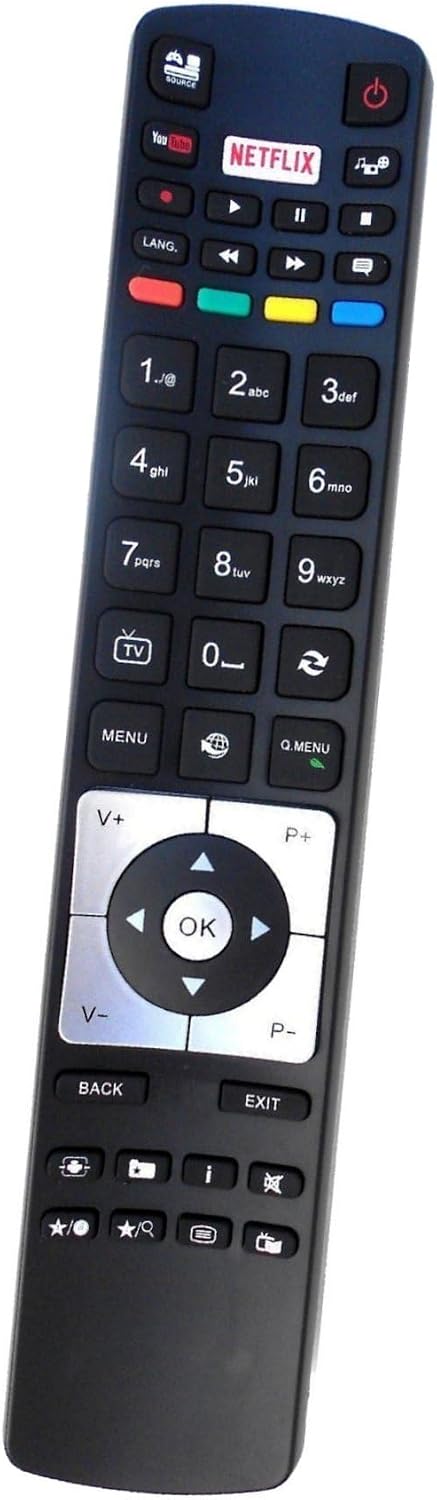
Image: Front view of the ARKAIA Replacement Remote Control. It features a black casing with clearly labeled buttons for power, volume, channel, navigation, smart TV apps (YouTube, Netflix), and numerical input.
4. Setup
4.1. Battery Installation
- Locate the battery compartment on the back of the remote control.
- Slide open the battery compartment cover.
- Insert two AAA alkaline batteries (not included), ensuring the positive (+) and negative (-) terminals align correctly with the markings inside the compartment.
- Close the battery compartment cover securely.
The remote control is now ready for immediate use with your compatible Telefunken TV.
5. Operating Instructions
This remote control provides full functionality for the specified Telefunken TV models. Point the remote control directly at the TV's infrared sensor.
5.1. Basic Functions
- Power Button (): Turns the TV on or off.
- Volume Up/Down (V+/V-): Adjusts the sound volume.
- Channel Up/Down (P+/P-): Changes the TV channel.
- Mute Button (): Mutes or unmutes the TV sound.
- Number Buttons (0-9): Directly input channel numbers.
5.2. Navigation and Menu Functions
- Directional Buttons (Up, Down, Left, Right): Navigate through menus and options.
- OK Button: Confirms selections or opens menus.
- MENU Button: Opens the main TV menu.
- Q.MENU Button: Opens the quick menu for common settings.
- BACK Button: Returns to the previous screen or menu.
- EXIT Button: Exits the current menu or application.
5.3. Smart TV and Media Functions
- YouTube Button: Directly launches the YouTube application.
- Netflix Button: Directly launches the Netflix application.
- Play/Pause, Stop, Fast Forward, Rewind Buttons: Control media playback.
- Source/Input Button: Changes the input source (HDMI, AV, etc.).
6. Maintenance
- Clean the remote control regularly with a soft, dry cloth.
- Do not use liquid cleaners, abrasive cleaners, or chemical solvents.
- Keep the remote control away from dust and moisture.
7. Troubleshooting
7.1. Remote Control Not Working
- Check Batteries: Ensure batteries are inserted correctly with the correct polarity (+/-). Replace old or depleted batteries with new alkaline batteries.
- Line of Sight: Make sure there are no obstructions between the remote control and the TV's infrared sensor.
- Distance: Ensure you are within the maximum operating range (up to 10 meters).
- TV Compatibility: Verify that your Telefunken TV model is listed as compatible with this remote control.
7.2. Buttons Not Responding
- Clean the remote control surface, especially around the buttons, to remove any dirt or debris that might be obstructing them.
- If only specific buttons are not working, the remote might be damaged.
8. Specifications
| Brand | ARKAIA |
| Compatible Devices | Television (Telefunken models: 43UHS3500, 43UHX4500, 50WF401A, 50WF402A, 50WU401A, 50YU401A) |
| Controller Type | Button Control |
| Maximum Range | 10 Meters |
| Battery Type | Alkaline (AAA, not included) |
| Country of Origin | China |
| ASIN | B0CH56B1YK |
9. Warranty and Support
ARKAIA provides a 2-year warranty for this replacement remote control, ensuring quality and reliability. For any issues or support inquiries, please refer to your purchase documentation or contact the seller directly.

Image: A comparison chart highlighting the benefits of purchasing an ARKAIA remote control, including immediate functionality, improved chip, 2-year warranty, ABS plastic material, top customer service, and high range, contrasted with generic remotes.
Ask a question about this manual
Ask about setup, troubleshooting, compatibility, parts, safety, or missing instructions. Manuals+ will review the question and use this page’s manual context to help answer it.