
1. Introduction
Thank you for choosing the LENCENT 100W International Travel Adapter. This universal adapter is designed to provide efficient and safe charging for your electronic devices across more than 200 countries. Featuring advanced GaN III technology, it offers high power output in a compact form factor. Please read this manual carefully before use to ensure optimal performance and safety.
2. Product Overview
The LENCENT 100W International Travel Adapter integrates multiple plug types and charging ports into a single device, making it ideal for global travel. It includes various international plug types and multiple USB-A and USB-C ports for simultaneous charging.
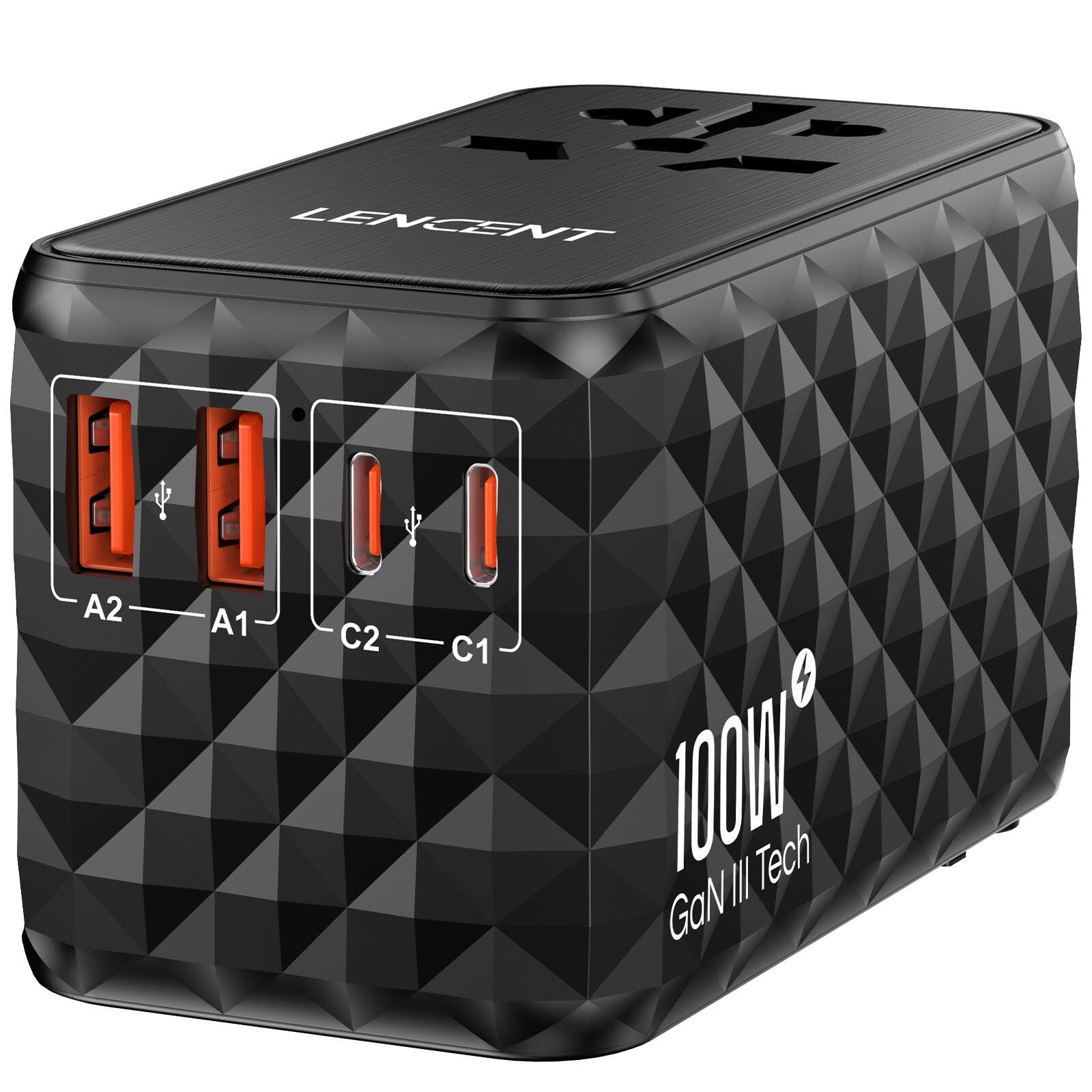
Figure 2.1: Front view of the LENCENT 100W International Travel Adapter.
Key Features:
- Universal Compatibility: Built-in Type C, Type G, Type I, and Type A plugs cover over 200 countries, including most of Europe, UK, China, Australia, New Zealand, USA, Japan, and Canada.
- 100W USB-C Fast Charging: Delivers up to 100W power output from a single USB-C port, capable of fast-charging phones, tablets, and USB-C notebooks.
- Advanced GaN III Technology: Utilizes Gallium Nitride (GaN) technology for a compact, efficient design that generates less heat compared to traditional chargers.
- Wide Device Compatibility: Supports USB PD 3.0, QC4.0, and PPS protocols, ensuring optimized charging speeds for a broad range of devices including iPhone 15/14/13 series, iPad, MacBook, and Samsung Galaxy.
- Multi-Safety Protection: Equipped with a 6-point safety system, including overload fuse, fireproof material, and short-circuit protection, for secure charging.

Figure 2.2: The adapter features retractable plugs for EU, UK, US, and AUS outlets, covering a wide range of international power standards.

Figure 2.3: GaN III technology enables a significantly smaller and more efficient design for the travel adapter.
3. Setup
3.1 Identifying the Correct Plug Type
Before connecting the adapter, identify the appropriate plug type for your destination country. The adapter features sliders on the side to deploy the correct prongs.
- Type A (US/Japan/Canada): Slide the 'USA/AUS' button to extend the two flat parallel prongs.
- Type I (Australia/New Zealand/China): Slide the 'USA/AUS' button and rotate the prongs to form a V-shape.
- Type G (UK/Ireland/Dubai): Slide the 'UK' button to extend the three rectangular prongs.
- Type C (Europe/France/Germany): Slide the 'EU' button to extend the two round prongs.
Ensure only one plug type is extended at a time. After use, retract the prongs by sliding the button back into its original position.

Figure 3.1: Use the side sliders to deploy the correct international plug for your destination.
3.2 Connecting to a Power Outlet
Once the correct prongs are extended, firmly insert the adapter into the wall power outlet. The adapter is ready for use when securely connected.
4. Operating Instructions
The LENCENT 100W International Travel Adapter allows you to charge multiple devices simultaneously using its universal AC socket and multiple USB ports.
4.1 Using the Universal AC Socket
The front of the adapter features a universal AC socket compatible with various plug types (excluding Type M - South Africa). This socket provides up to 2500W (10A max) of power. Important: This adapter does not convert voltage. Ensure your device is compatible with the local voltage (100-250V) before plugging it in.

Figure 4.1: The universal AC socket accepts various plug types for your devices.
4.2 Using the USB Charging Ports
The adapter is equipped with two USB-A ports (A1, A2) and two USB-C ports (C1, C2) for charging your devices.
- USB-C Ports (C1, C2): Each USB-C port can deliver up to 100W when used individually (5V=3A, 9V=3A, 12V=3A, 15V=3A, 20V=5A). These ports support fast charging protocols like PD 3.0, QC4.0, and PPS.
- USB-A Ports (A1, A2): Each USB-A port can deliver up to 18W when used individually (5V=3A, 9V=2A, 12V=1.5A).
- Combined Output: When multiple USB ports are used simultaneously, the total DC output is 100W. The adapter intelligently distributes power to optimize charging for connected devices.

Figure 4.2: The adapter features two USB-A and two USB-C ports for versatile charging.
Video 4.1: This video demonstrates the LENCENT 100W universal travel adapter's features, including its various plug types, fast charging capabilities, and ability to power multiple devices simultaneously. It highlights the compact design and GaN III technology.
5. Maintenance
Proper maintenance ensures the longevity and safe operation of your travel adapter.
- Cleaning: Disconnect the adapter from the power outlet and all devices before cleaning. Use a dry, soft cloth to wipe the surface. Do not use liquid cleaners or aerosols.
- Storage: Store the adapter in a cool, dry place away from direct sunlight and moisture. Use the provided carrying case for protection during travel.
- Fuse Replacement: The adapter includes a replaceable 10A fuse for overload protection. If the adapter stops working due to an overload, replace the fuse. A spare fuse is typically located within a small compartment on the adapter. Refer to the diagram below for fuse location.

Figure 5.1: The adapter features dual 10A fuses for protection. A spare fuse is included for replacement.
6. Troubleshooting
If you encounter issues with your LENCENT International Travel Adapter, refer to the following common problems and solutions:
| Problem | Possible Cause | Solution |
|---|---|---|
| Adapter is not powering on/charging devices. | No power from the wall outlet; Blown fuse; Incorrect plug type selected; Device not properly connected. | Check the wall outlet with another device; Replace the fuse (refer to Maintenance section); Ensure the correct plug type is fully extended and inserted; Reconnect your device securely. |
| Slow charging speed. | Multiple devices connected exceeding total output; Device not compatible with fast charging protocols; Cable quality. | Disconnect some devices to allow higher power to critical devices; Ensure your device and cable support fast charging (PD, QC, PPS); Use a high-quality charging cable. |
| Adapter feels warm during use. | Normal operation under heavy load; Overload. | A slight warmth is normal. If it becomes excessively hot, disconnect devices immediately and allow it to cool. Reduce the number of connected devices. |
7. Specifications
| Feature | Detail |
|---|---|
| Model Number | PA055B-100W |
| Product Dimensions (L x W x H) | 3.62 x 2.13 x 2.13 inches |
| Item Weight | 9.7 ounces (275 Grams) |
| Input Voltage | 100-250V ~ 50/60Hz, 10A Max |
| Max AC Output | 2500W Max |
| USB-C1/C2 Output (Single Port) | 5V=3A, 9V=3A, 12V=3A, 15V=3A, 20V=5A (100W Max) |
| USB-A1/A2 Output (Single Port) | 5V=3A, 9V=2A, 12V=1.5A (18W Max) |
| Total DC Output | 100W |
| Safety Features | Overload Fuse, Fireproof Material, Short-Circuit Protection, Over-Temperature Protection |
| Technology | GaN III |
8. Safety Information
To ensure safe operation and prevent damage, please observe the following safety guidelines:
- Voltage Conversion: This adapter is NOT a voltage converter. It only adapts the plug shape. Ensure your electronic devices are compatible with the local voltage (100-250V) before connecting. Failure to do so may damage your devices.
- Indoor Use Only: This product is designed for indoor use only. Do not expose it to rain, moisture, or extreme temperatures.
- Overload Protection: Do not exceed the maximum load of 2500W (10A) for the AC socket or 100W total for the USB ports. Overloading can cause the fuse to blow or damage the adapter.
- Children: Keep out of reach of children.
- Disassembly: Do not attempt to disassemble, repair, or modify the adapter. Contact customer support if service is required.
- Damage: Do not use the adapter if it is damaged in any way.

Figure 8.1: The adapter incorporates multiple safety features for reliable operation.
9. Warranty & Support
LENCENT is committed to providing high-quality products and excellent customer service. While specific warranty details are not provided in this document, LENCENT offers multi-channel support for any inquiries or issues you may encounter.
Customer Support:
For assistance, please contact the LENCENT Customer Support Team through the following channels:
- Email: Refer to your product packaging or the official LENCENT website for contact email.
- Online Chat: Available through Amazon or the official LENCENT website.
- Official Website: Visit the LENCENT official website for FAQs, product registration, and further support options.
Please have your model number (PA055B-100W) and purchase information ready when contacting support.

Figure 9.1: LENCENT offers multi-channel support for customer assistance.


