
Introduction
This manual provides comprehensive instructions for the Poly Savi 8220-M UC D200 USB-A Wireless Headset System. The headset features a USB-A adapter for connectivity, active noise canceling, and integrated busy lights, designed for productive communication in various environments. Please read this manual thoroughly to ensure proper setup, operation, and maintenance of your device.
Package Contents
- Poly Savi 8220-M UC Wireless Headset
- Charging Base
- D200 USB-A Adapter
- USB Charging Cable
Setup
1. Initial Charging
Before first use, fully charge the headset. Connect the charging base to a power source using the provided USB cable. Place the headset on the charging base. The headset's LED indicator will show charging status.

Image 1: Poly Savi 8220-M UC Wireless Headset placed on its charging base, with the D200 USB-A adapter visible next to it. This image illustrates the complete system components and how the headset rests on the base.
2. Connecting the USB-A Adapter
- Insert the D200 USB-A adapter into an available USB-A port on your computer.
- The adapter's LED will flash to indicate it is searching for the headset.
- Once connected, the adapter's LED will turn solid blue.
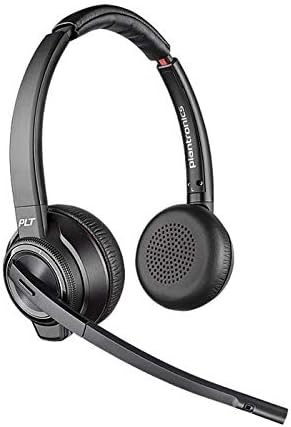
Image 2: Poly Savi 8220-M UC Wireless Headset shown with its microphone boom extended. This view highlights the over-ear design and the adjustable microphone for optimal voice capture.
Note: The headset and adapter are typically pre-paired. If pairing is required, refer to the troubleshooting section or the official Poly support website.
Operating Instructions
Power On/Off
- To power on, slide the power switch located on the earcup.
- To power off, slide the power switch to the off position.
Call Management
- Answer/End Call: Press the Call Control button on the earcup.
- Mute/Unmute: Press the Mute button on the microphone boom.
- Volume Adjustment: Use the Volume Up (+) and Volume Down (-) buttons on the earcup.
Active Noise Cancelling (ANC)
The Savi 8220-M UC features Active Noise Cancelling. To activate or deactivate ANC, locate the ANC switch on the earcup and slide it to the desired position. ANC helps reduce background noise for improved focus.
Busy Light
The integrated busy lights on the earcups automatically illuminate when you are on a call, signaling to others that you are occupied. This feature helps minimize interruptions.
Maintenance
- Cleaning: Wipe the headset and charging base with a soft, dry, anti-static cloth. Do not use harsh chemicals or abrasive materials.
- Storage: Store the headset in a cool, dry place away from extreme temperatures.
- Battery Care: To prolong battery life, avoid fully discharging the battery frequently. Charge the headset regularly, even if not in use for extended periods.
Troubleshooting
- No Audio / Poor Audio Quality
- Ensure the USB-A adapter is securely plugged into your computer.
- Verify the headset is powered on and paired with the adapter (solid blue LED on adapter).
- Check your computer's audio settings to ensure the Poly Savi 8220-M UC is selected as the default playback and recording device.
- Adjust the headset's volume controls.
- Ensure the microphone boom is positioned correctly near your mouth.
- Headset Not Pairing
- Ensure the headset is powered on and within range of the USB-A adapter.
- To manually pair, put the headset into pairing mode (refer to Poly's official documentation for specific steps, usually involves holding a button). Then, put the D200 adapter into pairing mode (often by pressing a recessed button with a paperclip).
- Restart your computer and try again.
- Short Battery Life
- Ensure the headset is fully charged before use.
- Battery performance may degrade over time with normal use.
- Active Noise Cancelling (ANC) can consume more battery power.
Specifications
| Feature | Detail |
|---|---|
| Model Name | Savi 8220-M UC |
| Connectivity Technology | Wireless |
| Noise Control | Active Noise Cancellation |
| Compatible Devices | Laptops, Desktops, Telephones, Smart Speakers, Tablets |
| Battery Life | Up to 13 Hours |
| Wireless Range (Line of Sight) | 590 feet (180ft in typical office) |
| Item Weight | 14 Ounces |
| Product Dimensions | 7 x 6 x 1 inches |
| UPC | 657768623455 |
Warranty and Support
This product is sold as an Amazon Renewed item. Amazon Renewed products are backed by the Amazon Renewed Guarantee. For specific warranty details and support related to renewed products, please refer to the Amazon Renewed program terms and conditions on the Amazon website.
For technical support or further assistance with your Poly Savi 8220-M UC headset, please visit the official Poly support website or contact their customer service.


