
1. Introduction
The WEN Universal Collapsible Miter Saw Stand (MSA200) is designed to provide a sturdy and reliable support system for your miter saw and workpiece. Its universal design ensures compatibility with most miter saws on the market, including all WEN miter saw series. The stand features a powder-coated steel frame for durability and a collapsible design for easy transportation and storage.
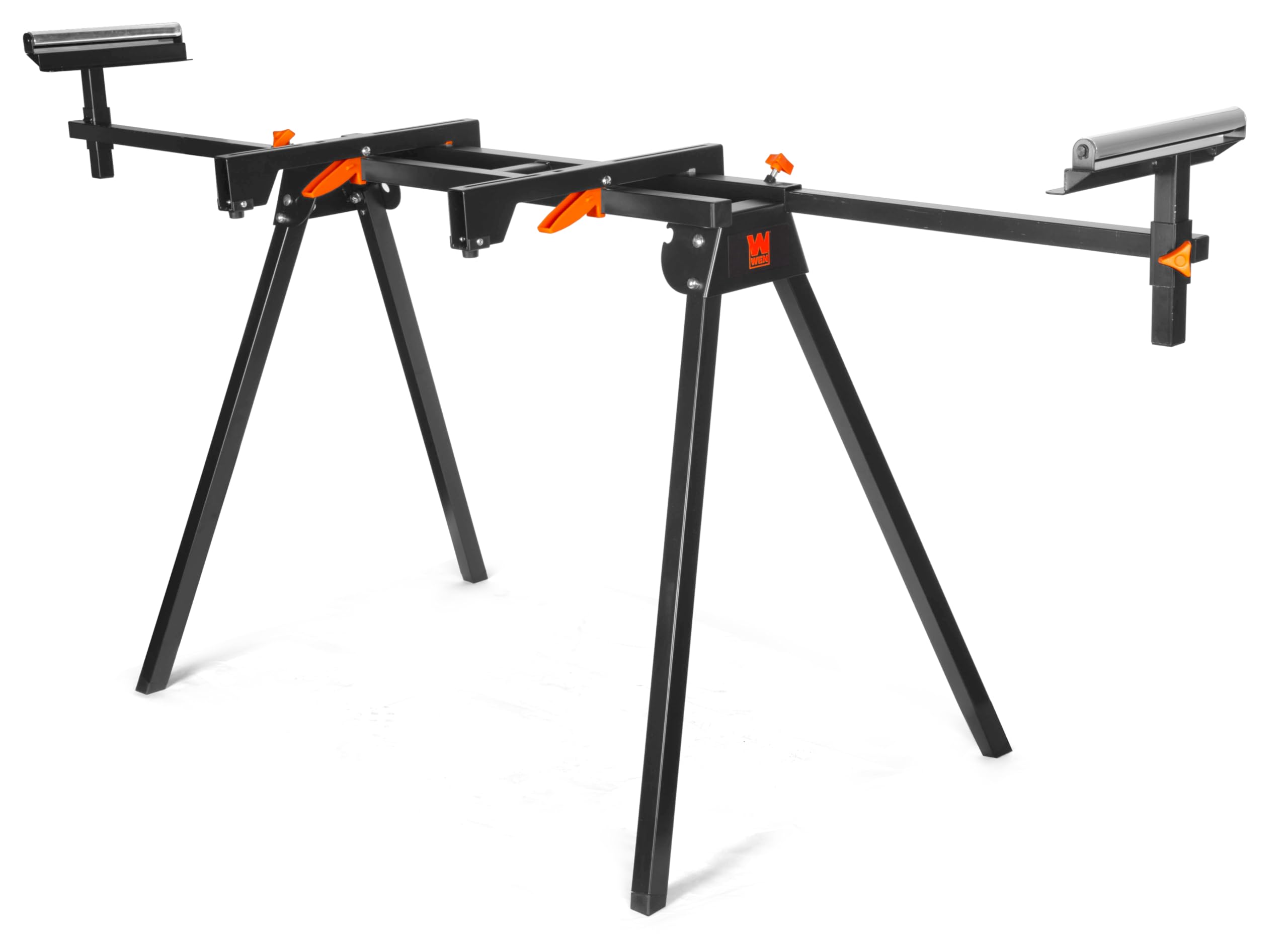
Figure 1: WEN Universal Collapsible Miter Saw Stand (MSA200) with miter saw.
2. Key Features
- Universal Design: Fits nearly every miter saw on the market, including all WEN miter saws.
- Collapsible Stand: Easily folds flat for secure transportation and storage.
- Sturdy Steel Frame: Elevates your miter saw 31 inches off the ground, providing a stable work surface.
- Extendable Support Arms: Extend anywhere from 36 to 80 inches to support boards up to 8 feet long.
- Adjustable-Height Rollers: Includes two adjustable-height rollers that also function as work stops for consistent cuts.
- Quick-Release Brackets: Tightly lock the miter saw in place for simple installation and adjustments.
- Durable Finish: Features a powder-coated finish to prevent corrosion and marring.
3. Setup Instructions
Follow these steps to assemble and set up your WEN Miter Saw Stand:
- Unpack Components: Carefully remove all parts from the packaging. Ensure all components listed in the parts diagram (not included in this text) are present.
- Unfold Legs: Place the main frame on a flat surface. Release the leg locking mechanisms and unfold the four legs until they click securely into place.
- Attach Extension Arms: Insert the two extension arms into the main frame's side receivers. Secure them using the provided tightening knobs.
- Install Roller Supports: Slide the adjustable-height roller supports onto the ends of the extension arms. Adjust their height and position as needed and secure with the thumb screws.
- Mount Miter Saw: Attach your miter saw to the quick-release brackets using the provided hardware (bolts, washers, nuts). Ensure the saw is centered and securely fastened to the brackets.
- Secure Brackets to Stand: Slide the quick-release brackets with the mounted miter saw onto the main frame. Engage the quick-release levers to lock the saw firmly in position.

Figure 2: Quick-release brackets for miter saw mounting.
4. Operating Instructions
Once your miter saw is securely mounted, you can begin operation. Always ensure your miter saw is unplugged during setup and adjustments.
- Adjusting Extension Arms: Loosen the tightening knobs on the extension arms to slide them in or out, providing support for longer workpieces. Retighten the knobs firmly before cutting.
- Adjusting Roller Supports: The roller supports can be adjusted vertically to match the height of your miter saw's cutting surface. Use the thumb screws to lock them at the desired height. These rollers also act as work stops for repetitive cuts.
- Workpiece Support: Position your workpiece on the miter saw and ensure it is adequately supported by the extension arms and rollers. For very long pieces, additional support may be necessary.
- Portability: To move the stand, ensure the miter saw is securely attached or removed. The collapsible legs and compact design allow for easy transport.

Figure 3: Stand with extended support arms for long workpieces.
5. Maintenance
Regular maintenance ensures the longevity and safe operation of your miter saw stand.
- Cleaning: After each use, wipe down the stand to remove sawdust and debris. A damp cloth can be used, followed by a dry cloth.
- Inspection: Periodically inspect all bolts, nuts, and fasteners to ensure they are tight. Tighten any loose hardware.
- Lubrication: Apply a light lubricant to the sliding mechanisms of the extension arms and roller supports to ensure smooth operation.
- Storage: When not in use, fold the stand flat and store it in a dry, protected area to prevent rust and damage.

Figure 4: Adjustable roller support detail.
6. Troubleshooting
If you encounter issues with your miter saw stand, refer to the following common solutions:
- Stand is Unstable: Ensure all legs are fully extended and locked. Check that the stand is on a level surface. Adjust the rubber feet if necessary to compensate for uneven ground.
- Miter Saw Wobbles: Verify that the quick-release brackets are tightly secured to both the miter saw and the stand's main frame. Check all mounting hardware for tightness.
- Extension Arms or Rollers Stick: Clean any sawdust or debris from the sliding mechanisms. Apply a light lubricant to the moving parts.
- Difficulty Folding/Unfolding: Ensure all locking pins and knobs are disengaged before attempting to fold or unfold the legs. Check for any obstructions.

Figure 5: Collapsed stand for storage and transport.
7. Specifications
| Feature | Specification |
|---|---|
| Brand | WEN |
| Model Number | MSA200 |
| Material | Alloy Steel |
| Color | Black |
| Load Capacity | 350 Pounds |
| Extended Width | 36 to 80 inches |
| Height (Miter Saw Surface) | 31 inches (approximate, based on product description) |
| Item Weight | 11.86 Kilograms |
| Finish Type | Powder Coated |
| Assembly Required | No (implies minimal assembly, ready to use out of box or quick setup) |
| UPC | 044459392002 |
8. Warranty and Support
The WEN Universal Collapsible Miter Saw Stand (MSA200) comes backed by a two-year warranty. For customer support or warranty claims, please refer to the contact information provided with your product packaging or visit the official WEN website.