
1. Introduction
The Tzone TempU04 is a reusable digital USB temperature data logger designed for monitoring and recording temperature data in various applications, including cold chain transportation, pharmaceuticals, frozen food, fresh food, vegetables, and cold storage. This device features a built-in USB port for direct connection to a computer, automatically generating PDF and CSV reports without the need for special software. It offers high accuracy and complies with GSP standards, FDA CFR Part 21, ISO9001, ROHS, and EN12830 standards.

Figure 1: Tzone TempU04 Digital USB Temperature Logger. This image shows the compact, white and green device with an LCD screen and two control buttons.
Key features include an LCD display showing real-time, maximum, and minimum temperatures, temperature alarms, and current recording points. The device has a data capacity of 32,000 points and a replaceable CR2032 battery with a life of up to 1 year, depending on the recording interval. Its IP65 protection level ensures durability in various environments.
2. Setup
2.1 Initial Use and Parameter Configuration
The TempU04 is designed for plug-and-play operation. For initial use or to customize logging parameters, follow these steps:
- Software Download: Locate the information on the product packaging box to download the necessary configuration software. This software allows for advanced parameter settings.
- Connect to PC: Plug the TempU04 device into a USB port on your computer.
- Configure Parameters: Use the downloaded software to set parameters such as:
- Logging interval (e.g., 10 minutes, default)
- Start delay (e.g., 30 minutes, default)
- Alarm delay (e.g., 10 minutes, default)
- Alarm range (e.g., <2℃ or >8℃, default)
- Temperature unit (℃ or ℉)
- Preset time start
- Save Settings: After configuring, save the settings to the device through the software. Note that all previously recorded data will be cleared when parameters are set or the unit is restarted.
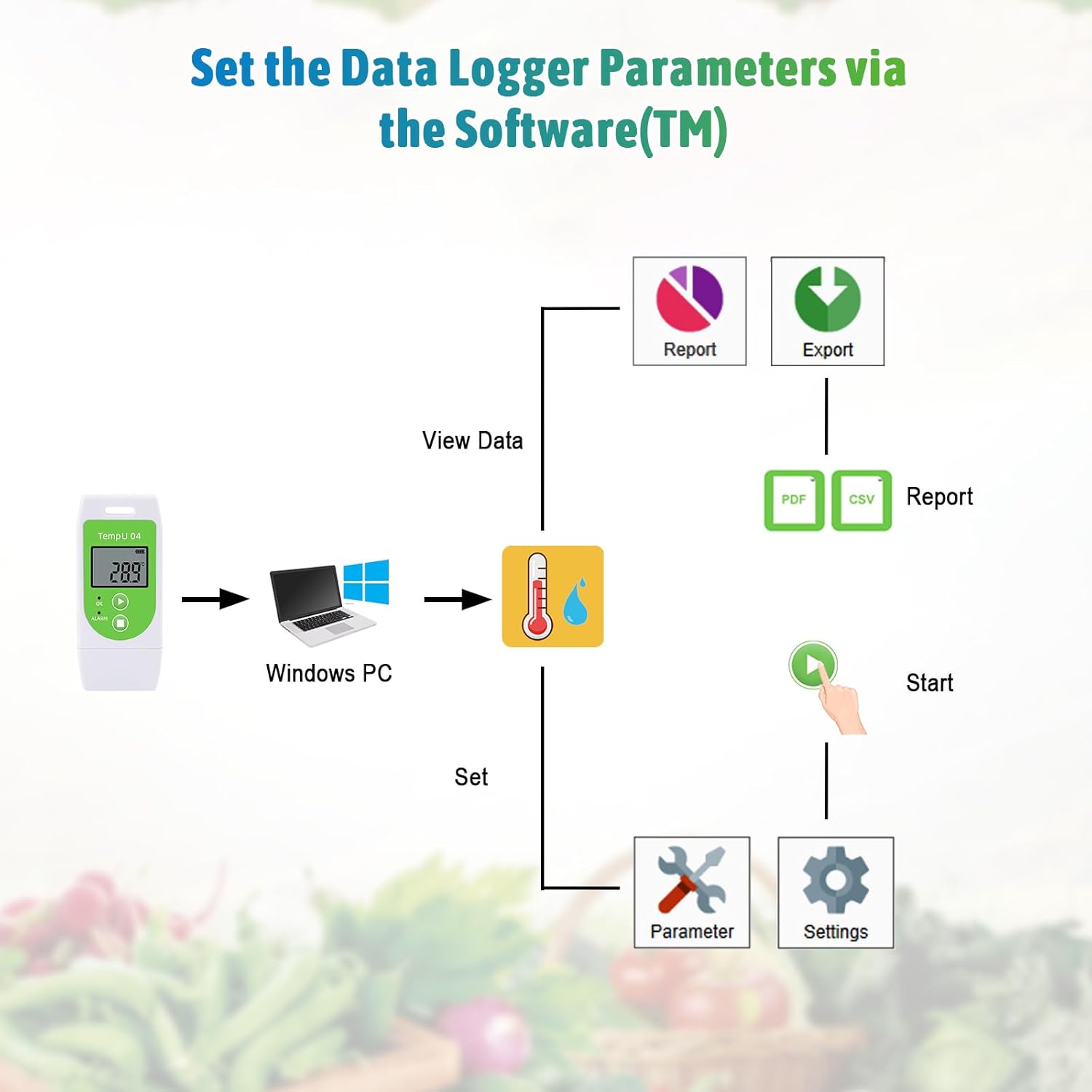
Figure 2: Setting Data Logger Parameters via Software. This diagram illustrates the process of connecting the TempU04 to a Windows PC to set parameters and view/export data reports (PDF/CSV).
3. Operating Instructions
3.1 Device Overview

Figure 3: TempU04 LCD Display and Button Functions. This image highlights the LCD screen showing temperature value, unit, high temp alarm, battery life, and the functions of the 'OK' (Start/Scroll/Mark) and 'ALARM' (Stop) buttons, along with the USB port and status indicator light.
3.2 Starting and Stopping Logging
- Start Logging: Press and hold the 'OK' button (Start/Scroll/Mark) for a few seconds until the status indicator light confirms logging has begun. If a start delay is configured, logging will commence after the specified delay.
- Stop Logging: Press and hold the 'ALARM' button (Stop) for a few seconds to stop the recording process. The device will indicate that logging has ceased.
3.3 Reading the LCD Display
The LCD screen provides real-time information:
- Temperature Value: Displays the current temperature.
- Temperature Unit: Indicates whether the temperature is in Celsius (℃) or Fahrenheit (℉).
- High Temp Alarm: An icon will appear if the temperature exceeds the set upper alarm limit.
- Battery Life: Shows the remaining battery charge.
- Current Recording Points: Indicates the number of data points recorded.
3.4 Data Retrieval and Report Generation
Once logging is complete, retrieve your data:
- Connect to PC: Plug the TempU04 into a USB port on your computer.
- Automatic Report Generation: The device will automatically generate a PDF and CSV data report. No special software is required for this step. The reports will typically appear as a removable drive on your computer.
- Access Reports: Open the generated PDF or CSV files to view the recorded temperature data, graphs, and summary statistics.

Figure 4: Auto-generated PDF & CSV Report. This image shows the TempU04 connected via USB to a laptop, with icons representing PDF and CSV files, and a sample data report displayed on the screen.
4. Maintenance
4.1 Battery Replacement
The TempU04 uses a replaceable CR2032 3.0V battery. When the battery life indicator on the LCD shows low power, replace the battery to ensure continuous operation and data integrity. Refer to the device's back panel for instructions on opening the battery compartment.
4.2 Cleaning
To clean the device, simply wipe it with a clean, damp cloth. Avoid using harsh chemicals or abrasive materials that could damage the casing or screen.
4.3 Data Management
Remember that changing parameters via the software or restarting the device will clear all previously recorded data. Always retrieve and save your data reports before making any configuration changes.
5. Troubleshooting
- Device Not Recognized by PC:
Ensure the device is firmly plugged into a functional USB port. Try a different USB port or computer. - No Data Report Generated:
Verify that logging was successfully started and completed. Ensure the device is connected correctly to the PC. If parameters were changed, remember that previous data might have been cleared. - Blank LCD Screen:
Check the battery level. If low, replace the CR2032 battery. - Incorrect Temperature Readings:
Ensure the device is placed in an appropriate environment for measurement. Verify the temperature unit (℃/℉) and calibration settings via the configuration software if available. - Logging Not Starting:
Confirm that the 'OK' button was pressed and held long enough to initiate logging. Check if a start delay is configured in the software.
6. Specifications

Figure 5: TempU04 Dimensions. This image shows the physical dimensions of the TempU04 device, measuring approximately 84mm in length and 36mm in width, and also illustrates its hanging design.
| Feature | Specification |
|---|---|
| Model Name | TempU04 |
| Temperature Range | -30℃ to 60℃ |
| Temperature Accuracy | ±0.5℃ (-20℃ to +40℃), ±1.0℃ (other) |
| Resolution | 0.1℃ |
| Data Capacity | 32,000 Points |
| Logging Interval | Configurable (Default: 10 mins) |
| Start Delay | Configurable (Default: 30 mins) |
| Alarm Delay | Configurable (Default: 10 mins) |
| Alarm Range | Configurable (Default: <2℃ or >8℃) |
| Battery | CR2032 3.0V (replaceable) |
| Battery Life | Up to 1 Year (depending on recording interval) |
| Protection Level | IP65 |
| Report Format | PDF and CSV |
| Time Zone | UTC +0:00 (Default) |
| Dimensions | 83mm*36mm*14mm (3.27 Inches Length) |
| Weight | 23g |
| Outer Material | Plastic |
| Display Type | LCD |
| Connectivity Technology | USB |
| Certifications | CE, FDA CFR Part 21, ISO 9001, RoHS, EN12830 |
7. Warranty and Support
7.1 Warranty Information
The Tzone TempU04 Digital USB Temperature Logger comes with a 1-year warranty from the date of purchase. This warranty covers manufacturing defects and ensures the product performs as described under normal use. Please retain your proof of purchase for warranty claims.
7.2 Customer Support
If you have any questions regarding the setup, operation, maintenance, or troubleshooting of your TempU04 device, please contact our customer support team. Contact details are typically provided on the product packaging or through the vendor from whom you purchased the device.


