
1. Introduction
The ARPHA D280 Keyless Entry Door Lock is an advanced smart deadbolt designed to provide secure and convenient access to your home or office. This lock offers multiple unlocking methods, including fingerprint recognition, keypad password entry, mobile application control, eKey sharing, and traditional mechanical keys. Its robust design and smart features ensure enhanced security and ease of use.

Key features include a highly accurate biometric fingerprint sensor for quick unlocking, app control via Bluetooth for managing access and viewing logs, and an anti-peeping password function for added security. The lock is designed for effortless installation and is compatible with both left and right-handed doors.
2. Setup and Installation
2.1 Package Contents
- Exterior Assembly
- Interior Assembly
- Latch
- Mounting Plate
- Backup Keys (2)
- Installation Screws and Hardware
2.2 Door Compatibility
The ARPHA D280 lock is universally compatible with both left and right door orientations. It fits door thicknesses ranging from 1-3/8" to 2-1/8" (35mm - 55mm) and supports backsets of 2-3/8" (60mm) and 2-3/4" (70mm).
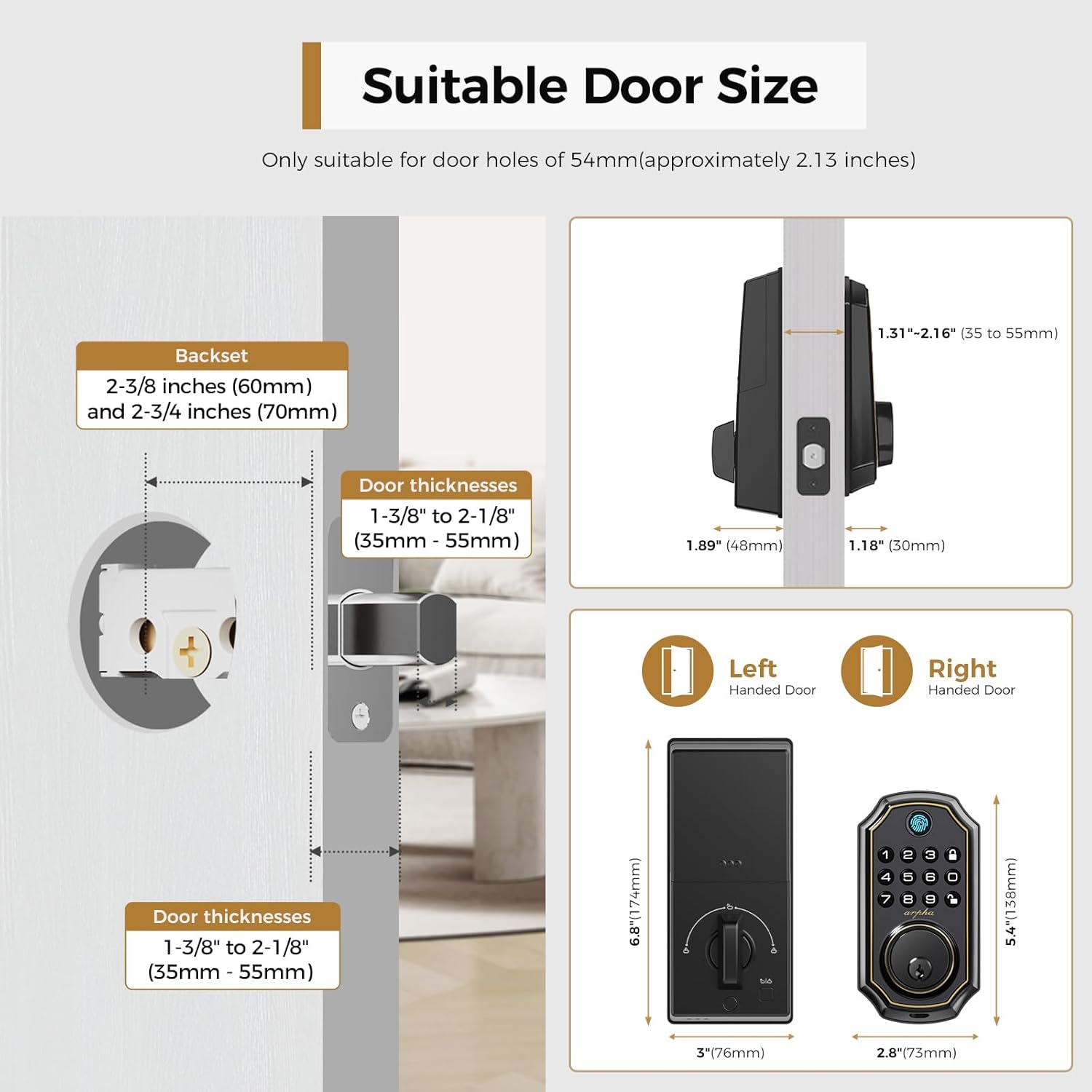
2.3 Installation Steps
Installation can be completed in minutes with a screwdriver. Follow the detailed instructions provided in the included installation guide for precise steps. Ensure your door's existing holes match the lock's requirements for a seamless fit.

2.4 Battery Installation
The electronic door lock is powered by 4 AA batteries (not included). Open the battery compartment on the interior assembly and insert the batteries, ensuring correct polarity. The lock will provide a low battery sound prompt when power is running low.
3. Operating the Lock
3.1 Multiple Unlocking Methods
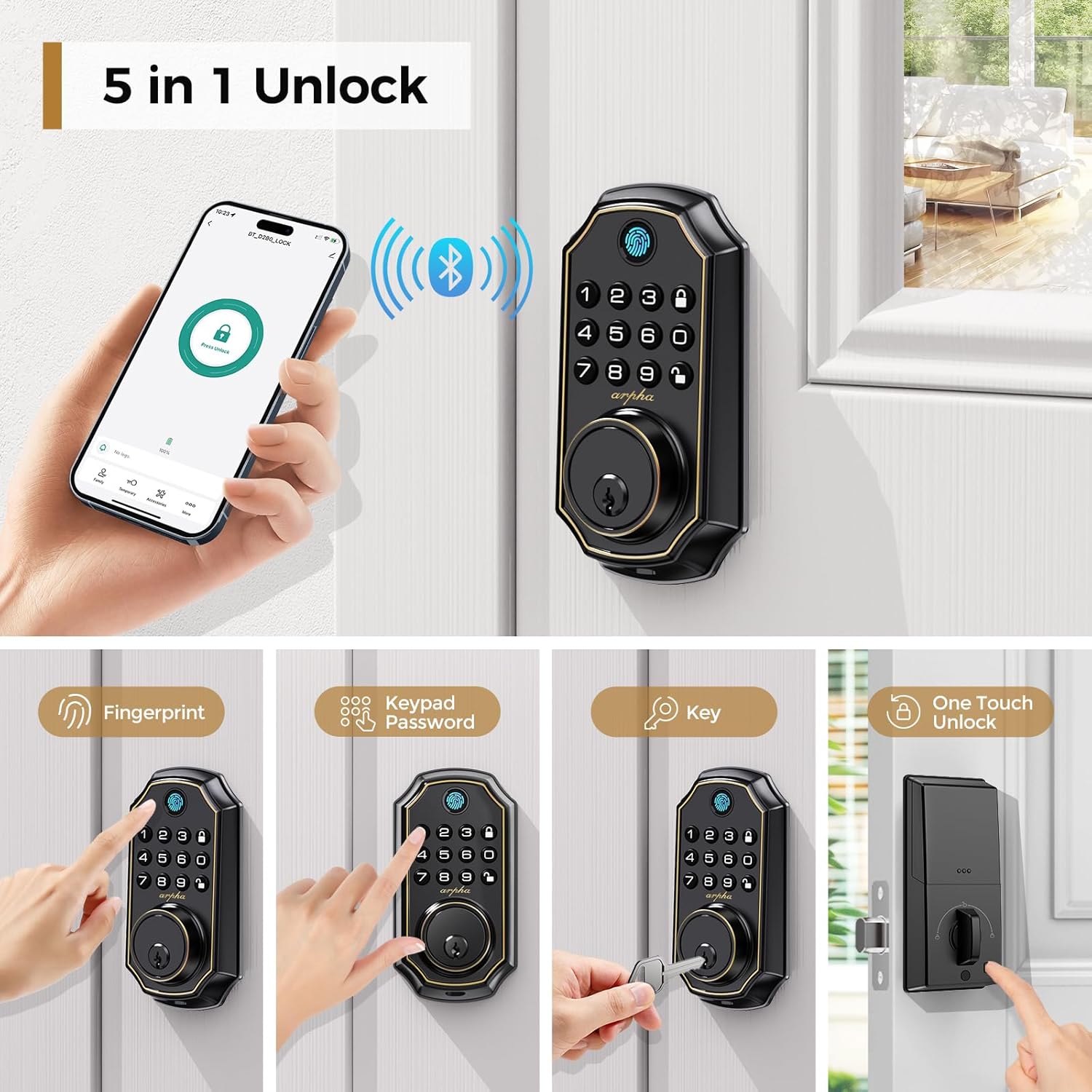
The ARPHA D280 offers five convenient ways to unlock your door:
- Fingerprint Recognition: Utilize the advanced biometric sensor for quick, 0.3-second unlocking. The lock supports up to 50 unique fingerprints with a recognition rate of up to 99%.
- Keypad Password: Enter your personalized code on the illuminated keypad.
- Mobile App Access: Unlock the door with a tap on your smartphone via the ARPHA/Tuya mobile application (Bluetooth connection required).
- eKey Sharing: Share temporary or permanent digital keys with guests or service providers through the app.
- Mechanical Key Override: Use the physical backup keys for traditional unlocking, ensuring access even during power outages.
3.2 Anti-Peeping Password
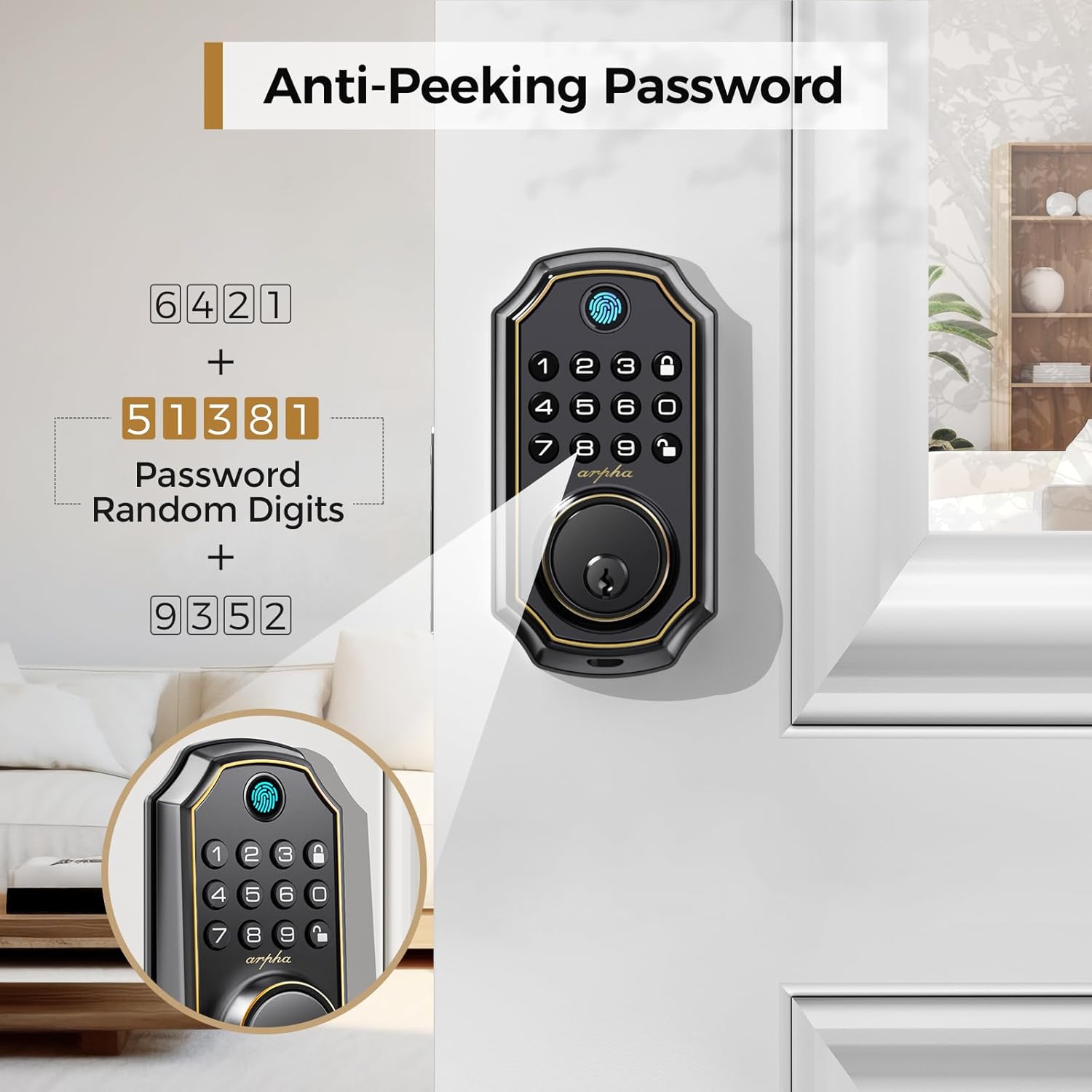
To prevent others from guessing your password, you can enter random digits before and after your actual PIN code. The lock will still recognize the correct sequence within the longer string of numbers.
3.3 Auto-Lock and One-Touch Lock
The lock features an adjustable auto-lock function, which can be set from 10 seconds to 30 minutes, automatically securing your door after a set period. For immediate locking, simply press the dedicated one-touch lock button on the keypad.

3.4 App Control Features
Connect the lock to the ARPHA/Tuya mobile application via Bluetooth to access advanced features:
- View access entry logs.
- Generate one-time, permanent, or date-specific access codes remotely (with gateway).
- Receive low battery alerts.
- Manage user access and permissions.
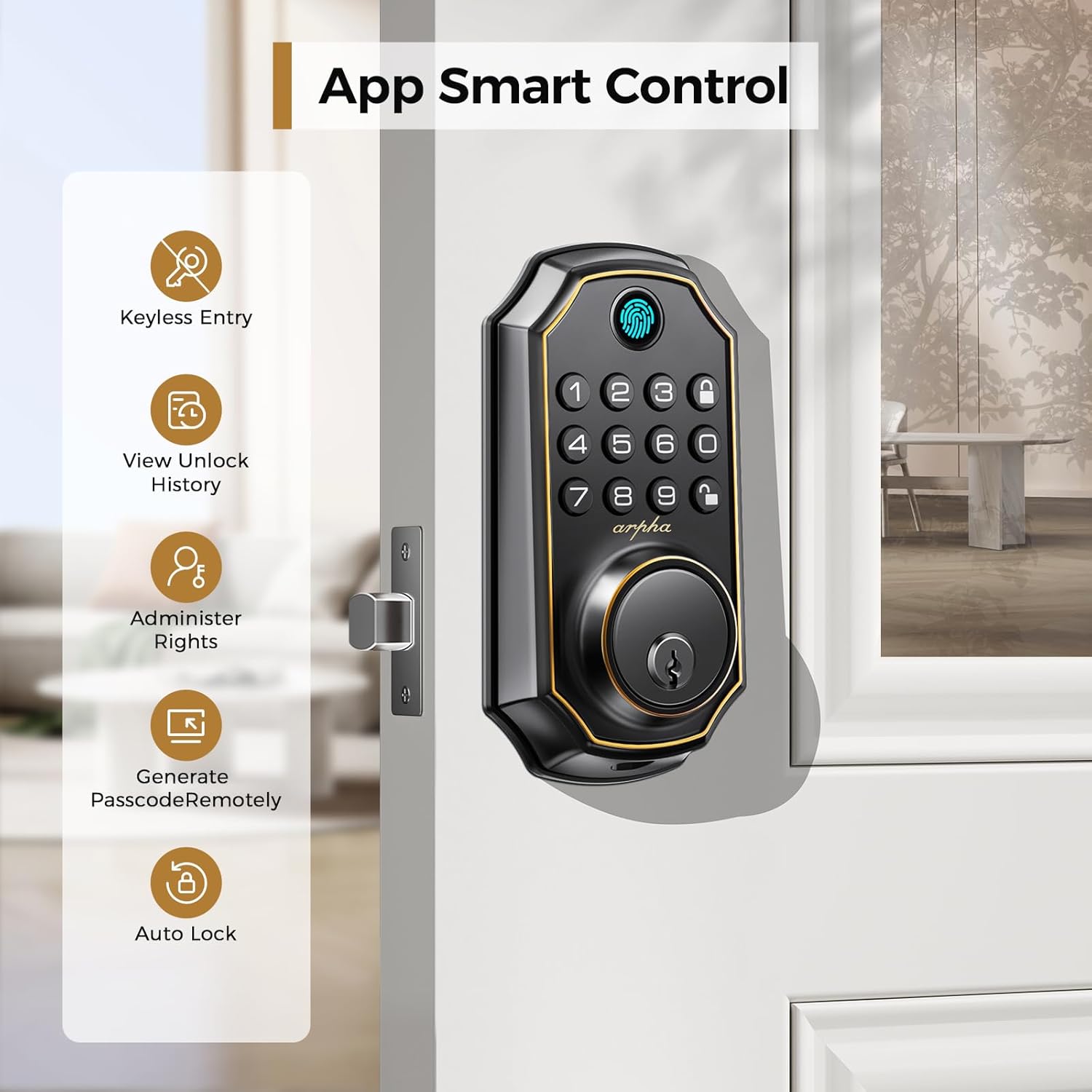
Note: For remote management and Wi-Fi connectivity (e.g., Amazon Alexa, Google Assistant integration), an optional ARPHA GT gateway is required. Without the gateway, app control is limited to Bluetooth range.
4. Maintenance
4.1 Battery Replacement
The lock is powered by 4 AA batteries, providing approximately 3-4 months of continuous operation. When the battery level is low, the lock will emit a sound prompt. Replace all four batteries promptly to ensure continued functionality.

4.2 Emergency Power Port
In case of complete battery depletion, the lock features a Type-C emergency power port. Connect a portable power bank to this port to temporarily power the lock and gain access.
4.3 Environmental Conditions
The ARPHA D280 is designed to withstand various weather conditions, operating effectively in temperatures up to +140°F and with an IP54 rating for water resistance.

5. Troubleshooting
5.1 Common Issues and Solutions
- Lock not responding: Check battery levels and replace if necessary. Use the Type-C emergency power port or mechanical key.
- Fingerprint not recognized: Ensure your finger is clean and dry. Re-register your fingerprint if the issue persists. The sensor is highly sensitive, but proper placement is key.
- Keypad not lighting up: This may indicate low battery. Replace batteries.
- App connectivity issues: Ensure Bluetooth is enabled on your smartphone and you are within range of the lock. If using a gateway, verify its connection to Wi-Fi and the lock.
- Frequent battery changes: Ensure you are using high-quality AA alkaline batteries. If the issue persists, contact customer support.
- Lock losing connection: If the lock frequently disconnects from the app, especially when leaving for work, ensure the app is running in the background or consider purchasing the optional Wi-Fi gateway for more stable remote access.
For more complex issues, refer to the detailed troubleshooting section in the full product manual or contact ARPHA customer support.
6. Specifications
| Feature | Specification |
|---|---|
| Brand | ARPHA |
| Model Name | D280 |
| Lock Type | Biometric, Combination Lock, Deadbolt, Keypad |
| Material | Zinc |
| Item Dimensions (L x W x H) | 5.44 x 2.89 x 1.98 inches |
| Item Weight | 2.35 pounds |
| Power Source | 4 AA Batteries (not included) |
| Emergency Power | Type-C Port |
| Connectivity Protocol | BLE (Bluetooth Low Energy) |
| User Capacity | Up to 50 Passwords, 50 Fingerprints |
| Door Thickness Compatibility | 1-3/8" to 2-1/8" (35mm - 55mm) |
| Backset Compatibility | 2-3/8" (60mm) and 2-3/4" (70mm) |
| Finish Type | Matte |
7. Warranty and Support
ARPHA electronic deadbolts are backed by an 18-month assurance, covering manufacturing defects and malfunctions under normal use. Additionally, lifetime technical support is provided to assist you with any questions or issues you may encounter.
The ARPHA customer service team is available 24/7 to provide assistance. For support, please visit the official ARPHA website or contact their customer service directly through the contact information provided with your product packaging.
For more information about ARPHA products and support, you can visit the ARPHA Store on Amazon.


