
Introduction
Thank you for choosing the TRIUMPHKEY Electric Height Adjustable Desk. This manual provides comprehensive guidance for the assembly, operation, maintenance, and troubleshooting of your new desk. Please read these instructions carefully before assembly and use to ensure safe and efficient operation.
Safety Information
Always ensure the desk is correctly assembled and stable before use. Do not exceed the weight limit of 60 kg. Keep electrical components away from water and other hazards. Always follow assembly instructions carefully to prevent injury.
- Ensure all screws and fasteners are tightened securely.
- Do not place liquids directly on the desk surface near electrical components.
- Keep children and pets away from the desk during operation.
- Avoid placing objects under the desk that could obstruct its movement.
- Disconnect power before cleaning or performing maintenance.
Package Contents
Verify that all components are present before beginning assembly. If any parts are missing or damaged, please contact customer support.
- Desktop (120 cm x 60 cm, Rustic Brown)
- Electric Lifting Columns (2)
- Foot Supports (2)
- Monitor Shelf / Storage Cubicle
- Control Panel with Up/Down and Memory Buttons
- Power Adapter and Cable
- Assembly Hardware (screws, tools, etc.)
- Instruction Manual
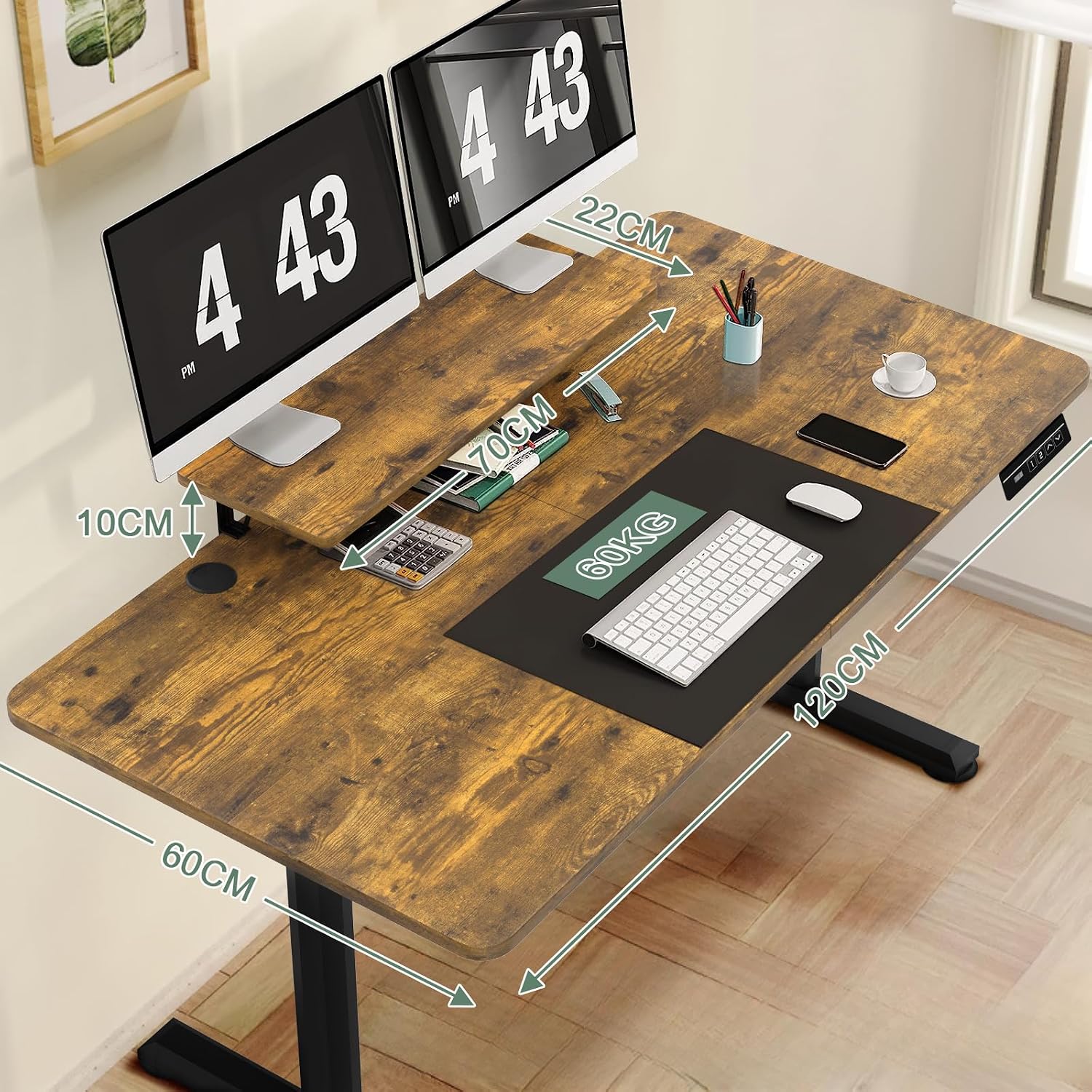
Image: Overview of desk dimensions (120cm length, 60cm width) and the monitor shelf (70cm length, 22cm width, 10cm height).
Setup and Assembly
The TRIUMPHKEY Electric Desk is designed for straightforward assembly. It is recommended to have two people for assembly. Follow the numbered parts and detailed instructions provided in the separate assembly guide included in your package.
- Unpack Components: Carefully remove all parts from the packaging and lay them out on a clean, soft surface to prevent scratches.
- Assemble Desk Frame: Attach the lifting columns to the desktop and then secure the foot supports. Ensure all connections are firm.
- Install Control Panel: Mount the control panel to the underside of the desk in an easily accessible location.
- Connect Electrical Components: Connect the motor cables from the lifting columns to the control box, and then connect the control panel to the control box. Finally, connect the power adapter.
- Attach Monitor Shelf: The monitor shelf can be attached using the provided brackets. It can also be removed if not desired, or used as an open storage cubicle.
- Cable Management: Utilize the integrated cable grommets (two on the desktop) to organize and route your cables neatly.

Image: Illustration of the multifunctional shelf assembly, showing how it attaches to the desk and the cable grommets.
Operating Instructions
Your electric height adjustable desk allows for seamless transitions between sitting and standing positions.
Control Panel Functions:

Image: The convenient control panel, typically located on the right underside of the desk, featuring up/down arrows and memory preset buttons.
- Up/Down Arrows (▲ / ▼): Press and hold the up arrow to raise the desk, and the down arrow to lower it. Release the button at your desired height. The desk adjusts smoothly between 72 cm and 117 cm.
- Memory Presets (1, 2, 3, 4): Your desk features memory buttons to save and recall preferred heights.
- To Save a Height: Adjust the desk to your desired height using the up/down arrows. Press the "M" button (or similar memory set button) followed by the desired number button (1, 2, 3, or 4). The display will confirm the setting.
- To Recall a Height: Simply press the corresponding number button (1, 2, 3, or 4). The desk will automatically move to the saved height.
- Anti-Collision System: The desk is equipped with an anti-collision system. If the desk encounters an obstacle during height adjustment, it will stop and reverse slightly to prevent damage.
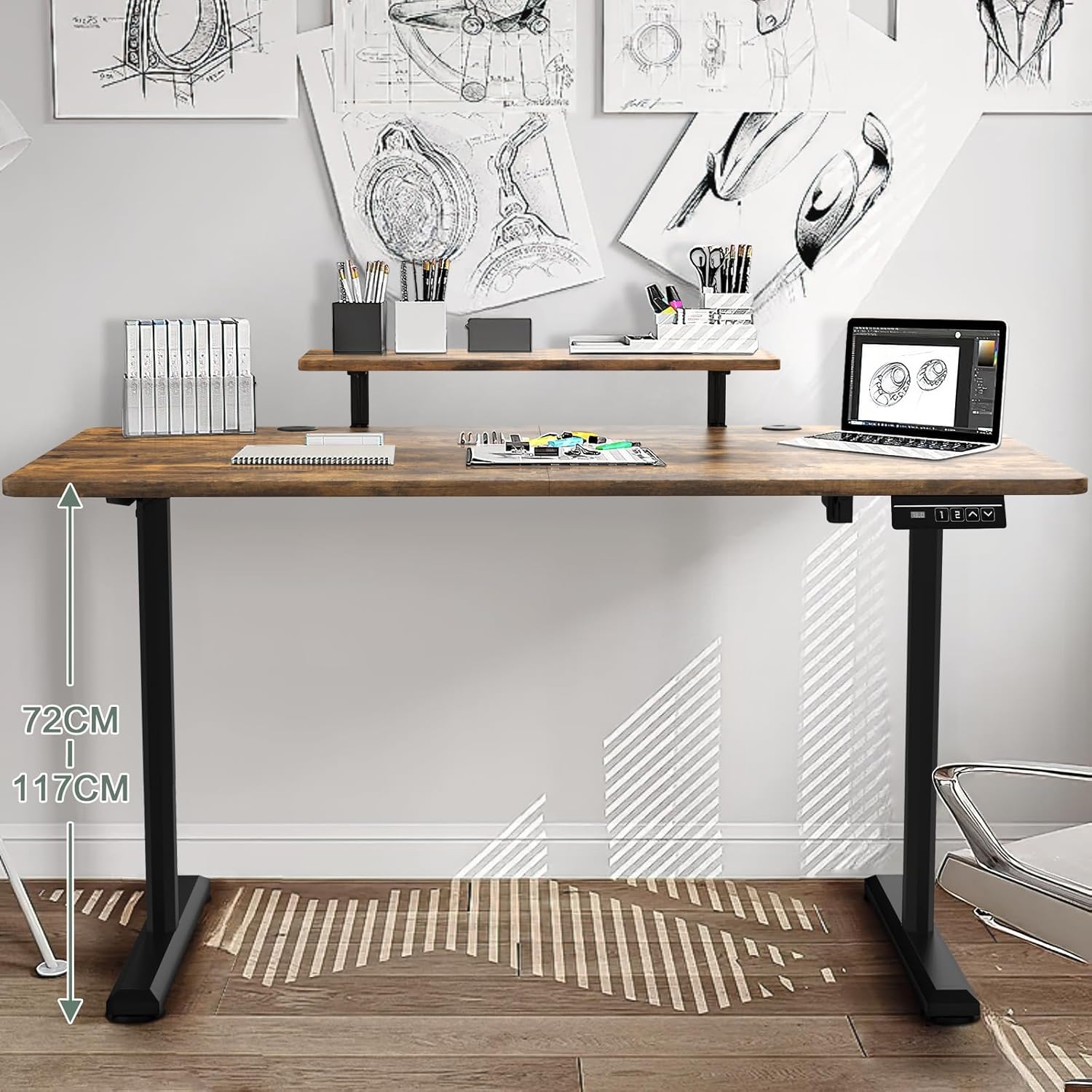
Image: The desk demonstrating its adjustable height range from 72cm (sitting) to 117cm (standing).

Image: A visual representation of the anti-collision system, showing the desk stopping and reversing upon encountering an obstacle.
Maintenance
Regular maintenance ensures the longevity and optimal performance of your desk.
- Cleaning: Wipe the desk surface with a soft, damp cloth. Avoid abrasive cleaners or harsh chemicals that could damage the finish. For electrical components, use a dry cloth.
- Inspections: Periodically check all screws and fasteners to ensure they remain tight. Re-tighten if necessary.
- Cable Management: Ensure cables are not pinched or tangled, especially during height adjustments.
- Weight Limit: Do not exceed the maximum weight capacity of 60 kg to prevent damage to the motor and frame.
Troubleshooting
If you encounter issues with your desk, refer to the following common problems and solutions:
| Problem | Possible Cause | Solution |
|---|---|---|
| Desk does not move. | Power cable disconnected; motor cable loose; overload. | Check power connection. Ensure all motor cables are securely plugged in. Reduce weight on the desk. |
| Desk moves unevenly or makes unusual noises. | Loose screws; uneven weight distribution; obstruction. | Check and tighten all assembly screws. Redistribute weight evenly. Check for obstructions under the desk. |
| Anti-collision system frequently activates. | Obstruction; sensitivity setting (if adjustable). | Ensure no objects are in the path of the desk's movement. Refer to the full assembly guide for advanced settings if applicable. |
| Memory presets not working. | Presets not saved correctly. | Re-save your desired heights following the "To Save a Height" instructions. |
If the problem persists after attempting these solutions, please contact TRIUMPHKEY customer support.
Specifications
- Brand: TRIUMPHKEY
- Model: 0162
- Color: Rustic Brown
- Desktop Dimensions (L x W): 120 cm x 60 cm
- Height Adjustment Range: 72 cm - 117 cm
- Material: Engineered Wood (desktop), Alloy Steel (frame/legs)
- Weight Capacity: 60 kg
- Special Features: Electric Height Adjustment, Ergonomic Design, Integrated Monitor Stand/Storage Shelf, Anti-Collision System, Memory Presets
- Product Weight: Approximately 23.5 kg
Warranty and Support
TRIUMPHKEY products are manufactured to high-quality standards. For specific warranty details, please refer to the warranty card included with your purchase or visit the official TRIUMPHKEY website.
For technical support, missing parts, or any inquiries, please contact TRIUMPHKEY customer service through the retailer where the product was purchased or via the contact information provided on the official TRIUMPHKEY website.
Online Resources: For additional information and support, you may visit the TRIUMPHKEY Store on Amazon.


