
Sharper Image Vacuum Handheld Cordless
Sharper Image Cordless Handheld Vacuum
Instruction Manual
Model: Vacuum Handheld Cordless
Introduction
This Sharper Image Cordless Handheld Vacuum is engineered for powerful and convenient cleaning. Featuring a high-speed 120W brushless motor and advanced HEPA filtration, it efficiently tackles dust, dirt, and debris. Its compact and ergonomic design makes it ideal for quick clean-ups in your home, car, or on upholstery. The included charging dock provides a neat storage solution for the vacuum and its accessories.
What's Included
- Cordless Handheld Vacuum
- Charging Dock
- Pet Hair Tool
- 2-in-1 Upholstery + Crevice Tool
- Power Adapter
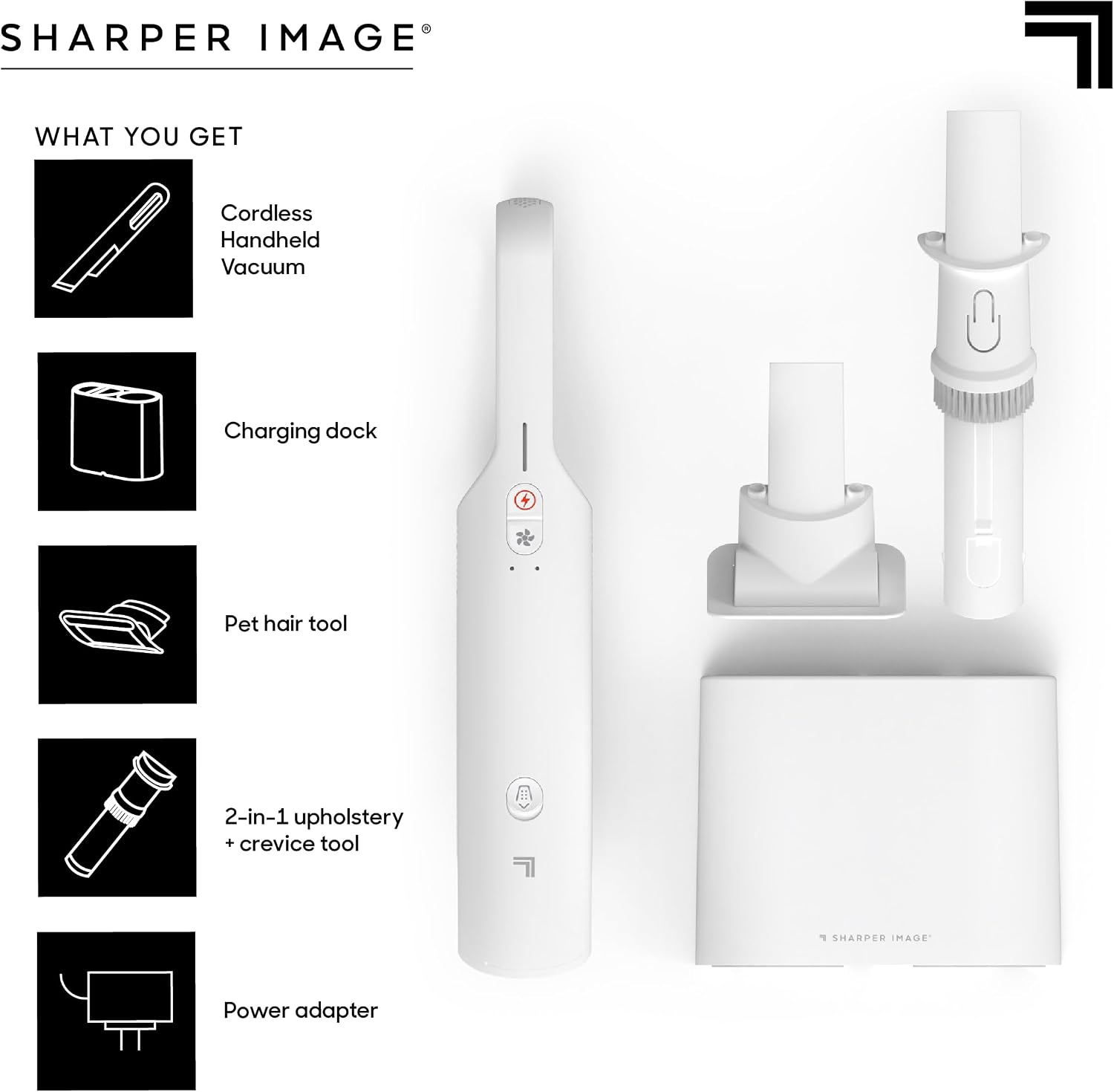
Figure 1: All components included with the Sharper Image Cordless Handheld Vacuum.
Key Features
Unparalleled Power in a Compact Design
This handheld vacuum features a high-speed, powerful 120W brushless motor. Its compact size allows it to effortlessly tackle dust, dirt, and debris, making it a valuable tool for quick clean-ups and detailed cleaning tasks.

Figure 2: Demonstrating the powerful 120W motor's suction capability.
Charging Dock and Storage Solution
The charging dock not only recharges your vacuum but also serves as a compact storage solution for the vacuum and its accessories, ensuring your cleaning tools are neatly organized and readily available.

Figure 3: The vacuum and its accessories neatly stored in the charging dock.
User-Friendly Ergonomic Design
With a lightweight build and a comfortable handle featuring intuitive controls, the vacuum's ergonomic design ensures cleaning is an effortless and enjoyable task. It can be used as a dust buster for mattresses or as a car accessory with its built-in bright lights.

Figure 4: The ergonomic design allows for comfortable handling during use.
Advanced HEPA Filtration
Benefit from the vacuum's 3-stage HEPA filtration system, which efficiently removes 99.97% of particles. This significantly reduces allergens and contributes to cleaner air in your home environment.
Expert Pet Hair Removal
The included pet hair tool is designed to efficiently remove pet hair from your car and living space, providing a practical solution for pet owners to maintain a clean and comfortable environment.

Figure 5: The pet hair tool effectively removing pet hair from surfaces.
Setup
- Unpacking: Carefully remove all components from the packaging. Ensure all items listed in the "What's Included" section are present.
- Charging the Vacuum:
- Connect the power adapter to the charging dock.
- Plug the power adapter into a standard 120V electrical outlet.
- Place the handheld vacuum into the charging dock. Ensure the metal contacts on the vacuum align with those on the dock.
- A white indicator light on the vacuum will illuminate, displaying different patterns to indicate charging status. Allow the vacuum to fully charge before first use.

Figure 6: The main product components, ready for setup and charging.
- Attaching Accessories: Select the desired cleaning attachment (Pet Hair Tool or 2-in-1 Upholstery + Crevice Tool) and firmly push it onto the vacuum's nozzle until it clicks into place.
Operating Instructions
- Powering On/Off: Press the power button located on the handle to turn the vacuum on. Press it again to turn it off. The vacuum typically has two speed settings; press the power button to cycle between them.
- Using the 2-in-1 Upholstery + Crevice Tool:
- For tight spaces and crevices, use the narrow crevice tool.
- For upholstery and broader surfaces, slide the brush attachment forward to engage the bristles.

Figure 7: Utilizing the 2-in-1 upholstery and crevice tool for detailed cleaning.
- Using the Pet Hair Tool: Attach the specialized pet hair tool for effective removal of pet hair from carpets, upholstery, and other fabric surfaces.
- Bright Lights: The vacuum is equipped with bright lights to illuminate the cleaning area, especially useful in dimly lit spaces like under furniture or inside a car.
- Battery Life: A fully charged vacuum provides approximately 11 minutes of continuous runtime. The indicator lights will show the remaining battery level.
Maintenance
- Emptying the Dust Bin:
- Ensure the vacuum is turned off.
- Locate the dust bin release button (refer to Figure 8).
- Press the release button and carefully detach the dust bin from the main unit.
- Empty the contents into a waste bin.

Figure 8: Releasing and emptying the dust bin.
- Cleaning the HEPA Filter:
- After emptying the dust bin, remove the HEPA filter.
- Tap the filter gently over a waste bin to dislodge trapped dust and debris.
- For a more thorough cleaning, the filter can be rinsed under cool running water. Ensure the filter is completely dry before reinserting it into the vacuum.
- Regular filter cleaning is crucial for maintaining optimal suction performance.
Troubleshooting
| Problem | Possible Cause | Solution |
|---|---|---|
| Low Suction Power |
|
|
| Vacuum Does Not Turn On |
|
|
| Pet Hair Tool Ineffective |
|
|
Specifications
| Brand | Sharper Image |
| Model Name | Vacuum Handheld Cordless |
| Special Feature | Cordless, Bagless |
| Filter Type | HEPA Filter |
| Included Components | Pet Hair Tool, Crevice Tool, Charging Dock |
| Is Cordless? | Yes |
| Capacity | 0.2 Kilograms |
| Wattage | 120 watts |
| Runtime | 11 minutes |
| Form Factor | Handheld |
| Color | White |
| Product Dimensions | 8.19"L x 4.33"W x 18.07"H |
| Battery Description | Lithium-Ion |
| Item Weight | 11.2 ounces |
| UPC | 843479184006 |
| ASIN | B0CGXZ9DBK |
Official Product Video
Video 1: Sharper Image Brand Overview. This video provides a general overview of the Sharper Image brand and its product philosophy. While not specific to the vacuum's operation, it showcases the brand's commitment to innovative everyday products.
Warranty and Support
For warranty information and customer support, please refer to the contact details provided on the product packaging or visit the official Sharper Image website. Keep your purchase receipt for warranty claims.
Related documentsVacuum Handheld Cordless


Ask a question about this manual
Ask about setup, troubleshooting, compatibility, parts, safety, or missing instructions. Manuals+ will review the question and use this page’s manual context to help answer it.