
Aroepurt GX-230828-19409 YGH-JGP
Aroepurt Phone Case User Manual
Model: GX-230828-19409 YGH-JGP
Introduction
This manual provides instructions for the Aroepurt Phone Case, designed for the Vortex HD65. This case offers robust protection, a convenient ring stand, and a unique luminous effect. Please read this manual carefully to ensure proper use and maintenance of your new phone case.
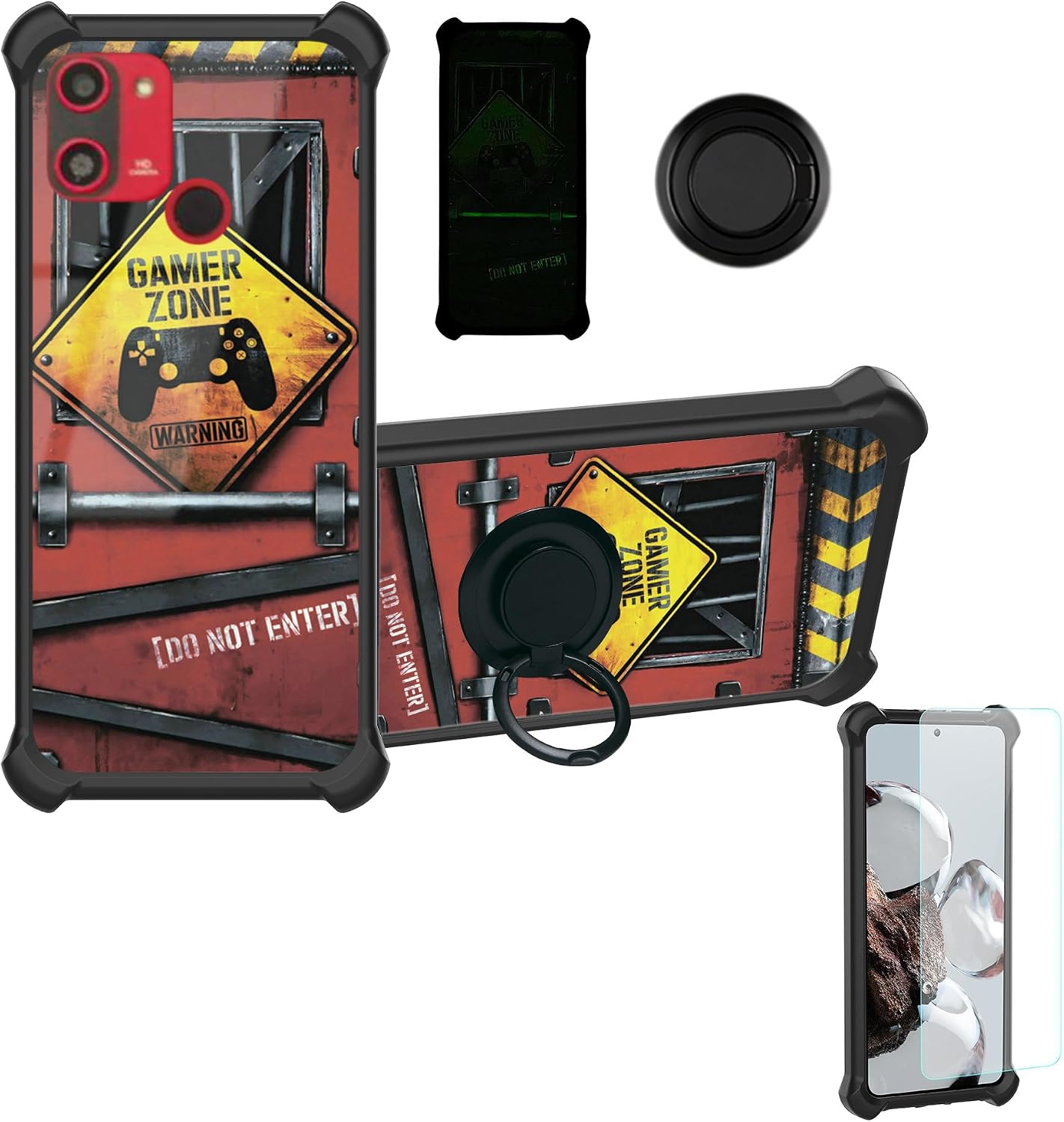
Figure 1: Overview of the Aroepurt Phone Case components, including the case with its "Gamer Zone" design, integrated ring stand, and an accompanying screen protector.
Setup and Installation
1. Installing the Phone Case
- Ensure your Vortex HD65 phone is clean and free of dust or debris.
- Align the phone with the case, starting with the top or bottom edge.
- Gently press the phone into the case, ensuring all corners and edges are securely seated within the soft silicone frame.
- Verify that all ports, buttons, and camera cutouts align correctly with the phone.
2. Attaching the Adhesive Metal Finger Ring Support (Optional)
The metal finger ring support can be attached directly to the case or used separately.
- Clean the desired attachment area on the back of the phone case with an alcohol wipe and let it dry completely.
- Peel off the protective film from the adhesive side of the metal finger ring support.
- Carefully position the ring support on the case and press firmly for at least 30 seconds to ensure strong adhesion.
- Allow the adhesive to cure for a few hours before heavy use for optimal bond strength.
Operating Instructions
1. Luminous Effect
The case features a special luminous effect. For this effect to activate, the case must absorb light from a bright source, such as sunlight or artificial light. Once charged, the case will emit a fluorescent glow in dark environments.

Figure 2: Illustration of the luminous effect mechanism, detailing the light absorbing layer and the multi-layered back panel construction.
2. Finger Ring Support Functionality
- One-Hand Operation: The finger ring allows for a more secure grip on your phone, making it easier to reach all areas of the screen with one hand.
- Kickstand Function: Rotate the ring 180 degrees to use it as a kickstand for hands-free viewing of videos or video calls.
- 360-Degree Rotation: The ring can rotate 360 degrees, providing flexibility for various viewing angles and comfortable holding positions.
- Magnetic Car Mount Compatibility: The metal ring is designed to be compatible with magnetic car mounts (car mount not included). Simply attach the case to a magnetic car mount for secure navigation or hands-free calling while driving.

Figure 3: Demonstration of enhanced one-hand phone operation using the integrated finger ring stand.

Figure 4: The phone case's compatibility with magnetic car mounts, highlighting the metal ring's function.
Maintenance and Care
- Cleaning: To clean the case, remove it from your phone. Use a soft, damp cloth with mild soap and water. Avoid harsh chemicals or abrasive cleaners, as these can damage the case's finish or luminous properties.
- Storage: Store the case in a cool, dry place away from direct sunlight when not in use.
- Protection: While the case offers significant protection with its PC hard back panel, soft silicone frame, and four-corner shock airbags, it is not indestructible. Avoid dropping your phone from excessive heights or exposing it to extreme impacts.

Figure 5: Detail of the case's shockproof design, featuring reinforced corners with shock airbags for enhanced drop protection.
Troubleshooting
| Problem | Possible Cause | Solution |
|---|---|---|
| Luminous effect is weak or not visible. | Insufficient light absorption. | Expose the case to bright light (sunlight or strong artificial light) for a longer period to charge the luminous material. |
| Finger ring feels stiff or loose. | Normal wear or minor debris. | Gently rotate the ring several times to loosen it. If loose, ensure the adhesive is fully cured or re-apply if necessary. |
| Case does not fit phone properly. | Incorrect phone model or improper installation. | Ensure your phone is a Vortex HD65. Re-install the case, making sure all edges snap into place. |
Specifications
| Feature | Detail |
|---|---|
| Product Model | GX-230828-19409 YGH-JGP |
| Compatible Device | Vortex HD65 |
| Materials | Hard PC (Polycarbonate) back panel, Soft Silicone frame |
| Special Features | Luminous Effect, 360° Rotating Finger Ring Support, Magnetic Car Mount Compatibility, Four-corner Shock Airbags |
| Product Dimensions | 0.39 x 0.39 x 0.39 inches |
| Item Weight | 2.46 ounces |
| Color | YGH-JGP (Specific design/color variant) |
| Included in Box | 1*Phone Case |
Warranty and Support
For any questions, concerns, or support regarding your Aroepurt Phone Case, please contact the manufacturer directly through the retailer's platform where the product was purchased. Please refer to your purchase documentation for specific warranty details, if applicable.
Manufacturer: Aroepurt
Ask a question about this manual
Ask about setup, troubleshooting, compatibility, parts, safety, or missing instructions. Manuals+ will review the question and use this page’s manual context to help answer it.