
SLuB PB-807
SLuB 15000mAh Mobile Power Bank User Manual
Model: PB-807
Brand: SLuB
1. Introduction
Thank you for purchasing the SLuB 15000mAh Mobile Power Bank. This versatile device combines a high-capacity power bank, an AC adapter, and multiple built-in charging cables, offering a convenient and efficient charging solution for your electronic devices. Please read this manual carefully before use to ensure proper operation and to maximize the lifespan of your product.
2. Product Overview
The SLuB Mobile Power Bank is designed for portability and multi-device compatibility. It features a compact design with a foldable AC plug and integrated charging cables.

Figure 2.1: SLuB 15000mAh Mobile Power Bank (Black)
Key Components:
- Integrated AC Plug: For direct wall charging of the power bank.
- Built-in Cables: Includes Type-C, Lightning, and Micro USB cables for various devices.
- USB-A Output Port: Additional port for charging devices using your own cable.
- Type-C Input/Output Port: For charging the power bank or external devices.
- LED Indicator Lights: Display remaining battery capacity.
- Strap: For easy carrying and portability.
3. Features
- High Capacity: Equipped with a 15000mAh battery, capable of multiple charges for smartphones and other devices. Ideal for daily use and emergency power during disasters.
- Integrated AC Adapter: The built-in AC plug allows for direct charging of the power bank from a wall outlet, while simultaneously charging your smartphone or tablet. Supports 110V-240V wide voltage range, suitable for most countries.
- 3 Built-in Cables & 2 USB Output Ports: Features integrated iPhone (Lightning), Micro USB, and Type-C cables, providing compatibility with most devices without needing to carry extra cables. Additionally, it has a Type-C (Max 20W) and a USB-A (Max 22.5W) output port, enabling simultaneous charging of up to 5 devices.
- LED Power Display & Strap Function: Four LED indicator lights show the remaining battery level, making it easy to know when to recharge. The built-in Micro USB cable also doubles as a convenient strap for easy portability.
- Ultra-Lightweight & Compact: Weighing only 235g, it is highly portable. Despite its 15000mAh capacity, its compact size allows it to fit easily into a pocket.
- Airline Compliant: Can be carried on board aircraft, making it suitable for travel.
- Multiple Safety Protections: Equipped with over-voltage protection, over-current protection, short-circuit protection, over-discharge protection, over-charge protection, and temperature protection to ensure safe charging for both the power bank and your devices.

Figure 3.1: Built-in Micro USB, iPhone, and Type-C cables
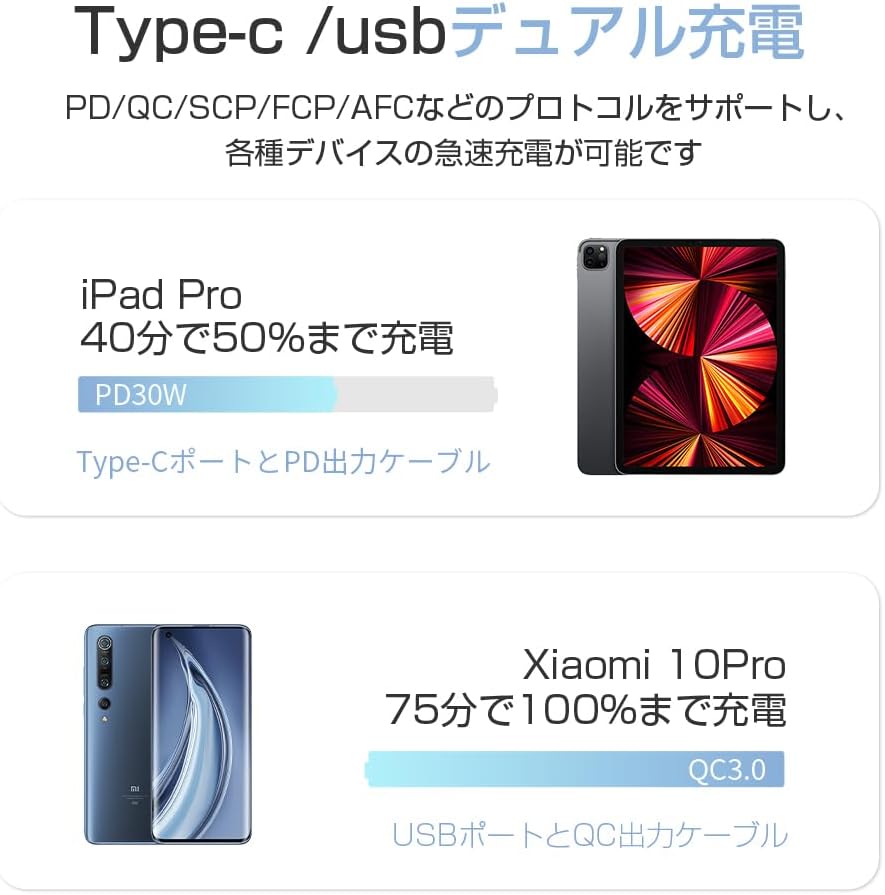
Figure 3.2: Dual Charging with Type-C/USB Ports

Figure 3.3: LED Battery Level Indicators

Figure 3.4: Compact and Portable Design

Figure 3.5: Universal Voltage and Airline Compatibility

Figure 3.6: Multi-Layer Safety Protection
4. Setup
4.1 Initial Charging of the Power Bank
- Using the AC Plug: Fold out the integrated AC plug and insert it directly into a wall outlet. The LED indicators will light up to show charging progress.
- Using Type-C Input: Connect a Type-C charging cable (not included, unless specified) to the power bank's Type-C input port and the other end to a USB wall adapter or computer.
It is recommended to fully charge the power bank before first use.
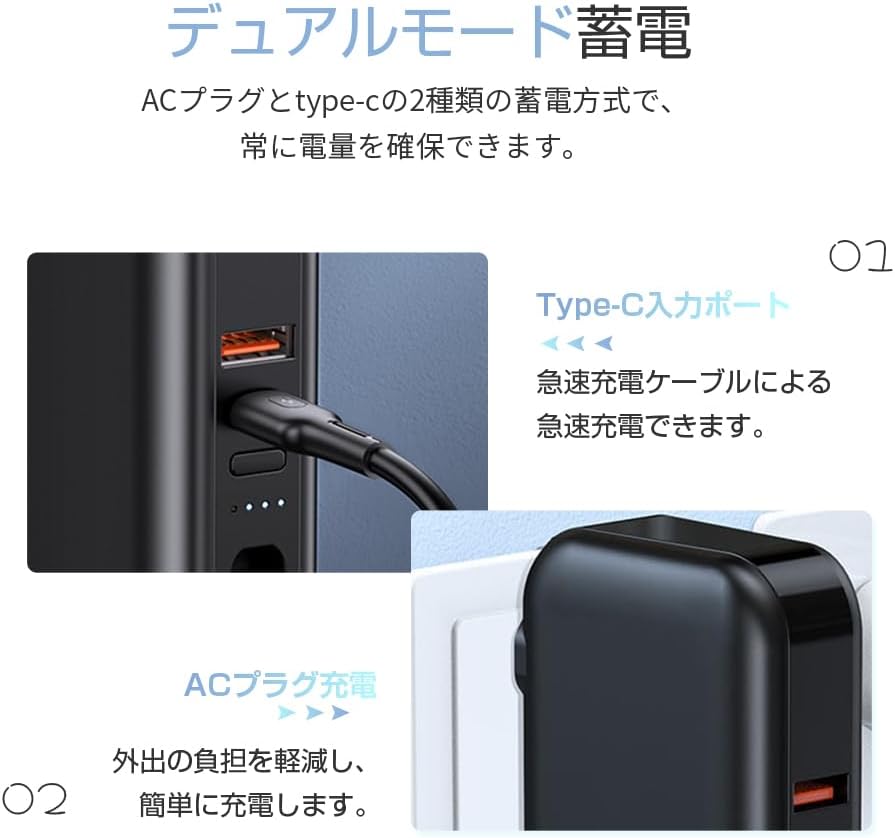
Figure 4.1: Dual Mode Charging (AC Plug and Type-C Input)
5. Operating Instructions
5.1 Charging External Devices
- Using Built-in Cables: Select the appropriate built-in cable (Type-C, Lightning, or Micro USB) and connect it directly to your device's charging port.
- Using USB-A Output Port: Connect your device's charging cable to the USB-A output port on the power bank, then connect the other end to your device.
- Using Type-C Output Port: Connect your device's Type-C charging cable to the power bank's Type-C port, then connect the other end to your device.
The power bank will automatically begin charging your device. The LED indicators will show the remaining power.
5.2 Simultaneous Charging
The power bank supports charging up to 5 devices simultaneously using a combination of its built-in cables and external USB-A/Type-C ports.
5.3 Checking Battery Level
Press the power button (if available, or simply connect a device) to activate the LED indicators. The number of lit LEDs indicates the approximate remaining battery capacity:
- 4 LEDs: 76% - 100%
- 3 LEDs: 51% - 75%
- 2 LEDs: 26% - 50%
- 1 LED: 1% - 25%
6. Maintenance
- Cleaning: Use a soft, dry cloth to clean the surface of the power bank. Do not use liquid cleaners or abrasive materials.
- Storage: Store the power bank in a cool, dry place away from direct sunlight, extreme temperatures, and humidity.
- Battery Care: To prolong battery life, fully charge the power bank at least once every three months if not in regular use. Avoid completely draining the battery frequently.
- Handling: Do not drop, disassemble, or attempt to repair the device yourself. This may void the warranty and cause damage.
7. Troubleshooting
| Problem | Possible Cause | Solution |
|---|---|---|
| Power bank not charging | AC plug not fully inserted; charging cable faulty; wall outlet no power. | Ensure AC plug is fully inserted. Try a different cable or wall outlet. |
| Device not charging from power bank | Power bank battery empty; cable not properly connected; device incompatible. | Recharge power bank. Ensure cables are securely connected. Check device compatibility. |
| Slow charging | Using non-fast charging port/cable; multiple devices charging simultaneously. | Ensure you are using the fast charging ports (Type-C PD, USB-A QC). Disconnect other devices for faster charging of a single device. |
| LED indicators not working | Power bank is completely discharged; internal malfunction. | Charge the power bank for an extended period. If problem persists, contact customer support. |
If the problem persists after trying the above solutions, please contact SLuB customer support for assistance.
8. Specifications
| Feature | Detail |
|---|---|
| Product Name | Mobile Battery |
| Model Number | PB-807 |
| Battery Capacity | 15000mAh / 55.5Wh |
| AC Input | 110-240V 50/60Hz 0.3A |
| Type-C Input | 5V-3A, 9V-2A, 12V-1.5A |
| Type-C Output | 5V-3A, 9V-2.22A, 12V-1.67A |
| iPhone/Micro Output | 5V-2A |
| USB-A Output | 5V-4.5A, 9V-2A, 12V-1.5A |
| Battery Type | Polymer Battery |
| Operating Temperature | -10°C ~ 40°C |
| Product Weight | 290 g |
| Package Dimensions | 17.5 x 9 x 3.4 cm |
9. Warranty and Support
This product comes with a standard manufacturer's warranty. For specific warranty terms and conditions, please refer to the warranty card included in the product packaging or contact SLuB customer support directly.
For technical support, troubleshooting assistance, or any inquiries regarding your SLuB Mobile Power Bank, please contact the seller or visit the official SLuB website. Keep your purchase receipt as proof of purchase for warranty claims.
Related documentsPB-807


Ask a question about this manual
Ask about setup, troubleshooting, compatibility, parts, safety, or missing instructions. Manuals+ will review the question and use this page’s manual context to help answer it.