
ATOMSTACK S30 Pro
ATOMSTACK S30 Pro Laser Engraving Machine User Manual
Model: S30 Pro
1. Introduction
The ATOMSTACK S30 Pro is a professional-grade laser engraving and cutting machine designed for high precision and efficiency. Featuring a powerful 33000mW laser output and advanced control methods, it is suitable for a wide range of materials and applications. This manual provides essential information for safe operation, setup, maintenance, and troubleshooting to ensure optimal performance and longevity of your device.
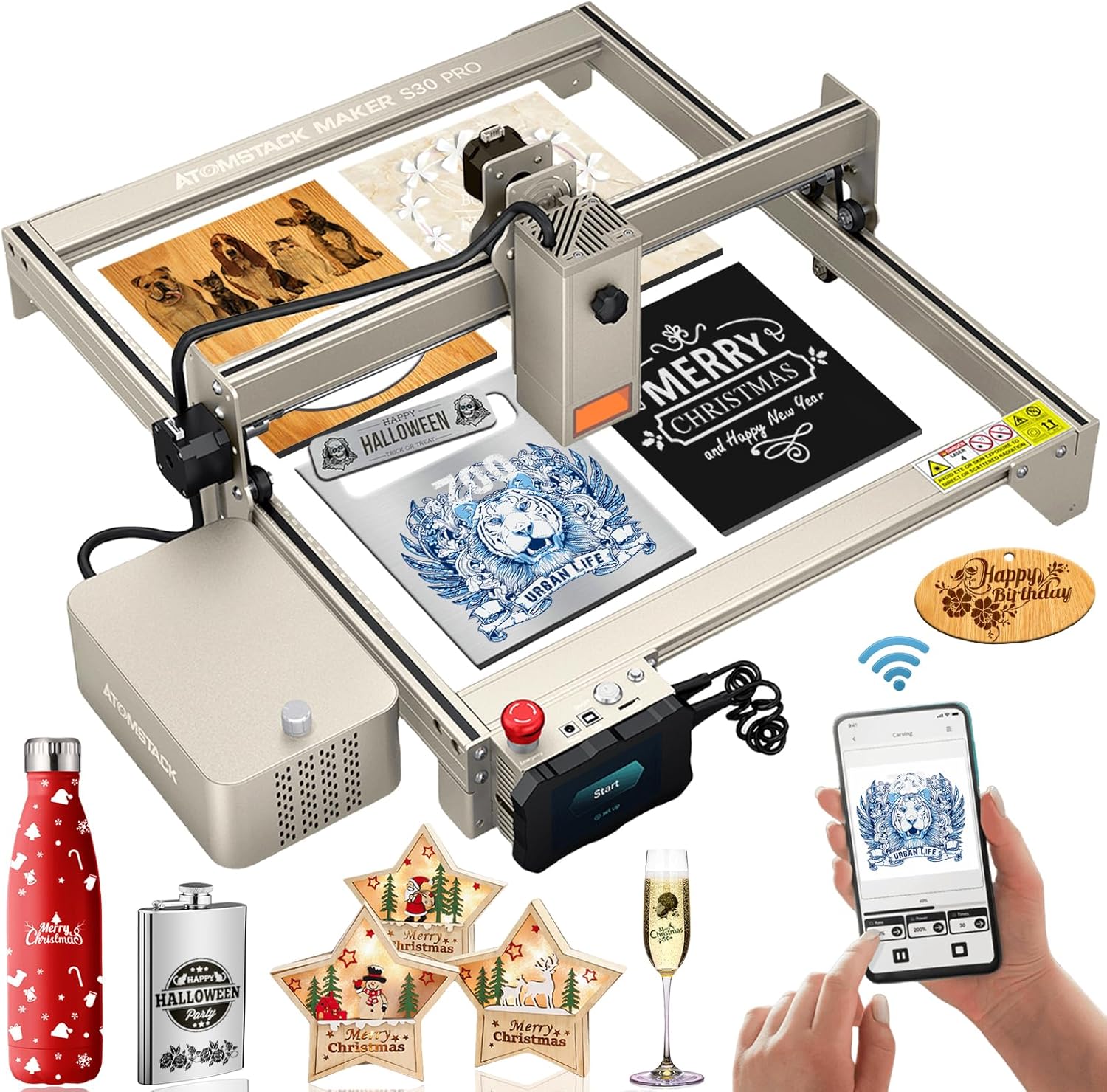
Figure 1: The ATOMSTACK S30 Pro Laser Engraving Machine, showcasing its design and examples of engraved and cut materials.
2. Safety Information
Operating a laser engraving machine requires strict adherence to safety protocols to prevent injury and damage. The ATOMSTACK S30 Pro is a Laser Class 4 device, indicating a high-power laser that can cause severe eye and skin damage from direct or scattered exposure. Always prioritize safety.
- Eye Protection: Always wear the provided eye protection glasses during operation. The panoramic lens eye protection cover filters out 97% of harmful UV rays, but additional safety glasses are recommended.
- Ventilation: Operate the machine in a well-ventilated area to dissipate fumes and smoke produced during engraving and cutting.
- Fire Safety: Keep a fire extinguisher nearby. Do not leave the machine unattended during operation, especially when cutting flammable materials.
- Emergency Stop: Familiarize yourself with the emergency stop switch and its location. In case of any malfunction or emergency, immediately press this switch to halt operation.
- Children and Pets: Keep children and pets away from the operating area to prevent accidental exposure to the laser.
- Material Compatibility: Only engrave or cut materials specified as safe. Avoid reflective or unknown materials that could cause unexpected laser reflections.

Figure 2: Key safety features of the ATOMSTACK S30 Pro, highlighting the eye protection cover and the prominent emergency stop button for immediate shutdown.
3. Package Contents
Before beginning assembly, please verify that all components are present and undamaged:
- ATOMSTACK S30 Pro Laser Engraving Machine Frame
- 33000mW Laser Module
- Air Assist Pump Kit
- Control Box with Touchscreen
- Power Adapter and Cables
- USB Connection Cable
- Safety Glasses
- Material Samples for Testing
- User Manual (this document)
- Assembly Tools (screws, wrenches, etc.)
4. Setup
Follow these steps to assemble and prepare your ATOMSTACK S30 Pro for first use:
- Unpacking: Carefully remove all components from the packaging. Keep the original packaging for future storage or transport.
- Frame Assembly: Assemble the aluminum profile frame according to the included quick start guide. Ensure all screws are tightened securely for stability.
- Laser Module Installation: Mount the 33000mW laser module onto the gantry. The S30 Pro features a tool-free focus and height adjustment knob for easy installation.
- Control Box Connection: Connect the control box to the main frame and the laser module using the provided cables.
- Air Assist Pump Connection: Connect the air assist pump to the designated port on the laser module and the control box. Ensure the air hose is securely attached.
- Power Connection: Connect the power adapter to the control box and then to a suitable power outlet (AC100-240V, 50/60Hz).
- Software Installation: Install the recommended software (LaserGRBL or LightBurn) on your computer. These operating systems support Win XP, Win 7, Win 8, XP, Win 10 system.
- Initial Test: Perform a small test engraving on a scrap piece of material to verify proper setup and laser alignment.

Figure 3: Overview of the ATOMSTACK S30 Pro's core components and features, essential for understanding its capabilities during setup.
5. Operating
The ATOMSTACK S30 Pro offers versatile control methods and powerful engraving/cutting capabilities. Always ensure proper material placement and laser focus before starting any operation.
5.1. Control Methods
The S30 Pro supports three primary control methods:
- Computer Control: Connect via USB and use LaserGRBL or LightBurn software for comprehensive control.
- Touchscreen Control: Insert a TF/SD card with your design files and operate directly via the integrated touchscreen.
- Smartphone Control: After a firmware update, download the ATOMSTACK app and connect via Wi-Fi for mobile operation.

Figure 4: Illustration of the diverse control options available for the ATOMSTACK S30 Pro, including touchscreen, smartphone, and computer interfaces.
5.2. Material Preparation and Focusing
Ensure your material is flat and securely placed on the working area. The S30 Pro features a fixed-focus laser, eliminating the need for manual focusing. Simply ensure the material thickness is within the optimal range for the laser's focal point.

Figure 5: Demonstrating the ultra-fine laser spot of the S30 Pro, crucial for achieving high-precision engraving results.
5.3. Engraving and Cutting
The S30 Pro excels in both engraving and cutting tasks. Its 33000mW output allows for deep cuts and intricate engravings.
- Engraving: Achieve precise and high-contrast engravings on various materials, including wood, bamboo, cardboard, plastic, leather, PCB, aluminum oxide, non-reflective coated metals, 304 mirror stainless steel, glass, ceramic, cotton fabric, and slate. The 32-bit motherboard provides 256-bit color gradient mapping for enhanced detail.
- Cutting: Capable of cutting 20mm wood, 10mm black acrylic in a single pass, and 0.1mm stainless steel. With multiple passes, it can cut 25mm thick wood and 30mm black acrylic. The integrated air assist pump significantly improves cutting capabilities and prevents laser head clogging.

Figure 6: A visual guide to the wide array of materials compatible with the ATOMSTACK S30 Pro for both engraving and cutting.

Figure 7: Detailed illustration of the ATOMSTACK S30 Pro's impressive single-pass cutting thickness on various materials.

Figure 8: Visual representation of the S30 Pro's enhanced working speeds for both cutting and engraving, demonstrating its efficiency.
Video 1: Demonstrates the ATOMSTACK S30 Pro 130W Laser Engraver in action, showcasing its cutting and engraving capabilities on various materials, including wood and acrylic. It highlights the precision and speed of the machine, as well as the effectiveness of the air assist system in producing clean cuts.
6. Maintenance
Regular maintenance ensures the longevity and consistent performance of your ATOMSTACK S30 Pro.
- Laser Lens Cleaning: Periodically clean the laser lens with a soft, lint-free cloth and lens cleaning solution to maintain optimal laser output.
- Rail and Belt Cleaning: Keep the guide rails and belts free from dust and debris to ensure smooth movement of the laser module. Use a dry cloth or compressed air.
- Air Assist Nozzle: Regularly check the air assist nozzle for any blockages or buildup, especially after cutting materials that produce significant residue. The new poly wind cover design helps prevent clogging.
- Firmware Updates: Check the official ATOMSTACK website for any available firmware updates to ensure your machine has the latest features and performance improvements.
- General Cleaning: Wipe down the machine's exterior with a damp cloth to remove dust and residue.

Figure 9: Highlighting the benefits of the standard air assist kits in maintaining a clean laser path and preventing material residue buildup.
7. Troubleshooting
Here are some common issues and their potential solutions:
- Laser Not Firing:
- Check power connections.
- Ensure the emergency stop button is disengaged.
- Verify software settings and laser power output. - Poor Engraving/Cutting Quality:
- Ensure the material is flat and properly positioned.
- Clean the laser lens.
- Adjust laser power and speed settings in your software.
- Check for any obstructions in the laser path or air assist nozzle. - Machine Not Responding:
- Restart the machine and your controlling device (computer/smartphone).
- Check USB or Wi-Fi connection.
- Ensure firmware is up to date. - Unusual Noises:
- Inspect the belts and rails for debris or misalignment.
- Lubricate moving parts if necessary (refer to detailed maintenance guide).
8. Specifications
| Feature | Specification |
|---|---|
| Item Model | ATOMSTACK S30 PRO |
| Engraving Area | 400*410mm |
| Output Laser Power | 33000mW |
| Laser Class | 4 |
| Electric Power | 160W |
| Wavelength | 445 ± 5nm |
| Engraving Accuracy | 0.01mm |
| Focusing Method | Fixed-Focus Laser |
| Control Methods | Smartphone (App), Computer (USB), Touchscreen (TF/SD card) |
| Operating System Support | LaserGRBL, LightBurn (Win XP, Win 7, Win 8, Win 10) |
| Input Format | NC, BMP, JPG, PNG, DXF, etc. |
| Data Transfer Method | USB connection |
| Input Voltage | AC100-240V, 50/60Hz |
| Output Voltage | DC24V, 6A |
9. Warranty and Support
For warranty information and technical support, please refer to the official ATOMSTACK website or contact the seller directly. Keep your purchase receipt as proof of purchase for warranty claims. Regular updates and support resources may be available online.
Related documentsS30 Pro


Ask a question about this manual
Ask about setup, troubleshooting, compatibility, parts, safety, or missing instructions. Manuals+ will review the question and use this page’s manual context to help answer it.