
HAILIWEI LYYX-M12
HAILIWEI Portable Karaoke Machine User Manual
Model: LYYX-M12
Introduction
Thank you for choosing the HAILIWEI Portable Karaoke Machine. This device is designed to provide an enjoyable audio experience with its portable speaker and two wireless microphones, perfect for various occasions. Please read this manual carefully to ensure proper use and maintenance of your new karaoke machine.
What's in the Box
- 1 x HAILIWEI Portable Karaoke Machine Speaker
- 2 x Wireless Microphones
- 1 x USB Charging Cable
- 1 x AUX Cable
- 1 x User Manual (this document)

Figure 1: HAILIWEI Portable Karaoke Machine package contents, including the speaker, two microphones, and the gift box.
Product Overview
Familiarize yourself with the main components and features of your HAILIWEI Portable Karaoke Machine.

Figure 2: The karaoke machine connected to a smartphone and laptop, showcasing its Bluetooth 5.3 compatibility and various sound effects.

Figure 3: A child using the wireless microphone, emphasizing the product's ease of use and portability for all ages.
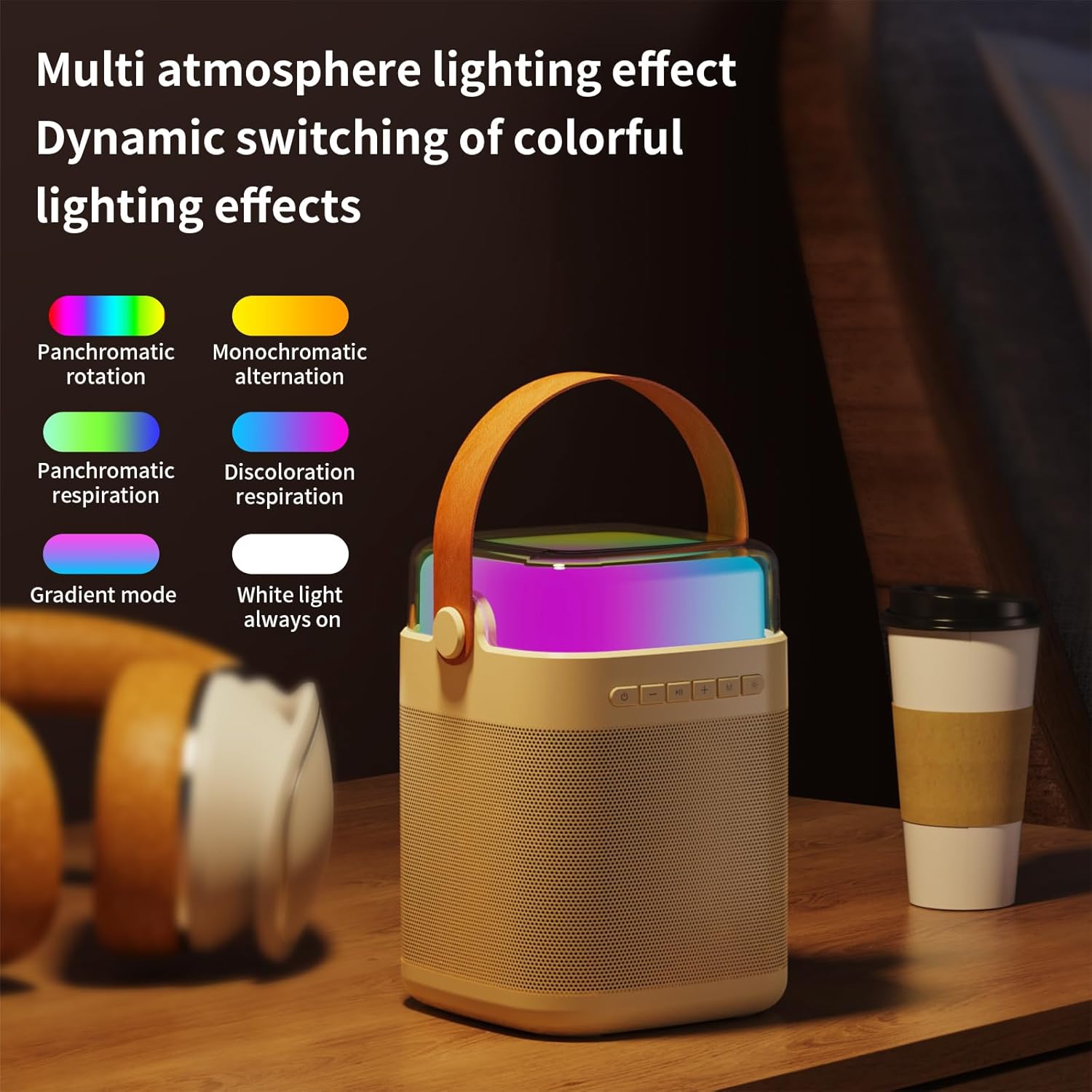
Figure 4: Overview of the machine's features including colorful lights, dual wireless microphones, USB-C charging, AUX-in, SD card slot, and USB-A port.
Setup Guide
1. Charging the Device
Before first use, fully charge the karaoke machine speaker and both wireless microphones. Use the provided USB charging cable.
- Speaker Charging: Connect the USB-C cable to the charging port on the speaker and to a USB power adapter (not included). The charging indicator will show status.
- Microphone Charging: Connect the USB cable to the charging port on each microphone.
- Charging Time: Speaker takes approximately 3 hours for a full charge. Microphones take approximately 2 hours.
2. Powering On/Off
- Speaker: Press and hold the power button on the speaker for 3 seconds to turn on or off.
- Microphones: Press and hold the power button on each microphone for 3 seconds to turn on or off.
3. Bluetooth Connection
The karaoke machine uses Bluetooth 5.3 for stable wireless connection to your devices.
- Turn on the karaoke machine speaker. It will automatically enter Bluetooth pairing mode.
- On your smartphone, tablet, or other Bluetooth-enabled device, go to Bluetooth settings and search for "HAILIWEI".
- Select "HAILIWEI" to pair. A voice prompt will confirm successful connection.
Once connected, you can play music from your device through the karaoke machine speaker.
4. Microphone Pairing
The two wireless microphones are pre-paired with the speaker. If they do not connect automatically:
- Ensure both the speaker and microphones are powered on.
- The microphones should automatically connect to the speaker. A blue indicator light on the microphone will confirm connection.
- If connection fails, turn off both the speaker and microphones, then turn them on again.
Operating Instructions
1. Music Playback
- Bluetooth: Play music from your paired device.
- AUX Input: Connect an external audio source using the 3.5mm AUX cable.
- USB/TF Card: Insert a USB flash drive or TF (Micro SD) card with MP3 files into the respective port. The speaker will automatically play music.
2. Speaker Controls
The speaker features intuitive controls on its top panel:
- Power Button: Press and hold to power on/off. Short press to switch modes (Bluetooth/AUX/USB/TF).
- Play/Pause Button: Short press to play or pause music.
- Previous/Volume Down (-): Short press for previous track. Long press to decrease volume.
- Next/Volume Up (+): Short press for next track. Long press to increase volume.
- Microphone Volume (M): Adjust microphone volume.
- Light Mode Button (*): Short press to cycle through different lighting effects.

Figure 5: The speaker's top panel showing control buttons and dynamic lighting effects.
3. Microphone Usage
- Ensure microphones are powered on and connected to the speaker.
- Speak or sing into the microphone. Adjust the microphone volume using the 'M' button on the speaker.
- Sound Effects: The system supports five sound change effects: Original Voice, Child, Monster, Male Voice, Female Voice. Refer to the speaker controls for activating these effects.
Maintenance
Proper care will extend the life of your karaoke machine.
- Cleaning: Use a soft, dry cloth to clean the exterior of the speaker and microphones. Do not use abrasive cleaners or solvents.
- Storage: Store the device in a cool, dry place away from direct sunlight and extreme temperatures.
- Battery Care: To maintain battery health, charge the device regularly, even if not in frequent use. Avoid fully discharging the battery for extended periods.
- Water Exposure: This device is not waterproof. Avoid exposure to water or high humidity.
Troubleshooting
If you encounter issues, please refer to the following common problems and solutions:
| Problem | Solution |
|---|---|
| No sound from speaker. |
|
| Microphones not working. |
|
| Bluetooth connection issues. |
|
| Short battery life. |
|
Specifications
| Feature | Detail |
|---|---|
| Model Number | LYYX-M12 |
| Brand | HAILIWEI |
| Mounting Type | Tabletop |
| Power Source | Battery Powered |
| Connector Type | Aux, USB |
| Material | Metal |
| Output Wattage | 13 Watts |
| Number of Channels | 1 |
| Audio Input | Bluetooth, TF card, USB flash drive, AUX cable |
| Product Dimensions | 6.62 x 5.2 x 7 inches |
| Item Weight | 2.4 pounds |
| Microphone Weight | 0.18 pounds (approx.) |
| Microphone Battery Capacity | 500 mAh (approx.) |
| Microphone Usage Time | About 15 hours |
| Speaker Battery Capacity | 3000 mAh (approx.) |
| Speaker Usage Time | 5-12 hours |
| Connectivity Technology | AUX, Bluetooth, USB |
| Color | Beige |
| Compatible Devices | Smartphone, Tablet |

Figure 6: Detailed dimensions and weight of the speaker and microphone.
Warranty and Support
HAILIWEI products are manufactured to high quality standards. For warranty information or technical support, please refer to the contact details provided with your purchase or visit the official HAILIWEI website.
Additional user guides in PDF format may be available for download from the product's Amazon listing or the manufacturer's website.
Related documentsLYYX-M12


Ask a question about this manual
Ask about setup, troubleshooting, compatibility, parts, safety, or missing instructions. Manuals+ will review the question and use this page’s manual context to help answer it.