
Product Overview
This manual provides instructions for the ALLIMITY RCH-2609NA replacement remote control, designed for use with specific Hisense Air Conditioner models. This remote control requires no programming and is ready for use after battery installation.
Key Features
- Direct replacement, no setup or programming required.
- Durable ABS material construction.
- Ergonomic design for comfortable handling.
- Compatible with Hisense Air Conditioner models KFR-35G and 27FZBPH.
Package Contents
- 1 x ALLIMITY RCH-2609NA Remote Control
- (Batteries and additional manual not included)

Front view of the ALLIMITY RCH-2609NA remote control, showing the display screen and primary control buttons.
Setup Guide
Battery Installation
- Locate the battery compartment on the back of the remote control.
- Slide the battery cover downwards to open.
- Insert two (2) AAA alkaline batteries, ensuring correct polarity (+ and -) as indicated inside the compartment.
- Slide the battery cover back into place until it clicks securely.
- The remote control is now ready for use.
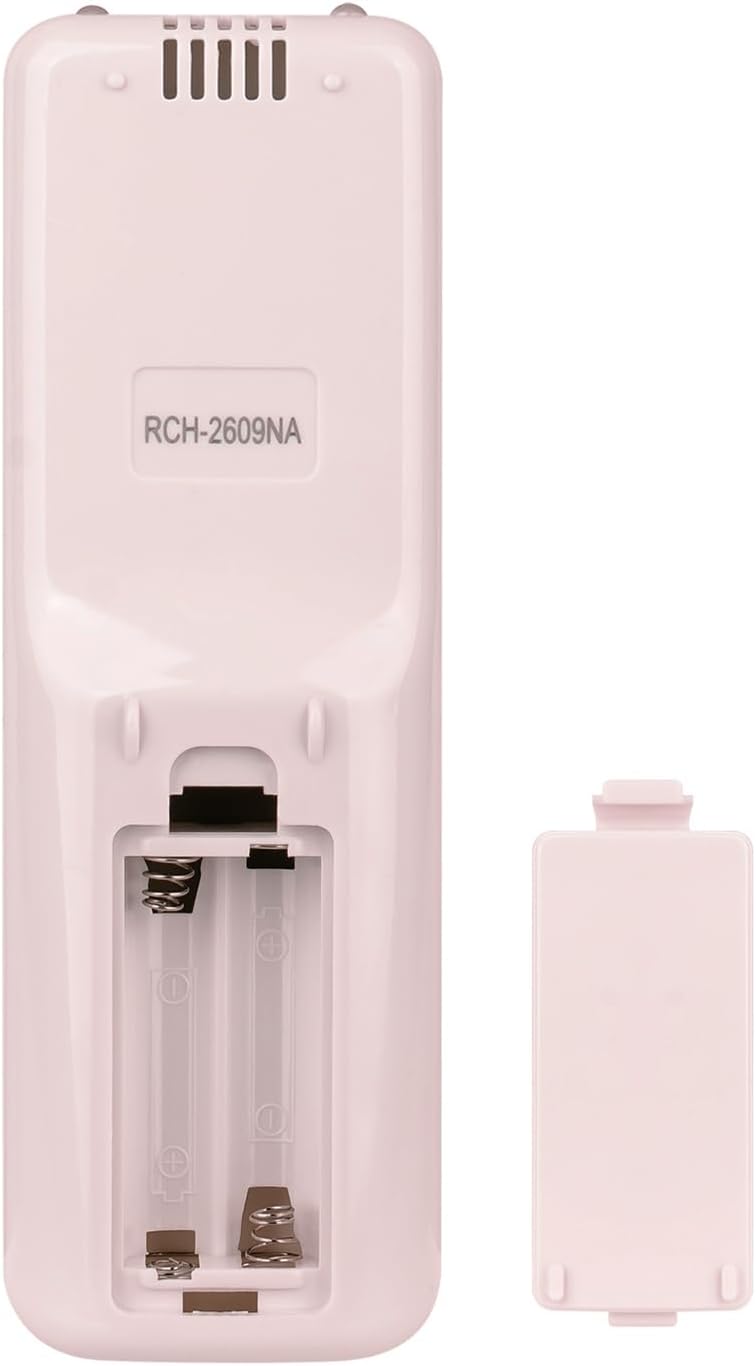
The rear of the remote control, illustrating the open battery compartment for inserting two AAA batteries.
Operating Instructions
This remote control is designed for intuitive operation. Point the remote control directly at your Hisense air conditioner's receiver when pressing buttons.

A direct front view of the remote control, highlighting the layout of the power, temperature adjustment, mode, and fan speed buttons.
Button Functions
- Power Button (⏻): Press to turn the air conditioner ON or OFF.
- Temperature Up (▲): Increases the set temperature.
- Temperature Down (▼): Decreases the set temperature.
- Mode Button (☀︎/❄︎): Cycles through operating modes such as Cool, Heat, Fan, Dry, Auto. (Specific modes depend on your air conditioner model.)
- Fan Speed Button (☸︎): Adjusts the fan speed (e.g., Low, Medium, High, Auto). (Specific speeds depend on your air conditioner model.)
Sliding Cover
The remote control features a sliding cover at the bottom. Slide it down to reveal additional, less frequently used functions, if available on your specific air conditioner model. Slide it up to protect these buttons and simplify the remote's appearance.
Maintenance
Cleaning the Remote Control
To clean the remote control, gently wipe its surface with a soft, dry cloth. Do not use liquid cleaners, abrasive materials, or chemical solvents, as these may damage the remote's finish or internal components.
Battery Replacement
Replace batteries when the remote control's response becomes sluggish or stops working. Always replace both batteries simultaneously with new AAA alkaline batteries. Do not mix old and new batteries, or different types of batteries.
Dispose of used batteries according to local regulations.
Troubleshooting
Common Issues and Solutions
| Problem | Possible Cause | Solution |
|---|---|---|
| Remote control not working. | Dead or incorrectly installed batteries. | Check battery polarity. Replace with new AAA alkaline batteries. |
| Air conditioner does not respond. | Obstruction between remote and AC unit; remote out of range; AC unit power off. | Ensure clear line of sight. Move closer to the AC unit. Check if the AC unit is powered on. |
| Some functions not working. | Air conditioner model does not support the function; sliding cover is closed. | Verify your AC model supports the function. Open the sliding cover for additional buttons. |
Product Specifications
| Feature | Detail |
|---|---|
| Model Number | RCH-2609NA |
| Brand | ALLIMITY |
| Compatible Devices | Hisense Air Conditioners (KFR-35G, 27FZBPH) |
| Power Source | 2 x AAA Alkaline Batteries (not included) |
| Material | ABS |
| Color | White |
| Dimensions | 6 x 2 x 0.6 inches (approx.) |
| Weight | 2.61 ounces (approx.) |
Support
For any questions or assistance regarding your ALLIMITY RCH-2609NA remote control, please contact our customer support. We aim to respond to all inquiries within 24 hours.
Please refer to your Hisense air conditioner's original manual for detailed information on its specific functions and features.