Introduction
This manual provides instructions for the ALLIMITY replacement remote control, specifically designed for use with the Vivitek QUMI Q38 DLP Projector. This remote offers direct functionality without the need for complex setup or programming, allowing for immediate use upon battery installation.
Setup: Battery Installation
The remote control requires two AAA alkaline batteries (not included) for operation. Please follow these steps for proper installation:
- Locate the battery compartment on the back of the remote control.
- Gently slide the battery compartment cover downwards or outwards to open it.
- Insert two AAA batteries, ensuring the positive (+) and negative (-) terminals align correctly with the markings inside the compartment.
- Replace the battery compartment cover by sliding it back into position until it clicks securely.

Image: The back of the ALLIMITY remote control with the battery cover removed, revealing two empty AAA battery slots. This illustrates where to insert the batteries.
Operating Instructions: Button Functions
This section details the functions of each button on your ALLIMITY replacement remote control.
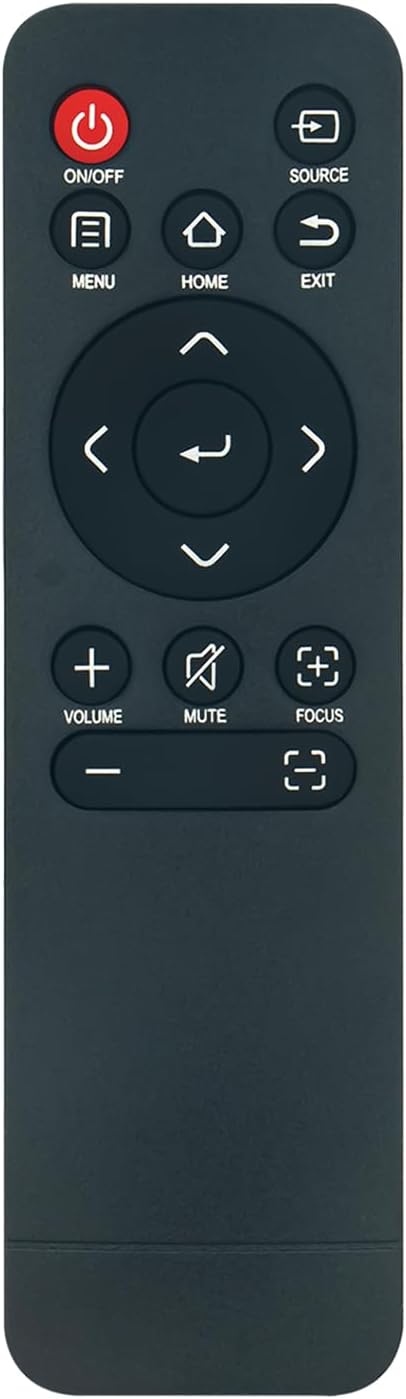
Image: A clear front view of the ALLIMITY remote control, displaying all its buttons and their respective labels.
- ON/OFF (Red Button): Powers the projector on or off.
- SOURCE: Selects the input source for the projector (e.g., HDMI, USB).
- MENU: Accesses the projector's main menu.
- HOME: Returns to the projector's home screen or main interface.
- EXIT: Exits the current menu or function.
- Navigation Pad (Up, Down, Left, Right, OK/Enter): Used to navigate through menus and confirm selections. The central button typically acts as 'OK' or 'Enter'.
- VOLUME (+/-): Adjusts the audio output volume of the projector.
- MUTE: Toggles audio mute on or off.
- FOCUS (Two buttons with square icons): Adjusts the projector's focus. One button typically increases focus, and the other decreases it.
Maintenance
To ensure the longevity and optimal performance of your remote control, follow these maintenance guidelines:
- Keep the remote control clean by wiping it with a soft, dry cloth. Avoid using liquid cleaners or abrasive materials.
- Do not expose the remote control to extreme temperatures, direct sunlight, or high humidity.
- If the remote control will not be used for an extended period, remove the batteries to prevent leakage and potential damage.
- Handle the remote control with care to prevent drops or impacts.
Troubleshooting
If you encounter issues with your remote control, refer to the following common problems and solutions:
- Remote Control Not Responding:
- Ensure batteries are inserted correctly with the correct polarity (+/-).
- Replace old batteries with new AAA alkaline batteries.
- Check for any obstructions between the remote control and the projector's infrared receiver.
- Verify that the projector is powered on.
- Buttons Not Functioning Correctly:
- Clean the remote control surface, especially around the buttons, to remove any dirt or debris.
- Ensure the remote control is pointed directly at the projector's infrared sensor.
Specifications
| Feature | Detail |
|---|---|
| Model Number | Q38-OSMHE |
| Compatible Devices | Vivitek QUMI Q38 DLP Projector |
| Power Source | 2 x AAA Alkaline Batteries (not included) |
| Product Dimensions | 6 x 2 x 0.6 inches |
| Item Weight | 1.02 ounces |
| Color | Black |
| Special Feature | Ergonomic design |
Warranty and Support
This ALLIMITY replacement remote control is designed for reliable performance. While specific warranty details are not provided in this manual, the manufacturer ensures products are strictly inspected before shipment.
For any questions or concerns regarding the remote control, please contact the seller directly. They commit to responding within 24 hours to assist with product-related inquiries.
Please note that the package content includes one remote control; a manual and batteries are not included with the product purchase.


