
1. Introduction
This manual provides essential information for the safe and efficient operation, maintenance, and troubleshooting of your HOBOT LEGEE D8 Eco Compactor Robot Vacuum Cleaner. Please read this manual thoroughly before using the device and retain it for future reference.

Figure 1: The HOBOT LEGEE D8 robot vacuum cleaner, its dustbin, and the companion mobile application.
2. Safety Information
Always follow basic safety precautions when using electrical appliances to reduce the risk of fire, electric shock, or injury.
- Do not operate the robot near open flames or heat sources.
- Keep hair, loose clothing, fingers, and all parts of the body away from openings and moving parts.
- Do not allow children to operate the robot. Supervise children and pets when the robot is in operation.
- Use only the manufacturer-specified power adapter and charging dock.
- Do not use the robot to pick up large objects, sharp items, or liquids.
- Ensure the water tank is properly sealed to prevent leaks.
3. Package Contents
Verify that all items are present in the package:
- HOBOT LEGEE D8 Robot Vacuum Cleaner
- Charging Dock
- Power Adapter
- Side Brushes (spare set included)
- Microfiber Cleaning Cloths (spare set included)
- Washable Filter (spare included)
- User Manual
4. Product Overview
Familiarize yourself with the main components of your LEGEE D8 robot vacuum cleaner.
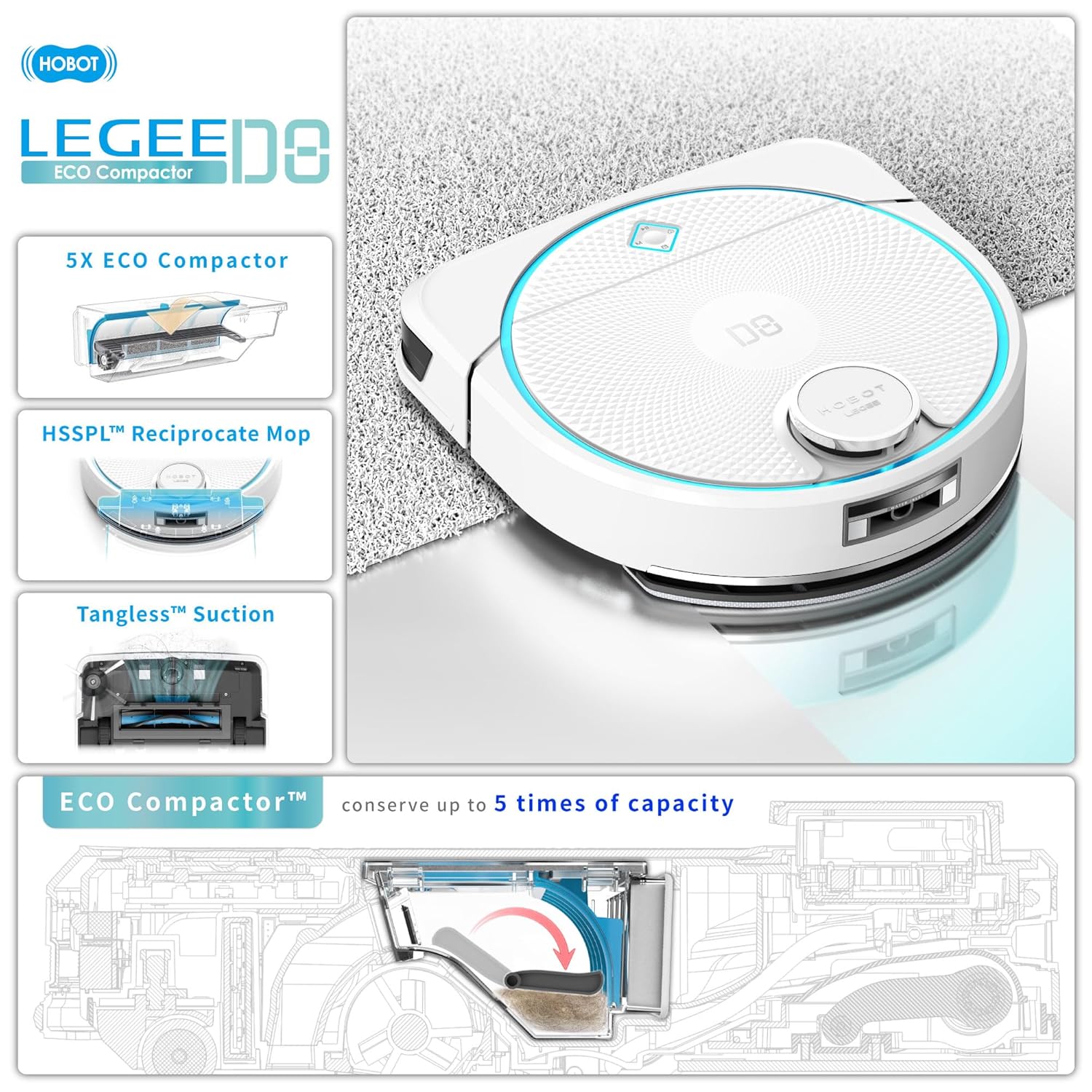
Figure 2: Key features of the LEGEE D8, including the ECO Compactor, HSSPL Mopping, and Tangless Suction.
Main Features:
- 5000Pa Tangless Suction Technology: Designed to pick up dust, debris, and pet hair effectively while minimizing tangling.
- ECO Compactor: Compresses dust and debris in the dustbin, increasing capacity and reducing emptying frequency.
- HSSPL Mopping Technology: High-speed power scrubbing mop with precise water spray for deep cleaning.
- D-Shape Design: Allows for thorough cleaning along edges and into corners.
- LiDAR Navigation: Advanced navigation system for efficient mapping and obstacle avoidance.
5. Setup
5.1 Charging the Robot
Place the charging dock against a wall in an open area. Connect the power adapter to the dock and a power outlet. Position the LEGEE D8 onto the charging dock. The robot will automatically align and begin charging. Ensure the robot is fully charged before its first use.

Figure 3: The LEGEE D8 robot vacuum cleaner correctly positioned on its charging dock.
5.2 App Installation and Connection
- Download the HOBOT LEGEE app from your smartphone's app store.
- Follow the in-app instructions to create an account and add your LEGEE D8 device.
- Ensure your robot is powered on and your smartphone is connected to a 2.4GHz Wi-Fi network during the pairing process.
5.3 Initial Mapping
During its first cleaning cycle, the LEGEE D8 will create a map of your home. Ensure all doors are open and clear any obstacles to allow for comprehensive mapping. This map will be saved in the app for future customized cleaning.
6. Operating Instructions
6.1 Starting a Cleaning Cycle
You can start a cleaning cycle in two ways:
- Via the App: Open the HOBOT LEGEE app, select your device, and choose a cleaning mode or start a general clean.
- On the Robot: Press the power button on the robot to start a standard cleaning cycle.
6.2 Filling the Water Tank
For mopping functions, fill the water tank with clean water. The LEGEE D8 features AI Smart Spray, which applies the optimal amount of water to dissolve stains without leaving excessive moisture.

Figure 4: Detail of the HSSPL Reciprocate Mopping system, showing its operational parameters.
6.3 Cleaning Modes (Talent Clean)
The app offers 7+1 distinctive Talent Clean modes, allowing you to customize cleaning routines based on your needs. These modes optimize suction, mopping, and navigation for different floor types and cleaning requirements.
6.4 Carpet Detection
The LEGEE D8 automatically lifts its mop by 7mm when transitioning to carpets, ensuring deep cleaning for hard floors while protecting soft surfaces from getting wet.
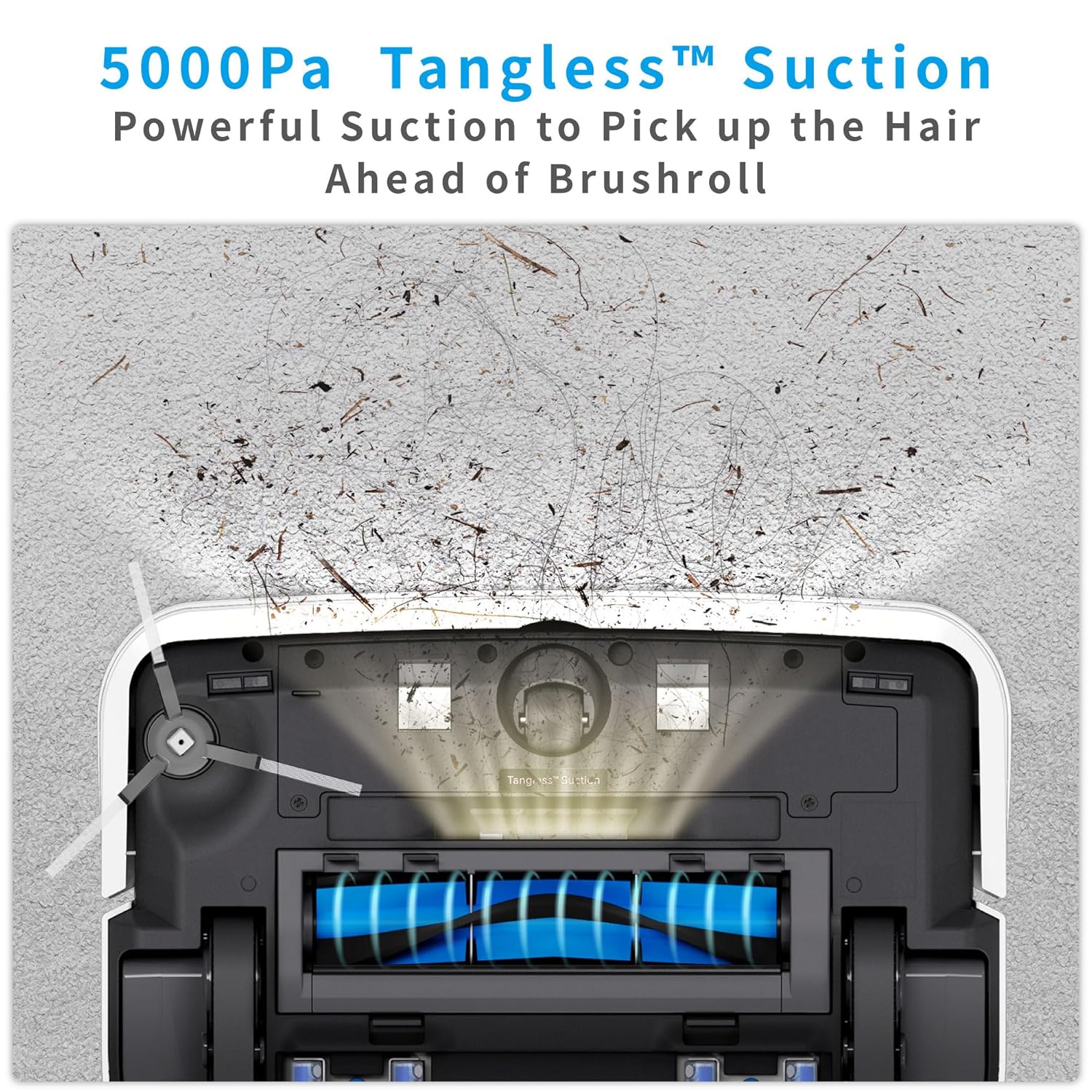
Figure 5: The LEGEE D8's D-shape design, LiDAR navigation, and app control interface.
7. Maintenance
Regular maintenance ensures optimal performance and extends the lifespan of your LEGEE D8.
7.1 Emptying the Dustbin (ECO Compactor)
The ECO Compactor technology compresses dust and debris, creating up to 5 times more space. Empty the dustbin regularly, especially after cleaning heavily soiled areas. The compactor mechanism also helps scrape the filter clean and reduce dust emission.

Figure 6: The ECO Compactor in action, demonstrating debris compression within the dustbin.
7.2 Cleaning Filters and Brushes
- Remove and clean the washable filter after every few uses. Allow it to air dry completely before reinserting.
- Inspect and clean the main brushroll and side brushes regularly to remove tangled hair or debris.
7.3 Cleaning Mopping Pads
Remove the microfiber cleaning cloths after each mopping session and wash them. Replace worn-out cloths with new ones to maintain effective mopping performance.
8. Troubleshooting
If you encounter issues with your LEGEE D8, refer to the following common problems and solutions:
| Problem | Possible Cause | Solution |
|---|---|---|
| Robot does not start | Low battery; Power button not pressed; Robot stuck | Charge the robot; Press power button; Clear obstacles |
| Poor cleaning performance | Full dustbin; Clogged filter/brushes; Worn mopping pads | Empty dustbin; Clean filter/brushes; Replace mopping pads |
| Robot gets stuck frequently | Obstacles; Uneven surfaces; Sensors blocked | Clear floor; Ensure even surfaces; Clean sensors |
| App connection issues | Incorrect Wi-Fi; Robot offline; App outdated | Verify 2.4GHz Wi-Fi; Restart robot/router; Update app |
For persistent issues, please contact customer support.
9. Specifications
| Feature | Detail |
|---|---|
| Brand | HOBOT |
| Model Number | LGD8 |
| Product Dimensions | 34.4L x 34.3W x 9.8H Centimeters |
| Item Weight | 3 kg 860 g |
| Colour | White |
| Filter Type | Washable + Self-Clean Filter |
| Battery Life | Up to 150 Minutes |
| Voltage | 19 Volts |
| Water Tank Capacity | 500 Milliliters |
| Power Source | Battery Powered |
| Control Method | App |
| Special Features | 20mm Obstacle Climbing, D-Shape Design, ECO Compactor, Micro-Fiber Cleaning Cloth with Ag+ ion, Tangless Suction 4-in-1 (Vacuum, Sweep, Spray, Mop) |
10. Warranty and Support
The HOBOT LEGEE D8 Eco Compactor Robot Vacuum Cleaner comes with a standard manufacturer's warranty. Please refer to the warranty card included in your package for specific terms and conditions.
For technical support, service, or warranty claims, please contact HOBOT customer service through their official website or the contact information provided in your product documentation.
