
1. Introduction
This manual provides essential information for the safe and efficient operation of your ROARBATT 10000W Voltage Converter Auto Transformer. This device is designed to automatically recognize input voltage and convert it between 110-120V and 220-240V, allowing you to use electrical appliances from various regions. Please read this manual thoroughly before use and retain it for future reference.

Figure 1: ROARBATT 10000W Voltage Converter Auto Transformer, blue unit with front outlets and digital displays.
2. Safety Precautions
To prevent injury or damage to the converter and connected appliances, observe the following safety guidelines:
- Load Capacity: For optimal safety and performance, the total wattage of all connected appliances should not exceed 70% of the converter's maximum capacity. For this 10000W model, the maximum recommended load is 8000W. Exceeding this limit can damage the converter and appliances.
- Automatic Voltage Recognition: The converter features an automatic voltage recognition chip. Do not attempt to manually select input voltage.
- Built-in Protection: The unit includes built-in circuit breaker, overload, overheat, input low voltage, and input over voltage protection. If an issue occurs, the converter will shut down automatically.
- Internal Fuse: This machine has a built-in fuse. Do not add external fuses or circuit breakers, as this may cause damage.
- Ventilation: Ensure the converter is placed in a well-ventilated area. Do not block ventilation openings.
- Environment: Use the converter indoors only. Keep it away from water, moisture, direct sunlight, and extreme temperatures.
- Handling: Do not open the converter casing. Refer all servicing to qualified personnel.
- Children and Pets: Keep the converter out of reach of children and pets.
3. Product Features and Components
The ROARBATT 10000W Voltage Converter is equipped with advanced features for reliable power conversion:
- Automatic Voltage Recognition: Detects input voltage (110-120V or 220-240V) and provides the correct output automatically.
- High Power Capacity: 10000W maximum capacity (8000W recommended continuous load).
- Multiple Outlets: 3 US standard outlets (110-120V output) and 3 universal outlets (220-240V output, excluding large South African plugs).
- LCD Displays: Two digital displays show the current output voltage for both 110-120V and 220-240V lines.
- Enhanced Security Protection: Overvoltage, overload, overcurrent, low voltage, and abnormal temperature protection.
- Durable Design: Features a sturdy steel belt handle for easy transport.
Component Overview
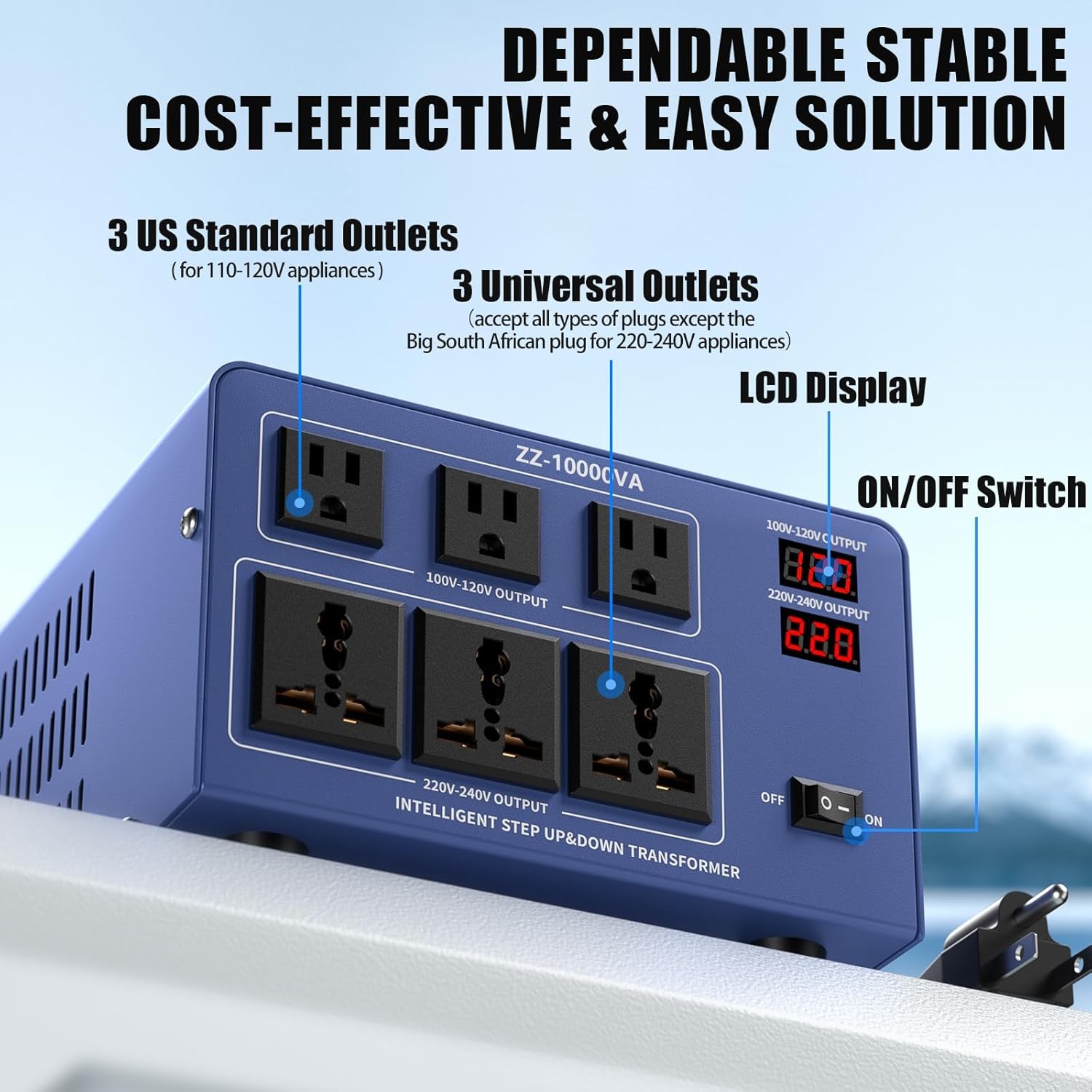
Figure 2: Front panel with 3 US standard outlets, 3 universal outlets, LCD displays for 100-120V and 220-240V output, and an ON/OFF switch.

Figure 3: Key components including the Power Switch, Fuse (internal), Handle, and LCD Display.
4. Setup
- Unpacking: Carefully remove the converter from its packaging. Inspect for any signs of damage.
- Placement: Place the converter on a stable, flat, and dry surface. Ensure there is adequate space around the unit for proper ventilation. Do not place it on carpet or other soft surfaces that could block airflow.
- Power Connection: Plug the converter's power cord into a suitable wall outlet. The converter will automatically detect the input voltage (110-120V or 220-240V).
- Appliance Connection: Identify the voltage requirement of your appliance.
- For 110-120V appliances, plug them into the US standard outlets.
- For 220-240V appliances, plug them into the universal outlets.
Important: Always ensure the appliance's wattage does not exceed the recommended load capacity of the converter (8000W for this 10000W model) and that the total load across all outlets does not exceed 70% of the converter's capacity.
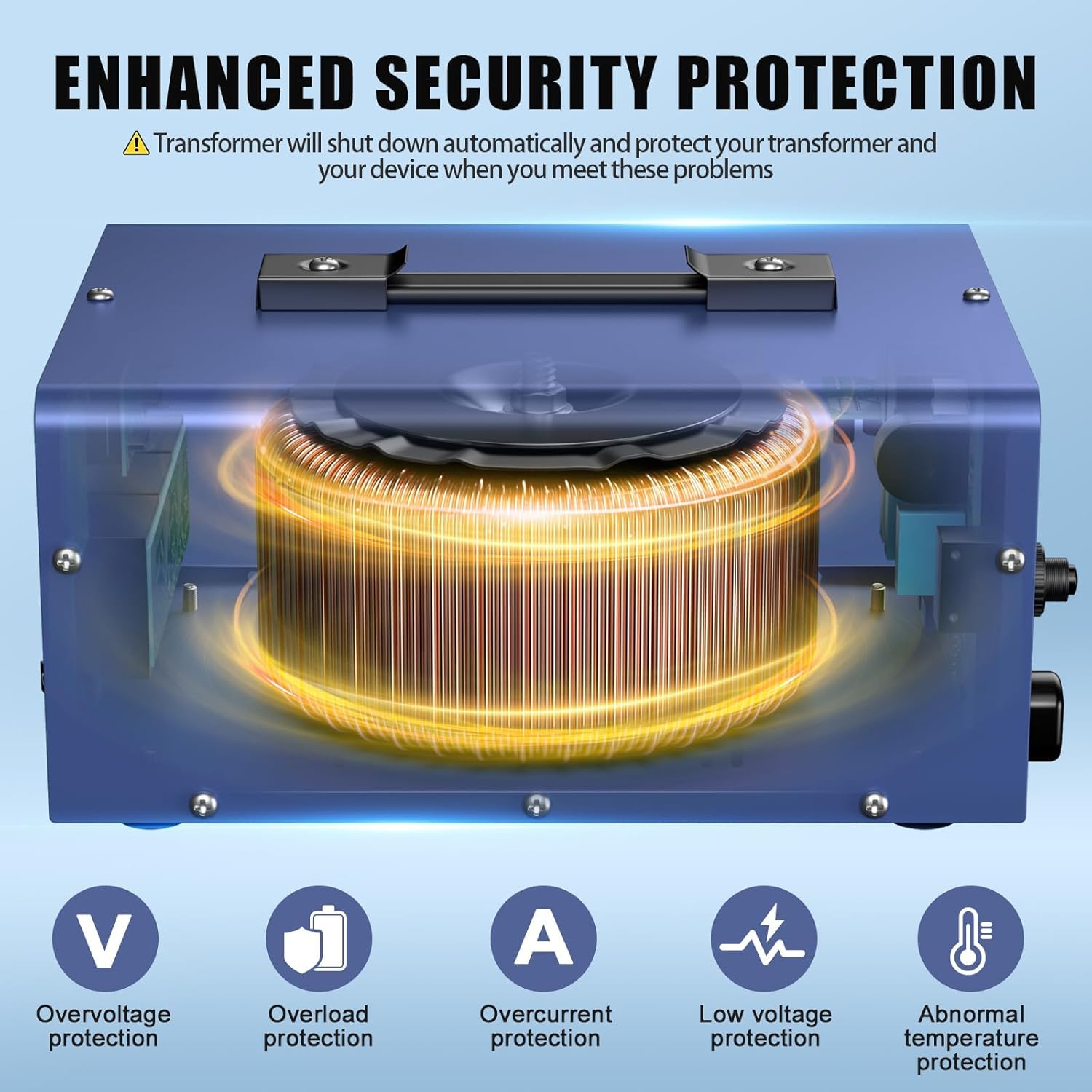
Figure 4: The converter connected to various devices, demonstrating its multi-outlet capability.
5. Operating Instructions
- Power On: After connecting the converter to the wall outlet and your appliances to the appropriate output sockets, press the ON/OFF switch to the 'ON' position.
- Automatic Voltage Recognition: The converter will automatically detect the input voltage and adjust its output accordingly. The LCD displays will show the current output voltage for both 100-120V and 220-240V lines.
- Monitoring Output: Observe the LCD displays to confirm the correct voltage is being supplied to your devices.
- Power Off: When you are finished using the converter, press the ON/OFF switch to the 'OFF' position. Disconnect appliances before unplugging the converter from the wall outlet.

Figure 5: The automatic voltage recognition chip simplifies operation by eliminating manual input voltage selection.
6. Maintenance
- Cleaning: Ensure the converter is turned off and unplugged before cleaning. Use a soft, dry cloth to wipe the exterior. Do not use liquid cleaners or solvents.
- Storage: Store the converter in a cool, dry place away from direct sunlight and moisture when not in use.
- Inspection: Periodically check the power cord and the converter for any signs of damage. If damage is found, discontinue use and contact support.
7. Troubleshooting
| Problem | Possible Cause | Solution |
|---|---|---|
| No power to converter/appliances |
|
|
| Overload protection activated (converter shuts down) | Total wattage of connected appliances exceeds 70% of converter's capacity (e.g., over 8000W for 10000W model). |
|
| Incorrect voltage output displayed | Appliance plugged into the wrong type of outlet (e.g., 110V appliance into 220V outlet). | Verify that appliances are plugged into the correct output sockets (US outlets for 110-120V, Universal outlets for 220-240V). The automatic recognition is for input, not for directing output to specific outlets. |
| Converter is overheating |
|
|

Figure 6: Illustration of the internal toroidal transformer and various protection mechanisms including overvoltage, overload, overcurrent, low voltage, and abnormal temperature protection.
8. Specifications
| Feature | Specification |
|---|---|
| Model Number | SF20250614B0CGVDZ53S |
| Brand | ROARBATT |
| Power Capacity | 10000W (Max), 8000W (Recommended Continuous Load) |
| Input Voltage | Automatic recognition of 110-120V or 220-240V |
| Output Voltage | 110-120V (via US outlets), 220-240V (via Universal outlets) |
| Total Power Outlets | 6 (3 US Standard, 3 Universal) |
| Plug Format (Input) | Type A (USA Grounded 3-Prong Plug) |
| Dimensions (L x W x H) | 23.7 x 12.95 x 10.67 inches (Package) |
| Weight | 27.07 Pounds (Package) |

Figure 7: Overview of the converter's dimensions and integrated protection features.
9. Warranty and Support
For warranty information, please refer to the documentation provided with your purchase or contact the seller directly. ROARBATT is committed to providing quality products and customer satisfaction.
If you encounter any issues or have questions regarding your ROARBATT 10000W Voltage Converter, please contact ROARBATT customer support through the retailer where the product was purchased or visit the official ROARBATT store for assistance.
ROARBATT Store: https://www.amazon.com/stores/ROARBATT/page/4818A0DB-F8A7-4067-A389-D9806003E66A