
1. Safety Information
Please read and understand all safety information before using the AVAPOW A68 Jump Starter. Failure to follow these instructions may result in electric shock, fire, or serious injury.
- Always ensure proper polarity when connecting the jumper cables to the vehicle battery. Connecting incorrectly can cause damage to the jump starter, vehicle, or result in injury.
- Do not short circuit the jumper clamps. Avoid connecting the positive and negative clamps together.
- Use the jump starter in a well-ventilated area.
- Keep the device away from children.
- Do not expose the jump starter to rain or extreme temperatures.
- If the product alarms due to incorrect connection of positive and negative poles, immediately disconnect the clamps to prevent safety problems.
- Do not attempt to disassemble or modify the jump starter. Servicing should only be performed by qualified personnel.
2. Product Overview & Components
The AVAPOW A68 Jump Starter is a powerful and versatile device designed to jump start vehicles and charge electronic devices. It comes with the following components:
- AVAPOW A68 Jump Starter Unit
- Smart Jumper Cables
- 18W Wall Charger
- USB-C Charging Cable
- Storage Case
Product Features

Figure 2.1: The AVAPOW A68 Jump Starter unit, smart jumper cables, 18W wall charger, and various charging cables, all neatly organized in its carrying case.

Figure 2.2: Design description highlighting the power button, battery indicator lights, Type-C input, USB1/USB2 outputs, DC output, EC5 output/dust cover, and ultra-bright LED light.
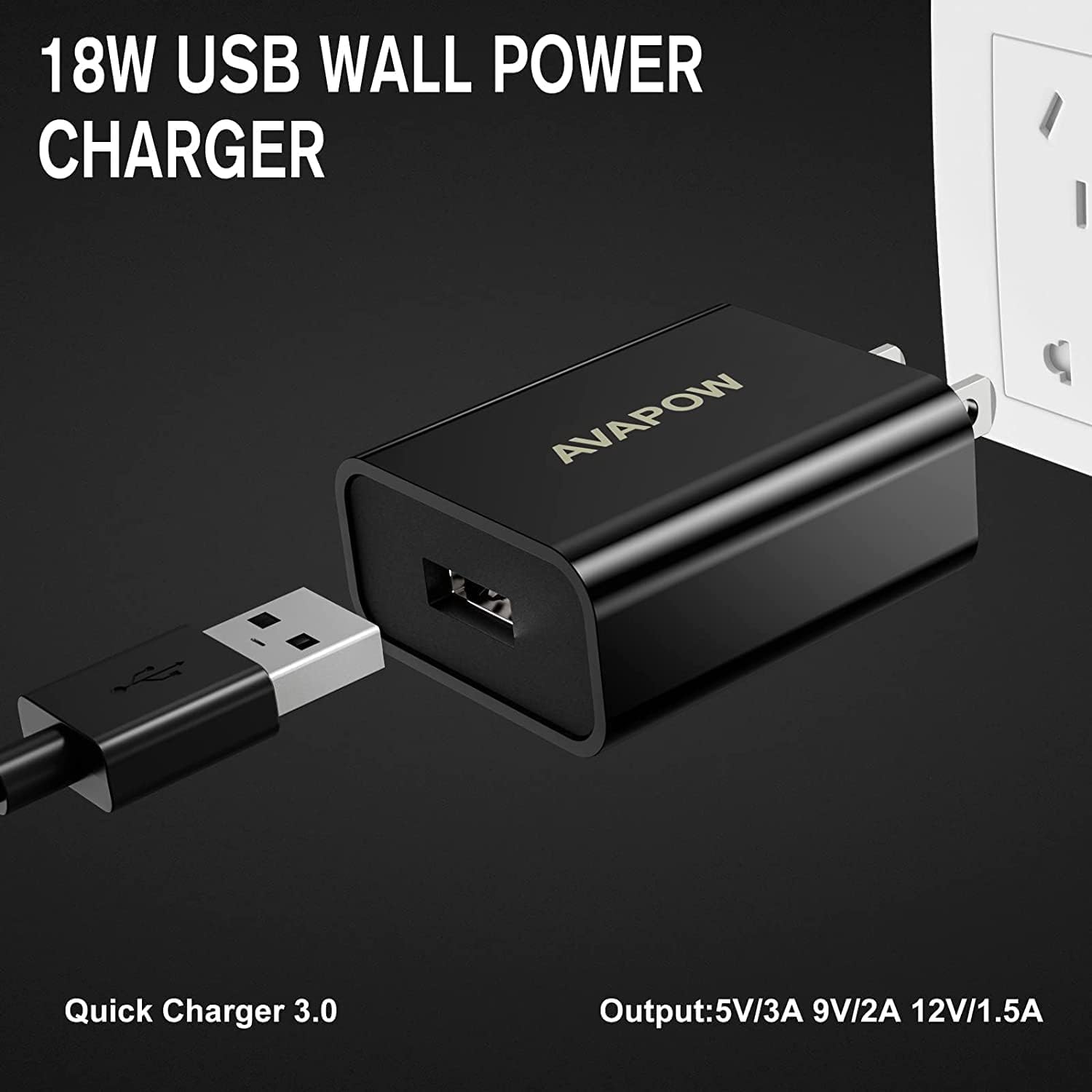
Figure 2.3: The included 18W USB Wall Power Charger, featuring Quick Charger 3.0 technology with output specifications of 5V/3A, 9V/2A, and 12V/1.5A.

Figure 2.4: Illustration of the Force Start Function button. For completely dead batteries (voltage <2V), long press the red button for 3 seconds until the middle indicator light turns green.
3. Setup & Charging
Initial Charging
Before first use, fully charge the AVAPOW A68 Jump Starter. The unit typically comes partially charged, but a full charge ensures optimal performance.
Charging the Jump Starter
Use the provided 18W wall charger and USB-C cable to charge the jump starter. The charging time is approximately 3-6 hours, depending on the current battery level and the specific AVAPOW jump starter model (e.g., A18: 3H, A28: 4H, A58: 5H, A68: 6H).

Figure 3.1: The 18W wall charger can be used to charge the jump starter or other compatible devices like smartphones, offering fast charging capabilities.

Figure 3.2: Example of the AVAPOW charger connected to a jump starter, illustrating approximate charging times for various AVAPOW models (A07: 2.5H, A17: 3H, A27: 4H).
4. Operating Instructions
4.1. Jump Starting a Vehicle
The AVAPOW A68 can safely start all gas engines and diesel engines, including those with drained batteries. It is suitable for 12-volt cars, trucks, motorcycles, boats, RVs, tractors, ATVs, UTVs, lawnmowers, and snowmobiles.
- Connect Jumper Cables: Open the dust cover on the jump starter and firmly insert the smart jumper cable plug into the EC5 output port.
- Attach Clamps: Connect the red (positive, +) clamp to the positive terminal of the vehicle battery. Connect the black (negative, -) clamp to the negative terminal of the vehicle battery. Ensure a secure connection.
- Check Indicator: The smart jumper cable unit will show an indicator light. A solid green light indicates a correct connection and readiness to jump start. If the light is red or flashing, check connections and battery status.
- Force Start (if needed): If the vehicle battery is completely dead (voltage <2V) and the jump starter does not automatically detect it, long press the 'Force Start' button on the smart jumper cable for 3 seconds until the middle indicator light turns green.
- Start Vehicle: Once the green light is solid, start your vehicle's engine.
- Remove Clamps: After the engine starts, immediately remove the jumper clamps from the vehicle battery, then disconnect the smart jumper cable from the jump starter unit.

Figure 4.1: The AVAPOW A68 Jump Starter is capable of starting all 12V vehicles, including both gas and 12L diesel engines, with its 6000A super peak current.
4.2. Using as a Portable Power Bank
The AVAPOW A68 is equipped with 2 USB output ports (USB1 and USB2), including one quick-charging port (5V/3A 9V/2A 12V/1.5A). It can charge cellphones, tablets, Kindles, digital cameras, and other USB-powered devices.
- Connect your device's USB charging cable to one of the USB output ports on the jump starter.
- Press the power button on the jump starter to begin charging.
4.3. Using the LED Flashlight
The jump starter features an ultra-bright LED light for emergency situations or working in low-light conditions.
- To turn on the flashlight, press and hold the power button for a few seconds.
- Press the power button again to cycle through different light modes (e.g., solid, strobe, SOS).
- Press and hold the power button again to turn off the flashlight.
5. Maintenance
Proper maintenance will extend the life of your AVAPOW A68 Jump Starter.
- Storage: Store the jump starter in a cool, dry place away from direct sunlight and extreme temperatures. Use the provided carrying case for protection.
- Recharging: For optimal battery life, recharge the jump starter every 3-6 months, even if it has not been used. This prevents deep discharge and maintains battery health.
- Cleaning: Wipe the unit with a soft, dry cloth. Do not use harsh chemicals or abrasive cleaners.
- Cable Care: Inspect jumper cables and clamps for any damage before each use. Ensure they are clean and free of corrosion.
6. Troubleshooting
If you encounter issues with your AVAPOW A68 Jump Starter, refer to the following common problems and solutions:
| Problem | Possible Cause | Solution |
|---|---|---|
| Jump starter does not turn on. | Battery is completely drained. | Charge the jump starter fully using the provided wall charger. |
| Vehicle does not start after connecting. | Incorrect clamp connection (polarity reversed). Vehicle battery is extremely dead (below 2V). Poor connection to battery terminals. | Ensure clamps are connected correctly (red to +, black to -). Use the 'Force Start' function if the battery is completely dead. Clean battery terminals and ensure clamps are securely attached. |
| Jump starter gets hot during charging/use. | Normal operation (slight warmth). Overcharging/Over-current (safety protection activated). | A slight warmth is normal. If it becomes excessively hot, disconnect and allow to cool. The wall charger has a protection system against overcharging, over-currents, and overheating. |
| USB devices are not charging. | Jump starter is off. Cable issue. | Press the power button to activate USB output. Try a different USB cable. |
If the problem persists after trying these solutions, please contact AVAPOW customer support.
7. Specifications
| Feature | Specification |
|---|---|
| Brand | AVAPOW |
| Model Number | AVAPOW-A68-6000A-JUMP-STARTER-bf292704f0 |
| Peak Output Current | 6000 Amps |
| Amperage | 6000 Amps |
| Manufacturer | AVAPOW |
| USB Output 1 | 5V/3A, 9V/2A, 12V/1.5A (Quick Charge) |
| USB Output 2 | 5V/2.4A |
| Type-C Input | 5V/3A, 9V/2A, 12V/1.5A |
| DC Output | 12V/10A |
| Compatible Engine Types | All Gas Engines, All Diesel Engines |
8. Warranty & Support
For warranty information, product support, or technical assistance, please refer to the documentation included with your purchase or visit the official AVAPOW website. Keep your purchase receipt as proof of purchase for any warranty claims.
AVAPOW Direct is the seller of this product on Amazon. For specific inquiries, you may contact them directly through the Amazon platform.


