
1. Introduction
Thank you for purchasing the TEC-SITAZID-C Digital 3-in-1 Stud Finder and Wall Scanner. This versatile device is designed to accurately detect the location of studs (wood), metal objects (such as pipes), and live AC wires behind walls. It is an essential tool for DIY projects, new construction, installing shelves, frames, panels, or fire alarms, ensuring safe and precise drilling or mounting.
Please read this manual carefully before using the device to ensure proper operation and to prevent potential hazards.
2. Safety Information
- Always exercise caution when working with walls. Do not rely solely on this device to avoid electrical wires or pipes. Always turn off power to the area you are working on if there is any doubt.
- Do not expose the device to moisture or extreme temperatures.
- Keep the device away from children.
- Ensure the battery is inserted correctly according to polarity markings.
- Remove the battery if the device will not be used for an extended period.
3. Product Overview
The TEC-SITAZID-C features a clear digital display, a power/select button, and an ergonomic design for comfortable use. It offers three distinct detection modes for various materials.

Figure 1: Front view of the TEC-SITAZID-C Stud Finder, highlighting its digital display and the three selectable detection modes.

Figure 2: The device features an anti-slip design for secure handling and is compact enough to fit in a pocket. It emits a beep sound upon detection.
4. Setup
4.1 Battery Installation
- Locate the battery compartment on the back of the device.
- Open the battery compartment cover.
- Insert one 6F22 type 9V battery (sold separately), ensuring correct polarity (+/-).
- Close the battery compartment cover securely.
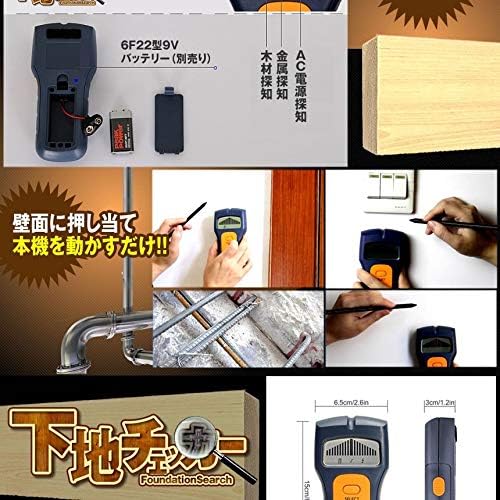
Figure 3: Illustration of battery installation and various usage scenarios for the stud finder.
5. Operating Instructions
5.1 Power On/Off
Press the 'SELECT' button to turn the device on. The device will automatically power off after a period of inactivity to conserve battery life.
5.2 Selecting Detection Mode
After powering on, press the 'SELECT' button repeatedly to cycle through the three detection modes:
- Metal Detection: For locating metal pipes, rebar, or other metallic objects.
- Wood Detection: For finding wooden studs or beams.
- AC Power Detection: For identifying live AC electrical wires.
The selected mode will be indicated on the digital display.
5.3 Scanning Procedure
- Select the desired detection mode.
- Place the device flat against the wall surface. Ensure full contact.
- Slowly slide the device horizontally across the wall.
- Observe the digital display. As the device approaches a target, the signal strength indicator will increase.
- When the device is directly over the center of the target, the signal strength will be at its maximum, and the device will emit an audible beep. Mark this location.
- Repeat the scan from the opposite direction to confirm the edges and center of the detected object.

Figure 4: Proper technique for using the stud finder: press against the wall and slide horizontally to detect hidden objects.
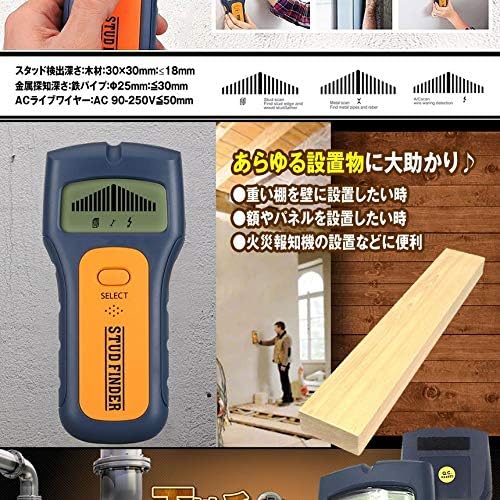
Figure 5: The stud finder is useful for various installations, including heavy shelves, frames, panels, and fire alarms. Detection depths are also illustrated.
6. Maintenance
- Clean the device with a soft, dry cloth. Do not use abrasive cleaners or solvents.
- Store the device in a cool, dry place, away from direct sunlight and extreme temperatures.
- Remove the battery if the device is not used for extended periods to prevent leakage.
7. Troubleshooting
- Device does not power on: Check if the 9V battery is inserted correctly and has sufficient charge. Replace the battery if necessary.
- Inaccurate readings: Ensure the device is held flat against the wall and moved slowly. Calibrate by moving it away from any known objects before scanning. Environmental factors like humidity or wall material can affect accuracy.
- No detection: Verify that the correct detection mode is selected for the target material. Ensure the object is within the specified detection depth.
8. Specifications
| Feature | Specification |
|---|---|
| Model | TEC-SITAZID-C |
| Dimensions | Approx. 155 x 72 x 28 mm |
| Weight (without battery) | Approx. 127 g |
| Power Supply | 1 x 6F22 type 9V battery (sold separately) |
| Stud Detection Depth (Wood) | Wood (30x30mm): ≤18 mm |
| Metal Detection Depth (Iron Pipe) | Iron Pipe (Φ25mm): ≤30 mm |
| AC Live Wire Detection Depth | AC 90-250V: ≤50 mm |
| Display Type | Digital |
| Material | Iron (device casing may include other materials) |
9. Warranty and Support
As an imported product, support is provided only for initial defects. Please inspect the product upon receipt. Minor scratches or dirt may be present due to the nature of imported goods.