
1. Introduction
This manual provides essential information for the safe and efficient operation, installation, and maintenance of your Lion Energy UT 1300 BT HTR Lithium Deep Cycle Battery. Please read this manual thoroughly before using the product to ensure proper handling and to maximize its lifespan and performance.
The Lion Energy UT 1300 BT HTR is a 12.8V, 105Ah (1344Wh) Lithium Iron Phosphate (LiFePO4) deep cycle battery designed for various applications including RVs, marine, solar energy systems, and general backup power. It features integrated Bluetooth monitoring and an internal heating system for enhanced performance in colder environments.

Figure 1: Front view of the Lion Energy UT 1300 BT HTR battery, showcasing its robust design and terminal posts.
2. Safety Information
Always observe the following safety precautions to prevent injury or damage to the battery and connected equipment:
- Do not short-circuit the battery terminals.
- Do not immerse the battery in water or expose it to excessive moisture.
- Do not expose the battery to fire or extreme heat.
- Do not disassemble, crush, or puncture the battery.
- Use only compatible chargers and charging methods specified by Lion Energy.
- Ensure proper ventilation during charging and discharge.
- Wear appropriate personal protective equipment (PPE) such as gloves and eye protection when handling batteries.
- Keep out of reach of children.
- In case of fire, use a Class D fire extinguisher. Water can exacerbate lithium battery fires.
Proposition 65 Warning: This product can expose you to chemicals which are known to the State of California to cause cancer and birth defects or other reproductive harm. For more information go to www.P65Warnings.ca.gov.
3. Product Features
The Lion Energy UT 1300 BT HTR battery incorporates advanced technology for reliable and long-lasting power:
- Lithium Iron Phosphate (LiFePO4) Chemistry: Offers superior cycle life, enhanced safety, and stable performance compared to traditional lead-acid batteries.
- Bluetooth Monitoring: Connect to your mobile device to monitor battery capacity, voltage, current, temperature, and other vital statistics in real-time.
- Internal Heating System: Enables charging in sub-freezing temperatures by automatically warming the battery cells.
- Battery Management System (BMS): Built-in protection against overcharge, over-discharge, over-current, and short-circuiting, ensuring optimal battery health and safety.
- Lightweight Design: Weighs approximately 23 pounds, making it highly portable for various applications.

Figure 2: Key features of the Lion Energy UT 1300 BT HTR, including deep cycle lithium, Bluetooth compatibility, portability, and LiFePO4 chemistry.
4. Setup and Installation
4.1 Unpacking
Carefully remove the battery from its packaging. Inspect the battery for any visible damage. If damage is observed, contact Lion Energy support immediately.
4.2 Initial Charge
It is recommended to fully charge the battery before its first use. Connect a compatible LiFePO4 charger to the battery terminals. Ensure the charger's voltage and current settings are appropriate for a 12.8V LiFePO4 battery (typically 13.9V-14.6V charging voltage, up to 100A maximum charge rate).
4.3 Connecting to a System
When connecting the battery to your system (e.g., RV, solar inverter), follow these steps:
- Ensure all connected equipment is turned off.
- Connect the positive (+) terminal of the battery to the positive terminal of your system using appropriate gauge cables.
- Connect the negative (-) terminal of the battery to the negative terminal of your system using appropriate gauge cables.
- Ensure all connections are tight and secure to prevent arcing or poor performance.
- Verify polarity before turning on any equipment.
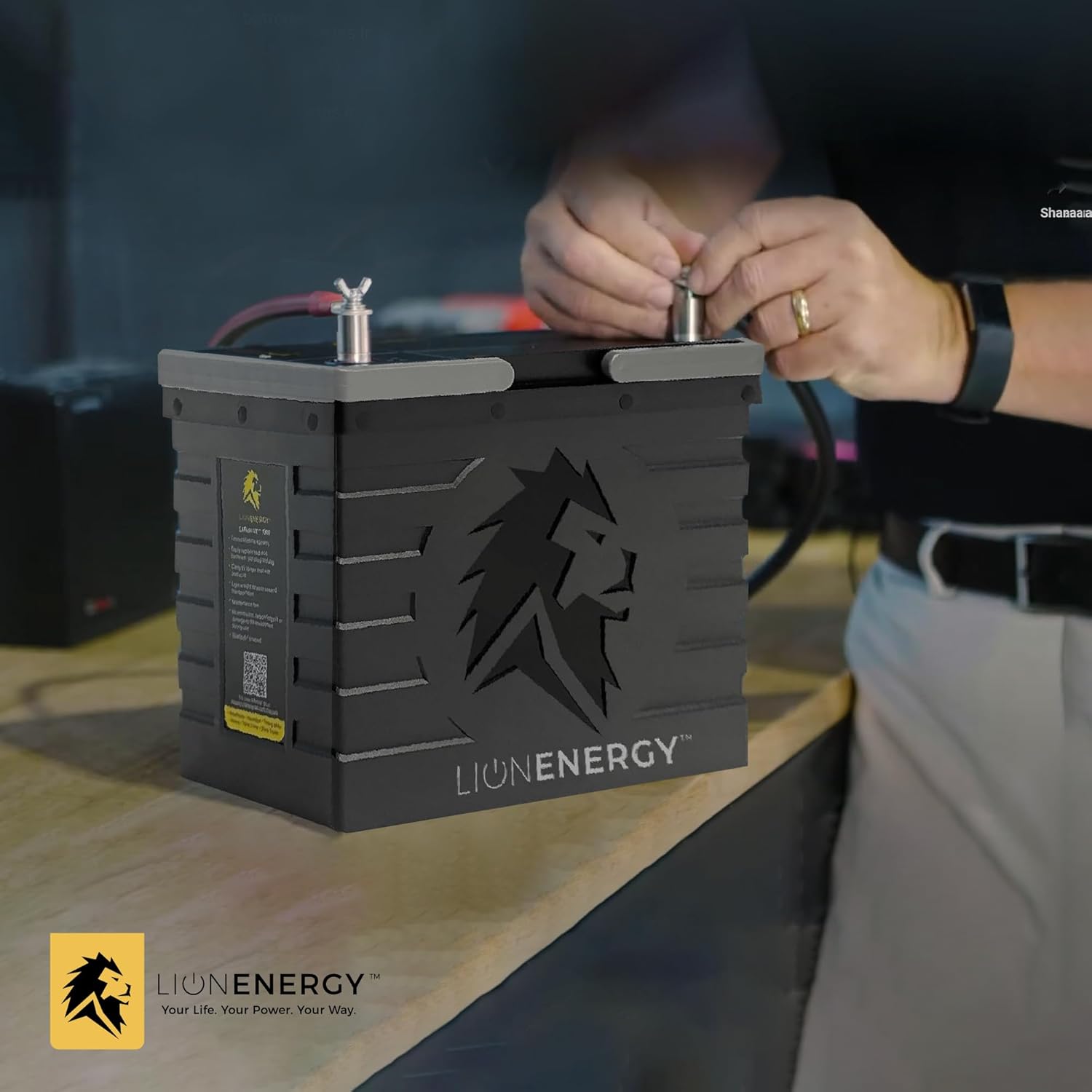
Figure 3: Proper connection of battery cables to the terminals, ensuring secure contact.
5. Operating the Battery
5.1 General Use
The UT 1300 BT HTR is designed for deep cycle applications, providing consistent power for extended periods. It can be used in various setups:

Figure 4: Common applications for the Lion Energy UT 1300 BT HTR battery, such as RVs, boats, off-grid systems, and overlanding vehicles.
5.2 Bluetooth Monitoring
Download the official Lion Energy app from your device's app store. Enable Bluetooth on your mobile device and open the app. The app will detect your UT 1300 BT HTR battery, allowing you to view real-time data such as:
- State of Charge (SOC)
- Voltage
- Current (charge/discharge)
- Temperature
- Cycle Count
5.3 Charging
The battery can be charged using various sources, including solar panels, AC chargers, and vehicle alternators, provided they are compatible with LiFePO4 batteries and adhere to the recommended charging parameters. The internal heater will activate automatically if the battery temperature is too low for safe charging, ensuring optimal charging conditions.

Figure 5: The Lion Energy battery can be charged via solar panels, offering flexibility for off-grid power solutions.
6. Maintenance
The Lion Energy UT 1300 BT HTR battery requires minimal maintenance due to its LiFePO4 chemistry and integrated BMS. However, following these guidelines will help ensure its longevity:
- Regular Inspection: Periodically check the battery terminals and cables for corrosion, damage, or loose connections. Clean terminals with a wire brush if necessary.
- Cleaning: Keep the battery clean and free of dirt and debris. Use a dry cloth to wipe down the battery case. Do not use harsh chemicals or abrasive cleaners.
- Storage: If storing the battery for an extended period, ensure it is charged to approximately 50-70% State of Charge (SOC). Store in a cool, dry place, away from direct sunlight and extreme temperatures.
- Avoid Deep Discharge: While the BMS protects against over-discharge, consistently running the battery to 0% SOC can reduce its overall lifespan.
7. Troubleshooting
If you encounter issues with your Lion Energy UT 1300 BT HTR battery, refer to the following common problems and solutions:
| Problem | Possible Cause | Solution |
|---|---|---|
| Battery not charging | Loose connections, incompatible charger, BMS protection activated, low temperature | Check all cable connections. Ensure charger is LiFePO4 compatible. Verify battery temperature is within operating range (internal heater should activate if too cold). Reset BMS by disconnecting and reconnecting. |
| No power output | Battery discharged, BMS protection activated, loose connections | Check battery SOC via Bluetooth app. Recharge battery if low. Check for loose connections. Reset BMS. |
| Bluetooth app not connecting | Bluetooth disabled, app issue, battery too far | Ensure Bluetooth is enabled on your device. Restart the app. Move closer to the battery. Restart your mobile device. |
| Battery feels warm during operation | Normal operation under heavy load, internal heater active | Slight warmth is normal. If excessively hot, disconnect load and contact support. Ensure adequate ventilation. |
If the problem persists after attempting these solutions, please contact Lion Energy customer support for further assistance.
8. Specifications
Detailed technical specifications for the Lion Energy UT 1300 BT HTR battery:

Figure 6: Key performance metrics of the Lion Energy UT 1300 BT HTR, highlighting its 150A continuous output and 105Ah capacity.
| Specification | Value |
|---|---|
| Model | UT 1300 BT HTR |
| Battery Chemistry | Lithium Iron Phosphate (LiFePO4) |
| Nominal Voltage | 12.8V |
| Capacity | 105 Ah / 1344 Wh |
| Continuous Discharge Current | 150A |
| Maximum Charge Rate | Up to 100A |
| Recommended Charging Voltage | 13.9V - 14.6V |
| Operating Temperature (Discharge) | -4°F to 131°F (-20°C to 55°C) |
| Operating Temperature (Charge) | 32°F to 113°F (0°C to 45°C) - Internal heater extends range below 32°F |
| Weight | Approximately 23 lbs (10.4 kg) |
| Dimensions (L x W x H) | 10.2" x 6.6" x 8.8" (up to 9.8" with battery posts) |
| Cycle Life | 3,500+ cycles at 100% Depth of Discharge (DOD) |
| Bluetooth | Yes |
| Internal Heater | Yes |
9. Warranty and Support
The Lion Energy UT 1300 BT HTR battery is backed by a Limited Lifetime Warranty, reflecting the manufacturer's confidence in its durability and performance. For specific terms and conditions of the warranty, please refer to the official Lion Energy website or contact customer support.

Figure 7: The Lion Energy UT 1300 BT HTR offers over 3,500 life-cycles, weighs 23 lbs, is Bluetooth enabled, and comes with a Limited Lifetime Warranty.
For technical support, warranty claims, or any questions regarding your Lion Energy product, please visit the official Lion Energy website or contact their customer service department:
- Website: www.lionenergy.com
- Customer Service: Refer to the website for current contact information (phone, email, support portal).