
OPPO A38 Glowing Gold
OPPO A38 4G Dual-SIM Smartphone User Manual
Model: A38 Glowing Gold | Brand: OPPO
1. Introduction
Welcome to the user manual for your new OPPO A38 4G Dual-SIM Smartphone. This guide provides essential information to help you set up, operate, maintain, and troubleshoot your device. The OPPO A38 4G is designed for reliable performance, featuring a powerful Octa-core processor, 4GB of RAM, and 128GB of internal storage, expandable via microSDXC. It runs on Android 13 and is powered by a long-lasting 5000 mAh battery.

Figure 1: Front and back view of the OPPO A38 4G Smartphone in Glowing Gold.
2. Setup Guide
2.1. SIM Card and microSD Card Installation
The OPPO A38 4G supports Dual-SIM functionality and expandable storage. Ensure the device is powered off before inserting or removing cards.
- Locate the SIM card tray on the side of the phone.
- Insert the SIM ejector tool (if provided, otherwise a small paperclip) into the small hole on the tray to eject it.
- Place your Nano-SIM cards and/or microSDXC card into the designated slots on the tray, ensuring correct orientation.
- Gently push the tray back into the phone until it clicks into place.

Figure 2: Illustrates the SIM card tray and the use of the ejector tool for installation.
2.2. Initial Power On and Network Compatibility
Press and hold the Power button located on the side of the device until the OPPO logo appears. Follow the on-screen prompts to complete the initial setup, including language selection, Wi-Fi connection, and Google account setup.
Important Network Compatibility Note:
This smartphone is designed for GSM networks. It is not compatible with CDMA networks, including but not limited to VERIZON, SPRINT, and US CELLULAR in the USA. Please verify compatibility with your network provider for 3G or 4G/LTE services before use.
2.3. Charging the Device
Before first use, it is recommended to fully charge your OPPO A38 4G. Use the provided USB cable to connect the phone to a compatible power adapter or a computer's USB port.
- Connect the USB cable to the phone's USB port at the bottom.
- Connect the other end of the USB cable to a power source.
- The charging indicator will appear on the screen.
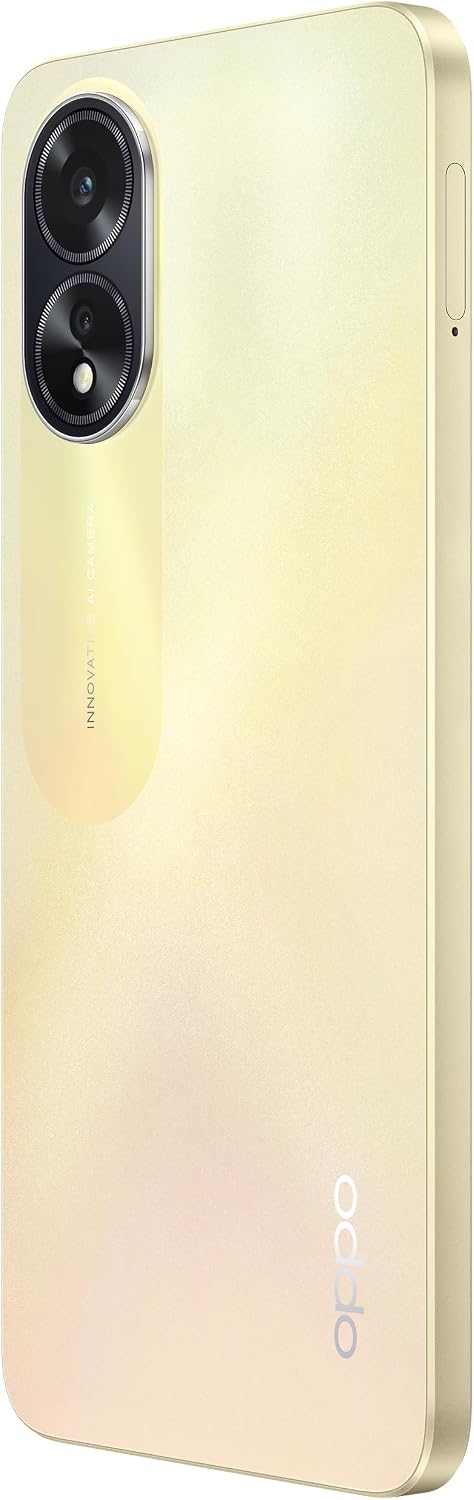
Figure 3: The bottom edge of the OPPO A38 4G, highlighting the USB-C charging port.
3. Operating Your Device
3.1. Basic Navigation and User Interface
The OPPO A38 4G features a responsive touchscreen for intuitive navigation. It runs on Android 13 with ColorOS 13.1, offering a user-friendly interface.
- Touch: Tap icons to open apps or select items.
- Swipe: Move your finger across the screen to scroll through pages or content.
- Pinch: Use two fingers to zoom in or out on photos and web pages.
- Power Button: Press to wake/sleep the screen. Press and hold to power off or restart.
- Volume Buttons: Adjust media volume, call volume, or ringtone volume.

Figure 4: Side view of the OPPO A38 4G, indicating the power and volume buttons.
3.2. Camera Functions
Capture high-quality photos and videos with the OPPO A38 4G's camera system.
- Rear Camera: Equipped with a 50 MP main sensor for detailed images.
- Front Camera: Features a 5 MP sensor for selfies and video calls.
To open the camera, tap the Camera icon on your home screen or lock screen. Select modes like Photo, Video, Portrait, or Night mode as needed.

Figure 5: Close-up view of the dual-camera module on the back of the OPPO A38 4G.
3.3. Connectivity
Your device supports various connectivity options:
- 4G/LTE: For high-speed mobile data.
- Wi-Fi: Connect to wireless networks for internet access.
- Bluetooth: Pair with wireless headphones, speakers, and other devices.
- GPS: For location services and navigation.
- USB: For charging and data transfer via the USB-C port.
4. Maintenance
4.1. Cleaning Your Device
To keep your OPPO A38 4G in optimal condition, clean it regularly:
- Use a soft, lint-free cloth to wipe the screen and body.
- Avoid using harsh chemicals, abrasive cleaners, or aerosol sprays.
- Do not expose the device to excessive moisture.
4.2. Software Updates
Regularly check for and install software updates to ensure your device has the latest features, security patches, and performance improvements. Go to Settings > About phone > Software update.
4.3. Battery Care
To prolong battery life:
- Avoid extreme temperatures.
- Do not let the battery drain completely before recharging frequently.
- Use the original charger and cable.
4.4. Storage Management
Periodically review your stored data. Delete unnecessary files, clear app caches, and consider moving large files to a microSD card or cloud storage to free up internal space.
5. Troubleshooting
If you encounter issues with your OPPO A38 4G, try the following steps:
- Device Not Powering On: Ensure the battery is charged. Connect the charger and wait a few minutes before attempting to power on again.
- Network Connectivity Issues: Check if your SIM card is properly inserted. Verify that your network provider supports GSM and 4G/LTE frequencies compatible with this device. Restart the phone.
- Apps Crashing/Freezing: Close and reopen the app. Clear the app's cache (Settings > Apps > [App Name] > Storage > Clear cache). Restart the device.
- Slow Performance: Close background apps. Free up storage space. Restart the device.
- Charging Problems: Ensure the USB cable and charger are not damaged. Try a different power outlet or USB port.
For persistent issues, consider performing a factory reset (Settings > System > Reset options > Erase all data (factory reset)). Note: A factory reset will erase all data on your phone. Back up important data before proceeding.
6. Specifications
Below are the key technical specifications for the OPPO A38 4G Smartphone:
| Feature | Specification |
|---|---|
| Model Name | Oppo A38 4G |
| Operating System | Android 13.0, ColorOS 13.1 |
| Processor | Mediatek MT6769 Helio G85 (12nm), Octa-core (2x2.0 GHz Cortex-A75 & 6x1.8 GHz Cortex-A55) |
| RAM | 4 GB |
| Internal Storage | 128 GB (expandable via microSDXC) |
| Display | 6.56 inches IPS LCD, 90Hz, 720 nits (peak), 720 x 1612 pixels (~269 ppi density) |
| Rear Camera | 50 MP |
| Front Camera | 5 MP |
| Battery Capacity | 5000 mAh Li-Po (non-removable) |
| Connectivity | 4G/LTE, Wi-Fi, Bluetooth, GPS, USB Type-C |
| Dimensions | 7.24 x 3.9 x 2.4 inches (Package) |
| Item Weight | 6.7 ounces (190 Grams) |
| Color | Glowing Gold |
7. Warranty and Support
For warranty information and customer support, please refer to the documentation included with your purchase or visit the official OPPO website. Warranty terms and conditions may vary by region and retailer.
Manufacturer: Oppo
Related documentsA38 Glowing Gold


Ask a question about this manual
Ask about setup, troubleshooting, compatibility, parts, safety, or missing instructions. Manuals+ will review the question and use this page’s manual context to help answer it.