
Introduction
Thank you for choosing the WMARK NG-130 Professional High-Speed Hair Clipper. This manual provides essential information for the safe and effective use, maintenance, and care of your new hair clipper. Please read it thoroughly before first use and keep it for future reference.
Safety Instructions
- Always unplug the clippers when not in use.
- Keep the blades away from the face and eyes during operation.
- Do not ingest or inhale small parts.
- Clean the clippers and guide combs after each use.
- Keep out of reach of children and pets.
- Always supervise children when the clippers are in use or accessible.
- Do not use the appliance near water or in wet environments.
- Do not disassemble the clipper; refer to qualified service personnel for repairs.
What's Included

Image: The WMARK NG-130 Hair Clipper package contents, including the clipper, guide combs, cleaning brush, oil, charging cable, and wireless charging base.
- WMARK NG-130 Hair Clipper (Silver)
- 6 Guide Combs (various sizes)
- 1 Cleaning Brush
- 1 Comb
- 2 Hair Stickers
- 1 Charging Cable
- 1 Cordless Charging Device
- Blade Oil
Setup
Charging the Clipper

Image: The WMARK NG-130 Hair Clipper being charged wirelessly on its charging base, showing the LCD display.
- Connect the charging cable to the cordless charging device and a suitable power source.
- Place the hair clipper onto the cordless charging device. The LCD display will indicate charging status.
- A full charge typically takes 3-4 hours and provides approximately 240 minutes of running time.
Attaching Guide Combs
- Select the desired guide comb based on the hair length you wish to achieve.
- Align the guide comb with the clipper blade and push it firmly until it clicks into place.
- To remove, gently pull the comb away from the blade.
Operating Instructions

Image: Examples of the WMARK NG-130 Hair Clipper being used for hair cutting and beard trimming.
- Ensure the clipper is fully charged or connected to a power source for corded operation.
- Attach the appropriate guide comb for your desired hair length.
- Turn on the clipper using the push and pull switch.
- Adjust the cutting length using the taper lever. The clipper features 4 adjustable levels for precise control.
- Begin trimming hair, moving the clipper against the direction of hair growth for an even cut.
- For detailed work or outlining, remove the guide comb and use the bare blade carefully.
- After use, turn off the clipper and unplug it if corded.
Key Features

Image: An internal diagram highlighting the 7000RPM motor, low noise operation, 4 adjustable cutting lengths, and wireless/wired charging capabilities of the WMARK NG-130.
- Powerful Motor: Equipped with a 7000RPM high-speed microchipped magnetic motor for efficient cutting.
- Precision Blades: Features an ultra-thin sharp moving blade made of 440C stainless steel fade blade for professional results.
- Adjustable Taper Lever: Easily adjust the lock-in length with the push and pull taper lever.
- LCD Display: Provides clear indication of battery power.
- Cordless & Corded Use: Offers flexibility for both cordless operation and corded use while charging.
Maintenance
Cleaning the Blades
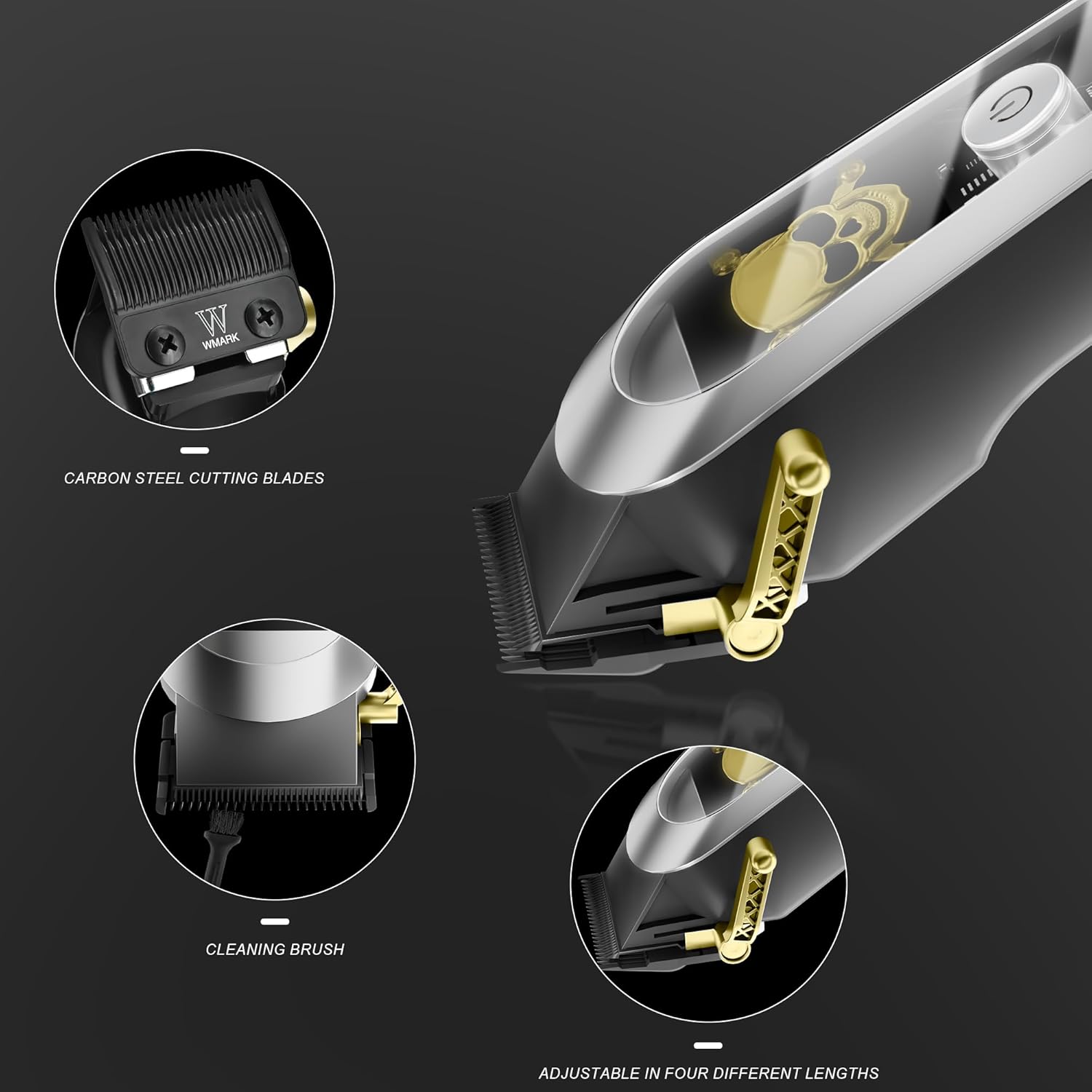
Image: A detailed view of the carbon steel cutting blades and the included cleaning brush for the WMARK NG-130 clipper.
- After each use, turn off and unplug the clipper.
- Remove any attached guide combs.
- Use the provided cleaning brush to remove loose hairs from the blades and the clipper body.
- Apply a small drop of blade oil (included) to the blades to ensure smooth operation and longevity. Turn the clipper on for a few seconds to distribute the oil, then turn it off.
- Store the clipper in a dry, safe place.
Troubleshooting
| Problem | Possible Cause | Solution |
|---|---|---|
| Clipper not turning on. | Low battery or not charged. | Charge the clipper fully using the provided charging device. |
| Clipper pulling hair or cutting poorly. | Blades are dull, dirty, or not oiled. | Clean the blades thoroughly and apply blade oil. If issues persist, consider professional sharpening or blade replacement. |
| Excessive noise or vibration. | Blades are loose or internal components are misaligned. | Ensure blades are securely fastened. If the problem continues, contact customer support. |
| Clipper not charging. | Charging cable or base is faulty, or connection is poor. | Check all connections. Try a different power outlet. Ensure the clipper is correctly seated on the wireless charging base. |
Specifications
Video: An overview of the WMARK NG-130 Hair Clipper, demonstrating its features, wireless charging, and high-speed motor.
- Model Number: SB-009 (NG-130)
- Brand: WMARK
- Color: Silver
- Blade Material: 440C Stainless Steel
- Motor Speed: 7000 RPM
- Power Source: Corded Electric / Cordless (Rechargeable)
- Battery Type: Lithium (2000 mAh)
- Charging Time: 3-4 Hours
- Running Time: Approximately 240 Minutes
- Adjustable Cutting Lengths: 4 levels via taper lever
- Included Components: Clipper, 6 Guide Combs, Comb, Cleaning Brush, Charging Cable, Cordless Charging Device
- Target Audience: Men
- Package Dimensions: 9.72 x 9.33 x 2.72 inches
- Item Weight: 2.01 Pounds
Warranty and Support
For warranty information or technical support, please refer to the product packaging or contact WMARK customer service directly. Keep your purchase receipt as proof of purchase.
Manufacturer: WMARK


