
SPANN CS-MIOP350SL
SPANN Replacement Battery User Manual
Model: CS-MIOP350SL for Medion MD96193, MD96220 Mobile GPS
Introduction
This manual provides essential instructions for the safe and effective use of your SPANN CS-MIOP350SL replacement battery. This battery is designed for compatibility with specific Medion Mobile GPS devices. Please read this manual thoroughly before installation and use.
Safety Information
Observe the following safety precautions to prevent damage to the battery, device, or personal injury:
- Do not attempt to disassemble, open, or service the battery pack.
- Do not crush, puncture, short external contacts, or dispose of in fire or water.
- Do not store above 60°C (140°F).
- Replace only with the battery pack designated for this product.
- Keep out of reach of children.
- Dispose of used batteries according to local regulations.
Compatibility
This SPANN replacement battery (Model: CS-MIOP350SL) is compatible with the following Medion Mobile GPS models and part numbers:
- Medion MD96193
- Medion MD96220
- Part Numbers: 541380530005, 541380530006, BL-LP1230/11-D00001U, BP-LP1200/11-D0001 MX, G025A-Ab, G025M-AB

Image: SPANN CS-MIOP350SL replacement battery, showing its label and connector. This battery is designed for specific Medion GPS devices.
Setup and Installation
Before installing the new battery, ensure your device is powered off and disconnected from any power source. Refer to your Medion GPS device's original manual for specific battery compartment access instructions.
- Power Off Device: Completely power off your Medion GPS device.
- Locate Battery Compartment: Identify and open the battery compartment on your GPS device. This may require a small screwdriver or prying tool, depending on the device model.
- Remove Old Battery: Carefully disconnect the old battery's connector from the device's port. Remove the old battery from its compartment.
- Insert New Battery: Place the SPANN CS-MIOP350SL battery into the compartment, ensuring proper orientation.
- Connect Battery: Align the battery connector with the device's port and gently push to secure the connection. Do not force the connector.
- Close Compartment: Securely close the battery compartment.
- Initial Charge: It is recommended to fully charge the new battery before its first use.
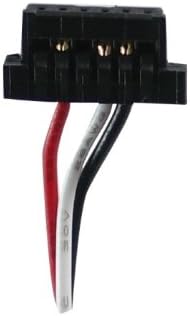
Image: Close-up view of the battery's connector, showing the wiring. Ensure this connector is properly aligned and seated during installation.
Operating Instructions
Once the battery is installed and fully charged, your Medion GPS device is ready for operation. The battery is a Lithium-ion type with a nominal voltage of 3.7V and a capacity of 1250mAh (4.63Wh).
- First Use: After installation, power on your GPS device. The device should recognize the new battery.
- Charging: Use the original charger provided with your Medion GPS device to charge the battery. The battery features built-in protection against over-charge.
- Discharging: The battery is designed with over-discharge protection to prolong its lifespan.
- Temperature: Operate the device within its recommended temperature range. The battery has over-heat protection.
Maintenance and Storage
Proper maintenance and storage will extend the lifespan of your SPANN replacement battery.
- Regular Charging: For optimal performance, avoid completely draining the battery frequently. Charge it regularly.
- Storage: If storing the battery for an extended period, ensure it is charged to approximately 50-70% capacity. Store in a cool, dry place, away from direct sunlight and extreme temperatures. Do not store above 60°C (140°F).
- Cleaning: Keep the battery contacts clean and free from dust or debris. Use a dry, soft cloth if cleaning is necessary.
- No Memory Effect: This Li-ion battery does not suffer from memory effect, meaning you do not need to fully discharge it before recharging.

Image: Top-down view of the battery's label, displaying model number, capacity, and voltage. This information is crucial for proper identification and maintenance.
Troubleshooting
If you encounter issues with your SPANN replacement battery, consider the following:
- Battery Not Charging:
- Ensure the charger is properly connected to both the device and a power outlet.
- Verify that the battery connector is securely seated in the device.
- Try using a different compatible charger if available.
- Device Not Powering On:
- Confirm the battery is fully charged.
- Check that the battery is correctly installed and connected.
- Ensure the device itself is not faulty (test with another known-good battery if possible).
- Shortened Battery Life:
- Ensure the battery has undergone an initial full charge cycle.
- Review device settings that might consume excessive power (e.g., screen brightness, GPS usage).
- Avoid extreme temperatures during operation and storage.
If issues persist, please contact customer support.
Specifications
| Model Number | CS-MIOP350SL |
| Battery Type | Lithium-ion (Li-ion) |
| Voltage | 3.7V |
| Capacity | 1250mAh / 4.63Wh |
| Dimensions (L x W x H) | 50.00 x 35.95 x 6.92 mm (approx. 1.97 x 1.42 x 0.27 inches) |
| Weight | 50g (approx. 1.76 ounces) |
| Protection Features | Over-charge, Over-discharge, Over-heat, Over-current, Short-circuit protection |
Warranty Information
This SPANN replacement battery comes with a 365-day warranty from the date of purchase. This warranty covers manufacturing defects and issues arising from normal use. It does not cover damage caused by misuse, accident, unauthorized modification, or improper installation.
Please retain your proof of purchase for warranty claims.
Customer Support
For any questions, concerns, or technical assistance regarding your SPANN replacement battery, please contact our customer support team. Refer to the retailer's website or your purchase documentation for contact details.
Our products undergo strict quality inspection. If you have any questions, please do not hesitate to contact us.
Ask a question about this manual
Ask about setup, troubleshooting, compatibility, parts, safety, or missing instructions. Manuals+ will review the question and use this page’s manual context to help answer it.