
1. Introduction
This user manual provides detailed instructions for the installation, operation, and maintenance of your WSDCAM Smart Bike Tail Light (Model: KS-SF31). This innovative device integrates multiple safety features into a single unit, including a tail light, turn signals, brake light, bike horn, and anti-theft alarm, enhancing your visibility and security during cycling.
2. Package Contents
Please verify that all items listed below are included in your package:
- WSDCAM Smart Bike Tail Light
- Wireless Remote Control
- Remote Bracket for Handlebar (silicone)
- Taillight Bracket for Rack Mount
- USB-C Charging Cable
- Hex Key
- Gaskets (4x)
- Bolts (2x)
- User Manual (this document)
3. Product Features
- 5-in-1 Functionality: Combines a rear bike light, turn signals, automatic brake light, electric bike horn, and anti-theft vibration alarm.
- Ultra-Bright Illumination: Features 31 high-end LED lights, providing up to 160 lumens for enhanced visibility day and night.
- Multiple Light Modes: Offers 6 distinct light modes: Slow Flashing, Breathing, Fast Blinking, Steady Light, Emergency Light, and OFF. Easily selectable via the wireless remote.
- Integrated Turn Signals: Left and right turn signals activated by the remote, accompanied by an audible click sound for clear indication to others.
- Smart Brake Light: Built-in auto sensor detects braking and automatically highlights the rear light for 2 seconds to alert following traffic. (Note: Not active in emergency modes).
- Anti-Theft Alarm: Vibration-activated alarm with a loud 110-decibel sound. Features 7 adjustable sensitivity levels to deter theft.
- Electric Bike Horn: Emits a 110-decibel sound with 3 adjustable volume levels and 3 distinct horn sounds: electric car horn, standard horn, or birdcall sound.
- Smart Auto ON/OFF: The tail light automatically turns off after 30 seconds of inactivity in dark environments (e.g., indoors or at night) and will turn back on when motion is detected. In bright environments, the light automatically turns off to save battery power (available in Slow Flashing and Breathing modes only).
- Wireless Remote Control: Remote attaches to handlebars (0.78 to 0.94 inches diameter) with a strong wireless range of approximately 98 to 196 feet.
- USB Rechargeable Battery: Equipped with a 3.7V 2000mAh rechargeable lithium battery, offering up to 70 hours of fast blinking on a full 6-hour charge.
- IP65 Waterproof Rating: Both the tail light and remote are designed to withstand water splashes and rain.
- Indicators: Includes charging level and low battery indicators.
4. Setup & Installation
4.1. Tail Light Installation (Rack Mount)
The WSDCAM Smart Bike Tail Light is designed for easy installation on your bike's cargo rack. Ensure your rack has suitable mounting holes.
- Align the taillight bracket with the mounting holes on your cargo rack.
- Insert the provided bolts through the bracket and rack holes.
- Secure the bolts with the nuts and gaskets, tightening them with the hex key until the bracket is firmly attached.
- Slide the tail light onto the mounted bracket until it clicks securely into place.

Image: The tail light unit shown with its cargo rack mounting bracket, indicating dimensions for compatibility.

Image: The WSDCAM Smart Bike Tail Light securely attached to a bicycle's rear cargo rack, with the wireless remote visible on the handlebar.
4.2. Wireless Remote Installation
The wireless remote comes with a silicone bracket for easy attachment to your bicycle handlebars.
- Choose a convenient location on your handlebar (diameter 0.78 to 0.94 inches).
- Wrap the silicone remote bracket around the handlebar.
- Secure the remote control into the bracket. The silicone material allows for flexible adjustment to various handlebar sizes and shapes without tools.
5. Operation
5.1. Power On/Off & Light Modes
To power on the tail light, press the main button on the light unit. Use the wireless remote to cycle through the 6 light modes:
- Slow Flashing: Gentle, continuous flash.
- Breathing: Light fades in and out smoothly.
- Fast Blinking: Rapid, continuous flash.
- Steady Light: Constant illumination.
- Emergency Light: Flashes yellow for emergency situations.
- OFF: Turns the light off.

Image: Visual representation of the six available light modes, demonstrating their patterns and intensity.
5.2. Turn Signals
To activate the turn signals, press the 'R' (Right) or 'L' (Left) button on the wireless remote. The corresponding side of the tail light will flash, accompanied by an audible click sound, similar to a car's turn signal. This alerts other road users to your intended direction.

Image: The tail light demonstrating its smart brake feature and directional turn signals (left and right).
5.3. Smart Brake Light
The tail light features an automatic brake light function. When the built-in sensor detects a reduction in speed (braking), the light will automatically highlight for 2 seconds to signal your deceleration to vehicles behind you. This feature is not available in emergency modes.
5.4. Bike Horn Function
Press the horn button on the remote control to activate the electric bike horn. The horn produces a loud 110-decibel sound. You can adjust the volume to 3 levels and choose from 3 different horn sounds: electric car horn, standard horn, or birdcall sound.
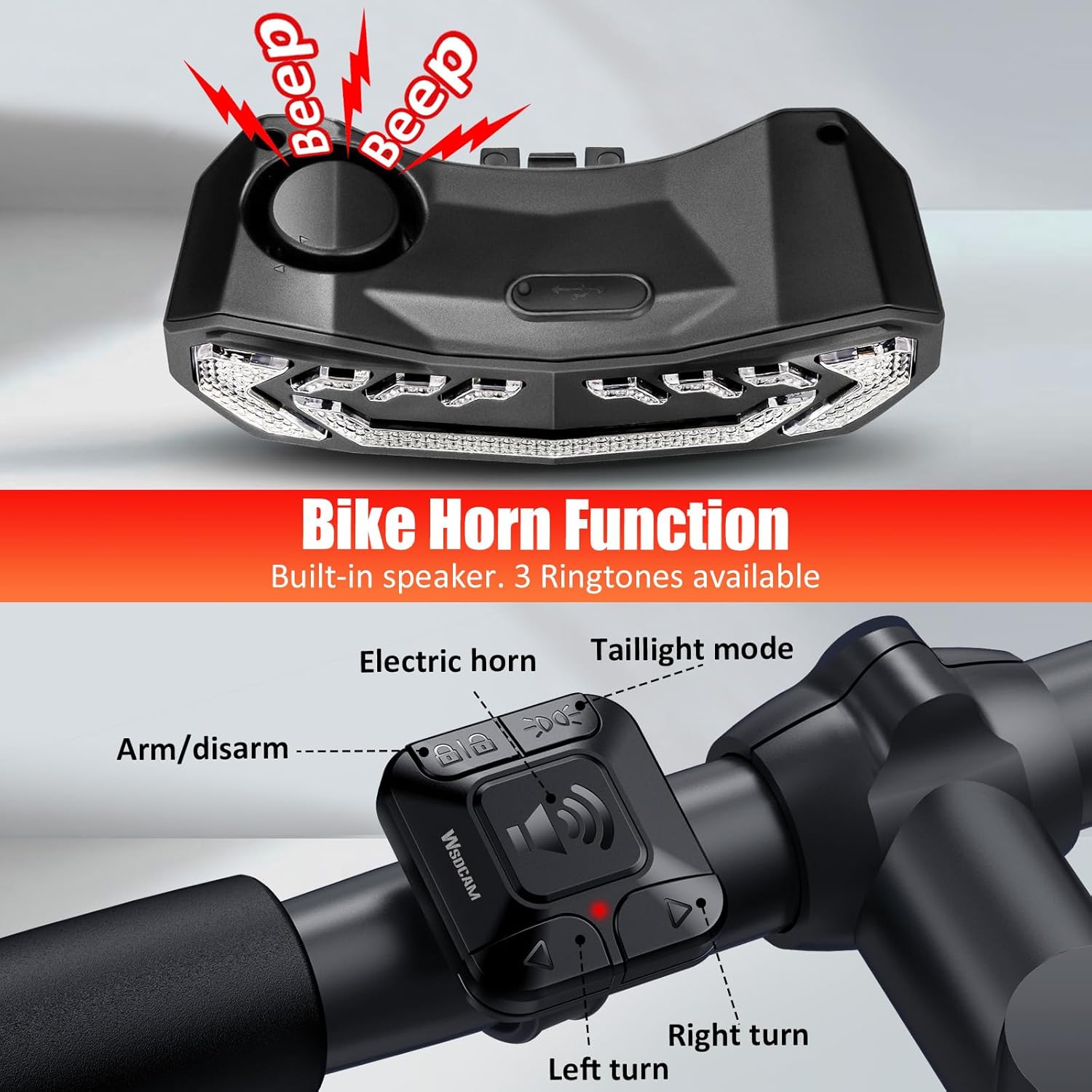
Image: The bike horn function of the tail light, showing the remote control and sound output.
5.5. Anti-Theft Vibration Alarm
To arm the anti-theft alarm, press the lock button on the remote. The alarm is activated by vibrations and will emit a loud 110-decibel sound to deter potential thieves. You can adjust the alarm's sensitivity to 7 levels, from a gentle touch to a strong impact, using the remote control settings.

Image: The anti-theft alarm feature in action, showing the tail light emitting alarm signals when the bike is disturbed.
5.6. Smart Auto ON/OFF
This feature is available in Slow Flashing and Breathing modes only. The tail light is designed to automatically turn off after 30 seconds of inactivity in dark environments (e.g., indoors or at night) and will turn back on when motion is detected. In bright environments, the light automatically turns off to save battery power.
6. Charging & Battery
The WSDCAM Smart Bike Tail Light is equipped with a 3.7V 2000mAh rechargeable lithium battery. It provides up to 70 hours of fast blinking with a full 6-hour charge.
- Charging: Use the provided USB-C cable to charge the tail light. A full charge typically takes about 6 hours.
- Charging Indicators: The light features a charging level indicator to show battery status.
- Low Battery Indicator: A low battery indicator will alert you when charging is needed.
- Remote Battery: The remote control uses a 3V CR2032 battery (included) which can last up to 3 years (based on 30 uses per day).
7. Maintenance
To ensure the longevity and optimal performance of your WSDCAM Smart Bike Tail Light, follow these maintenance guidelines:
- Cleaning: Wipe the light and remote with a soft, damp cloth. Avoid using abrasive cleaners or solvents.
- Waterproofing: The device has an IP65 waterproof rating, meaning it is protected against water jets from any direction. However, avoid submerging it in water. Ensure the USB charging port cover is securely closed when not charging.
- Storage: Store the device in a cool, dry place when not in use for extended periods.
8. Troubleshooting
If you encounter any issues with your WSDCAM Smart Bike Tail Light, please consider the following common solutions:
- Light not turning on: Ensure the battery is charged. Connect the light to the USB-C charger and check the charging indicator.
- Remote not responding: Check the remote control's battery (CR2032). Ensure the remote is within the effective wireless range (98-196 feet).
- Alarm sensitivity: If the alarm is too sensitive or not sensitive enough, adjust the sensitivity level using the remote control settings (7 levels available).
- Brake light not activating: Ensure the light is not in emergency mode, as this feature is not available in that specific mode.
For persistent issues or further assistance, please refer to the full user manual or contact WSDCAM customer support.
9. Specifications
| Feature | Specification |
|---|---|
| Brand | WSDCAM |
| Model | KS-SF31 |
| Light Output | Max 160 Lumens |
| Number of LEDs | 31 |
| Light Modes | 6 (Slow Flashing, Breathing, Fast Blinking, Steady Light, Emergency Light, OFF) |
| Alarm/Horn Noise Level | Up to 110dB |
| Waterproof Rating | IP65 |
| Tail Light Battery | 3.7V 2000mAh Lithium Battery (Rechargeable via USB-C) |
| Remote Battery | 3V CR2032 Battery |
| Full Charging Time | Approx. 6 hours |
| Tail Light Battery Life (Fast Flash) | Up to 70 hours |
| Tail Light Battery Life (Steady Mode) | Up to 30 hours |
| Remote Range | 98ft to 196ft (open area) |
| Remote Holder Compatibility | Handlebars 0.78 to 0.94 inches diameter |
| Material | Polycarbonate |
| Item Weight | 0.29 Kilograms |
10. Warranty & Support
The WSDCAM Smart Bike Tail Light comes with a 1-Year Warranty from the date of purchase. This warranty covers manufacturing defects and issues arising from normal use.
For warranty claims, technical support, or any questions regarding your product, please contact WSDCAM customer service through the retailer's platform or the official WSDCAM website. Please have your purchase details and product model number (KS-SF31) ready when contacting support.


