
OLIGHT O-OlanternMusicGNCamou#-GD-DE-FBA
OLIGHT Olantern Music Lantern User Manual
Model: O-OlanternMusicGNCamou#-GD-DE-FBA
Introduction
The OLIGHT Olantern Music is a versatile classic lantern designed for both illumination and audio entertainment. It combines a vintage aesthetic with modern features, offering warm and white light options with stepless dimming, and a powerful Bluetooth speaker system. This manual provides detailed instructions for setting up, operating, maintaining, and troubleshooting your Olantern Music.
Product Overview
Familiarize yourself with the components of your Olantern Music lantern.

Image: Detailed view of the Olantern Music, highlighting the adjustment knob, interconnection button, volume controls, Bluetooth button, light button, handle, indicator, white light LEDs, warm light LEDs, protective cover, USB dust plug, and stereo speaker area.
- Adjustment Knob: Used for power ON/OFF and stepless dimming of light.
- Interconnection Button: For pairing multiple Olantern Music units.
- Volume Controls (V+/V-): Adjusts audio volume.
- Bluetooth Button: Activates Bluetooth pairing mode.
- Light Button: Toggles between warm and white light modes.
- Handle: For carrying or hanging the lantern.
- Indicator: Shows battery status and charging.
- White Light LEDs: Provides bright, cool illumination.
- Warm Light LEDs: Provides a soft, ambient glow.
- Protective Cover: Shields the light source.
- USB Dust Plug: Protects the charging port.
- Stereo Speaker Area: Integrated audio output.
Setup
Charging the Lantern
Before first use, fully charge your Olantern Music. The lantern is equipped with a built-in rechargeable battery.
- Locate the USB charging port, usually protected by a dust plug.
- Connect the provided USB cable to the lantern and a compatible USB power source (e.g., wall adapter, power bank).
- The indicator light will show charging status. Refer to the indicator section for specific light behaviors.
- A full charge ensures optimal performance and runtime.

Image: The Olantern Music acting as an emergency power source, charging a smartphone via its USB port. This highlights its dual functionality beyond just light and music.
Operating Instructions
Light Operation
The Olantern Music offers both warm and white light, with stepless dimming for precise brightness control.
- Power On/Off: Rotate the adjustment knob clockwise to turn on the light. Continue rotating to increase brightness. Rotate counter-clockwise to decrease brightness and turn off.
- Switching Light Modes: Press the Light button to toggle between warm white light (Edison-style bulb) and cool white light (circular LED).
- Stepless Dimming: While the light is on, rotate the adjustment knob to smoothly adjust the brightness from 10 lumens to 300 lumens.

Image: Two Olantern Music units are shown, one emitting a warm, Edison-style glow and the other a bright, cool white light, illustrating the dual light source capability and stepless dimming feature.
Music Playback (Bluetooth)
Enjoy high-quality audio through the integrated Bluetooth speaker.
- Bluetooth Pairing: Press and hold the Bluetooth button until the indicator flashes, indicating pairing mode. On your device, search for "OLIGHT Olantern Music" and connect.
- Volume Control: Use the V+ and V- buttons to adjust the volume.
- Play/Pause: Press the Play/Pause button to control music playback.
- Stereo Pairing (TWS): To achieve true wireless stereo sound, ensure two Olantern Music units are powered on. On one unit, press and hold the Interconnection button until it enters pairing mode. The two units will automatically connect, providing left and right stereo channels.
- Multi-Unit Networking: For a broader sound experience, multiple Olantern Music units can be networked via Bluetooth 5.3 to create a sound network. Follow the stereo pairing steps for initial connection, then refer to the advanced settings for linking additional units.

Image: Two Olantern Music lanterns are placed on a wooden table outdoors, with blue sound waves emanating from them, symbolizing their ability to pair for stereo audio, enhancing the listening experience.

Image: A visual representation of the Olantern Music's integrated light and stereo design, emphasizing its 2*45mm full-range sound units and 80mm passive radiator for rich audio quality.
Additional Features
- Built-in Vibration Sensor: The button backlights will illuminate in white when vibrations are detected, making it easier to locate controls in low-light conditions.
- Emergency Powerhouse: The lantern can provide power to other devices via its USB port, acting as a portable power bank during critical moments.
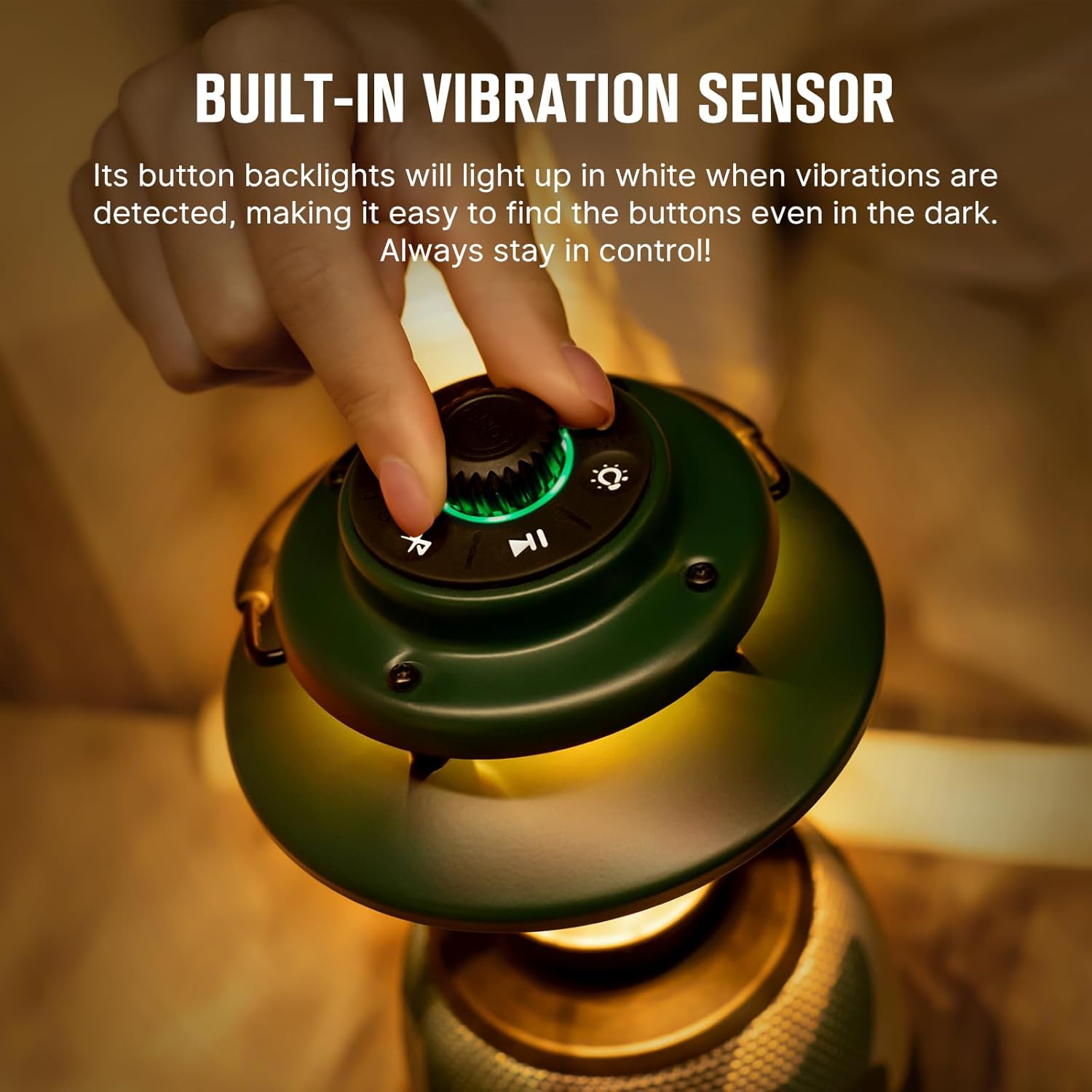
Image: A hand is shown adjusting the top knob of the Olantern Music, with the control buttons illuminated, demonstrating the built-in vibration sensor that lights up the buttons for easy visibility in the dark.
Maintenance
Proper maintenance ensures the longevity and optimal performance of your Olantern Music.
- Cleaning: Wipe the lantern with a soft, damp cloth. Do not use abrasive cleaners or solvents.
- Storage: Store the lantern in a cool, dry place when not in use. If storing for extended periods, charge the battery every 3-6 months to maintain battery health.
- Water Resistance: The Olantern Music is rated as waterproof (Étanche). While it can withstand splashes and rain, avoid submerging it in water for prolonged periods. Ensure the USB dust plug is securely closed when exposed to moisture.
- Battery Care: Avoid fully discharging the battery frequently. Charge it before it completely runs out to prolong its lifespan.
Troubleshooting
If you encounter issues with your Olantern Music, refer to the following common problems and solutions:
| Problem | Possible Cause | Solution |
|---|---|---|
| Lantern does not turn on. | Low battery; Power knob not rotated sufficiently. | Charge the lantern fully. Ensure the adjustment knob is rotated past the "OFF" position. |
| Light is dim or flickers. | Low battery; Dimming knob not adjusted correctly. | Charge the lantern. Rotate the adjustment knob clockwise to increase brightness. |
| Cannot connect via Bluetooth. | Bluetooth not in pairing mode; Device too far; Interference. | Press and hold the Bluetooth button to enter pairing mode. Ensure your device's Bluetooth is on and within range. Move closer to the lantern. |
| No sound from speaker. | Volume too low; Not connected via Bluetooth; Muted on source device. | Increase volume using V+ button. Ensure successful Bluetooth connection. Check volume on your connected device. |
| Stereo pairing (TWS) fails. | Units too far apart; One unit not in pairing mode. | Ensure both units are close to each other. Press and hold the Interconnection button on one unit to initiate TWS pairing. |
Specifications
Key technical specifications for the OLIGHT Olantern Music Lantern.
| Feature | Detail |
|---|---|
| Model Number | O-OlanternMusicGNCamou#-GD-DE-FBA |
| Max Output (Light) | 300 Lumens |
| Max Runtime (Light) | 110 Hours (Low Light Mode) |
| Music Playback Runtime | Up to 35 Hours (at 50% volume) |
| Light Modes | Orange Warm Light, White Cool Light (Stepless Dimming 10-300 lumens) |
| Speaker Configuration | 2*45mm Full-range Sound Units, 1*85mm Passive Radiator |
| Bluetooth Version | 5.3 (Supports TWS and Multi-unit Networking) |
| Battery Type | Built-in Lithium-ion (4 cells included) |
| Power Output (Discharging) | 18 Watts |
| Dimensions (L x W x H) | 12.4 x 12.4 x 23 cm (4.88 x 4.88 x 9.06 inches) |
| Weight | 1.28 kg (34.57 oz / 980g) |
| Material | Metal |
| Water Resistance Level | Waterproof (Étanche) |

Image: The Olantern Music hanging, with an overlay of its key specifications including Max Output (300 Lumens), Max Runtime (110 Hours), Weight (34.57oz/980g), Battery (Rechargeable Built-in), Dimension (ID124*H230mm), and Water Resistance (IPX5).
Warranty and Support
OLIGHT provides comprehensive customer support and warranty services for its products.
- Warranty Information: For detailed warranty terms and conditions, please refer to the official OLIGHT website or the warranty card included with your product.
- Customer Support: If you have any questions, require technical assistance, or need to report an issue, please contact OLIGHT customer service. Contact details can typically be found on the official OLIGHT website or product packaging.
- Online Resources: Visit the OLIGHT Brand Store for additional product information, FAQs, and updates.
Related documentsO-OlanternMusicGNCamou#-GD-DE-FBA


Ask a question about this manual
Ask about setup, troubleshooting, compatibility, parts, safety, or missing instructions. Manuals+ will review the question and use this page’s manual context to help answer it.