
1. Introduction
This manual provides detailed instructions for the use and maintenance of your MEDca Rechargeable Bluetooth Hearing Aids. These digital sound amplifiers are designed to enhance auditory experiences for seniors and adults, featuring Bluetooth connectivity, active noise cancellation, and a portable charging case. Please read this manual thoroughly before first use to ensure proper operation and longevity of your device.
2. What's in the Box
Carefully unpack your MEDca Rechargeable Bluetooth Hearing Aids and verify that all components are present:
- 1 Pair of Hearing Aids
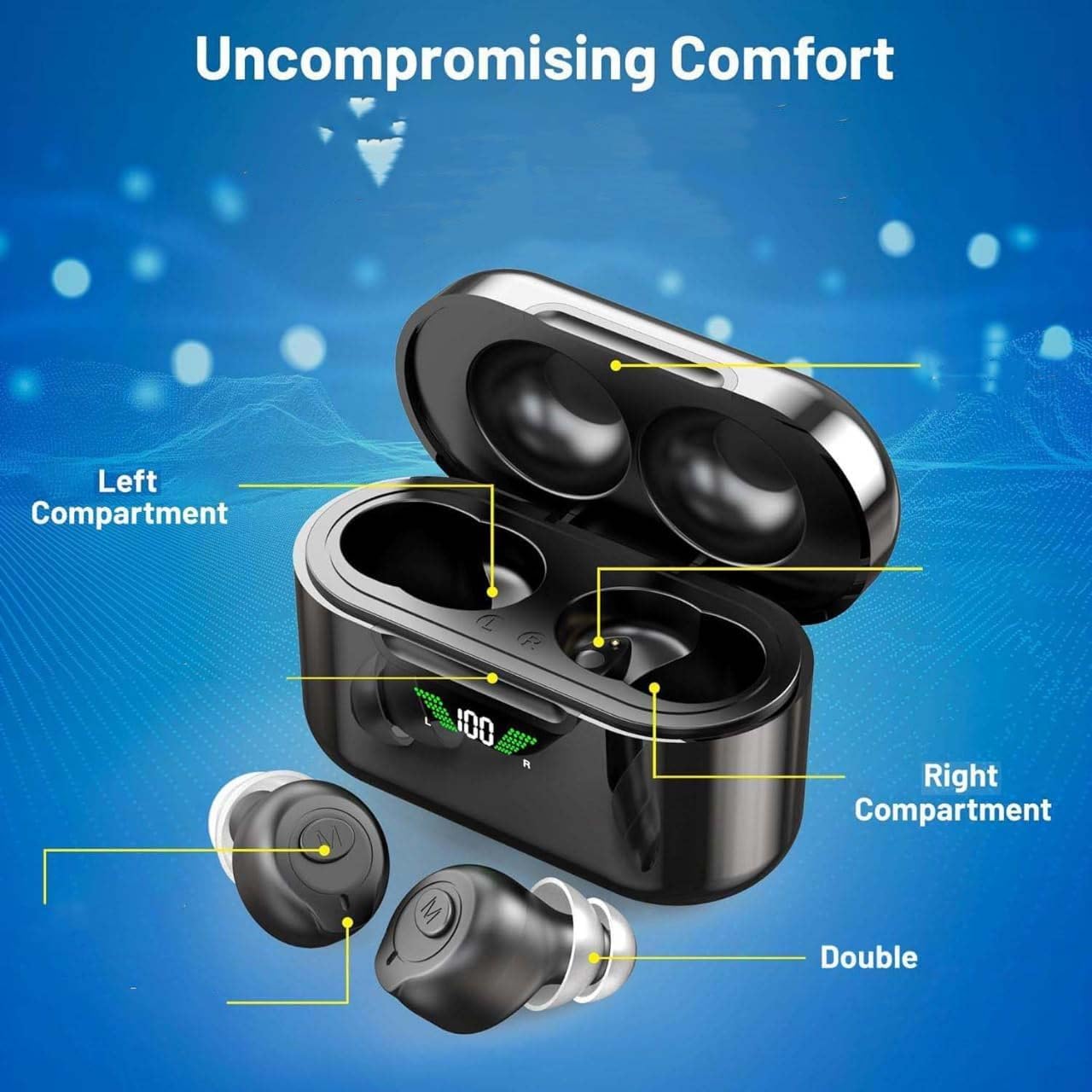
- 1 Recharging Case with HD LCD Display
- 6 Ear Domes (S/M/L sizes)
- 1 USB to USB-C Charging Cable
- 1 Cleaning Brush
- 1 Instruction Manual (this document)

3. Setup
3.1 Initial Charging
Before first use, ensure the charging case and hearing aids are fully charged. The portable carrying case features a digital power display screen to monitor battery status.
- Connect the USB-C charging cable to the charging case and a power source.
- The LCD display on the case will show the charging progress. When the display shows '100', the charging case is fully charged.
- Place the hearing aids into the charging case. A green icon flashing on the case indicates the hearing aids are charging.
- A full charge for the hearing aids takes approximately 2 hours, providing up to 6 hours of continuous use. The fully charged case can provide up to 5 additional charges for the hearing aids.

3.2 Selecting Ear Domes
To ensure optimal sound quality and comfort, select the appropriate size ear domes. The package includes various sizes (S/M/L) in both single and double layer designs.
- Gently remove the pre-installed ear domes from the hearing aids.
- Try different sizes and types to find the best fit for your ear canal. A good fit will minimize whistling sounds and provide clear amplification.
- Ensure the ear dome is securely attached to the hearing aid before insertion.
3.3 Bluetooth Pairing
Your MEDca hearing aids offer 2-in-1 Bluetooth connectivity for calls, music, and settings adjustment.
- Ensure Bluetooth is enabled on your smartphone or other compatible device.
- Take one hearing aid out of the charging case. It will automatically turn on.
- Press the 'M' button on the hearing aid three times in quick succession to activate pairing mode. You should hear a "pairing" beep.
- On your device, search for Bluetooth devices and select "GM-903BT" to connect.
- Once the first hearing aid is connected, take the second hearing aid out of the charging case. It will automatically connect to your device.

Bluetooth Pairing Troubleshooting:
If Bluetooth pairing fails or you need to reconnect:
- Place both hearing aids back into the charging case.
- On your phone's Bluetooth settings, "Forget This Device" for "GM-903BT" if it was previously connected.
- Take both hearing aids out of the charging case.
- Click the 'M' key on one hearing aid three times in succession to re-enter pairing mode.
- Reconnect via your phone's Bluetooth settings.
4. Operating Instructions
4.1 Power On/Off
- Power On: The hearing aids automatically power on when removed from the charging case.
- Power Off: Place the hearing aids back into the charging case to power them off and begin charging.

4.2 Volume Adjustment
The hearing aids feature five levels of volume adjustment.
- To adjust the volume, press the 'M' button on the hearing aid. Each press cycles through the volume levels.
- Adjust to a comfortable listening level.

4.3 Bluetooth Functions
Once paired, your hearing aids can be used for various Bluetooth functions:
- Phone Calls: Answer or end calls directly through the hearing aids.
- Music/Video Playback: Stream audio from your connected device.
- Customization: Adjust settings and switch between functions with the 'M' button.
5. Maintenance
Regular cleaning and proper care will extend the life of your hearing aids.
- Use the provided cleaning brush to gently remove earwax or debris from the ear domes and sound ports.
- Wipe the hearing aids and charging case with a soft, dry cloth. Do not use liquids or abrasive cleaners.
- Store the hearing aids in their charging case when not in use to protect them and keep them charged.
- Avoid exposing the devices to excessive moisture, heat, or direct sunlight. The hearing aids are not water resistant.
6. Troubleshooting
6.1 Whistling Sound (Feedback)
If you experience a whistling sound even when the hearing aids are worn correctly:
- Ensure the ear dome is properly seated in your ear canal, creating a tight seal.
- Try a different size or type of ear dome (single or double layer) to achieve a better fit.
- Reduce the volume level.
6.2 No Sound or Low Volume
- Check the battery level of both the hearing aids and the charging case. Recharge if necessary.
- Ensure the hearing aids are powered on.
- Increase the volume using the 'M' button.
- Clean the ear domes and sound ports to remove any blockages.
6.3 Bluetooth Disconnection
- Ensure the hearing aids are within range of your Bluetooth device.
- Repeat the Bluetooth pairing steps outlined in Section 3.3.
- Restart your Bluetooth device and the hearing aids.
7. Specifications
| Feature | Detail |
|---|---|
| Model Name | MEDca Rechargeable Hearing Aids |
| Item Model Number | 850055946064 |
| Connectivity Technology | Wireless (Bluetooth 4.0) |
| Noise Control | Active Noise Cancellation |
| Battery Life (Hearing Aids) | Up to 6 Hours (continuous use) |
| Charging Time (Hearing Aids) | 2 Hours |
| Charging Case Backup Power | Up to 60 Hours (5 full charges) |
| Control Type | Touch (M button) |
| Ear Placement | In Ear |
| Water Resistance Level | Not Water Resistant |
| Material | Plastic or lightweight resin |
| Item Weight | 6 ounces |
| Manufacturer | MEDca |
8. Warranty and Support
For warranty information and customer support, please refer to the official MEDca website or contact their customer service directly. Keep your purchase receipt as proof of purchase.