
FOVKSUC U2-B-1T+2R
FOVKSUC Wireless Doorbell Instruction Manual
Model: U2-B-1T+2R
Introduction
This manual provides comprehensive instructions for the installation, operation, maintenance, and troubleshooting of your FOVKSUC Wireless Doorbell, Model U2-B-1T+2R. Please read this manual thoroughly before using the product to ensure proper function and longevity.

Image: The FOVKSUC Wireless Doorbell kit, featuring two black plug-in receivers and one black wireless push button.
Package Contents
Verify that all items listed below are included in your package:
- 1 x Transmitter (Wireless Push Button) with pre-installed CR2032 battery
- 2 x Plug-in Receivers (U.S. plug only)
- 1 x Adhesive Tape for mounting
- 1 x Screwdriver
- 2 x Screws for mounting
- 2 x Anchors for mounting
- 1 x User Manual (this document)
Setup and Installation
The FOVKSUC Wireless Doorbell offers two installation methods for the transmitter: adhesive mounting or screw mounting.
Transmitter Installation (Wireless Push Button)
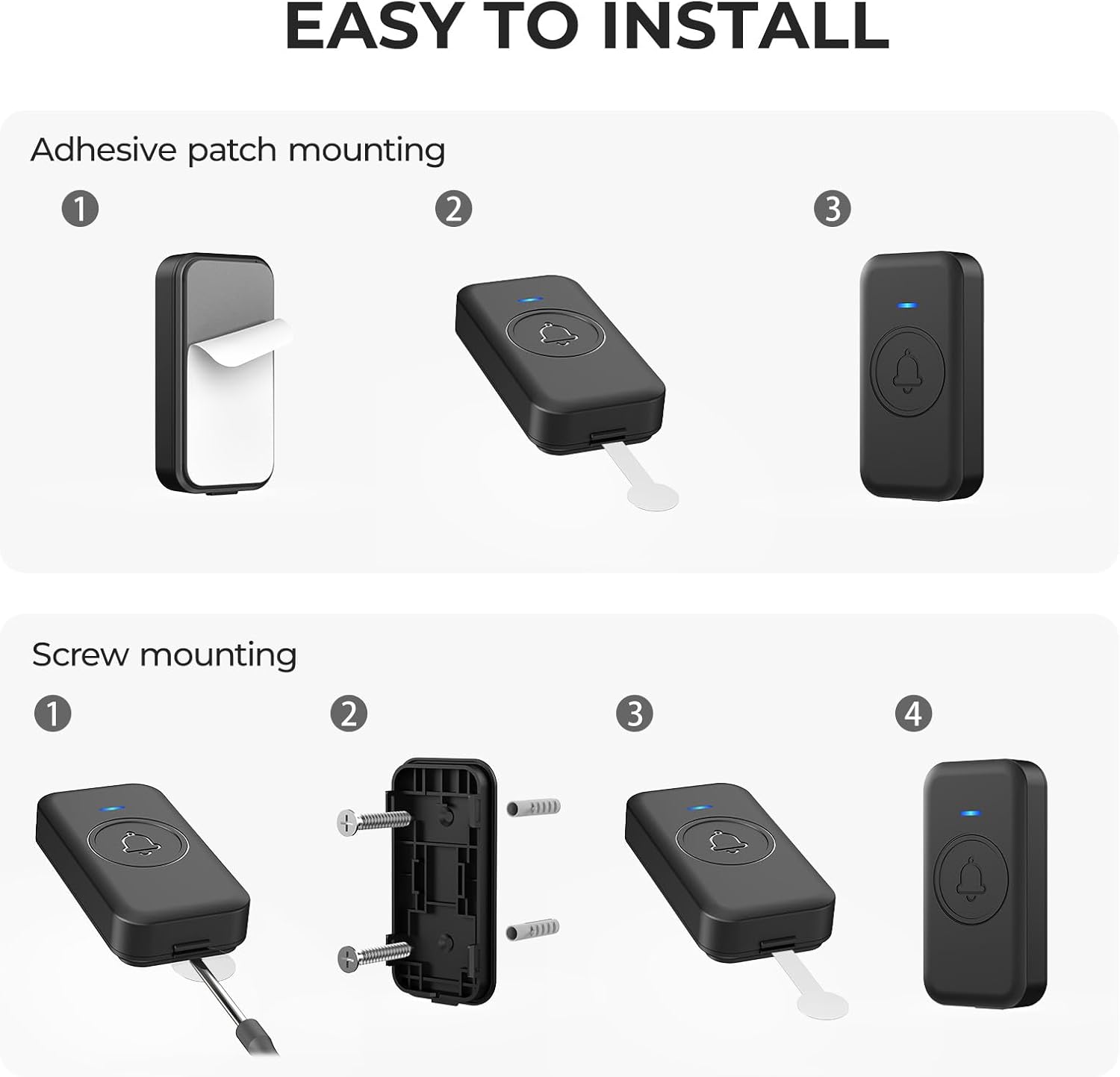
Image: Visual guide for installing the doorbell transmitter using either adhesive tape or screws.
Method 1: Adhesive Mounting
- Clean the desired mounting surface thoroughly to ensure it is dry and free of dust or grease.
- Peel off one side of the protective film from the adhesive tape.
- Attach the adhesive tape firmly to the back of the transmitter.
- Peel off the remaining protective film from the adhesive tape.
- Press the transmitter firmly onto the cleaned surface for at least 30 seconds.
Method 2: Screw Mounting
- Open the back cover of the transmitter using the provided screwdriver.
- Position the back cover on the desired mounting surface and mark the screw holes.
- Drill pilot holes if necessary, and insert the anchors if mounting into drywall or masonry.
- Secure the back cover to the surface using the provided screws.
- Attach the transmitter body to the secured back cover.
Receiver Installation (Plug-in Unit)
- Select a standard U.S. electrical outlet within range of the transmitter.
- Plug the receiver directly into the electrical outlet. The receiver will power on and be ready for use.
- Ensure the receiver is not obstructed by large objects or metal surfaces, which could interfere with the wireless signal.

Image: A FOVKSUC doorbell receiver plugged into a standard wall outlet.
Operating Instructions
Selecting a Chime
The doorbell offers 60 selectable melodies. To change the chime:
- Press the "Next Button" on the side of the receiver to cycle through the available melodies.
- To preview a chime, long-press the "VOL / SETUP Button" for 2 seconds. This will play the prelude of each song, allowing for quick selection.
- The selected chime will be saved automatically, even after a power outage, due to the power-off memory function.

Image: Side view of the receiver highlighting the "Previous" and "Next" buttons for chime selection.
Adjusting Volume
There are 5 adjustable volume levels, ranging from 0dB (mute) to 110dB.
- Press the "VOL / SETUP Button" on the side of the receiver repeatedly to cycle through the 5 volume levels.
- The volume setting will be saved automatically.

Image: Close-up of the receiver's side, indicating the volume/setup button.
Mute Modes
The doorbell offers two mute modes for convenience:
- Flashing Only Mode: Set the volume to 0dB using the "VOL / SETUP Button". The receiver will flash its LED indicator without producing sound when the doorbell is pressed.
- Temporary Mute: Press the "Mute Button" (center button) on the receiver to temporarily stop the current ringing sound.

Image: A visual representation of the two mute methods, showing a sleeping baby for context.
Power-Off Memory Function
The doorbell system retains your last selected chime and volume setting even after a power outage or if the receiver is unplugged. No re-pairing or re-setting is required.

Image: A doorbell receiver plugged into an outlet, with an icon indicating memory retention of settings.
Maintenance
Cleaning
Wipe the doorbell units with a soft, dry cloth. Do not use abrasive cleaners or solvents, as these may damage the surface.
Battery Replacement (Transmitter)
The transmitter uses a CR2032 coin cell battery, which has an average life of 3 years (based on 5 presses per day). When the transmitter's LED indicator no longer lights up or the signal range decreases significantly, it's time to replace the battery.
- Carefully open the back cover of the transmitter using the provided screwdriver or a small flat-head screwdriver.
- Remove the old CR2032 battery.
- Insert a new CR2032 battery with the positive (+) side facing up.
- Close the back cover securely.

Image: A CR2032 coin cell battery positioned next to the doorbell transmitter, indicating its power source.
Environmental Conditions
The transmitter is IP55 waterproof and designed for stable operation in temperatures ranging from -4°F to 140°F (-20°C to 60°C). Ensure the transmitter is installed in a location that minimizes direct exposure to extreme weather conditions for optimal longevity, although it is built to withstand them.

Image: The doorbell transmitter shown in rain and snow, emphasizing its IP55 waterproof rating and ability to operate in a wide temperature range.
Troubleshooting
| Problem | Possible Cause | Solution |
|---|---|---|
| Receiver does not ring. |
|
|
| Doorbell rings intermittently or has poor range. |
|
|
| Chime selection or volume setting is lost after power cycle. | This should not occur due to the power-off memory function. | If this issue persists, please contact customer support. |
Specifications
| Model Number | U2-B-1T+2R |
| Brand | FOVKSUC |
| Color | Black |
| Material | ABS |
| Power Source | AC & Battery-Powered |
| Voltage | 120 Volts (U.S. Plug Only) |
| Transmitter Battery | 1 x CR2032 (included), Average life: 3 years |
| Receiver Dimensions | 3.15 x 2.8 x 0.8 inches |
| Transmitter Dimensions | 3.05 x 1.57 x 0.57 inches |
| Wireless Range | Up to 1000 feet (300 meters) in open areas |
| Chimes | 60 selectable melodies |
| Volume Levels | 5 levels (0dB to 110dB) |
| Waterproof Rating | IP55 (Transmitter) |
| Operating Temperature | -4°F to 140°F (-20°C to 60°C) |
| Certifications | EU CE / US FCC |
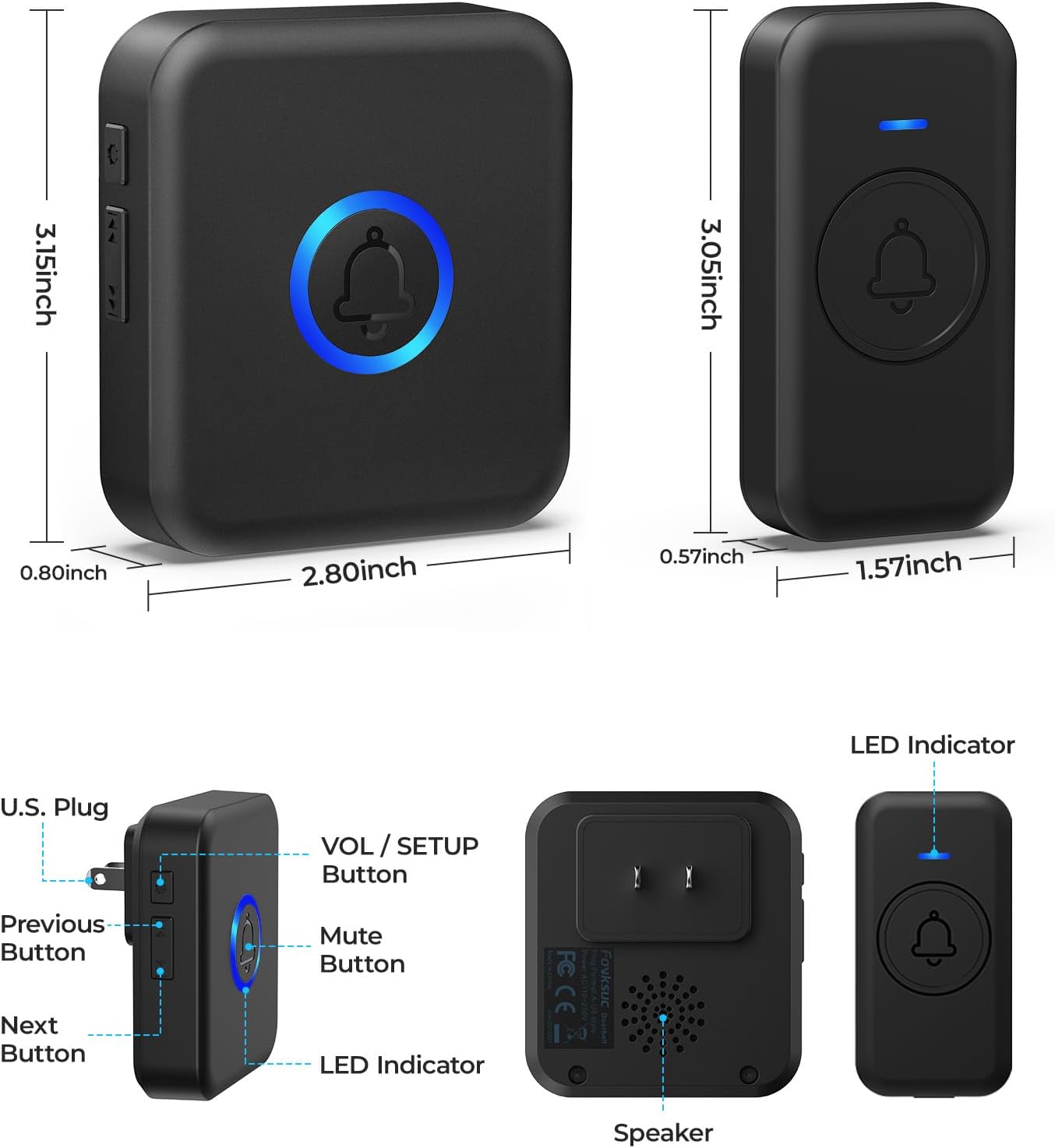
Image: Detailed view of the receiver and transmitter, including dimensions and button functions.
Warranty and Support
FOVKSUC provides professional after-sales support for its products.
- Warranty: The product comes with an 18-month warranty.
- Support: For any issues during use, please contact FOVKSUC customer service directly through the Amazon platform. A professional customer service team and experts are available to provide pre-sales and after-sales assistance.
- Return Policy: A 30-day money-back guarantee is offered.

Image: Customer service representatives ready to assist with product inquiries.
Related documentsU2-B-1T+2R


Ask a question about this manual
Ask about setup, troubleshooting, compatibility, parts, safety, or missing instructions. Manuals+ will review the question and use this page’s manual context to help answer it.