
Introduction
The GTRS S801 Smart Electric Guitar Kit integrates traditional guitar features with modern digital simulation technology, offering a versatile and portable playing experience. It is equipped with an Intelligent Processor System that functions seamlessly with a dedicated mobile application, providing a wide array of effects and tools.
This manual will guide you through the various aspects of your GTRS S801 guitar, from initial setup to advanced operation and maintenance.
Setup
1. Initial Charging and Battery
The GTRS S801 guitar comes with a built-in rechargeable Lithium Ion battery. Before first use, ensure the guitar is fully charged. A full charge provides approximately 10-12 hours of battery life, depending on usage.

Figure 1: GTRS Guitar Battery Compartment
2. Mobile App Connection
The Intelligent Processor System is controlled via the GTRS mobile app (available for Android and Apple devices). Download the app from your device's app store.
- Turn on the GTRS guitar.
- Open the GTRS app on your mobile device.
- Follow the on-screen prompts to connect the guitar via Bluetooth. The app will display the connection status.

Figure 2: GTRS S801 Guitar with Mobile App Interface

Figure 3: Bluetooth Connection via GTRS App
Operating the GTRS S801
1. Intelligent Processor System
The core of the GTRS S801 is its Intelligent Processor System, offering a wide range of digital effects and features:
- Guitar Simulations: 9 classic guitar simulations.
- Guitar Effects: 126 diverse guitar effects.
- Drum Grooves: 40 drum grooves for practice and accompaniment.
- Metronome: 10 metronome variations.
- Looper: An 80-second looper for creating layered performances.
All settings and parameters can be quickly edited and customized through the GTRS App.
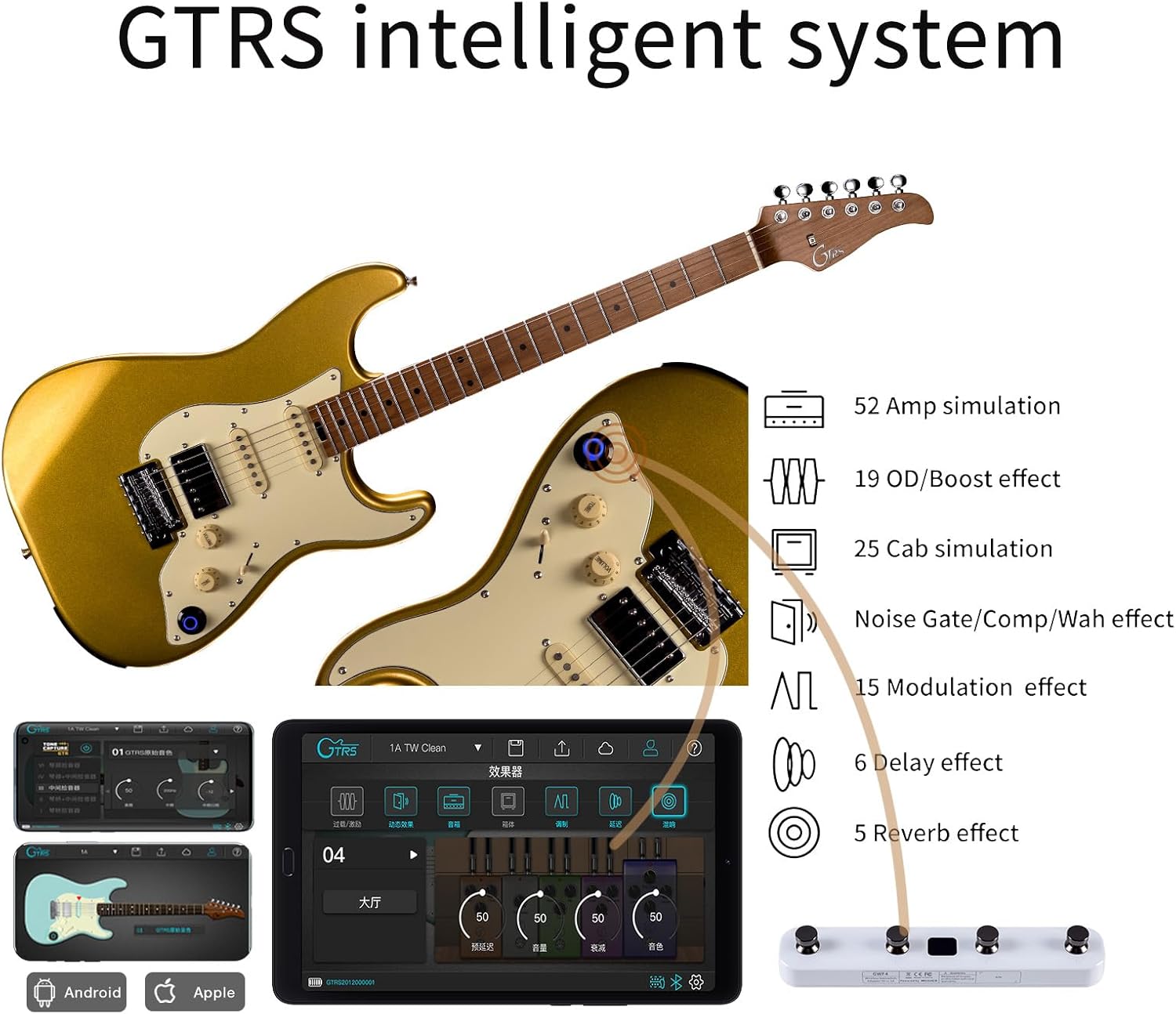
Figure 4: GTRS Intelligent System Features
2. Super-Knob and GWF4 Wireless Footswitch
The guitar features a 'Super-Knob' for quick access to presets and settings. For enhanced control during live performances, the optional GWF4 Wireless Footswitch (purchased separately) allows for rapid preset changes without manual adjustments on the guitar or app.

Figure 5: All-in-One Features of GTRS S801

Figure 6: Wireless Footswitch Support
3. Direct Use and Headphone Output
When the GTRS Intelligent System is turned off, the guitar functions as a standard electric guitar and can be plugged into any amplifier, pedals, or effects unit. For silent practice or direct monitoring, you can connect headphones directly to the guitar's output jack using a single OTG cable.
Maintenance
1. General Cleaning
- Regularly wipe down the body, neck, and strings with a soft, lint-free cloth after each use to remove sweat and oils.
- For glossy finishes, use a guitar-specific polish sparingly.
- Clean the fretboard with a suitable fretboard conditioner during string changes to prevent drying and cracking.
2. String Replacement
Replace strings regularly to maintain optimal tone and playability. Refer to standard guitar string replacement guides for proper technique.
3. Battery Care
To prolong battery life, avoid completely draining the battery frequently. Store the guitar in a cool, dry place when not in use, and charge it periodically if stored for extended periods.
Troubleshooting
1. Bluetooth Connectivity Issues
- Ensure Bluetooth is On: Verify Bluetooth is enabled on both your GTRS guitar and mobile device.
- Restart Devices: Try restarting both the guitar and your mobile device.
- Forget Device: In your phone's Bluetooth settings, 'forget' or 'unpair' the GTRS guitar, then attempt to reconnect through the GTRS app.
- App Update: Ensure your GTRS app is updated to the latest version.
- Device Compatibility: Some users have reported issues with USB audio functionality on specific Apple devices (e.g., iPhone 15) when connected directly. Consider using a USB-C hub or alternative connection methods if direct connection fails.
2. No Sound Output
- Check Volume: Ensure the guitar's volume knob and any connected amplifier/headphone volumes are turned up.
- Battery Level: A low battery can affect sound output. Charge the guitar.
- Cable Connection: Verify all cables (guitar to amp, headphones) are securely connected.
- System On/Off: If using the intelligent system, ensure it is powered on. If using as a regular guitar, ensure the intelligent system is turned off.
Specifications
| Feature | Detail |
|---|---|
| Brand | GTRS |
| Model Number | GTRS |
| Item Weight | 15.22 pounds |
| Package Dimensions | 45 x 17.5 x 6.25 inches |
| Country of Origin | China |
| Batteries | 1 Lithium Ion batteries required (included) |
| Back Material | Basswood |
| Body Material | Basswood |
| Color Name | right gold |
| Fretboard Material | Rosewood |
| Guitar Pickup Configuration | S-S-H |
| String Material | Brass |
| Top Material | Basswood |
| Neck Material Type | Maple |
| Number of Strings | 6 |
| Guitar Bridge System | Tremolo |
| Size | S801 |
| Hand Orientation | Right |
Warranty and Support
Specific warranty details and direct support contact information are not provided in the product data. Please refer to the retailer's website or your purchase documentation for warranty terms and customer support options.


