
Star Micronics MCL32CBI
Star Micronics mC-Label3 MCL32CBI Direct Thermal Printer User Manual
Model: MCL32CBI
Introduction
This manual provides essential information for the setup, operation, maintenance, and troubleshooting of your Star Micronics mC-Label3 MCL32CBI Direct Thermal Printer. Please read this manual thoroughly before using the printer to ensure proper and safe operation.
Package Contents
Verify that all items listed below are included in your package:
- mC-Label3 Multifunctional Printer
- AC Adapter
- Power Cable
- USB Cables (C-C 1.0m and C-A 1.8m)
- LAN Cable (1m)
- Simple Setup Sheet Safety Guide

Image: Front view of the Star Micronics mC-Label3 printer, showcasing its compact design and label output slot.
Setup
1. Connecting the Printer
The mC-Label3 MCL32CBI printer offers multiple connectivity options:
- USB-C: Connect the printer directly to your PC, Android, or iOS device using the provided USB-C to USB-C or USB-C to USB-A cables.
- Ethernet (LAN): For network connectivity, connect the printer to your router or network switch using the supplied LAN cable.
- Bluetooth: The MCL32CBI model supports Bluetooth connectivity for iOS and Android devices. Ensure Bluetooth is enabled on your device and pair with the printer.

Image: Rear view of the mC-Label3 printer, highlighting the LAN, USB, and power ports for various connection types.
2. Loading Media
The printer supports various media types, including linerless labels, die-cut labels, continuous labels, and thermal receipt paper.
- Open the top cover of the printer by lifting the latch.
- Place the media roll into the media compartment, ensuring the leading edge feeds out from the top.
- Pull a small amount of media past the print head and close the top cover securely.
- Ensure the media is properly aligned within the guides.

Image: Top-down view of the mC-Label3 printer with its cover open, illustrating the internal mechanism for loading thermal paper or label rolls.
Operating Instructions
1. Powering On/Off
Connect the power cable to the printer and a power outlet. Press the power button located on the front of the printer to turn it on. The status indicator light will illuminate.
2. Printing Labels and Receipts
The mC-Label3 MCL32CBI printer is designed for efficient label and receipt printing. It supports various applications and cloud services.
- Software Compatibility: Works seamlessly with PC, Android, and iOS applications.
- Cloud Services: Utilize Star Micronics Cloud Services to design and manage labels.
- One Touch Label: This feature allows storing pre-made receipts and labels for quick and easy printing directly from the printer.
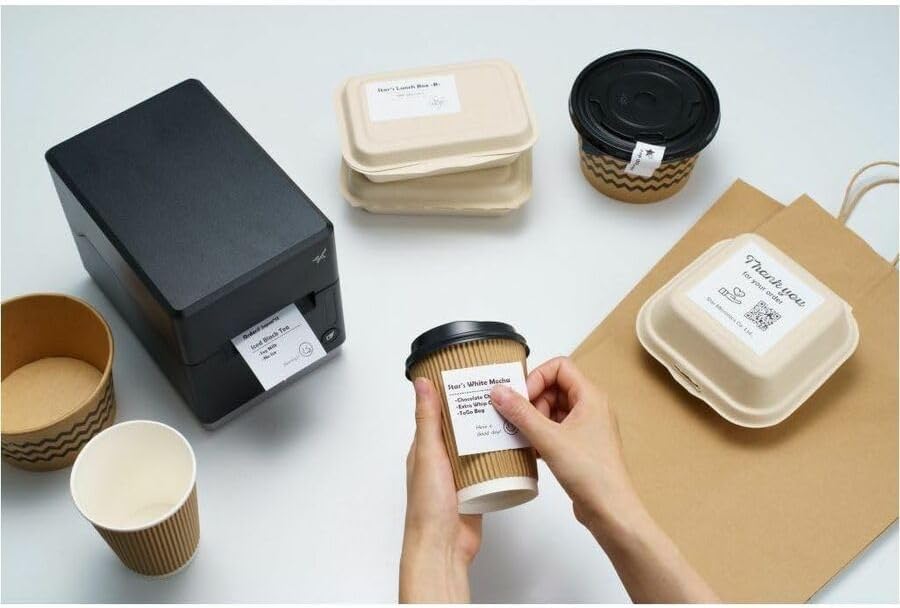
Image: A hand pressing the feed button on the mC-Label3 printer, demonstrating the printing of a 'Thank you' label.

Image: The mC-Label3 printer shown in a practical setting, printing labels for food containers and coffee cups, illustrating its versatility.
Maintenance
1. Cleaning the Printer
Regular cleaning ensures optimal performance and extends the life of your printer.
- Use a soft, lint-free cloth dampened with isopropyl alcohol to clean the print head.
- Wipe down the exterior of the printer with a soft, dry cloth.
- Avoid using abrasive cleaners or solvents.
2. Replacing Media
When the media roll is depleted, follow the media loading instructions in the Setup section to replace it.
3. Effortless Repairs
The mC-Label3 is designed for effortless, no-tools-required repairs with minimal upkeep, simplifying any necessary component replacements.
Troubleshooting
This section provides solutions to common issues you might encounter.
| Problem | Possible Cause | Solution |
|---|---|---|
| Printer not powering on | Power cable not connected; Power outlet issue | Ensure power cable is securely connected; Try a different power outlet. |
| No print output | Out of media; Media loaded incorrectly; Driver issue | Load new media; Re-load media correctly; Reinstall printer drivers. |
| Poor print quality | Dirty print head; Low quality media | Clean the print head; Use recommended thermal media. |
| Connectivity issues | Incorrect cable connection; Bluetooth not paired; Network configuration | Check USB/Ethernet cables; Re-pair Bluetooth; Verify network settings. |
Specifications
| Feature | Detail |
|---|---|
| Model Name | mC-Label3 |
| Item Model Number | MCL32CBI |
| Printing Technology | Direct Thermal |
| Printer Output | Monochrome |
| Max Print Speed Monochrome | 23 ppm |
| Maximum Black and White Print Resolution | 203 DPI (203 x 203 DPI) |
| Print Media | Labels (Linerless, Die-Cut, Continuous), Thermal Receipt |
| Connectivity Technology | Bluetooth, Wired (USB, Ethernet) |
| Hardware Interface | USB, Ethernet |
| Compatible Devices | PC, Android, iOS |
| Controller Type | iOS, Android |
| Product Dimensions | 6.7"D x 5.6"W x 8.3"H (17.0 x 14.2 x 21.1 cm) |
| Item Weight | 7.2 pounds (3.27 kg) |
| Memory Storage Capacity | 64 MB |
| Color | Black |
| Manufacturer | STAR MICRONICS |
| Country of Origin | China |
Warranty Information
The Star Micronics mC-Label3 MCL32CBI printer comes with a manufacturer's warranty. For specific terms and conditions, please refer to the warranty card included in your package or visit the official Star Micronics website.
Warranty Type: Manufacturer
Support
For further assistance, technical support, or to download the latest drivers and firmware, please visit the official Star Micronics support website or contact their customer service.
Star Micronics Official Website: www.starmicronics.com
Support Link: www.starmicronics.com/support
Related documentsMCL32CBI


Ask a question about this manual
Ask about setup, troubleshooting, compatibility, parts, safety, or missing instructions. Manuals+ will review the question and use this page’s manual context to help answer it.