
1. Introduction
Thank you for choosing the FOREVER TWE-110 EARP Bluetooth Earbuds. These earbuds are designed to provide a high-quality audio experience with wireless freedom and intuitive controls. This manual will guide you through the setup, operation, and maintenance of your new earbuds.
2. Safety Information
- Do not expose the earbuds or charging case to extreme temperatures, humidity, or liquids.
- Avoid dropping, impacting, or disassembling the device.
- Keep out of reach of children.
- Use only the provided charging cable or a certified equivalent.
- Prolonged listening at high volume levels may cause hearing damage. Adjust volume to a moderate level.
3. Package Contents
Please check that all items are present in your package:
- FOREVER TWE-110 EARP Bluetooth Earbuds (Left and Right)
- Charging Case
- USB Charging Cable
- User Manual
4. Product Overview
Familiarize yourself with the components of your FOREVER TWE-110 EARP earbuds and charging case.
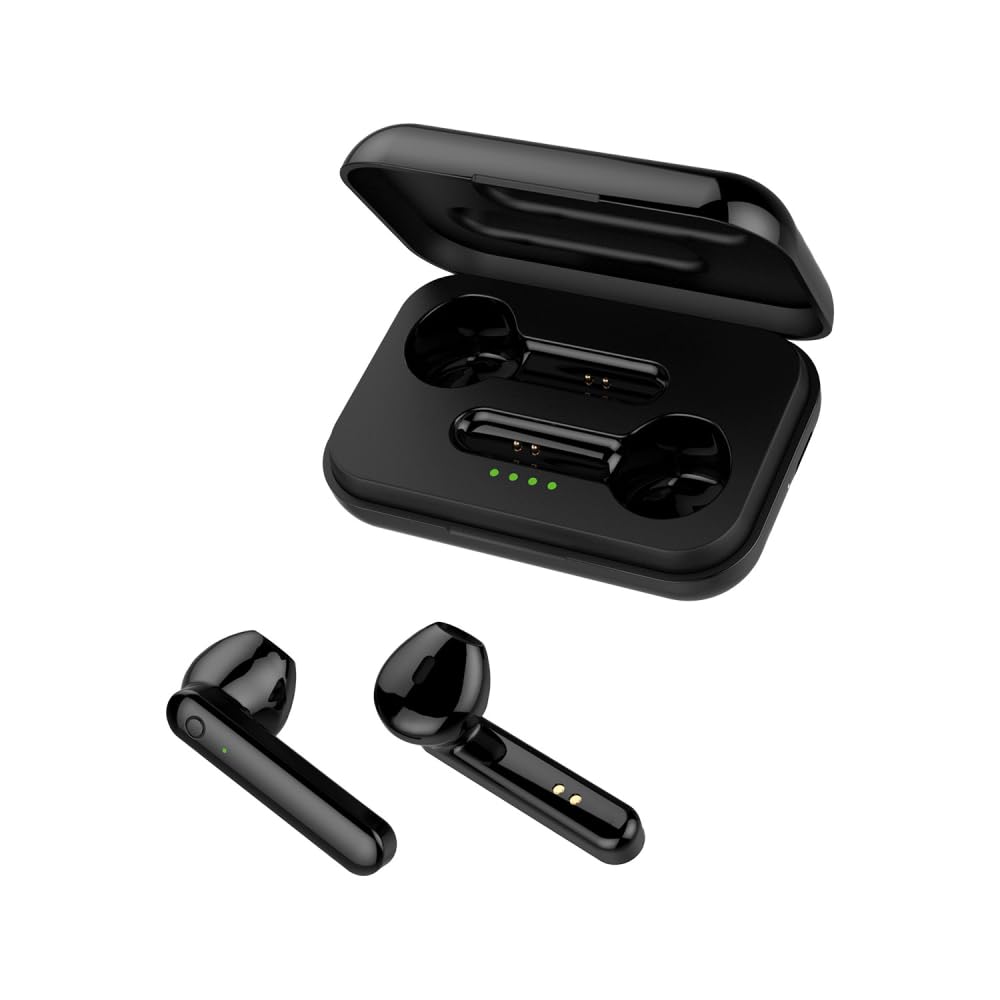
Image: FOREVER TWE-110 EARP Bluetooth Earbuds and Charging Case. This image displays the two black earbuds positioned above their matching black charging case, illustrating the complete product set.

Image: FOREVER TWE-110 EARP earbuds inside the open charging case, showing LED indicators. The image shows the black earbuds nestled in their open charging case, with small green LED lights visible, indicating charging status or battery level.

Image: Infographic highlighting features like sound quality, automatic pairing, 9-hour battery life, and LED indicators for FOREVER TWE-110 EARP. This graphic visually represents key features of the earbuds, including excellent sound quality, automatic power on/off and pairing, up to 9 hours of autonomy with the case, and LED battery level display.
5. Setup
5.1 Charging the Earbuds and Case
Before first use, fully charge the earbuds and the charging case.
- Place the earbuds into the charging case. Ensure they are correctly seated.
- Connect the USB charging cable to the charging port on the case and to a USB power source (e.g., computer, wall adapter).
- The LED indicators on the case will show the charging status. Once fully charged, the indicators may turn solid or turn off, depending on the model.
- Charging time is approximately 3 hours for a full charge of the case and earbuds.
5.2 Pairing with a Bluetooth Device
The earbuds use Bluetooth 5.1 for stable wireless connectivity.
- Open the charging case. The earbuds will automatically power on and enter pairing mode. The LED indicator on one earbud will flash, indicating it's ready to pair.
- On your device (smartphone, tablet, laptop), enable Bluetooth.
- Search for available Bluetooth devices. You should see "TWE-110" in the list.
- Select "TWE-110" to connect. Once connected, the LED indicator on the earbud will stop flashing.
- The earbuds will automatically reconnect to the last paired device when taken out of the case, if Bluetooth is enabled on the device.

Image: Smartphone displaying Bluetooth settings connected to 'TWE-110', next to a pink FOREVER TWE-110 EARP charging case, illustrating Bluetooth 5.1 connectivity. This image shows a smartphone screen with Bluetooth settings open, indicating a successful connection to 'TWE-110', positioned beside an open pink charging case with earbuds inside.
6. Operating Instructions
6.1 Power On/Off
- Power On: Open the charging case, and the earbuds will automatically power on.
- Power Off: Place the earbuds back into the charging case and close the lid. They will automatically power off and begin charging.
6.2 Touch Controls
The TWE-110 EARP earbuds feature intuitive touch controls on each earbud.
| Function | Action |
|---|---|
| Play/Pause Music | Single tap on either earbud |
| Next Track | Double tap on the right earbud |
| Previous Track | Double tap on the left earbud |
| Answer/End Call | Single tap on either earbud |
| Reject Call | Press and hold either earbud for 2 seconds |
| Activate Voice Assistant | Triple tap on either earbud |

Image: Black FOREVER TWE-110 EARP earbuds and charging case, with green sound waves, indicating hands-free calling. This image features the black earbuds and their case, with visual cues of sound waves emanating from the earbuds, symbolizing their hands-free calling capability.
7. Maintenance
7.1 Cleaning
- Gently wipe the earbuds and charging case with a soft, dry, lint-free cloth.
- Do not use abrasive cleaners, alcohol, or chemical solvents.
- Ensure charging contacts are clean and free of debris.
7.2 Storage
When not in use, store the earbuds in their charging case to protect them and keep them charged. Store in a cool, dry place away from direct sunlight.
8. Troubleshooting
If you encounter issues, refer to the following common solutions:
- Earbuds not pairing: Ensure both earbuds are out of the case and in pairing mode. Turn off and on your device's Bluetooth. Try resetting the earbuds (refer to manufacturer's website for specific reset instructions if needed).
- No sound: Check the volume on your device and on the earbuds. Ensure the earbuds are properly connected to your device.
- Charging issues: Ensure the charging cable is securely connected and the power source is active. Clean the charging contacts on both the earbuds and the case.
- Intermittent connection: Ensure there are no obstructions between the earbuds and your device. Move closer to your device. Avoid environments with strong electromagnetic interference.
9. Specifications
| Feature | Detail |
|---|---|
| Model Name | TWE-110 |
| Brand | FOREVER |
| Connectivity Technology | Wireless (Bluetooth 5.1) |
| Ear Placement | In-Ear |
| Control Method | Touch |
| Special Features | Touch Control, Built-in Microphone |
| Rechargeable Battery | Yes (1 Lithium-ion included) |
| Charging Time | Approximately 3 hours |
| Operating Time (Earbuds) | Up to 3 hours |
| Operating Time (with Charging Case) | Up to 9 hours |
| Compatible Devices | Smart Speaker, Motorcycle, Computer, Laptop, Car Audio System, Tablet, Mobile Phone, Television |
| Material | Faux Leather (referring to case finish or accents) |
10. Warranty and Support
10.1 Warranty Information
FOREVER products are covered by a manufacturer's warranty. Please refer to the warranty card included in your package or visit the official FOREVER website for detailed warranty terms and conditions. Keep your proof of purchase for warranty claims.
10.2 Customer Support
For technical assistance, troubleshooting, or product inquiries, please contact FOREVER customer support through their official website or the contact information provided in your product packaging.


