
1. Introduction
The STC-3028 is an intelligent digital display temperature and humidity controller designed for precise environmental management. This device features a dual display for simultaneous monitoring of temperature and humidity, making it suitable for a wide range of applications including sensor control boxes, water heaters, freezers, and fans. It operates on AC 110V-220V and comes with an integrated 1-meter AM2120 waterproof sensor for reliable measurements.
2. Safety Instructions
- Ensure the power supply voltage matches the device's requirements (AC 110V-220V).
- All wiring should be performed by a qualified professional to prevent electric shock or damage to the device.
- Strictly distinguish the interface of the relay, sensor, and power supply. Incorrect wiring can lead to malfunction or damage.
- Keep the sensor down-lead and power wire at a proper distance from each other to avoid interference.
- Do not expose the device to excessive moisture or extreme temperatures outside its operating range.
- Disconnect power before performing any maintenance or wiring changes.
3. Package Contents
Please check the package for the following items:
- 1x STC-3028 Controller Module
- 1x AM2120 Sensor Assembly (with 1-meter cable)
- 1x User Manual
4. Features
- Microcomputer intelligent digital display thermostat.
- Dual display for simultaneous temperature and humidity readings.
- Wide supply voltage range: AC 110V-220V.
- Temperature measurement range: -20°C to +80°C.
- Humidity measurement range: 00%RH to +100%RH.
- High accuracy: ±1°C for temperature, 0.1%RH for humidity.
- Equipped with a 1-meter AM2120 waterproof sensor.
- Large and clear LCD digital display for easy readability.
5. Setup and Installation
Carefully follow these instructions for proper installation and wiring of your STC-3028 controller.

Figure 5.1: STC-3028 Controller and Sensor Assembly.
This image shows the STC-3028 controller module with its dual digital displays for temperature and humidity, along with the connected AM2120 waterproof sensor. The main unit features control buttons and terminal blocks for wiring.
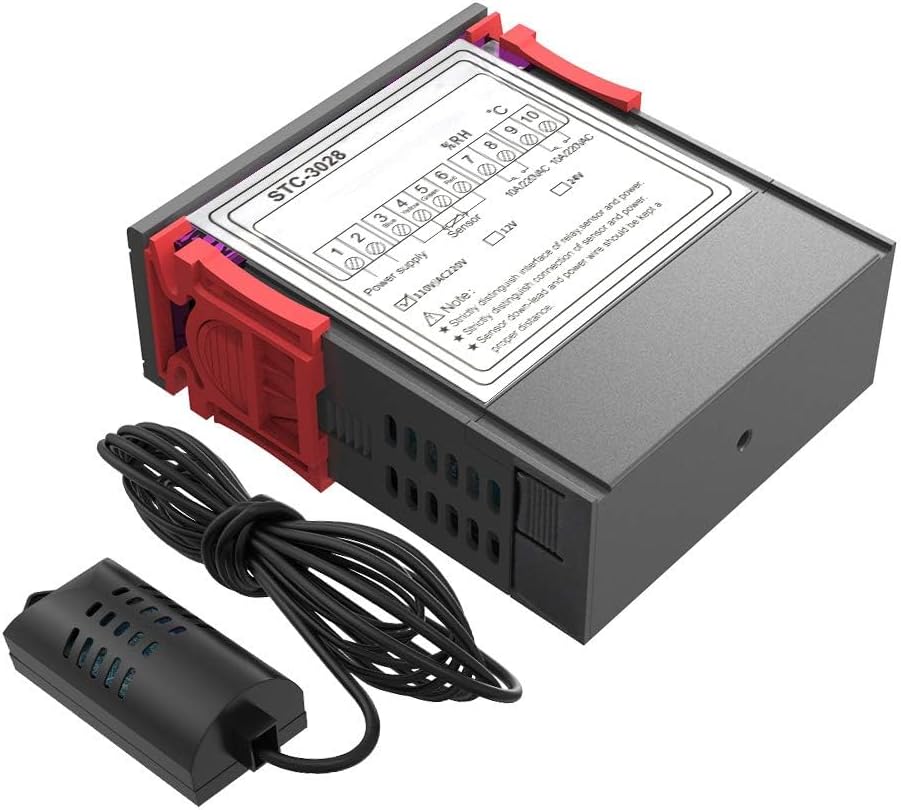
Figure 5.2: Top View of STC-3028 with Wiring Labels.
This image provides a top-down view of the STC-3028 controller, highlighting the terminal block with numbered pins and their corresponding functions, such as power supply, sensor input, and relay outputs for temperature and humidity control.

Figure 5.3: Detailed Wiring Diagram.
This diagram illustrates the electrical connections for the STC-3028. It shows the power supply input (N, L), the humidity sensor connection, and the independent power supply for the load, indicating how to connect the controller to external devices for temperature and humidity regulation.
5.1 Wiring Instructions
- Power Supply (Pins 1 & 2): Connect your AC 110V-220V power supply to terminals 1 and 2. Ensure correct polarity if applicable, though for AC, either connection is generally fine.
- Sensor Unit (Pins 3 & 4): Connect the AM2120 sensor assembly to terminals 3 and 4. Pay close attention to the sensor's wiring instructions to ensure correct connection.
- Temperature Output (Pins 9 & 10): These terminals are for the temperature control relay output. Connect your heating or cooling device (load) to these terminals. This output is rated for 10A/220VAC. Note that this is an independent power supply for the load.
- Humidity Output (Pins 7 & 8): These terminals are for the humidity control relay output. Connect your humidifier or dehumidifier (load) to these terminals. This output is rated for 10A/220VAC. This is also an independent power supply for the load.
- Important Note: As indicated on the device, always distinguish between the relay, sensor, and power interfaces. Maintain a proper distance between the sensor down-lead and power wires to prevent interference and ensure accurate readings.
5.2 Mounting

Figure 5.4: Product Dimensions.
This image provides the physical dimensions of the STC-3028 controller, including its length, width, and depth, as well as the front panel and mounting hole sizes, which are crucial for proper installation into a panel or enclosure.
The controller is designed for panel mounting. Refer to Figure 5.4 for precise dimensions:
- Product Size: 75(L) x 34.5(W) x 85(D) mm
- Front Panel Size: 75(L) x 34.5(W) mm
- Mounting Size: 71(L) x 29(W) mm
Cut an opening in your panel according to the mounting size and secure the controller using the integrated clips or mounting brackets.
6. Operating Instructions
Once powered on, the STC-3028 will display the current temperature and humidity readings on its dual digital displays. The red display typically shows temperature (°C), and the blue display shows humidity (%RH).
6.1 Setting Temperature and Humidity
The device features control buttons (likely 'SET', 'UP', 'DOWN' arrows) for adjusting the desired temperature and humidity set points. Specific button functions and menu navigation will be detailed in the included physical manual. Generally, you will press a 'SET' button to enter programming mode, use 'UP'/'DOWN' to adjust values, and press 'SET' again to confirm and exit.
The controller will automatically activate or deactivate the connected heating/cooling and humidifying/dehumidifying devices based on the set points and the current measured values.
7. Specifications
| Parameter | Value |
|---|---|
| Model | STC-3028 |
| Supply Voltage | AC 110V-220V |
| Temperature Range | -20°C ~ +80°C |
| Humidity Range | 00%RH ~ +100%RH |
| Temperature Accuracy | ±1°C |
| Humidity Accuracy | 0.1%RH |
| Sensor Type | AM2120 (1M waterproof) |
| Display Type | LCD Digital Display |
| Output Load | 10A/220VAC (Resistive Load) |
| Product Dimensions (L×W×D) | 75mm × 34.5mm × 85mm |
| Front Panel Size (L×W) | 75mm × 34.5mm |
| Mounting Size (L×W) | 71mm × 29mm |
8. Maintenance
To ensure the longevity and accurate performance of your STC-3028 controller, follow these maintenance guidelines:
- Cleaning: Gently wipe the display and casing with a soft, dry cloth. Do not use abrasive cleaners or solvents, as they may damage the plastic or screen.
- Sensor Care: Keep the sensor probe clean and free from dust or debris. While the sensor is waterproof, avoid prolonged submersion unless specifically designed for such conditions.
- Environmental Conditions: Ensure the controller is installed in an environment within its specified operating temperature and humidity ranges to prevent damage.
- Connection Check: Periodically inspect all wiring connections to ensure they are secure and free from corrosion.
9. Troubleshooting
If you encounter issues with your STC-3028 controller, consider the following common troubleshooting steps:
- No Power Display: Check the power supply connection (Pins 1 & 2) and ensure the voltage is within the 110V-220V AC range. Verify the power source is active.
- Incorrect Readings: Ensure the sensor is properly connected to Pins 3 & 4. Check the sensor cable for any damage. Verify that the sensor is placed in an area representative of the environment you wish to measure.
- Output Not Activating: Verify that the set points are correctly configured. Check the wiring to the load device (Pins 7, 8, 9, 10) and ensure the load itself is functional. Confirm that the measured temperature/humidity is outside the set range, triggering the output.
- Intermittent Operation: Check for loose wiring connections. Ensure the sensor cable is kept separate from power lines to avoid electrical interference.
If problems persist after attempting these steps, please contact customer support.
10. Warranty and Support
LLD_TK, as a USA Local Supplier, is committed to providing premium quality assurance products and fast services. This product is designed to meet or exceed OEM function and performance.
For technical support, warranty claims, or any inquiries regarding your STC-3028 controller, please contact your point of purchase or the manufacturer directly through the contact information provided with your product documentation.


