
1. Introduction
This manual provides essential instructions for the safe and efficient use of your dépow 7.4kW Type 2 CEE Electric Car Charging Cable. Please read this manual thoroughly before operating the device and retain it for future reference.
1.1 Key Features
- Mobile Wallbox Functionality: Operates as a 7.4kW mobile wallbox without requiring permanent installation.
- Fast Charging: Delivers up to 7.4kW (230V x 32A) charging power, significantly faster than standard domestic Schuko outlets.
- Adjustable Current: User-selectable current settings (6A, 10A, 16A, 20A, 24A, 32A) to suit various power sources and charging needs.
- Integrated LCD Control: Digital display for monitoring charging status, power, current, and setting delays.
- Versatile Connectivity: Equipped with a Type 2 connector for electric vehicles and a CEE 32A plug for power input, including a Schuko adapter for broader compatibility.
- Durable Design: IP66 rated control box and IP54 rated Type 2 plug for protection against dust and water.
1.2 Package Contents
Verify that all items are present in your package:
- dépow 7.4kW EV Charging Cable (Type 2 to CEE 32A)
- Schuko Adapter
- Waterproof Carrying Bag
- Handle Strap for Cable Management
- Microfiber Cleaning Cloth
- Wall Mounting Bracket (for control box)
- Plug Holder (for Type 2 connector)

2. Safety Information
Always adhere to the following safety guidelines to prevent injury or damage to the product and vehicle.
- Read all instructions before use.
- Do not use the charging cable if it appears damaged, frayed, or has exposed wires.
- Ensure the power outlet is properly grounded and rated for the current drawn by the charger.
- Avoid submerging the control box or connectors in water, despite their water-resistant ratings.
- Keep children and pets away from the charging area during operation.
- Do not attempt to open or repair the charging unit. Contact qualified personnel for service.
- Operate the charger within the specified temperature range of -25°C to 50°C.
2.1 Integrated Protection Features
The dépow charging cable incorporates multiple safety mechanisms:
- Overcurrent Protection
- Under/Overvoltage Protection
- Leakage Protection
- Overheating Protection
- Ground Fault Protection
- Short Circuit Protection

3. Setup and Installation
The dépow 7.4kW charging cable is designed for ease of use with existing CEE 32A outlets, requiring no complex installation.
3.1 Connecting to Power Source
- CEE 32A Connection: Locate a compatible CEE 32A (P17) socket. Ensure the socket is clean and free from debris. Insert the CEE 32A plug of the charging cable firmly into the socket.
- Schuko Adapter (Optional): If a CEE 32A socket is not available, you can use the provided Schuko adapter. Connect the CEE 32A plug to the adapter, then plug the adapter into a standard Schuko household outlet. Note that charging speed will be limited when using a Schuko adapter.

3.2 Wall Mounting (Optional)
The included wall mounting bracket allows for a semi-permanent installation of the control box, providing a dedicated charging point.
- Select a suitable location near your CEE 32A outlet, ensuring it is protected from direct impact and within reach of your vehicle.
- Use appropriate fasteners (not included) to securely mount the bracket to the wall.
- Slide the control box onto the mounted bracket.
- Utilize the plug holder to keep the Type 2 connector tidy when not in use.
4. Operating Instructions
Follow these steps to charge your electric vehicle using the dépow charging cable.
4.1 Charging Procedure
- Connect to Power: Ensure the CEE 32A plug (or Schuko adapter) is securely connected to the power outlet. The LCD on the control box will illuminate.
- Set Current and Delay (Optional):
- Press the 'A' button (Current) once to cycle through available current settings (6A, 10A, 16A, 20A, 24A, 32A). Select the desired charging current.
- Press the 'L' button (Time) once to set a delayed start time for charging (0.5 to 8 hours). Press and hold for 3 seconds to reset.
- Connect to Vehicle: Insert the Type 2 connector firmly into your vehicle's charging port.
- Start Charging: The charging process will begin automatically. The LCD will display real-time charging information.
Important Note: It is not possible to modify all settings (e.g., current) after the Type 2 connector has been plugged into the vehicle's charging port. Make any desired adjustments before connecting to the car.
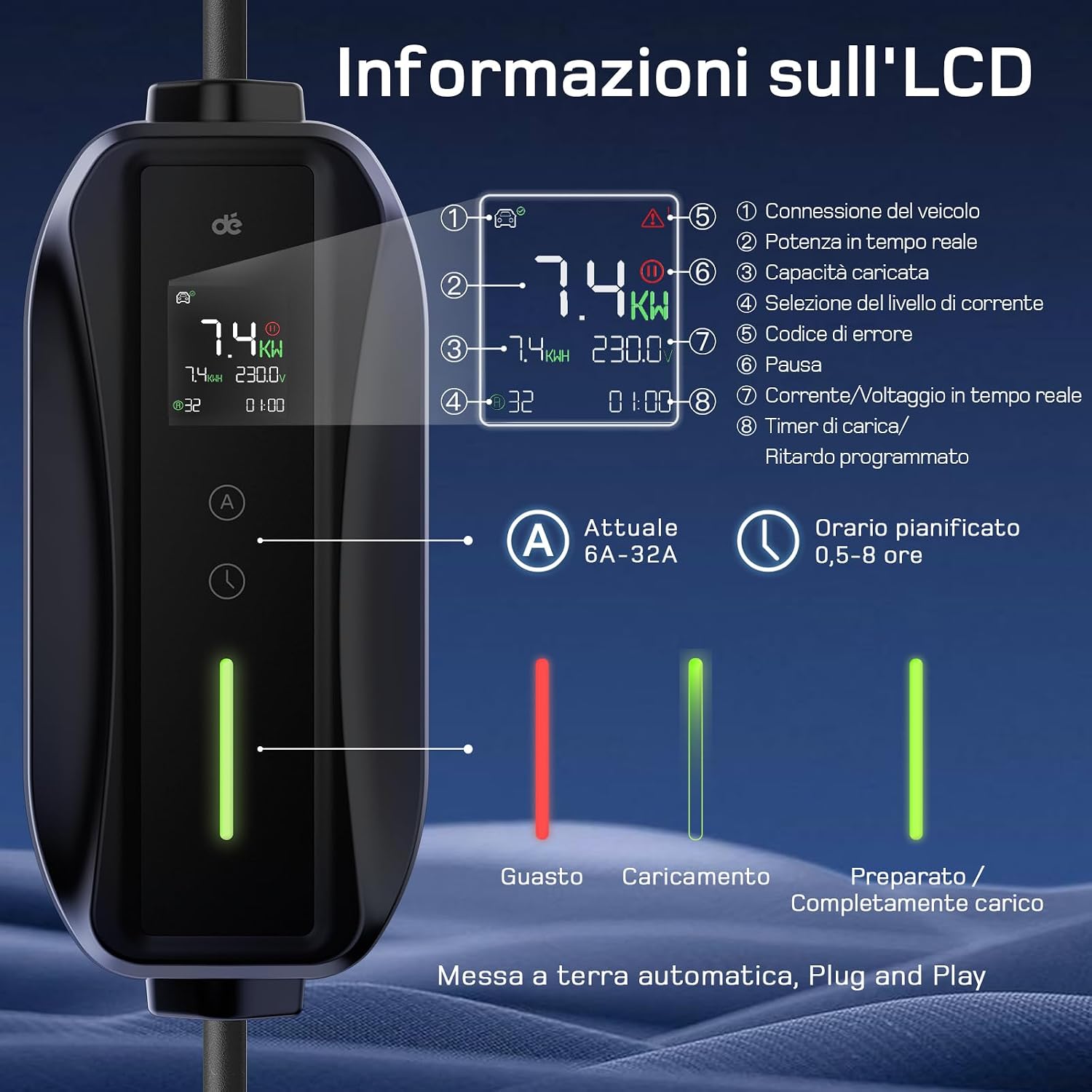

4.2 LCD Display Information
The LCD provides the following information:
- Vehicle Connection Icon: Indicates if the charger is connected to the vehicle.
- Error Icon: Displays if an error occurs.
- Real-time Power (kW): Current charging power.
- Charged Capacity (kWh): Total energy delivered.
- Delay Timer: Shows remaining time if delayed charging is set.
- Charging Cycle Icon: Visual representation of charging progress.
- Selected Current (A): The currently active charging current.
- Real-time Current/Voltage: Displays live electrical parameters.
4.3 Charging Speed Comparison

5. Maintenance
Proper maintenance ensures the longevity and optimal performance of your charging cable.
- Cleaning: Use the provided microfiber cloth to gently wipe the control box and cables. Do not use harsh chemicals or abrasive materials. Ensure all connectors are dry before use.
- Storage: When not in use, store the charging cable in the waterproof carrying bag. This protects it from dust, moisture, and physical damage. The compact design allows for easy storage in your vehicle's trunk.
- Inspection: Regularly inspect the cable, plugs, and control box for any signs of wear, damage, or corrosion. If any damage is found, discontinue use immediately and contact customer support.
- Cable Management: Use the handle strap to coil the cable neatly, preventing kinks and tangles that could lead to damage.

6. Troubleshooting
If you encounter issues with your dépow charging cable, refer to the following common problems and solutions.
6.1 Common Issues
- Charger Not Activating:
- Ensure the CEE 32A plug (or Schuko adapter) is fully inserted into the power outlet.
- Check if the power outlet is live and functioning correctly.
- Verify that the Type 2 connector is securely plugged into the vehicle's charging port.
- Slow Charging Speed:
- Confirm the selected current setting on the LCD. Adjust to a higher amperage if your power source and vehicle support it.
- If using the Schuko adapter, charging speed will be limited to a maximum of 3.68kW.
- Ensure your vehicle's onboard charger can accept 7.4kW. The final charging power is determined by the lower of the EV's maximum AC charging power and the wallbox/EV charger's power.
- Error Message on LCD:
- Note the specific error code displayed.
- Disconnect the charger from both the power source and the vehicle. Wait a few minutes, then reconnect.
- If the error persists, consult the detailed error code section (if available in future updates) or contact customer support.
7. Specifications
| Feature | Specification |
|---|---|
| Brand | dépow |
| Model Number | deDM2C07B6 |
| Charging Power | 7.4 kW (Monophase) |
| Input Voltage | 230V AC |
| Adjustable Current | 6A, 10A, 16A, 20A, 24A, 32A |
| Cable Length | 6 meters |
| Vehicle Connector | Type 2 |
| Power Plug | CEE 32A (with Schuko adapter) |
| Operating Temperature | -25°C to 50°C |
| Control Box IP Rating | IP66 |
| Type 2 Plug IP Rating | IP54 |
| Weight | 4.46 Kilograms |
| Product Dimensions | 36 x 33 x 14 cm |
8. Warranty and Support
dépow products are manufactured to high-quality standards. For any questions, technical assistance, or warranty claims, please contact our customer support team. Our support team is always available to assist you with product inquiries and troubleshooting.
Please refer to your purchase documentation for specific warranty terms and conditions.