
REVASRI NK-1000
REVASRI NK-1000 Laser Rangefinder User Manual
Model: NK-1000
Introduction
The REVASRI NK-1000 Laser Rangefinder is a high-precision optical instrument designed for accurate distance measurement. It is suitable for a variety of applications including hunting, golf, shooting, and archery. This manual provides detailed instructions on how to set up, operate, and maintain your rangefinder to ensure optimal performance and longevity.

Figure 1: REVASRI NK-1000 Laser Rangefinder. This image shows the compact, camouflage-patterned body of the rangefinder, highlighting its objective lens, eyepiece, and the REVASRI brand logo with the NK-1000 model designation.
Product Features
- High Magnification: Features 8x high-power magnification for clear and detailed viewing of distant targets.
- Extended Range: Capable of measuring distances from 5 to 1800 yards.
- High Accuracy: Provides precise measurements with an accuracy of ±0.5 yard.
- Multiple Measurement Modes: Includes Distance Mode, Scan Mode, Golf Mode (with Flag Lock), Two-Point Altimeter Mode, All-in-One Mode, Speed Measurement Mode, and Memory Mode.
- Fast and Continuous Measurement: Quickly measures targets in less than 1 second and supports continuous scanning for multiple targets.
- USB Rechargeable Battery: Equipped with a built-in lithium-ion battery for convenient USB charging.
- Durable and Waterproof Design: Built to withstand various outdoor conditions.

Figure 2: Rangefinder highlighting Hunting Mode. This image displays the rangefinder in an outdoor setting, emphasizing its 1000-yard measuring range and 6.5x magnification, suitable for hunting applications.
Package Contents
Please check the package contents upon unboxing to ensure all items are present:
- REVASRI NK-1000 Laser Rangefinder
- USB Charging Cable
- Carrying Pouch
- User Manual
- Lanyard (optional, may vary by package)
Setup
1. Charging the Battery
The REVASRI NK-1000 is equipped with a built-in lithium-ion battery. Before first use, fully charge the device.
- Locate the USB charging port on the side of the rangefinder.
- Connect the provided USB charging cable to the rangefinder and plug the other end into a standard USB power adapter (not included) or a computer USB port.
- The charging indicator will illuminate. Once fully charged, the indicator will change or turn off (refer to device specific behavior).
- A full charge typically takes a few hours.

Figure 3: USB Recharge Feature. This image shows the rangefinder being charged via its USB port, emphasizing the convenience of its lithium battery and automatic power-off feature after 30 seconds of inactivity.
2. Powering On/Off
- To power on, press the Power/Measurement button (usually the top button). The display will activate.
- The device will automatically shut down after a period of inactivity (e.g., 30 seconds) to conserve battery.
3. Adjusting Focus
Rotate the eyepiece to adjust the focus until the display and target appear clear and sharp.
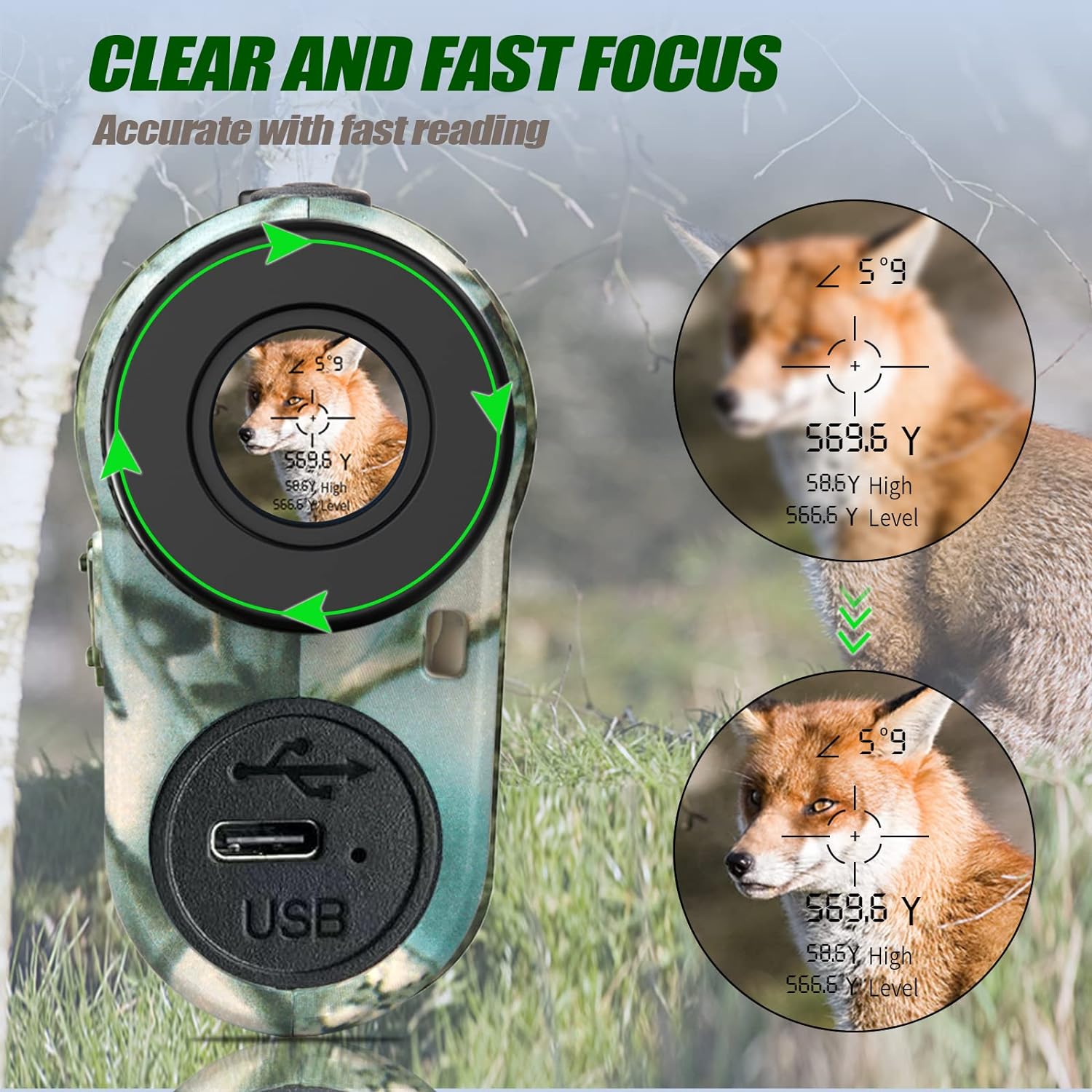
Figure 4: Clear and Fast Focus. This image illustrates the focus adjustment mechanism, showing how rotating the eyepiece clarifies the view and the digital overlay for accurate and fast readings.
4. Unit Selection (Meters/Yards)
The rangefinder allows switching between meters (M) and yards (Y). Consult your manual for the specific button combination to toggle units (often a long press of the Mode button or a combination of buttons).
Operating Modes
The REVASRI NK-1000 offers several modes to suit different measurement needs. Press the Mode button (usually the lower button) to cycle through the available modes.
1. Single Ranging (Distance Mode)
This is the standard mode for measuring the straight-line distance to a single target.
- Aim the crosshairs at your desired target.
- Press the Power/Measurement button once. The distance will be displayed instantly.
2. Scan Mode
Ideal for measuring multiple targets or moving objects continuously.
- Press and hold the Power/Measurement button.
- Pan the rangefinder across different targets. The distance will update continuously in real-time.
3. Golf Mode (Flag Lock)
Designed for golf, this mode helps to lock onto the flagstick, ignoring background objects.
- In Golf Mode, slowly scan the area around the flagstick.
- The device will identify and lock onto the closest target (the flagstick), often indicated by a vibration or a specific icon.
- The compensated distance (slope-adjusted) may also be displayed.

Figure 5: Target Lock Feature. This image demonstrates the "Target Lock" capability, showing the rangefinder's view with a deer in the crosshairs and the precise distance measurement, indicating easy capture of targets by scanning.
4. All-in-One Mode
This comprehensive mode displays multiple measurements simultaneously, including angle, height, horizontal distance, and straight-line distance.
- Select All-in-One Mode.
- Aim at the target and press the Measurement button.
- The display will show the angle, actual distance, horizontal distance, and vertical height to the target.

Figure 6: All-in-One Mode Display. This image shows the rangefinder's internal display with an overlay of an animal, demonstrating how it simultaneously displays angle, height, horizontal, and straight-line distance measurements.
5. Speed Measurement Mode
Measures the speed of objects moving radially towards or away from the rangefinder.
- Select Speed Measurement Mode.
- Aim at the moving object and press the Measurement button. The speed will be displayed in KM/H.
6. Two-Point Altimeter Mode
This mode allows you to measure the height of an object by taking two measurements: one to the base and one to the top of the object.
- Select Two-Point Altimeter Mode.
- Measure the distance to the base of the object.
- Measure the distance to the top of the object. The device will calculate and display the height.
7. Memory Mode
Allows you to store and recall previous measurements. Consult your device's specific instructions for saving and retrieving data.

Figure 7: Overview of 7 Measurement Modes. This diagram visually represents the seven distinct measurement modes available on the REVASRI NK-1000, including Single Ranging, All-in-one, Scan, Two Point Height, Speed measurement, Golf mode, and Memory storage, along with the device's dimensions.
Maintenance
- Cleaning: Use a soft, clean cloth to wipe the lenses and body. For stubborn dirt, a slightly damp cloth can be used. Avoid abrasive materials or harsh chemicals.
- Storage: Store the rangefinder in its protective pouch in a cool, dry place when not in use. Avoid extreme temperatures and high humidity.
- Battery Care: For optimal battery life, avoid fully discharging the battery frequently. If storing for extended periods, charge the battery to about 50% every few months.
- Avoid Direct Sunlight: Do not leave the rangefinder exposed to direct sunlight for prolonged periods, especially through the lens, as this can damage internal components.
Troubleshooting
| Problem | Possible Cause | Solution |
|---|---|---|
| Device does not power on. | Low or depleted battery. | Charge the battery using the provided USB cable. |
| Inaccurate measurements. | Unstable aiming; dirty lens; target too far or too small; adverse weather conditions (fog, heavy rain). | Ensure stable aiming; clean the lens; try measuring a larger, closer target; avoid use in extreme weather. |
| Display is blurry. | Eyepiece not focused. | Rotate the eyepiece to adjust focus until the display is clear. |
| Cannot switch modes. | Incorrect button press; device frozen. | Ensure you are pressing the correct Mode button; try powering off and on again. |
Specifications
| Feature | Detail |
|---|---|
| Brand | REVASRI |
| Model Number | NK-1000 |
| Magnification | 8X |
| Measuring Range | 5 - 1800 yards |
| Measurement Accuracy | ±0.5 yard |
| Speed Measurement Unit | KM/H |
| Battery Type | Lithium-ion (rechargeable) |
| Waterproof Level | Waterproof |
| Dimensions (L x W x H) | 9.5 x 3 x 6 cm (approx. 3.74 x 1.18 x 2.36 inches) |
| Weight | 140 g (approx. 4.94 oz) |
| Material | Plastic |
Safety Information
- Laser Safety: This device uses an invisible laser. Do not stare directly into the laser aperture or aim the laser at people or animals.
- Battery Safety: Use only the provided charging cable. Do not attempt to disassemble or replace the internal battery. Avoid exposing the device to extreme heat or fire.
- Environmental Conditions: While waterproof, avoid submerging the device in water. Do not operate in extremely dusty or corrosive environments.
- Children: Keep the device out of reach of children.
Warranty and Support
REVASRI products are manufactured to high-quality standards. For warranty information, technical support, or service inquiries, please refer to the contact details provided with your purchase or visit the official REVASRI website. Please retain your proof of purchase for warranty claims.
Related documentsNK-1000


Ask a question about this manual
Ask about setup, troubleshooting, compatibility, parts, safety, or missing instructions. Manuals+ will review the question and use this page’s manual context to help answer it.