
1. Introduction
This manual provides essential information for the safe and efficient use of your TCL 32L5AG 32-inch Full HD Smart Google TV. Please read these instructions thoroughly before operating the device and retain them for future reference. This television combines a Full HD display with Google TV functionality, offering a wide range of entertainment options and smart features.
2. Safety Information
Always adhere to the following safety precautions to prevent electric shock, fire, or damage to the product:
- Do not expose the TV to rain or moisture.
- Ensure proper ventilation; do not block ventilation openings.
- Use only the power cord supplied with the TV.
- Do not open the TV casing; refer all servicing to qualified personnel.
- Keep the TV away from direct sunlight, heat sources, and strong magnetic fields.
- Place the TV on a stable, level surface or mount it securely to a wall using a VESA-compliant bracket.
3. Product Overview
The TCL 32L5AG is a 32-inch Full HD Smart Google TV designed for an immersive viewing experience. It features a sleek, bezel-less design and integrates advanced image processing technologies.

Image: Front view of the TCL 32L5AG 32-inch Full HD Smart Google TV.
4. Setup
4.1 Unpacking
Carefully remove the TV and all accessories from the packaging. Ensure all components are present:
- TCL 32L5AG TV unit
- Remote control
- Power cord
- TV stand components and screws
- User manual (this document)
4.2 Stand Installation
To install the TV stand:
- Place the TV face down on a soft, flat surface to prevent screen damage.
- Align the stand bases with the corresponding slots on the bottom of the TV.
- Secure the stands using the provided screws.

Image: Diagram showing the TV dimensions and how the stand attaches to the base of the television.
4.3 Connecting Cables
Connect necessary cables to the TV's rear ports:
- Power: Connect the power cord to the TV and a wall outlet.
- Antenna: Connect your terrestrial or satellite antenna cable to the ANTENNA INPUT port.
- HDMI: For external devices like Blu-ray players or game consoles, use the HDMI INPUT 1 or 2 ports.
- LAN: For a wired internet connection, connect an Ethernet cable to the LAN port.
- USB: For external storage (e.g., HDD for recording), use the USB port.
- Optical Digital Audio Output: For connecting to a soundbar or home theater system.
- Headphone Output: For connecting headphones.
- Video Input: For older devices using composite video.
- miniB-CAS Card Slot: Insert your miniB-CAS card for digital broadcast reception (required for digital broadcasting in Japan).
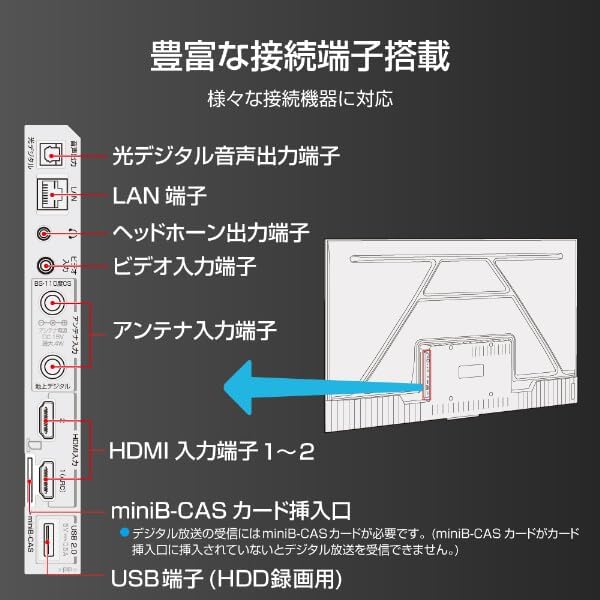
Image: Diagram illustrating the various input and output ports on the back of the TCL 32L5AG TV, including HDMI, USB, LAN, antenna, and audio outputs.
4.4 Initial Setup
After connecting all cables and powering on the TV for the first time, follow the on-screen instructions to complete the initial setup, which includes:
- Language selection.
- Network connection (Wi-Fi or wired LAN).
- Google account login for Google TV features.
- Channel scanning for broadcast TV.
5. Operating Instructions
5.1 Basic TV Operation
- Power On/Off: Press the power button on the remote control.
- Input Selection: Use the 'Input' button on the remote to switch between HDMI, TV, and other sources.
- Volume Control: Use the 'Volume Up/Down' buttons.
- Channel Change: Use the 'Channel Up/Down' buttons for broadcast TV.
5.2 Google TV Features
Your TCL 32L5AG comes with Google TV, providing a personalized and integrated entertainment experience.
- Content Browsing: The home screen displays recommended content based on your viewing history and preferences from various streaming services.
- Voice Search (OK Google): Press the Google Assistant button on your remote and speak into the microphone to search for movies, shows, or control your TV.
- Streaming Apps: Access popular services like Netflix, YouTube, Amazon Prime Video, Disney+, Hulu, and more directly from the TV.

Image: Screenshot of the Google TV home screen displaying various streaming applications and content recommendations.
5.3 Chromecast Built-in
The TV includes Chromecast built-in, allowing you to cast content from your smartphone, tablet, or computer directly to the TV screen.
- Ensure your mobile device and TV are connected to the same Wi-Fi network.
- Open a Chromecast-enabled app (e.g., YouTube, Netflix) on your mobile device.
- Tap the Cast icon (
 ) within the app.
 - Select your TCL TV from the list of devices to start casting.

Image: A smartphone displaying a video, with an arrow indicating it is casting to the larger TCL TV screen.
6. Features
6.1 Algo Engine Lite
The Algo Engine Lite utilizes an advanced image analysis algorithm to enhance picture quality for both broadcast TV and streaming services, delivering a high-quality visual experience.

Image: A close-up of a microchip labeled "Algo Engine Lite" on a circuit board, representing the TV's image processing unit.
6.1.1 Detail Restoration
The Algo Engine effectively suppresses noise around text and edges, as well as wave-like noise in flat image areas. It also intelligently upscales HD and 2K images to 4K resolution, reproducing high-definition visuals.

Image: A split image showing a cityscape. The 'Before' side appears less sharp with more noise, while the 'After' side, processed by Algo Engine, shows improved detail and reduced noise.
6.1.2 Superior Contrast (Micro Dimming)
Equipped with a "Micro Dimming" function, the Algo Engine analyzes image information in detail for each zone. By clearly distinguishing brightness and darkness down to fine details, it renders landscapes with a more realistic sense of depth.

Image: A split image of a night city scene. The 'Without Micro Dimming' side shows less defined lights and shadows, while the 'With Micro Dimming' side exhibits enhanced contrast and clearer details in both bright and dark areas.
6.1.3 Precise Color Management
With 3D color management, the Algo Engine suppresses color gamut loss during color transitions, accurately reproducing tones and colors from dark to bright areas.

Image: A split image showing various food bowls. The 'Before' side has muted or inaccurate colors, while the 'After' side, processed by Algo Engine, displays vibrant and accurate colors with a wider color spectrum indicated by a gradient bar.
6.1.4 Enhanced HDR Expression
The Algo Engine analyzes High Dynamic Range (HDR) images without omission, flexibly adapting to a wide range of brightness levels. It faithfully reproduces the bright and dark areas of the image, supporting HDR10 and HLG formats (1080p only).

Image: A split image of a sunset landscape. The 'Before' side shows less dynamic range, while the 'After' side, processed by Algo Engine, reveals richer colors, brighter highlights, and deeper shadows, enhancing the HDR effect.
6.2 Full HD LCD Display
The TV features a Full HD LCD panel with direct-lit LED backlighting, providing bright and high-quality images across the entire screen. The panel resolution is twice that of standard HD, allowing for detailed visuals and rich content expression.

Image: A split image comparing an HD display to a Full HD display, showing the difference in pixel density and clarity, particularly visible in magnified sections of the image.
6.3 Dolby Audio
Experience clear and powerful sound with Dolby Audio support, enhancing your overall entertainment experience.

Image: A visual representation of sound waves emanating from a waterfall, illustrating the immersive audio experience provided by Dolby Audio.
6.4 Bezel-less Design
The TV features a metal bezel-less frame, maximizing the screen area and enhancing the aesthetic presence in your living space.

Image: Three close-up views of the TCL TV, highlighting its thin metal frame and minimal bezels, showcasing the bezel-less design from different angles.
7. Specifications
| Feature | Description |
|---|---|
| Brand | TCL |
| Model Name | 32L5AG |
| Display Technology | LCD |
| Resolution | Full HD (1920 x 1080) |
| Refresh Rate | 120 Hz |
| Aspect Ratio | 1.78:1 |
| Contrast Ratio | 4000:1 |
| HDR Support | HDR10 |
| Motion Enhancement Technology | Algo Engine Lite |
| Image Quality Enhancement Technology | Algo Engine |
| Connectivity Technology | Bluetooth, Wi-Fi |
| Recommended Internet Services | YouTube, Netflix |
| Audio Input | RCA, Bluetooth |
| Signal Format | Composite, HDMI |
| HDMI Ports | 2 |
| USB 3.0 Ports | 1 |
| Product Dimensions (D x W x H) | 18 x 71.6 x 46.8 cm |
| Product Weight | 5 kg |
| Speaker Features | 10W Speakers |
| Speaker Channel Configuration | 2.0 |
| Wattage | 65 W |
| Power Consumption | 64 kWh/year |
| Control Method | Remote |
| Video Encoding Format | H.264, H.265 (HEVC) |
| Release Year / Model Year | 2021 |
| VESA Mount Standard | 100x100mm |
8. Maintenance
To ensure the longevity and optimal performance of your TV, follow these maintenance guidelines:
- Cleaning the Screen: Gently wipe the screen with a soft, lint-free cloth. For stubborn marks, slightly dampen the cloth with water or a specialized screen cleaner. Do not spray liquid directly onto the screen.
- Cleaning the Casing: Use a soft, dry cloth to wipe the TV casing. Avoid abrasive cleaners or solvents.
- Ventilation: Ensure the ventilation openings on the back of the TV are not blocked by dust or objects. Regularly clean any dust accumulation.
- Power Cord: Periodically check the power cord for any damage. If damaged, contact customer support for a replacement.
9. Troubleshooting
If you encounter issues with your TV, refer to the following common problems and solutions:
| Problem | Possible Solution |
|---|---|
| No power | Check if the power cord is securely plugged into the TV and the wall outlet. Try a different outlet. |
| No picture, but sound is present | Ensure the correct input source is selected. Check cable connections to external devices. |
| No sound, but picture is present | Check volume level and mute settings. Ensure external audio systems are correctly connected and powered on. |
| Remote control not working | Replace batteries. Ensure there are no obstructions between the remote and the TV's IR sensor. |
| Cannot connect to Wi-Fi | Check your router and modem. Re-enter the Wi-Fi password. Try restarting the TV and router. |
| Google TV features not working | Ensure you are logged into your Google account and have an active internet connection. |
If the problem persists after trying these solutions, please contact customer support.
10. Warranty and Support
Your TCL 32L5AG TV comes with a limited warranty. Please refer to the warranty card included in your product packaging for specific terms and conditions. For technical support, service, or warranty claims, please contact TCL customer service through their official website or the contact information provided in your warranty documentation.
For the latest information and support, visit the official TCL website: www.tcl.com


