
Introduction
This manual provides comprehensive instructions for the Accutime Spiderman Ghost Spider Kids Smartwatch, Model SPD4935AZ. Designed for children aged 3 and up, this interactive touchscreen smartwatch offers a range of engaging features while prioritizing safety by operating without Wi-Fi, calling, or texting capabilities. It combines educational learning with entertainment, making it an ideal first smart device for young users.
What's in the Box
- Accutime Spiderman Ghost Spider Kids Smartwatch
- Built-in Rechargeable Battery (pre-installed)
- USB Charging Cable
Key Features
- Touchscreen Display: Easy-to-navigate interface for young users.
- Selfie Camera: Capture photos and videos directly from the wrist.
- Photo Album Viewer: Browse saved pictures.
- Video Player: Watch recorded videos.
- Voice Recorder: Record and play back audio messages.
- Games: Multiple pre-loaded interactive games for entertainment.
- Alarm Clock: Set reminders for daily activities.
- Calculator: Basic arithmetic functions.
- Pedometer: Tracks steps taken, promoting physical activity.
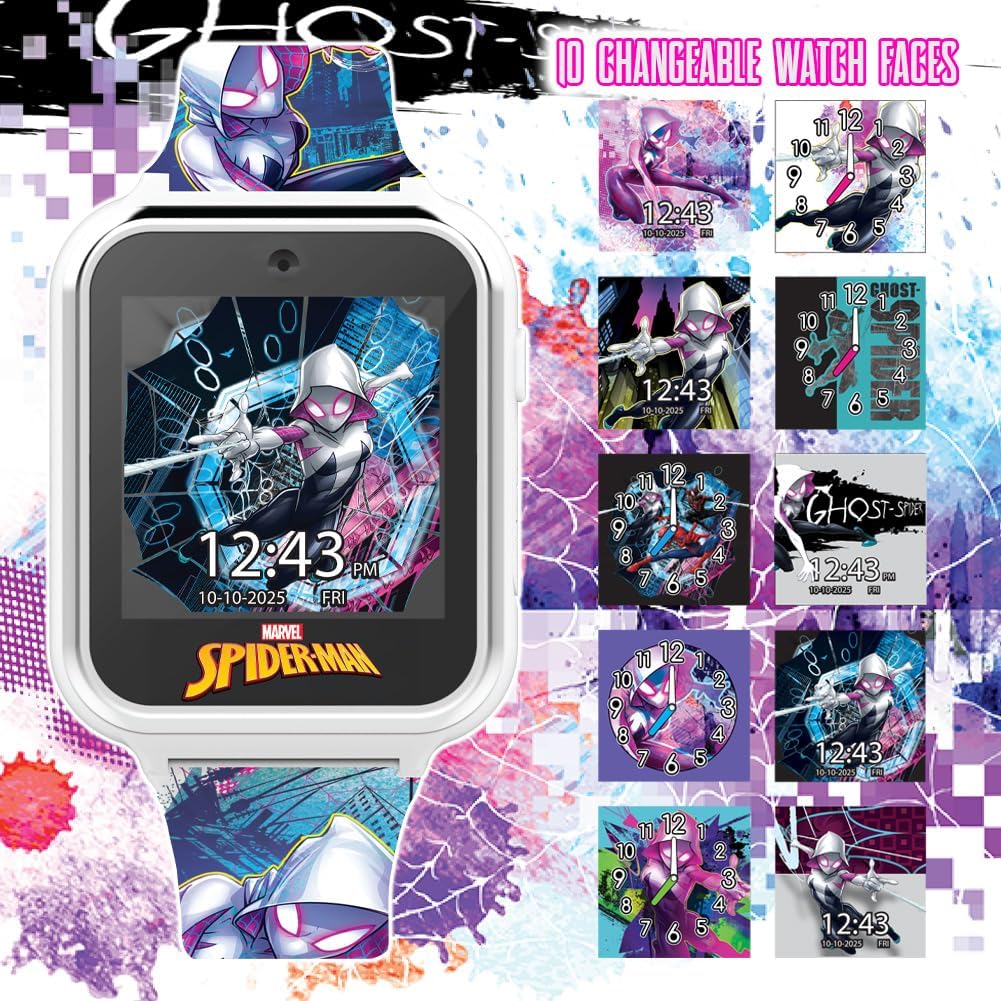
- Changeable Watch Faces: Customize the display with various Spiderman-themed designs.
- Safety Focused: No Wi-Fi, calling, or texting capabilities.
- Rechargeable Battery: Long-lasting power with included USB charging.
Setup
Initial Charging
Before first use, fully charge the smartwatch for at least three hours to ensure optimal battery performance. Locate the USB charging port on the side of the watch. Connect the provided USB charging cable to the watch and a compatible USB power source (e.g., computer USB port, USB wall adapter).
Operating Instructions
Power On/Off
Press and hold the side button to power the smartwatch on or off.
Touchscreen Navigation
The smartwatch features a responsive touchscreen. Swipe left or right to navigate through different applications and features. Tap on an icon to select and open an application.
Changing Watch Faces
From the home screen, press and hold the display to cycle through various Spiderman-themed watch faces. Release your finger when the desired watch face appears.

Using the Camera
Tap the camera icon to open the camera application. Press the on-screen button to take photos or start/stop video recording. The camera is located at the top of the watch face.
Accessing Games and Tools
Swipe through the main menu to find icons for games, pedometer, alarm, calculator, voice recorder, and other tools. Tap the respective icon to launch the desired function.

Official Product Video
Watch this video for a quick overview of the iTime Kids Interactive Watch features, including games, pedometer, alarm, and camera functions.
Maintenance
Cleaning
To clean the smartwatch, gently wipe the screen and strap with a soft, dry cloth. Avoid using harsh chemicals or abrasive materials.
Water Resistance
This smartwatch is NOT water-resistant. Avoid exposure to water, including rain, splashes, and submersion, as this can cause permanent damage to the device. Treat it with the same care as a mobile phone.
Troubleshooting
Watch Not Turning On
If the watch does not turn on, ensure it is fully charged. Connect it to the USB charging cable and allow it to charge for at least three hours. If the issue persists after charging, contact customer support.
Screen Malfunction After Water Exposure
If the screen turns white or the watch stops functioning after exposure to water, this indicates water damage. As the device is not water-resistant, such damage is typically irreversible. Do not attempt to dry it with rice or other methods, as internal components may already be compromised. Contact customer support for potential replacement options, though water damage may not be covered under warranty.
Specifications
| Model Name | SPIDERMAN Smart Watch |
| Brand | Accutime |
| Item Model Number | SPD4935AZ |
| Screen Size | 40 Millimeters |
| Shape | Square |
| Operating System | Custom |
| Special Features | Alarm Clock, Audio Recording, Camera, Pedometer, Time Display |
| Connectivity Technology | Bluetooth (for internal functions, not external device connection) |
| Wireless Communication Standard | Bluetooth (for internal functions, not external device connection) |
| Battery Type | 1 Lithium Ion battery (included) |
| GPS | No GPS |
| Item Weight | 0.22 Kilograms (approx. 7.8 ounces) |
| Manufacturer | Accutime Watch Corp. |
| Date First Available | August 23, 2023 |
Warranty and Support
Warranty Information
The Accutime Spiderman Ghost Spider Kids Smartwatch comes with a one-year warranty from Accutime Watch Corp. This warranty covers manufacturing defects under normal use. Please retain your proof of purchase for warranty claims.
Customer Support
For any questions, technical assistance, or warranty claims, please contact Accutime Watch Corp. customer support. Refer to the product packaging or the official Accutime website for the most current contact information.

