
1. Introduction
The Emiif ZK-SMC02 is a dedicated operation control module designed for single-axis stepper motors. This versatile module integrates both controller and driver functionalities, eliminating the need for a separate driver in many applications. It features a variety of built-in fixed operating modes, allowing users to quickly select the appropriate motion path for their needs. Key parameters such as distance, speed, delay, and cycle count can be stored and adjusted, even after power-off. The ZK-SMC02 can operate independently or be integrated into larger systems. It is suitable for general industrial control applications but should not be used in critical areas such as medical treatment, fire protection, or life-critical systems.
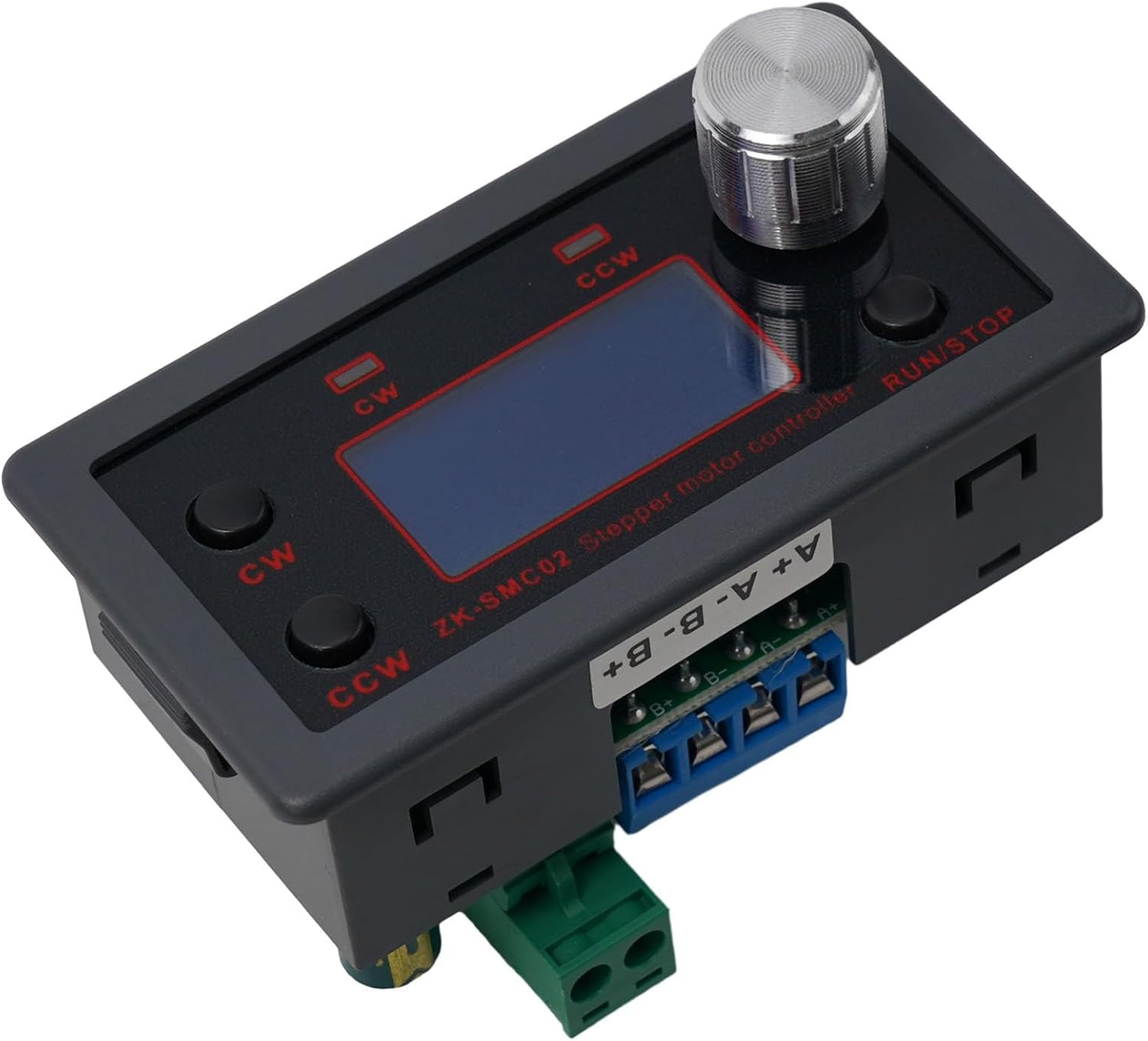
Figure 1: Front view of the Emiif ZK-SMC02 Stepper Motor Controller, showing the LCD screen, rotary encoder, and control buttons.
2. Key Features
- Integrated Design: Combines controller and driver functions, simplifying wiring and setup for single-axis stepper motors.
- Clear LCD Display: Provides real-time display of speed, delay, and cycle time for precise motor control.
- Parameter Memory: Controller parameters are saved automatically and retained even after power loss.
- Multiple Operating Modes: Features various fixed operating modes, allowing users to quickly select suitable motion paths for diverse applications.
- Flexible Control: Supports control via external buttons, UART serial interface commands, and adjustable working parameters.
- Direction and Speed Control: Rotation direction and speed can be easily adjusted via dedicated buttons.
- Wide Power Supply Range: Operates on DC 5-30V universal power.
- Reverse Polarity Protection: Includes input reverse polarity protection for enhanced safety.
3. Setup and Wiring
Proper wiring is crucial for the safe and correct operation of the ZK-SMC02. Ensure all connections are secure before applying power.
3.1 Power Supply Connection
- Connect a DC power supply within the 5-30V range to the power input terminals. Observe polarity: connect positive (+) to VIN and negative (-) to GND.
- The module includes input reverse polarity protection.
3.2 Stepper Motor Connection
The ZK-SMC02 is designed for single-axis stepper motors with a common cathode signal. Connect your stepper motor to the A+, A-, B+, B- terminals as shown in the wiring diagram. Ensure correct phase connections for proper motor operation.

Figure 2: Detailed wiring diagram showing connections for the stepper motor and power supply to the ZK-SMC02 module.
3.3 External Control Connections (Optional)
The module supports external control via UART serial interface. Refer to the detailed protocol documentation for specific commands and pinouts if utilizing this feature.

Figure 3: Close-up view of the terminal blocks on the ZK-SMC02, indicating connections for motor phases (A+, A-, B+, B-) and power input.

Figure 4: Bottom view of the ZK-SMC02 module, revealing the heatsink and DIP switches for subdivision selection.
4. Operating Instructions
The ZK-SMC02 offers automatic, manual, setting, and serial port control modes. The LCD screen and physical buttons provide intuitive control.
4.1 User Interface Overview

Figure 5: Front panel of the ZK-SMC02, highlighting the LCD display, CW (Clockwise) and CCW (Counter-Clockwise) buttons, and the rotary encoder with RUN/STOP button.
- LCD Screen: Displays current speed, delay times, cycle counts, and other operational parameters.
- Rotary Encoder: Used for navigating menus and adjusting parameter values.
- RUN/STOP Button: Press the rotary encoder to start or stop motor operation.
- CW Button: Initiates clockwise rotation or navigates menu options.
- CCW Button: Initiates counter-clockwise rotation or navigates menu options.
4.2 Mode Selection and Parameter Setting
The module offers various fixed operating modes. Use the rotary encoder and CW/CCW buttons to navigate through the modes and adjust parameters such as:
- Speed (0.1 ~ 999 circles/minute)
- Number of Forward Rotation Pulses (1-9999 pulses)
- Number of Reverse Pulses (1-9999 pulses)
- Cycle Times (1-9999 times)
- Forward Rotation Delay Time (0.0-999.9 seconds)
- Inversion Delay Time (0.0-999.9 seconds)
- Subdivision Selection (1-32 subdivisions, typically set via DIP switches on the PCB)
Consult the on-screen menu for specific navigation and adjustment procedures for each mode. Parameters are automatically saved.
5. Maintenance
The Emiif ZK-SMC02 is designed for reliable operation with minimal maintenance. Follow these guidelines to ensure longevity:
- Cleaning: Keep the module clean and free from dust and debris. Use a soft, dry cloth for cleaning. Avoid liquid cleaners.
- Environment: Operate the module within the specified temperature range of -5 °C to 60 °C and in a non-condensing environment. Avoid exposure to excessive moisture or corrosive substances.
- Connections: Periodically check all wiring connections to ensure they remain secure. Loose connections can lead to intermittent operation or damage.
- Ventilation: Ensure adequate airflow around the module, especially around the heatsink, to prevent overheating.
6. Troubleshooting
| Problem | Possible Cause | Solution |
|---|---|---|
| Module does not power on. | No power supply; incorrect voltage; reverse polarity. | Check power supply connection and voltage (5-30V DC). Ensure correct polarity. |
| Motor does not move. | Incorrect motor wiring; motor not connected; parameters not set; motor current too low/high. | Verify motor wiring (A+, A-, B+, B-). Ensure motor is connected. Check operating mode and parameters. Ensure motor is compatible and within drive capacity (4A). |
| Motor moves erratically or vibrates. | Incorrect subdivision setting; motor wiring issues; mechanical binding. | Adjust subdivision settings (DIP switches). Recheck motor wiring. Ensure motor and load move freely. |
| LCD display is blank or shows errors. | Power issue; internal fault. | Check power supply. If problem persists, contact support. |
| Parameters do not save. | Unlikely, as parameters are designed to save automatically. | Ensure power is not interrupted immediately after setting. If issue persists, contact support. |
7. Specifications
| Parameter | Value |
|---|---|
| Model | ZK-SMC02 Stepper Motor Controller + Driver |
| Compatible Motor | Stepper Motor |
| Number of Control Axes | Single-axis |
| Motor Signal | Common Cathode |
| Power Supply Range | DC 5-30V universal |
| Drive Capacity | 4A |
| Acceleration/Deceleration Control | Yes |
| Input Reverse Polarity Protection | Yes |
| Remote Control | TTL Serial Interface |
| Main System Functions | Automatic, Manual, Setting, Serial Port Control |
| Speed Range | 0.1 ~ 999 circles/minute |
| Number of Forward Pulses | 1-9999 pulses |
| Number of Reverse Pulses | 1-9999 pulses |
| Cycle Times | 1-9999 times |
| Forward Delay Time | 0.0-999.9 seconds |
| Inversion Delay Time | 0.0-999.9 seconds |
| Subdivision Selection Range | 1-32 subdivisions |
| Product Use Environment | -5 °C to 60 °C (no condensation) |
| Product Dimensions | 8 x 5 x 3 cm |
| Item Weight | 88 g |
8. Warranty and Support
For warranty information and technical support, please refer to the product packaging or contact your retailer. Keep your purchase receipt as proof of purchase.
For further assistance, you may also visit the Emiif official website or contact their customer service department. Please have your model number (ZK-SMC02) and purchase details ready when seeking support.