
GANPE GBC01
GANPE LED Lighted Bathroom Medicine Mirror Cabinet User Manual
Model: GBC01
1. Introduction
Thank you for choosing the GANPE LED Lighted Bathroom Medicine Mirror Cabinet. This manual provides essential information for the safe and efficient installation, operation, and maintenance of your new cabinet. Please read it thoroughly before use and retain it for future reference.

Figure 1: GANPE LED Lighted Bathroom Medicine Mirror Cabinet.
2. Key Features
- Stepless Adjustable Lighting: The frontlit LED can be adjusted from 10% to 100% brightness. It offers three color temperatures: warm white (3500K), natural light (4000K), and bright white (6500K). Features a light memory function and an additional light strip at the bottom.
- Mirrors on Both Sides: The cabinet door features mirrors on both its inner and outer surfaces, providing convenience for various grooming needs.
- Adequate Storage Space: Equipped with double doors and two layers of adjustable glass partitions, offering ample space for daily necessities. Includes integrated power sockets and USB ports for charging electronic devices.
- Enhanced Defogging Function: A built-in defogger ensures a clear mirror surface, even in humid bathroom conditions. The cabinet boasts an IP44 waterproof rating for safety and durability in damp environments.
- Durable Construction: Made from aluminum material, ensuring antirust properties and a long service life.

Figure 2: Integrated sockets, USB ports, durable aluminum construction, and bottom lighting.
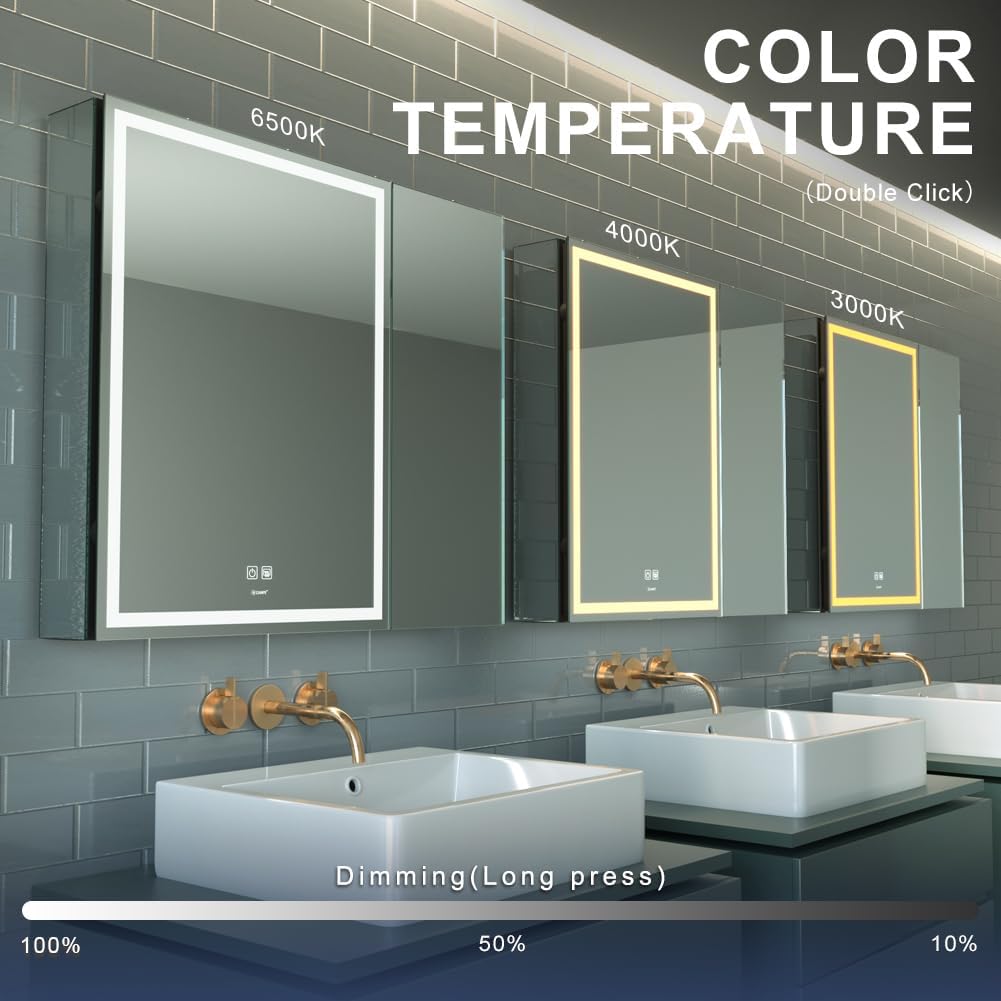
Figure 3: Adjustable color temperature (3000K, 4000K, 6500K) and dimming functionality.

Figure 4: Anti-fog functionality and IP44 waterproof rating for bathroom use.
3. Setup and Installation
The GANPE medicine cabinet is designed for easy wall-mount installation and comes fully assembled. A detailed manual is included to guide you through the process. Ensure you have the necessary tools before beginning.
3.1. Pre-Installation Checklist
- Verify all components are present as per the packing list.
- Ensure the installation area is suitable for a wall-mounted cabinet and can support its weight (35 pounds).
- Confirm electrical connections are accessible and meet local codes.
3.2. Installation Steps
- Use the provided installation cardboard template for accurate positioning and marking of drill holes on the wall.
- Drill holes and insert wall anchors as indicated by the template.
- Secure the mounting bracket to the wall using appropriate screws.
- Carefully hang the medicine cabinet onto the mounting bracket.
- Connect the electrical wiring. The cabinet can be hardwired or connected via a wall plug. Ensure all electrical connections are secure and safe.
- Adjust the glass partitions to your desired height within the cabinet.

Figure 5: Using the installation cardboard for precise wall positioning.

Figure 6: Front and side dimensions of the medicine cabinet.
4. Operation
4.1. Lighting Control
- Turn On/Off: Tap the power icon on the mirror surface to turn the LED light on or off.
- Adjust Brightness: Long press the power icon to steplessly adjust the brightness from 10% to 100%.
- Change Color Temperature: Double-click the power icon to cycle through the three color temperatures: warm white (3500K), natural light (4000K), and bright white (6500K).
- Memory Function: The cabinet remembers your last brightness and color temperature settings when turned off and on.
4.2. Anti-Fog Function
- Activate Defogger: Tap the defogger icon on the mirror surface to activate the built-in defogging function. This will clear any condensation from the mirror.
- Deactivate Defogger: Tap the defogger icon again to turn off the function.
4.3. Using Sockets and USB Ports
- Open the cabinet door to access the internal power sockets and USB ports.
- Plug in your electronic devices for convenient charging.
5. Maintenance
- Cleaning: Use a soft, damp cloth and a mild, non-abrasive cleaner to wipe the mirror and cabinet surfaces. Avoid harsh chemicals or abrasive materials that could damage the finish or mirror coating.
- Glass Shelves: The glass partitions are removable for easy cleaning. Handle them with care to prevent breakage.
- Electrical Components: Ensure the cabinet is disconnected from power before cleaning or performing any maintenance on electrical components.
- General Care: Regularly check for any loose connections or signs of wear. Due to its IP44 waterproof rating, the cabinet is designed for damp environments, but avoid direct water spray.
6. Troubleshooting
| Problem | Possible Cause | Solution |
|---|---|---|
| Light not turning on | No power supply; loose connection; faulty LED driver. | Check power outlet/circuit breaker. Ensure all connections are secure. Contact customer support if the issue persists. |
| Anti-fog not working | Defogger not activated; electrical issue. | Ensure the defogger icon is tapped. Check power supply. |
| Sockets/USB ports not working | No power to the cabinet; internal wiring issue. | Verify the cabinet is powered on. Avoid overloading the outlets. |
| Mirror appears foggy after defogger use | Excessive humidity; defogger not on long enough. | Allow more time for the defogger to work. Ensure proper bathroom ventilation. |
7. Specifications
| Attribute | Detail |
|---|---|
| Brand | GANPE |
| Model Number | GBC01 |
| Product Dimensions | 5.12"D x 29.53"W x 27.56"H |
| Color | 2 Doors |
| Special Features | Antirust, Anti-fog, Dimmable, Large space, USB & sockets, Easy to install |
| Mounting Type | Wall Mount |
| Room Type | Bathroom |
| Door Style | Flat Panel |
| Included Components | Mirror |
| Finish Type | Polished |
| Number of Shelves | 2 |
| Item Weight | 35 Pounds |
| Top Material Type | Glass |
| Back Material Type | Aluminum |
| Assembly Required | No |
| Frame Material | Aluminum |
| Country of Origin | China |
| UPC | 749838296598 |

Figure 7: Energy Efficiency Label. For more details, visit EPREL Database.
8. Warranty and Support
- Warranty: This product comes with a 1-year warranty. Free replacement of parts is available for three years.
- Returns: Enjoy free returns within 30 days of purchase.
- Customer Support: For any questions regarding installation, operation, or product issues, please contact our 24/7 Email Assistant.
9. Important Safety Information
Always follow the installation instructions carefully. Keep the cabinet away from heat sources and do not use it if the glass is broken or damaged. Ensure all electrical connections are made by a qualified professional if you are unsure. Do not attempt to modify the product in any way.
Ask a question about this manual
Ask about setup, troubleshooting, compatibility, parts, safety, or missing instructions. Manuals+ will review the question and use this page’s manual context to help answer it.