
1. Introduction and Overview
This manual provides detailed instructions for the assembly, operation, and maintenance of your BONTEC Electric Standing Desk Frame. This single motor frame is designed to offer ergonomic comfort by allowing easy height adjustments, promoting a healthier work environment.
The sturdy metal construction supports up to 185 lbs, ensuring stability for your monitors, computers, and office accessories. Its quiet motor, memory presets, and anti-collision features enhance user experience and safety.
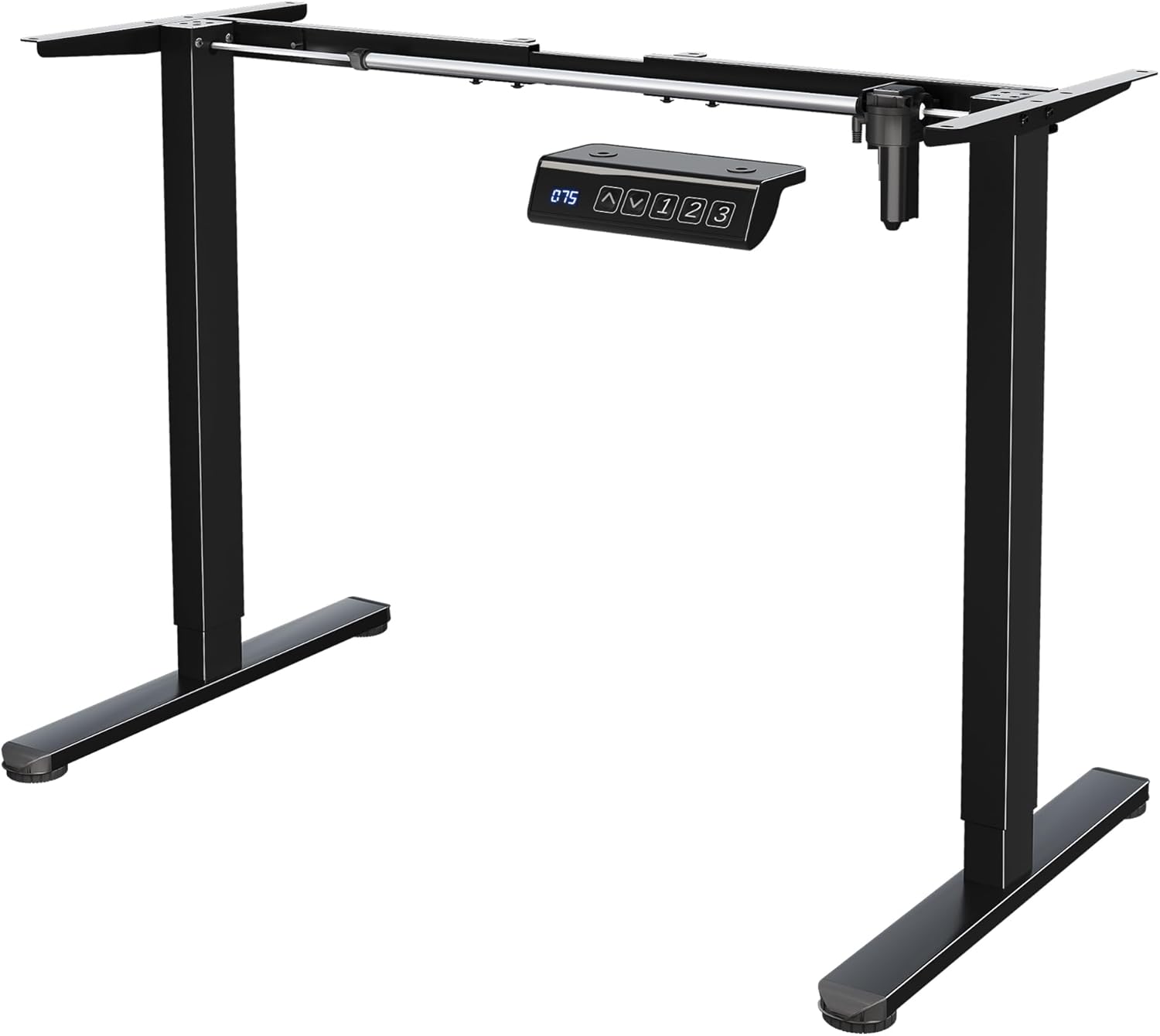
Image 1: Assembled BONTEC Electric Standing Desk Frame.
2. Safety Information
Please read all instructions carefully before assembly and use. Keep children and pets away from the desk during operation. Ensure no obstacles are in the desk's path during height adjustments. The anti-collision feature is designed to stop movement if an obstruction is detected, but user vigilance is always recommended.
3. Package Contents
The package includes all necessary accessories and labeled parts for straightforward assembly. Please verify all components are present and in good condition before proceeding.
4. Setup and Assembly Instructions
Follow the steps below for proper assembly. Refer to the accompanying video for visual guidance.
Video 1: Single Motor Standing Desk Frame Installation Guide. This video provides a step-by-step visual walkthrough of the assembly process.
- Step 1: Attach Top Brackets to Legs
Secure parts D (top brackets) to table legs B and C using the provided screws and Allen key. Ensure correct mounting orientation of part D. - Step 2: Prepare Crossbars
Loosen the screws on parts H and G (crossbars) to allow for adjustment. - Step 3: Connect Crossbars to Legs
Connect parts G and H to table legs B and C using the provided screws and Allen key. - Step 4: Attach Side Brackets and Hook
Attach part 5 (hook) to part F (side bracket) with a screw. Then, connect parts F to table legs B and C with screws. Note the installation direction of parts F. - Step 5: Insert Drive Shaft
Insert part I (drive shaft) into parts H and G (crossbars). - Step 6: Adjust Length and Tighten
Adjust the length of the frame as needed to fit your desktop. After proper adjustment, tighten the screws on parts H and G. When installing the desktop, ensure the distance between part F and both desktop edges is less than or equal to 5.9 inches. - Step 7: Secure Frame to Desktop
Secure parts H, G, and F to your desktop using the provided screws and screwdriver. - Step 8: Insert Drive Rod
Insert part E (drive rod) into table leg C and connect it to table leg B. Ensure both table legs are at their lowest height before inserting the drive rod. - Step 9: Attach Control Panel
Attach part A (control panel) to the desktop using the provided screws and screwdriver. Ensure part A is mounted on the same side as table leg B. - Step 10: Connect Wires and Manage Cables
Connect the wires from part A (control panel) and part J (power cable) to the motor. Use the provided cord snaps to secure and organize the cables, maintaining a tidy workspace.
Desktop Compatibility
This standing desk frame is compatible with tabletops 40"–63" long and 24"–30" wide, allowing for flexible workspace customization.

Image 2: Illustration of the desk frame's compatibility with different tabletop dimensions.
5. Operating Instructions
Height Adjustment
Easily adjust your desk height from 28.3" to 46.5" using the electric standing desk controller to alternate between sitting and standing positions. This smooth transition helps reduce back and neck strain, enhances posture, and supports long working hours comfortably.
Memory Settings
The standing desk controller includes 3 memory presets for quick height adjustments. Program your preferred sitting and standing heights for convenient switching.
Anti-Collision Feature
The anti-collision design stops instantly when the frame meets obstacles during adjustment, ensuring added safety for users and surrounding objects.
Quiet Operation
The electric desk adjustable height system runs under 55 dB, providing smooth and quiet lifting without disturbing your work environment.

Image 3: Detailed view of the multi-function control panel, showing buttons for height adjustment, memory presets, LED display, and overheating protection.
6. Maintenance
Regularly check all screws and connections to ensure they are tight. Clean the metal surfaces with a soft, damp cloth. Avoid using abrasive cleaners or solvents.
7. Troubleshooting
If the desk does not operate correctly after assembly, perform the initialization process:
- When first turning on the power after installation, the controller will show "rES".
- Press and hold the "down" button until you hear a "di" sound.
- The table will bounce back and then display a number. This indicates that the initialization is complete.
If issues persist, please refer to the manufacturer's support channels.
8. Specifications
| Feature | Specification |
|---|---|
| Brand | BONTEC |
| Model Number | ESD01-EU |
| Height Adjustment Range | 28.3" to 46.5" |
| Load Capacity | 185 lbs (85 kg) |
| Motor Type | Single Motor |
| Noise Level | Under 55 dB |
| Memory Presets | 3 |
| Anti-Collision | Yes |
| Material | Heavy-duty Steel |
| Color | Black |
| Product Dimensions | 53.07 x 22.99 x 46.5 inches |
| Item Weight | 26 pounds (11.8 kg) |
| Assembly Required | Yes |
Image 4: Product details with dimensions.
9. Warranty and Support
For warranty information or technical support, please contact BONTEC customer service directly. Refer to your purchase documentation for specific warranty terms and contact details.